
1. Prekawzjonijiet tas-Sigurtà
Before using the VILTROX AF 9mm F2.8 E Mount Lens, please read and understand the following safety precautions to ensure safe and proper operation:
- Do not look directly at the sun or strong light sources through the lens, as this can cause permanent eye damage.
- Keep the lens away from water and moisture to prevent damage to internal electronic components.
- Avoid dropping or subjecting the lens to strong impacts, which can cause optical or mechanical damage.
- Do not attempt to disassemble or modify the lens. Repairs should only be performed by authorized service personnel.
- Aħżen il-lenti f'post frisk u niexef, 'il bogħod mix-xemx diretta u minn temperaturi estremi.
- Żomm fejn ma jintlaħaqx mit-tfal.
2. Kontenut tal-Pakkett
Verify that all items are present in your VILTROX AF 9mm F2.8 E Mount Lens package:
- Lenti
- Għotjien tal-Lenti (ta' Quddiem u ta' Wara)
- Lens Hood
- Borża tal-Lenti
- Karta ta' Garanzija
- Manwal ta' Istruzzjoni

Image: Contents of the VILTROX AF 9mm F2.8 E Mount Lens package.
3. Prodott Aktarview
The VILTROX AF 9mm F2.8 E is an APS-C prime wide-angle lens designed for Sony E-mount cameras. It features a 13.5mm equivalent focal length (on APS-C) and a bright F2.8 aperture, making it suitable for landscapes, architecture, and vlogging.
3.1 Lens Features
- Qasam Ultra Wiesgħa ta ' View: Delivers a 113.8° field of view, ideal for expansive scenes.
- Disinn Ottiku Avvanzat: Comprises 13 elements in 11 groups, including 3 High Refractive (HR), 3 Extra-low Dispersion (ED), and 2 Aspherical (ASPH) elements for sharp, clear images.
- Close Focusing Capability: Minimum focusing distance of 0.13 meters (13cm) for detailed close-up shots.
- Ħfief u Kompatt: Weighs approximately 175g, enhancing portability.
- Reliable Autofocus: Equipped with an STM motor for fast and accurate autofocus performance.
- USB-C Upgrade Port: Allows for easy firmware updates to maintain optimal performance.
3.2 Komponenti tal-Lenti

Immaġni: Quddiem view tal-lenti.
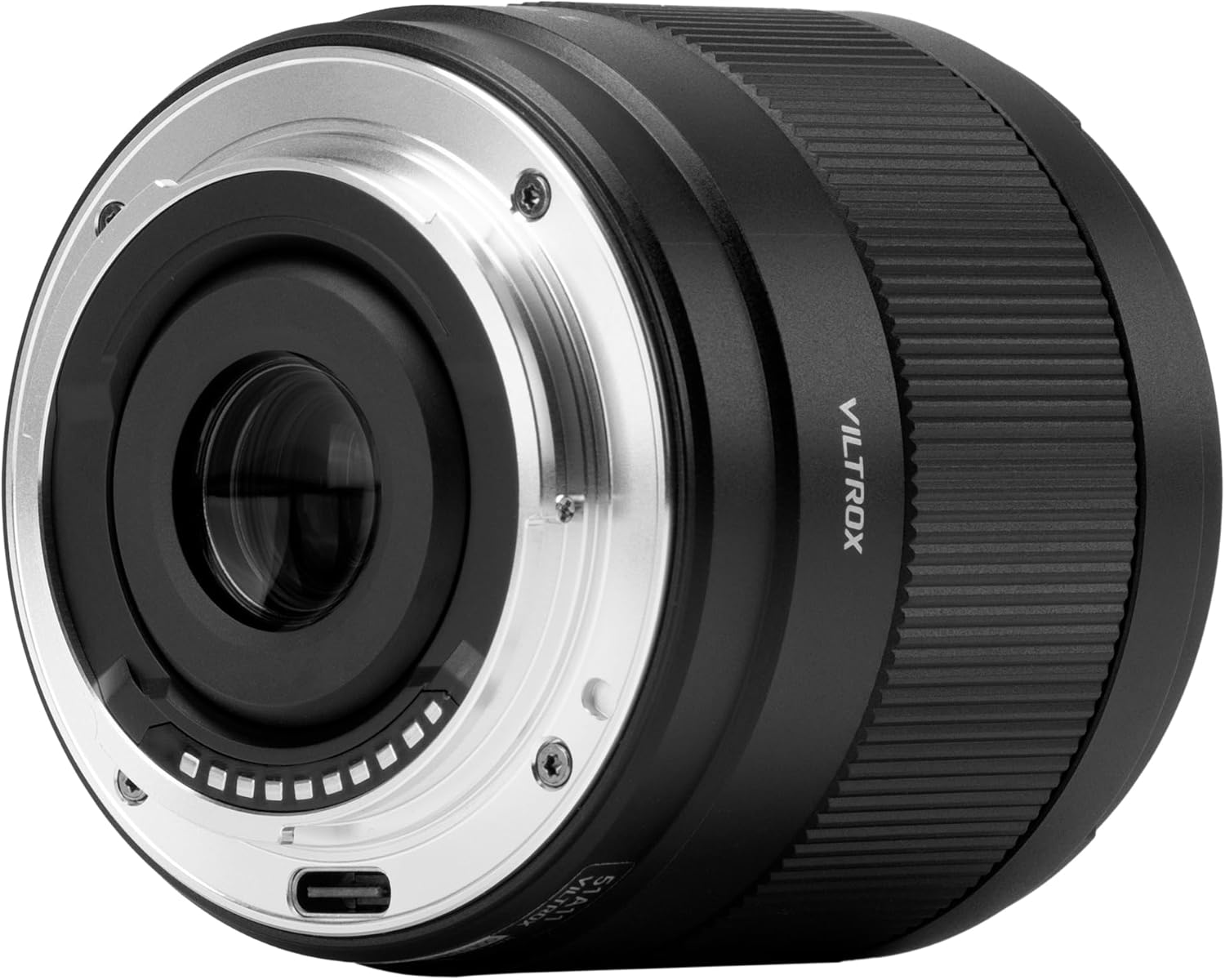
Immaġni: Wara view of the lens, highlighting the E-mount and USB-C port.

Image: Optical design diagram.

Image: MTF (Modulation Transfer Function) chart.
4. Setup
4.1 Twaħħil tal-Lenti
- Kun żgur li l-kamera tiegħek tkun mitfija.
- Neħħi l-għatu tal-lenti ta' wara mil-lenti u l-għatu tal-body mill-kamera tiegħek.
- Align the white index mark on the lens barrel with the white index mark on your camera's lens mount.
- Daħħal il-lenti fil-muntatura tal-kamera u dawwarha lejn l-arloġġ sakemm tikklikkja f'postha. Tisforzax il-lenti.
4.2 It-Tneħħija tal-Lenti
- Kun żgur li l-kamera tiegħek tkun mitfija.
- While pressing the lens release button on your camera, rotate the lens counter-clockwise until it stops.
- Carefully remove the lens from the camera mount.
- Waħħal l-għotjien tal-lenti ta’ quddiem u ta’ wara biex tipproteġi l-elementi tal-lenti.

Image: Lens attached to a Sony camera.
5. Tħaddim tal-Lenti
5.1 Awtofokus (AF)
The VILTROX AF 9mm F2.8 E lens features an STM motor for fast and accurate autofocus. To use autofocus, ensure your camera's focus mode is set to AF (Autofocus). The lens will automatically adjust focus when the shutter button is half-pressed.
5.2 Fokus Manwali (MF)
For precise control over focus, switch your camera's focus mode to MF (Manual Focus). Rotate the focus ring on the lens barrel to adjust the focus manually. Your camera's focus peaking or magnification features can assist with accurate manual focusing.
5.3 Kontroll tal-Apertura
The lens has a fixed maximum aperture of F2.8. Aperture control is managed through your camera's settings. Adjusting the aperture (f-stop) will affect the depth of field and the amount of light entering the lens.
5.4 Aġġornamenti tal-Firmware
The lens is equipped with a USB-C port for firmware updates. Regularly checking for and installing the latest firmware ensures optimal performance and compatibility with new camera models. Visit the VILTROX official website for firmware downloads and instructions.

Image: USB-C port for firmware updates.
5.5 Using the Lens Hood
The included lotus-shaped lens hood helps to block stray light, reducing flare and ghosting, and provides physical protection for the front element. Attach the lens hood by aligning it with the front of the lens and twisting until it locks into place.

Image: Lotus-shaped lens hood.
5.6 Vidjo Uffiċjali tal-Prodott
Video: Official VILTROX video showcasing the AF 9mm F2.8 Air E lens, highlighting its ultra-wide field of view and stunning results.
6. Manutenzjoni
6.1 Tindif tal-Lenti
- Uża pinzell tal-blower biex tneħħi t-trab u l-partiċelli maħlula mill-wiċċ tal-lenti.
- For smudges or fingerprints, use a clean, soft microfiber cloth specifically designed for optical lenses. Breathe lightly on the lens surface before wiping gently in a circular motion.
- Tużax solventi organiċi bħal irqaq taż-żebgħa jew benżin biex tnaddaf il-lenti.
6.2 Ħażna
- Dejjem waħħal l-għotjien tal-lenti ta’ quddiem u ta’ wara meta l-lenti ma tkunx qed tintuża.
- Store the lens in a dry, well-ventilated area, preferably in the included lens pouch, to protect it from dust and scratches.
- Avoid storing the lens in areas with high humidity or extreme temperature fluctuations.
7 Issolvi l-problemi
If you encounter issues with your VILTROX AF 9mm F2.8 E lens, refer to the following common problems and solutions:
- Lenti mhux rikonoxxuta mill-kamera: Ensure the lens is securely mounted and the camera is turned on. Check for any firmware updates for both the lens and camera.
- L-awtofokus mhux qed jaħdem: Verify that the camera's focus mode is set to AF. Clean the lens and camera contacts. Ensure there is sufficient light and contrast in the scene for the autofocus system to operate effectively.
- Image quality issues (e.g., blur, softness): Check if the lens is properly focused. Ensure the lens elements are clean. If using a filter, ensure it is clean and correctly attached.
- Lens not attaching/detaching smoothly: Ensure the index marks are aligned correctly when attaching. When detaching, press the lens release button firmly. Do not force the lens.
If problems persist, contact VILTROX customer support or an authorized service center for assistance.
8. Speċifikazzjonijiet
| Karatteristika | Speċifikazzjoni |
|---|---|
| Brand | VILTROX |
| Numru tal-Mudell | AF 9/2.8 E |
| Tul Fokali | 9mm (ekwivalenti għal 13.5mm fuq APS-C) |
| Apertura massima | F2.8 |
| Apertura Minima | F16 |
| Tip ta' Lenti | Wide Angle Prime Lens |
| Muntaturi Kompatibbli | Sony E-mount |
| Lens Elements/Groups | 13 Elementi f'11 Gruppi |
| Distanza Minima ta' Iffukar | 0.13m (0.43-il pied) |
| Mutur tal-Awtofokus | STM (Mutur Stepping) |
| Daqs tal-Filtru | 55mm |
| Piż | 175g (6.2 uqija) |
| Dimensjonijiet tal-Prodott | 2.22 x 2.56 x 2.56 pulzieri |
| Port tal-Aġġornament tal-Firmware | USB-C |
9. Garanzija u Appoġġ
VILTROX products are covered by a limited warranty. Please refer to the warranty card included in your package for specific terms and conditions, including the warranty period and coverage details.
For technical support, troubleshooting assistance, or warranty claims, please contact VILTROX customer service through their official webis-sit jew l-informazzjoni ta' kuntatt ipprovduta fuq il-karta tal-garanzija tiegħek.
Żomm il-prova tax-xiri tiegħek għall-validazzjoni tal-garanzija.