
VILTROX AF 56/1.2 E
VILTROX 56mm F1.2 Pro E Autofocus Lens User Manual
Model: AF 56/1.2 E
1. Introduzzjoni
This manual provides detailed instructions for the proper use and maintenance of your VILTROX 56mm F1.2 Pro E autofocus lens. Designed for Sony E-Mount cameras, this lens offers a large F1.2 aperture, ideal for portrait photography and low-light conditions. Please read this manual thoroughly before using the product to ensure optimal performance and longevity.

Figure 1.1: VILTROX 56mm F1.2 Pro E Lens with Lens Hood
2. Prodott Aktarview
The VILTROX 56mm F1.2 Pro E lens is engineered to deliver high-quality imaging with advanced features:
- F1.2 Apertura Kbira: Produces smooth, creamy bokeh, enhancing subject isolation and creating a three-dimensional feel in portraits.
- 85mm Portrait Focal Length: Offers a classic full-frame equivalent focal length, providing natural perspective suitable for professional portrait photography.
- Prestazzjoni Ottika Superjuri: Features an advanced 8-group, 13-element optical system, including 1 ED (Extra-low Dispersion), 1 UA (Ultra-Achromatic), and 3 HR (High Refractive) elements to improve image contrast and resolution.
- Quiet and Fast Autofocus HyperVCM: Ensures sharp focus with real-time subject tracking, suitable for both photography and videography, even with moving subjects.
- Durable Build and Reliability: Constructed from a magnesium-aluminum alloy for a lightweight yet robust body, offering high impact resistance and advanced dust and splash protection.

Figure 2.1: Optical Structure Diagram

Figure 2.2: MTF Chart (F1.2 & F1.8)
3. X'hemm fil-Kaxxa
Iċċekkja li l-oġġetti kollha li ġejjin huma inklużi fil-pakkett tiegħek:
- VILTROX 56mm F1.2 Pro E Lens
- Kap tal-Lenti ta 'Quddiem
- Kap tal-Lenti ta 'wara
- Borża tal-Lenti
- Lens Hood
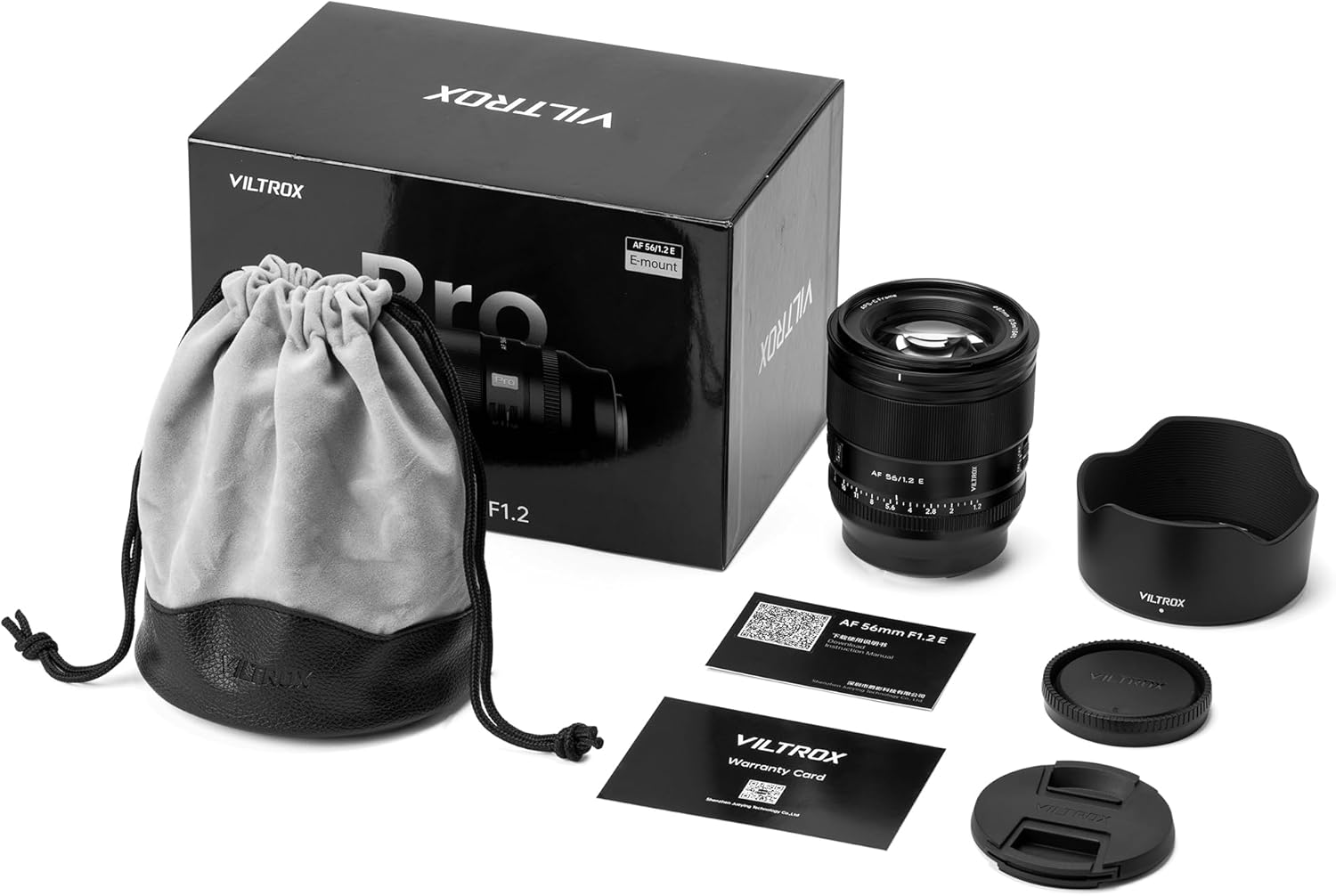
Figura 3.1: Kontenut tal-Pakkett
Unboxing Video
Video 3.1: An immersive unboxing of the VILTROX AF 56mm F1.2 Pro E lens, showing the lens, lens hood, and accessories being removed from the packaging.
4. Setup
4.1 Twaħħil tal-Lenti
- Align the mounting index on the lens with the mounting index on your Sony E-Mount camera body.
- Rotate the lens clockwise until it clicks into place. Ensure it is securely locked.

Figure 4.1: Attaching the Lens to a Camera
4.2 Swiċċ tal-Modalità tal-Fokus (AF/MF)
Locate the AF/MF switch on the side of the lens barrel. Slide the switch to select between Autofocus (AF) and Manual Focus (MF) modes. For optimal performance, ensure your camera's focus mode also matches the lens setting.

Figure 4.2: AF/MF Switch
4.3 Aperture Ring (Click ON/OFF)
The lens features an aperture ring with a 'Click' switch. When the switch is set to 'ON', the aperture ring provides tactile clicks at each f-stop, useful for photography. When set to 'OFF', the aperture ring moves smoothly without clicks, which is beneficial for video recording to avoid audible clicks during adjustments.

Figure 4.3: Aperture Ring and Click Switch
5. Tħaddim tal-Lenti
5.1 Tħaddim tal-Awtofokus
In AF mode, the lens utilizes its HyperVCM motor for fast and precise autofocus. Ensure your camera's autofocus settings are configured as desired (e.g., single-shot AF, continuous AF, eye AF). The lens supports advanced tracking capabilities for moving subjects.

Figure 5.1: Eye Autofocus in Use
5.2 Tħaddim tal-Fokus Manwali
In MF mode, rotate the focus ring to adjust focus manually. Your camera's focus peaking and magnification assist features can aid in achieving precise manual focus.
5.3 Kontroll tal-Apertura
The F1.2 large aperture allows for significant control over depth of field. Use wider apertures (smaller f-numbers like F1.2, F1.4) for shallow depth of field and pronounced background blur (bokeh). Use narrower apertures (larger f-numbers like F8, F11) for greater depth of field, keeping more of the scene in focus.
Aperture Comparison Video
Video 5.2: A comparison demonstrating the difference in background blur (bokeh) when shooting with wide (F1.2) versus narrow (F5.6) apertures using the VILTROX 56mm F1.2 Pro E lens.
Blur Effect Changes Video
Video 5.3: This video illustrates how the blur effect changes as the aperture is adjusted from small to large on the VILTROX 56mm F1.2 E lens.
5.4 Using the Lens Hood
Attach the included lens hood to reduce flare and ghosting caused by stray light, and to provide physical protection for the front element.
6. Manutenzjoni
Proper care ensures the longevity and performance of your lens:
- Tindif: Use a soft, lint-free cloth to clean the lens barrel. For lens elements, use a lens brush to remove dust, then gently wipe with a lens cleaning solution and a microfiber cloth. Avoid touching the glass directly with your fingers.
- Ħażna: When not in use, attach both front and rear lens caps. Store the lens in a dry, cool place, preferably in the provided lens pouch, away from direct sunlight and extreme temperatures.
- Umdità: Avoid exposing the lens to excessive moisture or rain. If it gets wet, wipe it dry immediately.
7 Issolvi l-problemi
If you encounter issues with your lens, refer to the following common solutions:
- Il-Lenti Mhux Imwaħħla Sewwa: Ensure the mounting index marks are aligned correctly and rotate until a click is heard. Check for any obstructions on the lens mount or camera body.
- Autofocus Not Working: Verify that the AF/MF switch on the lens is set to AF. Check your camera's focus mode settings. Ensure the lens contacts on both the lens and camera are clean.
- Rattling Sound When Shaking Lens: A slight rattling sound when the lens is off the camera and shaken is a normal characteristic of the VCM (Voice Coil Motor) autofocus system. This sound typically disappears once the lens is powered on and mounted to the camera. This is not a defect.
- Kwistjonijiet ta' Kwalità tal-Immaġni: Ensure lens elements are clean. Check camera settings (ISO, shutter speed, aperture). If using a protective filter, ensure it is clean and of high quality.
8. Speċifikazzjonijiet
| Karatteristika | Speċifikazzjoni |
|---|---|
| Brand | VILTROX |
| Numru tal-Mudell | AF 56/1.2 E |
| Tul Fokali | 56mm Fixed Focal Length |
| Apertura massima | F1.2 |
| Tip ta' Lenti | Standard Portrait Lens |
| Muntaturi Kompatibbli | Sony E |
| Disinn Ottiku | 13 elements in 8 groups (including 1 ED, 1 UA, 3 HR) |
| Mutur tal-Awtofokus | HyperVCM |
| Dimensjonijiet tal-Prodott | 3.61 x 3.09 x 3.09 pulzieri |
| Piż tal-oġġett | 1.26 liri |
| Manifattur | Shenzhen Jueying Technology Co., Ltd. |
9. Garanzija u Appoġġ
VILTROX products are designed for reliability and performance. For warranty information, technical support, or service inquiries, please refer to the official VILTROX webis-sit jew ikkuntattja lid-distributur lokali tiegħek.
You can also visit the official VILTROX store on Amazon for more product information and support: Ħanut Uffiċjali ta' VILTROX
Ask a question about this manual
Ask about setup, troubleshooting, compatibility, parts, safety, or missing instructions. Manuals+ will review the question and use this page’s manual context to help answer it.