
Introduzzjoni
This manual provides comprehensive instructions for the setup, operation, and maintenance of your Teendow XLY-M1 Automatic Cat Feeder with Camera. Please read this guide thoroughly before using the device to ensure proper function and safety for your pet.
Setup
1. Żpakkjar u Tqegħid
Carefully remove all components from the packaging. Place the feeder on a stable, flat surface in an area accessible to your pet and near a power outlet.
2. Konnessjoni tal-Enerġija
Connect the provided 12V power adapter to the feeder and then plug it into a wall outlet. The feeder features a 1.5-meter anti-bite cable designed to resist pet chewing. For backup power, install three D-cell batteries (not included) in the battery compartment at the bottom of the unit. This ensures continuous operation during power outages.
3. Konnessjoni Wi-Fi
The Teendow XLY-M1 supports dual-band Wi-Fi (2.4G and 5G) for stable connectivity. Download the Teendow app from your smartphone's app store. Follow the in-app instructions to connect your feeder to your home Wi-Fi network. Ensure your phone is connected to the same Wi-Fi network during the initial setup process.
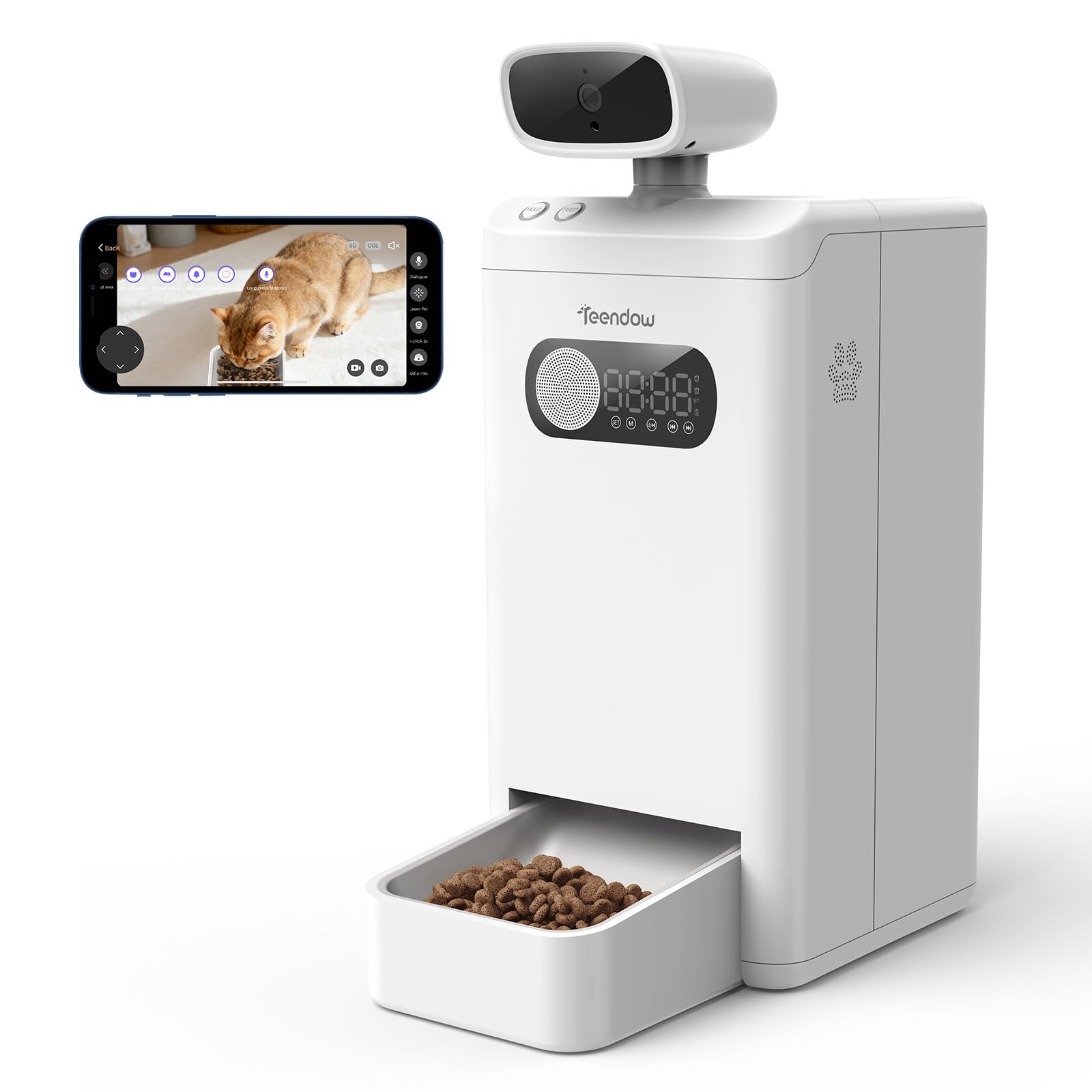
This image illustrates the Teendow XLY-M1 Automatic Cat Feeder's key features, including its support for 2.4G and 5G dual-band WiFi for stable connectivity. The feeder is powered by a 12V adapter with a 1.5-meter anti-bite cable, designed to prevent pet damage. The display shows '88:88', indicating a time setting, and the food tray contains dry pet food. The camera is visible at the top, and the power adapter is plugged into a wall outlet.
4. Imla t-Tank tal-Ikel
Open the lid of the food tank and fill it with dry pet food. The feeder has a 3.5L capacity. Ensure the food kibble size is appropriate for the feeder's dispensing mechanism (typically 5-15mm in diameter).
Istruzzjonijiet Operattivi
1. Scheduling Feedings
Use the Teendow app to set up a feeding schedule. You can customize meal times and portion sizes according to your pet's dietary needs. The app allows for multiple feeding times per day.
2. Tmigħ manwali
To dispense food manually, use the corresponding button on the feeder or the manual feed option within the app. This is useful for providing extra treats or adjusting feeding outside of the schedule.
3. Karatteristiċi tal-Kamera
The integrated 4MP HD camera allows you to monitor your pet remotely. Access the live feed through the Teendow app. The camera also features night vision, providing clear visibility in low-light conditions. You can use the two-way audio function to speak to your pet or listen to them.
4. Reġistrazzjoni u Daqq
The app may offer options to record video or take snapshots of your pet. Check the app settings for storage and playback features.
Manutenzjoni
1. Tindif tal-Feeder
Regularly clean the food tank, food tray, and dispensing mechanism to prevent food buildup and maintain hygiene. Disassemble removable parts as instructed in the app or a separate quick start guide. Wash with mild soap and water, then dry thoroughly before reassembling. Do not immerse the main unit in water.
2. Camera Lens Cleaning
Gently wipe the camera lens with a soft, dry cloth to ensure clear image quality.
3. Sostituzzjoni tal-batterija
If using backup batteries, replace them periodically or when the low battery indicator appears on the feeder or in the app.
Issolvi l-problemi
- Il-feeder mhux qed iqassam l-ikel: Check if the food tank is empty, if the dispensing mechanism is jammed, or if the power supply is stable. Ensure the schedule is correctly set in the app.
- Ma tistax tikkonnettja mal-Wi-Fi: Verify your Wi-Fi password and ensure the feeder is within range of your router. Confirm your router supports 2.4G or 5G networks and that your phone is connected to the same network during setup.
- Camera image is blurry: Clean the camera lens. Ensure there is adequate lighting in the room, or that night vision is active if in a dark environment.
- L-app ma tirrispondix: Close and restart the app. Check for app updates. Ensure your smartphone has a stable internet connection.
Speċifikazzjonijiet
| Brand | Teendow |
| Numru tal-Mudell | USXLYM10002 |
| Dimensjonijiet tal-Prodott | 22.86 x 17.78 x 45.72 ċm |
| Piż tal-oġġett | 2.99 kg |
| Kapaċità tal-Ikel | 3.5 Litri |
| Speċi fil-mira | Qattus (adattat ukoll għal klieb żgħar) |
| Karatteristiċi Speċjali | Camera, Feeding Schedule, Dual-Band Wi-Fi (2.4G/5G) |
| Sors tal-Enerġija | 12V Adapter, D-cell Battery Backup |
Informazzjoni dwar Garanzija
Teendow products typically come with a limited manufacturer's warranty. Please refer to the warranty card included in your product packaging or visit the official Teendow websit għal termini u kundizzjonijiet dettaljati tal-garanzija. Żomm l-irċevuta tax-xiri tiegħek bħala prova tax-xiri għal talbiet ta' garanzija.
Appoġġ għall-Klijent
For further assistance, technical support, or inquiries regarding your Teendow XLY-M1 Automatic Cat Feeder, please contact Teendow customer service. Contact information can typically be found on the product packaging, the official Teendow website, or within the Teendow mobile application.