
1. Nibdew
1.1 Żpakkjar u Setup Inizjali
Carefully remove your Lenovo ThinkPad L15 from its packaging. Ensure all components are present:
- Lenovo ThinkPad L15 Laptop
- Adapter tal-Enerġija USB-C 65W
1.2 Tixgħel
Connect the 65W USB-C power adapter to the laptop's USB-C port and a power outlet. Press the power button, typically located on the side or top right of the keyboard, to turn on the device. Follow the on-screen instructions to complete the initial Windows 11 Professional setup.
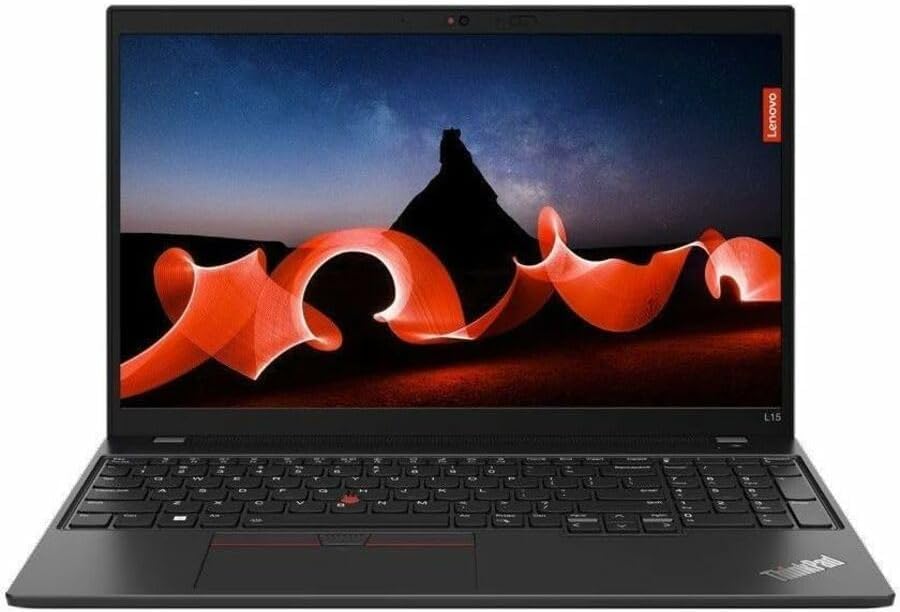
Quddiem view of the Lenovo ThinkPad L15 laptop, open to reveal its 15.6-inch display and full-size keyboard. The screen shows a vibrant landscape image, highlighting the display quality.
2. It-Tħaddim tal-Laptop Tiegħek
2.1 Tastiera u Touchpad
The ThinkPad L15 features a full-size, spill-resistant keyboard with a 10-key numeric pad and a TrackPoint pointing device for precise navigation.
- Tastiera: Standard QWERTY layout with dedicated function keys for system controls.
- TrackPoint: A red pointing stick located between the G, H, and B keys, used for cursor control.
- Touchpad: Supports multi-touch gestures for scrolling, zooming, and other functions.
2.2 Qarrej tal-Marki tas-Swaba'
For enhanced security, the laptop includes a fingerprint reader. Configure it through Windows Hello settings to enable secure biometric login.
2.3 Wiri
The 15.6-inch Full HD (1920x1080) IPS Anti-Glare display provides clear and comfortable viewing. The non-touch screen offers a 45% NTSC color gamut and 250 nits brightness at 60Hz.

Pro tal-ġenbfile of the Lenovo ThinkPad L15, showing its slim design and the hinge mechanism when partially open.
3. Konnettività
3.1 Portijiet u Konnessjonijiet
The ThinkPad L15 offers various ports for connecting peripherals and external devices:
- USB-C Thunderbolt 4: For high-speed data transfer, video output, and charging.
- USB-C 3.2 Ġen 1: For data transfer and charging.
- USB-A 3.2 Ġen 1 (x2)Għall-konnessjoni ta' apparati USB standard.
- HDMI 2.0: For connecting to external displays.
- Headphone / Mic Combo JackGħal input/output tal-awdjo.
- MicroSD Card Reader: For expanding storage or transferring data from memory cards.
- Port EthernetGħal konnessjoni ta' netwerk bil-fili.

Close-up of the left side of the Lenovo ThinkPad L15, featuring an Ethernet port, two USB-C ports (one Thunderbolt 4), an HDMI 2.0 port, and a USB-A 3.2 Gen 1 port.

Close-up of the right side of the Lenovo ThinkPad L15, showing a USB-A 3.2 Gen 1 port, a MicroSD card reader, and a security lock slot.
3.2 Konnettività bla fili
- Wi-Fi 6E (802.11AX): For high-speed wireless internet access.
- Bluetooth 5.3: For connecting wireless accessories such as headphones, mice, and keyboards.
4. Manutenzjoni u Kura
4.1 Kura Ġenerali
To ensure the longevity and optimal performance of your laptop:
- Keep the device clean and free from dust. Regularly wipe surfaces with a soft, dry cloth.
- Evita li tesponi l-laptop għal temperaturi estremi, dawl tax-xemx dirett, jew umdità għolja.
- Uża drapp artab u mingħajr suf, ftit imxarrabampened with water or a screen cleaner, for cleaning the display.
4.2 Aġġornamenti tas-Software
Regularly update your Windows 11 Professional operating system and device drivers to maintain optimal performance, security, and compatibility. Access updates through Windows Settings.
5 Issolvi l-problemi
5.1 Kwistjonijiet Komuni u Soluzzjonijiet
- Il-laptop ma jixgħelx: Ensure the power adapter is securely connected to both the laptop and a working power outlet. Verify the battery has sufficient charge.
- L-iskrin huwa vojt: Check power connections. If connected to an external monitor, ensure the correct display output settings are selected (e.g., by pressing Fn + F7 or similar key combination).
- Prestazzjoni bil-mod: Close unnecessary applications running in the background. Check for pending Windows updates or run a system diagnostic tool.
- Kwistjonijiet ta' konnettività Wi-Fi: Verify that Wi-Fi is enabled in Windows settings. Restart your wireless router. Update your network drivers if necessary.
Għal aktar assistenza, irreferi għas-servizz ta' appoġġ ta' Lenovo websit jew ikkuntattja lis-servizz tal-konsumatur.
6. Speċifikazzjonijiet
6.1 Speċifikazzjonijiet Tekniċi
| Karatteristika | Dettall |
|---|---|
| Proċessur | AMD Ryzen 5 PRO 5650U (2.30 GHz, up to 4.20 GHz Max Boost, 6 Cores, 12 Threads, 16 MB Cache) |
| RAM | 16GB DDR4 3200Mhz |
| Ħażna | 256GB PCIe SSD |
| Wiri | 15.6" FHD (1920 x 1080), IPS, Anti-Glare, Non-Touch, 45%NTSC, 250 nits, 60Hz |
| Sistema Operattiva | Windows 11 Professjonali |
| Grafika | Grafika AMD Radeon Integrata |
| Konnettività bla fili | Wi-Fi 6E 802.11AX (2 x 2), Bluetooth 5.3 |
| Portijiet | USB-C Thunderbolt 4, USB-C 3.2 Gen 1, 2 x USB-A 3.2 Gen 1, HDMI 2.0, Headphone / mic combo, MicroSD card reader, Ethernet |
| Webcam | 720P HD RGB Webcam |
| Tastiera | Spill Resistant Keyboard with 10-Key Numeric Pad |
| Dimensjonijiet (LxWxH) | 14.43 x 0.83 x 9.84 pulzieri |
| Piż tal-oġġett | 5.79 liri |
| Kulur | Iswed |
7. Garanzija u Appoġġ
7.1 Garanzija tal-Prodott
This product is an Amazon Renewed, Certified Refurbished item. It comes with a 90-day refund/replacement return policy. For specific warranty details, please refer to the Amazon Renewed program terms and conditions.
7.2 Appoġġ għall-Klijent
For technical support or service inquiries, please visit the official Lenovo support website or contact the seller, USA Computers, directly for assistance with your Amazon Renewed purchase.