
Introduzzjoni
This user manual provides detailed instructions for setting up, operating, and maintaining your FIFINE AmpliGame H13BP Wired USB Gaming Headset. Please read this manual thoroughly before using the product to ensure optimal performance and longevity.
X'hemm fil-Kaxxa
- FIFINE AmpliGame H13BP Gaming Headset
- Mikrofonu li jinqala'
- Manwal għall-Utent

Immaġni: Il-FIFINE AmpliGame H13BP headset, its detachable microphone, and the user manual as packaged.
Prodott Overview
Il-FIFINE AmpliGame H13BP headset features a robust design with comfortable earcups and an adjustable headband for extended gaming sessions. It includes a versatile USB control box for easy audio management.
Komponenti Ewlenin:
- Headset: Equipped with 50mm dynamic drivers for clear audio across all frequencies.
- Mikrofonu li jinqala': Features noise-canceling technology for clear communication.
- USB Control Box: In-line controls for volume, mic mute, 7.1 surround sound, EQ modes, and game/chat balance.
- Dawl RGB: Customizable RGB effects on the earcups.
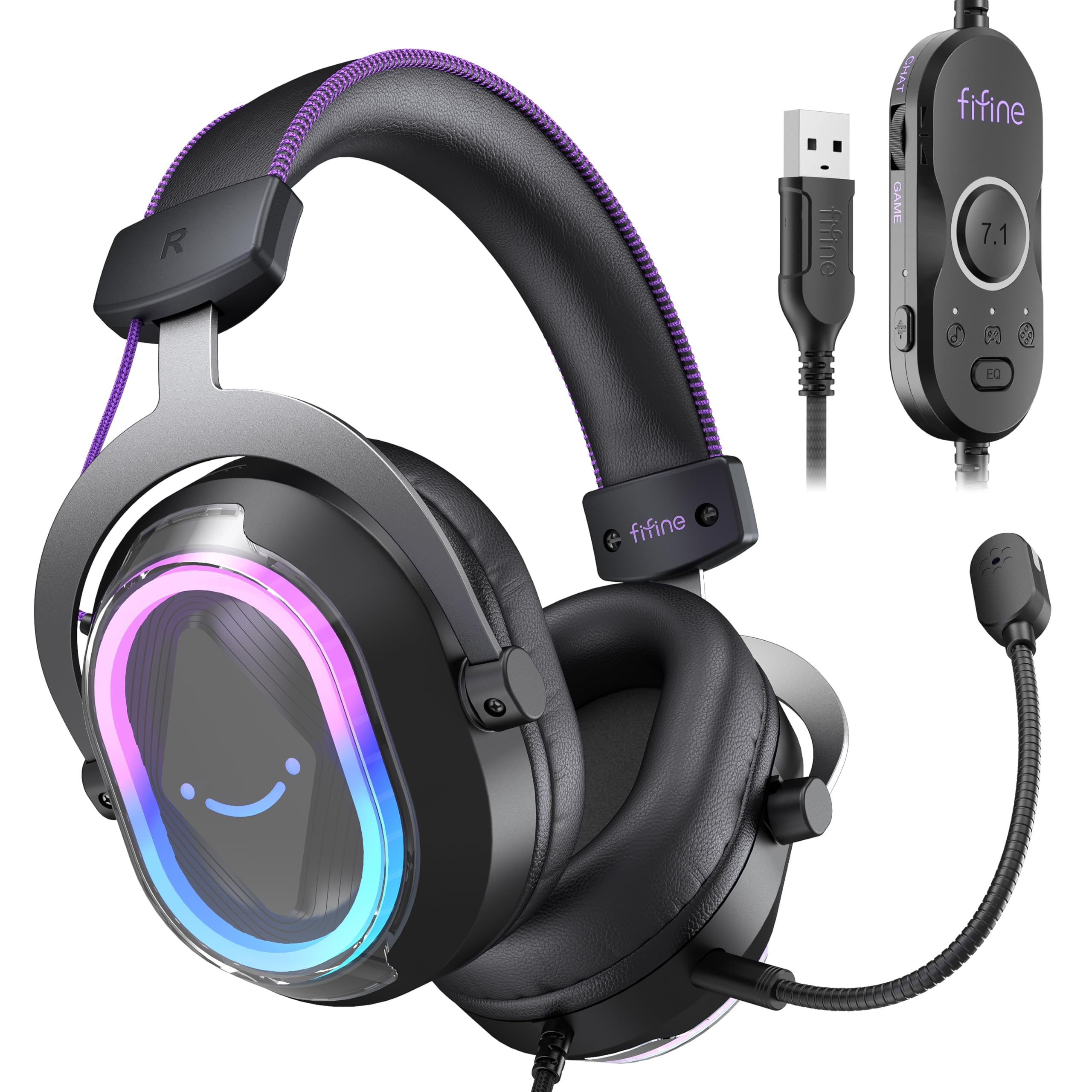
Immaġni: Dettaljata view tal-FIFINE AmpliGame H13BP Gaming Headset.

Image: Close-up diagram of the USB Control Box with labeled functions.
Setup
- Qabbad il-Headset: Plug the USB-A connector of the headset into an available USB port on your PC, Mac, PS5, or PS4. No additional software is required for basic functionality.
- Waħħal il-Mikrofonu: Insert the detachable microphone into the designated port on the left earcup until it clicks into place.
- Aġġusta Fit: Adjust the headband and earcup positions for a comfortable and secure fit. The protein skin ear pads and memory foam cushions are designed for long-term comfort.

Image: Headset connected to various compatible devices.
Istruzzjonijiet Operattivi
USB Control Box Functions:
- Headset Volume Control: Use the volume wheel on the side of the control box to adjust the overall headset volume.
- Mute tal-mikrofonu: Press the mic mute button on the control box to toggle the microphone on/off. The mic indicator light on the microphone will glow red when muted.
- Bilanċ tal-Logħba/Chat: Use the dedicated slider on the control box to prioritize game audio or chat audio. Slide towards 'CHAT' to increase chat volume relative to game volume, or towards 'GAME' to increase game volume.
- 7.1 Surround Sound: Press the 7.1 button on the control box to activate or deactivate 7.1 virtual surround sound.
- Modi EQ: Press the EQ button to cycle through four pre-set equalizer modes: Default (Balanced Audio), Music (Clear Vocal), Game (Powerful Bass), and Movie (Dynamic Enhancement). Long press the EQ button to return to default mode.

Image: Demonstrating the game/chat balancing feature.

Immaġni: Fuqview of the different EQ modes available.
Kontroll tad-Dawl RGB:
- Change RGB Modes: Press the dedicated button on the earcup to cycle through 11 different RGB lighting modes.
- Turn RGB On/Off: Long press the RGB button to turn the lighting on or off.

Image: Headset displaying various RGB lighting effects.
Karatteristiċi tal-mikrofonu
The detachable microphone is designed for clear voice pickup and features noise-canceling capabilities to reduce background distractions, ensuring your teammates hear you clearly.

Image: The microphone with its noise-canceling indicator.
Kumdità u Durabilità
The H13BP headset is built for comfort during long gaming sessions. It features protein skin ear pads and soft memory foam cushions that conform to your ears. The adjustable headband ensures a snug fit for various head sizes. The durable construction includes metal and plastic components, and the braided cable enhances longevity.

Image: Close-up of the headset's comfortable earcups and adjustable headband.
Speċifikazzjonijiet
| Karatteristika | Dettall |
|---|---|
| Brand | FIFINE |
| Numru tal-Mudell | H13BP |
| Teknoloġija tal-Konnettività | Bil-wajer (USB-A) |
| Tqegħid tal-widnejn | Fuq il-widnejn |
| Daqs tas-Sewwieq tal-Awdjo | 50 Millimetru |
| Tip ta' Sewwieq Awdjo | Sewwieq Dinamika |
| Medda ta' Frekwenzi | 20Hz - 20,000Hz |
| Impedenza | 32 Ohms |
| Kontroll tal-Ħoss | Kanċellazzjoni tal-Istorbju Passiv |
| Karatteristiċi Addizzjonali | 7.1 Surround Sound, Noise Canceling Mic, RGB Lighting |
| Apparati Kompatibbli | PC, Mac, PS5/PS4 (Not compatible with Xbox) |
| Karatteristiċi tal-Cable | Braided material cable (7.55ft) |
| Tip ta' Kontroll | Volume Control, Mic Mute, EQ Modes, 7.1 On/Off, Game/Chat Balance |
| Materjal | Ġilda, Metall, Plastik |
Issolvi l-problemi
Ebda Ħoss/Mikrofonu Mhux Jaħdem:
- Iċċekkja l-Konnessjonijiet: Kun żgur li l-konnettur USB-A huwa mdaħħal kompletament fil-port.
- Verify Mute Status: Check the mic mute button on the control box and the mic indicator light. Ensure the headset volume is not at minimum.
- Issettjar tas-Sistema: Confirm that the FIFINE H13BP headset is selected as the default audio input and output device in your computer's or console's sound settings.
- Kompatibilità: Remember that the headset is not compatible with Xbox consoles.
Dwal RGB Ma Jaħdmux:
- Iċċekkja l-Konnessjoni: Kun żgur li l-headset huwa konness sew permezz tal-USB.
- Aqleb l-RGB: Long press the RGB button on the earcup to ensure the lighting is not simply turned off.
Garanzija u Appoġġ
For warranty information and detailed support, please refer to the official FIFINE website or contact their customer service. FIFINE offers product specialists assistance and free technical support for their products.
You can visit the FIFINE Store for more information: Ħanut FIFINE fuq Amazon
Vidjows Uffiċjali tal-Prodott
FIFINE H13 USB Gaming Headset Review
Vidjo: Rieżami komprensivview of the FIFINE H13 USB Gaming Headset, demonstrating its features and performance.
Testing This Colorful Headset Immersive High-Quality Sound!
Video: A demonstration of the headset's immersive sound quality and vibrant RGB lighting.