
INQMEGA ST-637-6M-20X-4G-US
INQMEGA 20X Zoom Dual View Manwal tal-Utent tal-Kamera PTZ bil-Batterija Solari
Model: ST-637-6M-20X-4G-US
1. Introduzzjoni
Thank you for choosing the INQMEGA 20X Zoom Dual View Solar Battery PTZ Camera. This manual provides detailed instructions for the setup, operation, and maintenance of your camera. Please read this manual thoroughly before use to ensure proper functionality and safety.
This camera is designed for outdoor surveillance, featuring a 20X optical zoom, dual-lens system, solar power, and 4G cellular connectivity for remote monitoring.

Image 1.1: The INQMEGA 20X Zoom Dual View Solar Battery PTZ Camera with its accompanying solar panel.
2. Informazzjoni dwar is-Sigurtà
- Ensure the camera is installed in a secure location, out of reach of unauthorized individuals.
- Use only the provided power cable and solar panel for charging.
- Do not expose the camera to extreme temperatures or corrosive environments.
- Avoid direct exposure of the solar panel to shade for optimal charging.
- Tippruvax tiżżarma jew timmodifika l-kamera, għax dan jannulla l-garanzija.
3. Kontenut tal-Pakkett
Iċċekkja li l-oġġetti kollha elenkati hawn taħt huma inklużi fil-pakkett tiegħek:
- Kamera * 1
- Panel Solari * 1
- Manwal għall-Utent * 1
- Camera Bracket * 1
- Solar Panel Bracket * 1
- Kejbil tal-Enerġija * 1

Immaġni 3.1: Rappreżentazzjoni viżwali tal-oġġetti inklużi fil-pakkett tal-prodott.
4. Prodott Aktarview
Familiarize yourself with the components of your INQMEGA camera and solar panel:

Image 4.1: Labeled diagram of the camera and solar panel components with dimensions.
- Panel Solari: 6W panel for continuous power.
- Lenti ta' angolu wiesa': Jipprovdi qasam wiesa' ta' view.
- Zoom Lens: Offers 20X optical zoom for detailed viewing.
- LEDs bojod u IR: For effective night vision up to 50m.
- Sensor PIR: Passive Infrared sensor for human detection.
- Mikrofonu: Għal input awdjo u komunikazzjoni f'żewġ direzzjonijiet.
- Sensor tad-Dawl: Jidentifika d-dawl ambjentali għall-attivazzjoni awtomatika tal-viżjoni bil-lejl.
- Antenni: For 4G cellular connectivity.
- Indikatur LED: Juri l-istatus tal-kamera.
5. Setup
5.1 Powering the Camera (Solar Panel Connection)
The camera is equipped with a 10050mAh built-in battery and a 6W solar panel for continuous power. Connect the solar panel to the camera to ensure uninterrupted operation.
- Immonta l-pannell solari f'post li jirċievi l-massimu ta' dawl tax-xemx dirett matul il-ġurnata.
- Connect the solar panel's cable to the designated power input port on the camera.
- Ensure the connection is secure and waterproof.

Image 5.1: Illustration of the solar panel providing power to the camera.
5.2 Installazzjoni tal-Karta SIM u l-Karta TF
This camera supports 4G cellular connectivity and local storage via a TF card (up to 128GB, not included).
- Locate the SIM card slot and TF card slot on the camera (refer to Product Overview dijagramma).
- Insert a valid 4G SIM card into the SIM card slot with the metal contacts facing down.
- Insert a formatted TF card (Class 10 or higher recommended) into the TF card slot.
- Ensure both cards are inserted correctly and securely.
5.3 App Installation and Initial Pairing
The camera uses the UBOX application for remote control and monitoring.
- Download the "UBOX" app from your smartphone's app store (iOS App Store or Google Play Store).
- Irreġistra għal kont u illoggja.
- Segwi l-istruzzjonijiet fl-app biex iżżid il-kamera tiegħek. Dan tipikament jinvolvi l-iskennjar ta' kodiċi QR fuq il-kamera jew id-dħul manwali tal-ID tagħha.
- Kun żgur li l-ismartphone tiegħek għandu konnessjoni tal-internet attiva matul il-proċess ta' tqabbil.
6. Istruzzjonijiet Operattivi
6.1 Doppju View Monitoraġġ
The camera features a dual-lens system, providing both a wide-angle view and a zoom view simultaneously within the UBOX app.

Image 6.1: Dual video screens in the UBOX app, displaying wide-angle and zoom lens views.
- Open the UBOX app and select your camera.
- You will see two live video feeds. The top feed is typically the wide-angle lens, and the bottom feed is the zoom lens.
- Double-click on either view to switch between them or to make one full screen.
- Drag the screen of the wide-angle view to reposition the zoom lens's focus area. The zoom lens will follow the selected position.
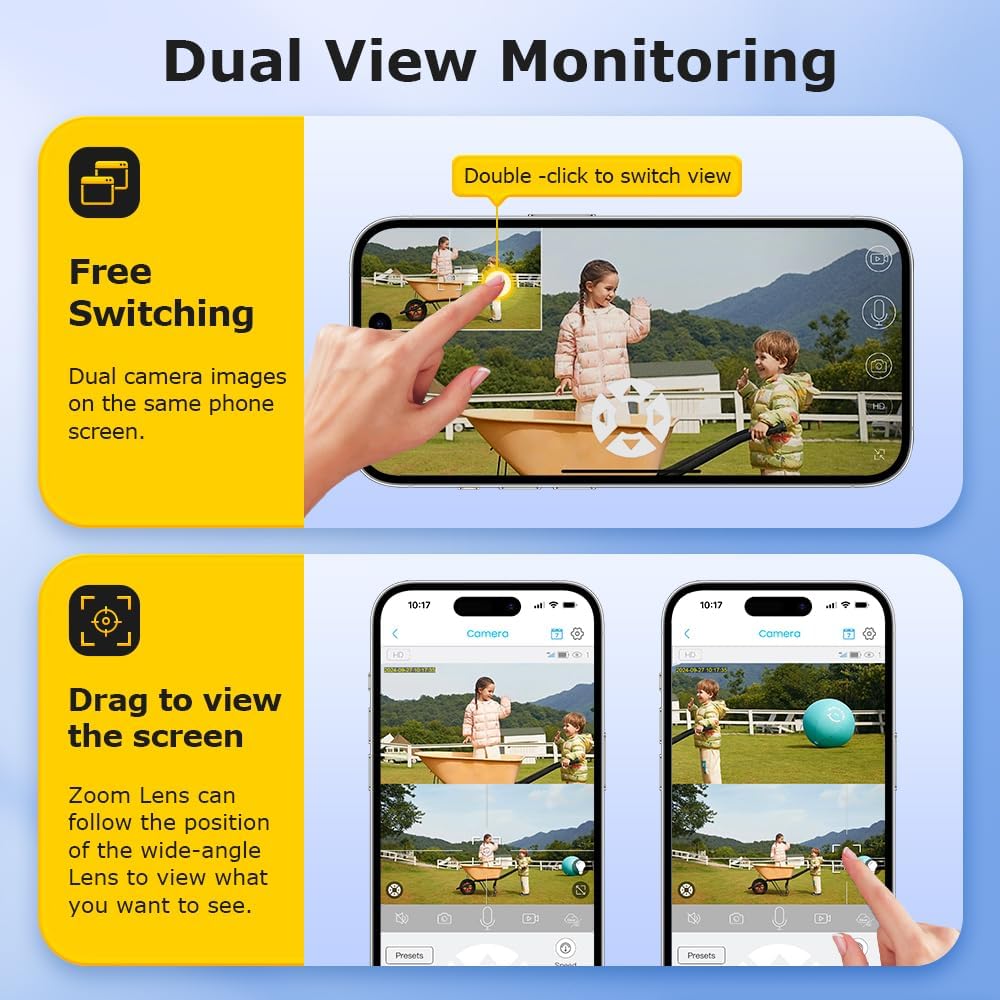
Image 6.2: Demonstrating free switching and drag-to-view functionality in the app.
6.2 PTZ Control and 20X Optical Zoom
The camera supports Pan-Tilt-Zoom (PTZ) functionality and a powerful 20X optical zoom.
- Fil-live view interface of the UBOX app, use the directional controls to pan (move horizontally) and tilt (move vertically) the camera.
- Utilize the zoom controls (e.g., a slider or +/- buttons) to activate the 20X optical zoom for detailed inspection of distant objects.
6.3 Viżjoni bil-lejl
The camera provides clear visibility in low-light conditions with its infrared (IR) and white LED lights, offering an effective night vision range of up to 50 meters.
- The camera automatically switches to night vision mode when ambient light is low.
- You can typically configure night vision settings (e.g., IR only, white light only, or smart mode) within the UBOX app.
6.4 Sejbien tal-Bniedem bil-PIR
The Passive Infrared (PIR) sensor detects human movement, triggering recordings and alerts.
- Enable PIR detection in the UBOX app settings.
- Aġġusta l-livelli ta' sensittività biex timminimizza l-allarmi foloz.
- When motion is detected, the camera will record and send notifications to your smartphone.
6.5 Awdjo b'żewġ direzzjonijiet
Communicate with visitors or deter intruders using the camera's built-in microphone and speaker.
- Fil-live view, tektek l-ikona tal-mikrofonu biex titkellem permezz tal-ispiker tal-kamera.
- Ensure your phone's microphone is enabled for the UBOX app.
6.6 Reġistrazzjoni u Ħażna
The camera supports both local TF card storage and cloud storage for recorded footage.

Image 6.3: The camera provides 6MP Super HD video quality for clear and smooth recordings.

Image 6.4: Multiple storage methods available: TF Card and Cloud Storage.
- Ħażna tal-Kard TF: Recordings are saved directly to the inserted TF card. The app allows you to view and download these recordings.
- Ħażna Cloud: Subscribe to a cloud storage plan through the UBOX app for secure, remote backup of your footage.
- Configure recording settings (e.g., continuous recording, event-triggered recording) within the app.
7. Manutenzjoni
- Tindif: Imsaħ il-lentijiet tal-kamera u l-pannell solari regolarment b'ċarruta ratba u driegħ.amp drapp biex tneħħi t-trab u l-fdalijiet. Tużax kimiċi ħarxa.
- Effiċjenza tal-Panel Solari: Ensure the solar panel remains free from obstructions (leaves, snow, dirt) to maintain optimal charging efficiency.
- Saħħa tal-batterija: While the camera is designed for continuous solar power, avoid prolonged periods of complete discharge in environments without sunlight to preserve battery life.
- Aġġornamenti tal-Firmware: Check the UBOX app periodically for firmware updates to ensure your camera has the latest features and security enhancements.
8 Issolvi l-problemi
| Problema | Soluzzjoni Possibbli |
|---|---|
| Il-kamera mhux qed tixgħel. |
|
| No 4G signal or offline. |
|
| PIR detection not working. |
|
| Kwalità fqira tal-viżjoni bil-lejl. |
|
9. Speċifikazzjonijiet
| Karatteristika | Dettall |
|---|---|
| Isem tal-Mudell | ST-637-6M-20X-4G-US |
| Użu fuq ġewwa/barra | Barra |
| Sors tal-Enerġija | Solar Powered (6W Solar Panel), Built-in 10050mAh Battery |
| Protokoll tal-Konnettività | Ċellulari (4G) |
| Tip ta' Kontrollur | UBOX App |
| Riżoluzzjoni tal-Qbid tal-Vidjo | 6MP |
| Zoom ottiku | 20X |
| Medda tal-Viżjoni Lejl | Up to 50m (230 Feet) |
| Medda ta 'Sejbien PIR | Max 12M |
| Għażliet ta' Ħażna | Amazon Cloud & TF Card (MAX 128GB, Not Included) |
| Livell ta 'Reżistenza għall-Ilma | Li ma jgħaddix ilma minnu (IP66) |
| Karatteristiċi Speċjali | 2-Way Audio, Dual View, Motion Sensor |
| Materjal | Plastik |
| Piż tal-oġġett | 5.5 liri |
10. Garanzija u Appoġġ
Your INQMEGA camera comes with a standard manufacturer's warranty. Please refer to the warranty card included in your package or visit the official INQMEGA websit għal termini u kundizzjonijiet dettaljati tal-garanzija.
For technical support, troubleshooting assistance, or further inquiries, please contact INQMEGA customer service through the UBOX app or visit the INQMEGA Store on Amazon.
Ask a question about this manual
Ask about setup, troubleshooting, compatibility, parts, safety, or missing instructions. Manuals+ will review the question and use this page’s manual context to help answer it.