
1. Introduzzjoni
Thank you for choosing the Schneider 43A1 4K UHD LED TV. This television combines advanced display technology with smart features to provide an immersive viewing experience. Featuring a 4K Ultra High Definition display, QLED-LCD technology with Direct LED backlighting, and the VIDAA Smart TV platform, your new TV offers vibrant colors, deep blacks, and access to a wide range of entertainment.
This manual provides essential information for the safe and efficient use of your television. Please read it thoroughly before operating the device and retain it for future reference.
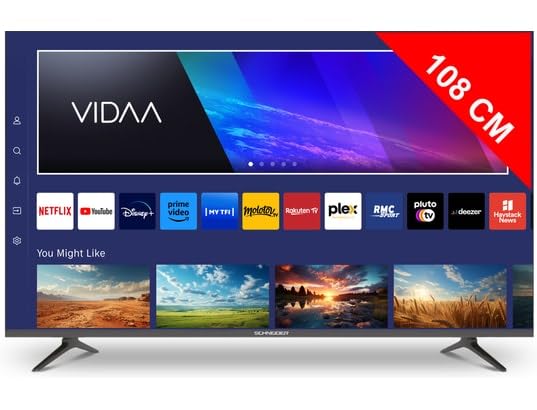
Stampa 1.1: Quddiem view of the Schneider 43A1 TV with VIDAA interface.
2. Informazzjoni dwar is-Sigurtà
Biex tiżgura tħaddim sikur u tevita ħsara, jekk jogħġbok osserva l-prekawzjonijiet ta' sigurtà li ġejjin:
- Pjazzament: Position the TV on a stable, level surface. Avoid placing it in direct sunlight, near heat sources, or in environments with high humidity or dust.
- Ventilazzjoni: Ensure adequate ventilation around the TV. Do not block ventilation openings. Maintain a minimum distance of 10 cm from walls or other objects.
- Provvista tal-Enerġija: Uża biss il-provvista tal-enerġija speċifikata voltage. Ensure the power cord is not pinched or walked on. Disconnect the power plug during lightning storms or when unused for extended periods.
- Tindif: Skonnettja t-TV qabel ma tnaddaf. Uża drapp artab u niexef. Tużax prodotti tat-tindif likwidi jew aerosol.
- Likwidi: Tesponix it-TV għal likwidi li jqattru jew jittajjru. Tpoġġix oġġetti mimlija b'likwidi, bħal vażuni, fuq it-TV.
- Tfal: Issorvelja lit-tfal biex tiżgura li ma jitilgħux fuq it-TV jew l-għamara.
- Immuntar tal-ħajt: If wall-mounting, use a VESA compatible bracket (200 x 200 mm) and ensure proper installation by qualified personnel to prevent injury.
3. Kontenut tal-Pakkett
Jekk jogħġbok iċċekkja li l-oġġetti kollha huma preżenti u f'kundizzjoni tajba:
- Schneider 43A1 4K UHD LED TV
- Kontroll mill-bogħod
- Kejbil tal-Enerġija
- Stand tat-TV (2 biċċiet)
- Viti għall-Stand tat-TV
- Manwal għall-Utent (dan id-dokument)
4. Setup
4.1 Disimballaġġ
Carefully remove the TV from its packaging. It is recommended to keep the original packaging for potential future transport or service needs.
4.2 Installazzjoni ta' Stand
If you are not wall-mounting the TV, attach the included stand pieces to the bottom of the TV using the provided screws. Ensure the stand is securely fastened before placing the TV upright.
4.3 Immuntar mal-Ħajt (Mhux obbligatorju)
The Schneider 43A1 is compatible with VESA 200 x 200 mm wall mounts. For safe installation, it is highly recommended to use a professional installer. Refer to your wall mount's instructions for specific details.
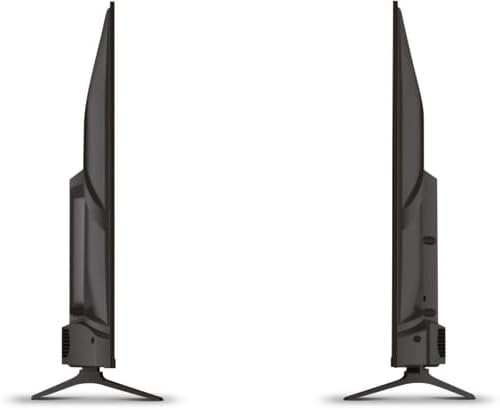
Immaġni 4.1: Ġenb view of the Schneider 43A1 TV, illustrating its profile for placement or wall mounting.
4.4 Konnessjoni ta' Apparati Esterni
It-TV tiegħek joffri diversi għażliet ta’ konnettività:
- HDMI: Connect up to three HDMI 2.0 devices (e.g., Blu-ray player, game console, set-top box) to the HDMI ports.
- USB: Two USB ports are available for connecting USB storage devices to play media.
- AV/Audio Input: For older devices requiring composite video and stereo audio.
- Output koassjali: Għall-konnessjoni ma' sistema awdjo esterna.
- Input tal-Antenna/Kejbil: Connect your antenna or cable TV signal for DVB-T/T2/C/S2 reception.
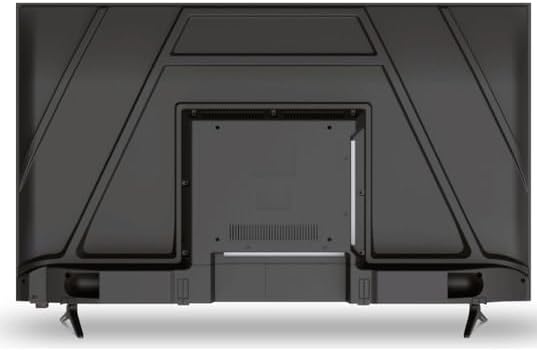
Stampa 4.2: Wara view of the Schneider 43A1 TV, highlighting connection ports.
4.5 Qawwa tal-Konnessjoni
Plug the power cable into the TV's power input, then into a suitable wall outlet.
4.6 Wizard tas-Setup Inizjali
Upon first power-on, the TV will guide you through an initial setup process. This includes selecting your language, connecting to a Wi-Fi network, and scanning for available channels (DVB-T/T2/C/S2).
5. Joperaw
5.1 Funzjonijiet ta' Kontroll mill-bogħod
Il-kontroll remot jippermettilek tinnaviga l-karatteristiċi tat-TV:
- Buttuna tal-Qawwa: Ixgħel jew jitfi t-TV.
- Volum 'il fuq/Niżżel: Jaġġusta l-livell tal-ħoss.
- Kanal 'l fuq/'l isfel: Jibdel il-kanali tat-TV.
- Input/Sors: Selects the input source (HDMI, USB, TV Tuner).
- Buttuni tan-Navigazzjoni: Għan-navigazzjoni tal-menù.
- Buttuni tat-TV Intelliġenti: Direct access to popular apps like Netflix, Prime Video, YouTube.
5.2 Smart TV (VIDAA)
The integrated VIDAA Smart TV platform provides access to a variety of applications and streaming services. Connect your TV to the internet via Wi-Fi to enjoy features like Netflix, Prime Video, and YouTube. Bluetooth connectivity allows for wireless connection to compatible audio devices.

Immaġni 5.1: Quddiem angolat view of the Schneider 43A1 TV, displaying the VIDAA Smart TV interface.
5.3 Għażla tal-Input
Press the 'Input' or 'Source' button on your remote control to switch between connected devices (HDMI 1, HDMI 2, HDMI 3, USB, AV, TV Tuner).
5.4 Issettjar tal-Immaġni u l-Ħoss
Access the TV's menu to adjust picture and sound settings. The 4K UHD resolution, QLED-LCD technology, and Direct LED backlighting ensure a high-quality visual experience. The TV also features upscaling to enhance lower-resolution content. Audio is delivered via 2 x 8 W RMS stereo speakers with Dolby Audio support.
5.5 PC Monitor Mode
The TV can be used as a PC monitor by connecting your computer via an HDMI cable. This mode optimizes the display for computer use.
6. Manutenzjoni
6.1 Tindif tat-TV
Before cleaning, ensure the TV is unplugged from the power outlet.
- Skrin: Imsaħ l-iskrin bil-mod b'ċarruta ratba u mingħajr suf. Għal marki persistenti, nixxef bil-modampLaħlaħ id-drapp bl-ilma jew b'prodott speċjalizzat għat-tindif tal-iskrin (tisprejjax direttament fuq l-iskrin).
- Barra: Uża drapp artab u niexef biex timsaħ it-TV.asing. Evita prodotti tat-tindif jew solventi li joborxu.
6.2 Aġġornamenti tas-Software
Your TV may receive software updates to improve performance and add new features. Ensure your TV is connected to the internet to receive these updates automatically or check for them manually through the settings menu.
7 Issolvi l-problemi
Jekk tiltaqa' ma' problemi bit-TV tiegħek, irreferi għall-problemi u s-soluzzjonijiet komuni li ġejjin:
- Ebda Qawwa:
- Iċċekkja jekk il-kejbil tal-enerġija huwiex imdaħħal sew fit-TV u fis-sokit tal-ħajt.
- Kun żgur li s-sokit tal-ħajt qed jaħdem (ittestja b'apparat ieħor).
- Agħfas il-buttuna tal-qawwa fuq il-kontroll remot jew fuq it-TV innifsu.
- Ebda Stampa/Ħoss:
- Ivverifika li s-sors tad-dħul korrett huwa magħżul (eż., HDMI 1, TV).
- Iċċekkja l-konnessjonijiet kollha tal-kejbil bejn it-TV u apparati esterni.
- Kun żgur li l-volum mhux siekta jew issettjat għall-minimu.
- If using an antenna, check the antenna connection and perform a channel scan.
- Il-Kontroll mill-bogħod Mhux Jaħdem:
- Ibdel il-batteriji fil-kontroll remot.
- Kun żgur li m'hemm l-ebda ostaklu bejn ir-remote u s-senser IR tat-TV.
- Smart TV/Network Issues:
- Iċċekkja r-router tal-Wi-Fi u l-konnessjoni tal-internet tiegħek.
- Go to the TV's network settings to re-connect to your Wi-Fi network.
- Erġa' ixgħel it-TV u r-router tiegħek.
Jekk il-problema tippersisti wara li tipprova dawn is-soluzzjonijiet, jekk jogħġbok ikkuntattja l-appoġġ għall-klijenti.
8. Speċifikazzjonijiet
| Karatteristika | Speċifikazzjoni |
|---|---|
| Mudell | Schneider 43A1 |
| Daqs tal-Wiri | 109 ċm (43 pulzieri) |
| Riżoluzzjoni | 4K Ultra HD (3840 x 2160 pixels) |
| Teknoloġija tal-Wiri | QLED-LCD with Direct LED Backlight |
| Proporzjon ta' Kuntrast | 1100:1 |
| Luminożità | 200 cd/m² |
| Output Awdjo | 2 x 8 W RMS Stereo |
| Teknoloġija Awdjo | Dolby Awdjo |
| Portijiet HDMI | 3 (HDMI 2.0) |
| Portijiet USB | 2 |
| Inputs oħra | AV/Audio Input |
| Outputs | Output Koassjali |
| Tuner | DVB-T/T2/C/S2 |
| Pjattaforma Smart TV | VIDAA (Netflix, Prime Video, YouTube) |
| Konnettività bla fili | Wi-Fi, Bluetooth |
| Kompatibilità VESA | 200 x 200 mm |
| Piż | 7.5 Kilogrammi |