
1. Matulview
The Srhythm NiceComfort 35 (2nd Gen) headphones offer an immersive audio experience with advanced features designed for comfort and superior sound quality. These headphones integrate hybrid active noise cancellation, Bluetooth 6.0 connectivity, and spatial audio technology to deliver clear sound and effective noise reduction.

Image: The Srhythm NiceComfort 35 (2nd Gen) headphones in black, showcasing id-disinn eleganti tagħhom.
2. X'hemm fil-Kaxxa
Your Srhythm NiceComfort 35 package includes the following items:
- 1 x Gift Box Packing
- 1 x NC35 Headphone
- 1 x Gwida Quick Start
- 1 x Quick Start Guide with Srhythm APP information
- 1 x 1m Type-C Charging Cable with Audio Function
- Kejbil tal-Awdjo 1 x 1.2m 3.5mm
- 1 x Airplane Adaptor (for airplane use only)

Image: All items included in the Srhythm NiceComfort 35 headphone package, neatly arranged.
3. Setup
3.1. Tixgħil / Mitfi
- Biex Tixgħel: Press and hold the Power button located on the right earcup until the indicator light illuminates.
- Biex Tifi: Agħfas u żomm il-buttuna tal-Qawwa sakemm id-dawl indikatur jintefa.
3.2. Tqabbil tal-Bluetooth
- Kun żgur li l-headphones huma mitfija.
- Agħfas u żomm il-buttuna tal-Power għal madwar 5 sekondi sakemm id-dawl indikatur jteptep blu u aħmar, u dan jindika l-modalità ta' tqabbil.
- Fuq l-apparat tiegħek (smartphone, tablet, kompjuter), attiva l-Bluetooth u fittex apparati disponibbli.
- Select "Srhythm NC35" from the list of available devices to connect.
- Ladarba jkun konness, id-dawl indikatur isir blu solidu.
3.3. Konnessjoni bil-fili
For a wired connection, use the provided 1.2m 3.5mm audio cable or the 1m Type-C charging cable with audio function. Plug one end into the headphone's audio port and the other into your audio source. The headphones can be used in wired mode even if the battery is depleted or powered off.
3.4. Srhythm App Installation
To unlock full customization features, download the official Srhythm App from your device's app store (App Store for iOS or Google Play Store for Android). Follow the in-app instructions to connect your headphones and access custom EQ settings, ambient sound modes, and more.
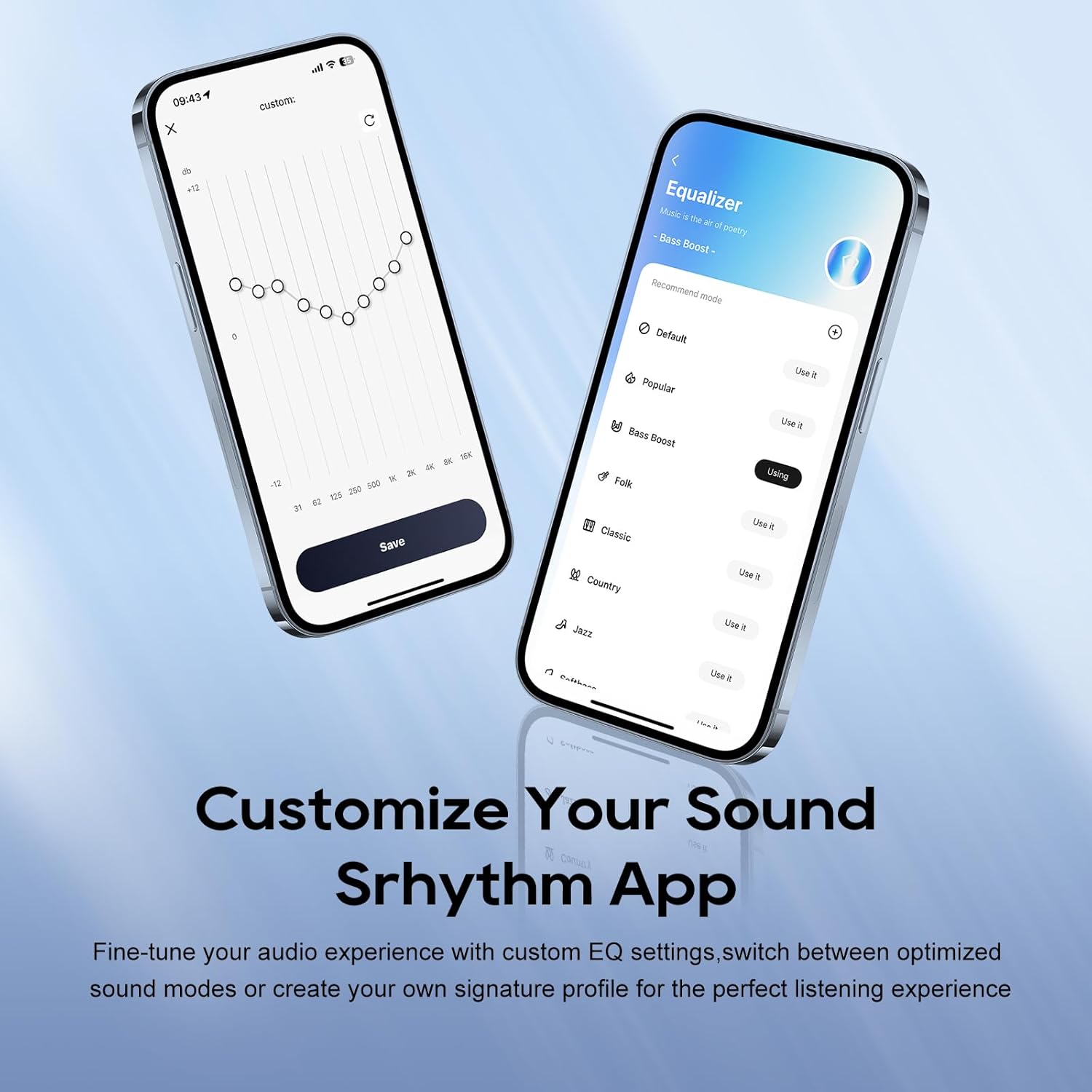
Image: A smartphone screen displaying the Srhythm App interface, highlighting equalizer and ambient sound customization options.
4. It-Tħaddim tal-Headphones
4.1. Kontrolli Bażiċi
- Volum 'il fuq/Niżżel: Uża l-buttuni tal-volum apposta fuq il-earcup.
- Play/Pawsa: Agħfas il-buttuna b'diversi funzjonijiet darba.
- Track li jmiss: Agħfas darbtejn il-buttuna multi-funzjoni.
- Track preċedenti: Agħfas tliet darbiet il-buttuna multi-funzjoni.
- Tweġiba/Tmiem Sejħa: Agħfas il-buttuna multi-funzjoni darba waqt telefonata li tkun dieħla jew telefonata attiva.
- Irrifjuta Sejħa: Agħfas u żomm il-buttuna multi-funzjoni għal żewġ sekondi waqt telefonata li tkun dieħla.
4.2. Noise Cancellation and Ambient Sound Modes
The headphones feature Hybrid Active Noise Cancellation (ANC) and Transparency Mode. These modes can be toggled using the dedicated ANC button on the earcup or through the Srhythm App.
- Kanċellazzjoni tal-Istorbju (ANC): Blocks up to 98% of ambient noise, ideal for travel or focused work.
- Modalità Normali: ANC is inactive.
- Modalità ta' Trasparenza: Jippermettilek tisma' l-inħawi ta' madwarek waqt li tisma' l-awdjo, u b'hekk ittejjeb l-għarfien tas-sitwazzjoni.
You can adjust the noise cancellation depth and select specific modes (Commuting, Indoor, Outdoor) via the Srhythm App for optimized performance.

Image: A man wearing the Srhythm NiceComfort 35 headphones, illustrating the 98% noise cancellation feature in a busy environment.
4.3. AI-Powered Call Clarity
Equipped with 5 advanced microphones and Environmental Noise Cancellation (ENC), the headphones ensure your voice is clear during calls, even in noisy environments. This technology reduces background distractions for flawless communication.

Image: A man smiling while using the Srhythm NiceComfort 35 headphones with a smartphone, highlighting the AI-Powered Call Clarity feature.
4.4. Awdjo Spazjali
Experience immersive sound with 4-speaker spatial audio technology. This feature delivers precision-tuned sound with distinct highs, deep bass, and stunning clarity across an ultra-wide 40kHz frequency range, creating a 3D audio experience for music, movies, and games.

Immaġni: Sploda view diagram illustrating the 4-speaker spatial audio technology inside the Srhythm NiceComfort 35 headphones.
4.5. Custom EQ via App
The Srhythm App allows you to fine-tune your audio experience with custom Equalizer (EQ) settings. You can switch between optimized sound modes (e.g., Bass Boost, Folk, Classic, Country, Jazz, Softbass, Softpitch) or create your own signature profile for personalized listening.
5. Manutenzjoni
5.1. Tindif
- Uża drapp artab u niexef biex tnaddaf l-uċuħ ta’ barra tal-headphones.
- Għall-earcups, imsaħ bil-mod b'xi ftit damp drapp u sapun ħafif jekk meħtieġ, imbagħad nixxef sew. Evita umdità eċċessiva.
- Tużax kimiċi ħarxa, solventi tat-tindif, jew deterġenti qawwija.
5.2. Ħażna
- Aħżen il-headphones f'post frisk u niexef 'il bogħod mix-xemx diretta u minn temperaturi estremi.
- The headphones feature a space-saving foldable design, allowing them to be folded for compact storage and transport.
- Evita li tpoġġi oġġetti tqal fuq il-headphones.
5.3. Kura tal-batterija
- Charge the headphones regularly, even if not in frequent use, to maintain battery health.
- Evita li l-batterija tinżel kompletament ta' spiss.
6 Issolvi l-problemi
- Ebda Qawwa: Ensure the headphones are fully charged. Connect the Type-C charging cable and allow sufficient time for charging.
- Ma tistax tikkopja permezz tal-Bluetooth: Ensure the headphones are in pairing mode (flashing blue and red light). Turn off and on your device's Bluetooth, then try re-pairing. Make sure the headphones are not connected to another device.
- Ebda Ħsejjes: Check the volume levels on both the headphones and your connected device. Ensure the headphones are properly paired or the audio cable is securely connected.
- Kwalità tal-Ħoss Fqira: Ensure the audio source is of good quality. If using Bluetooth, try moving closer to your device to avoid interference. Adjust EQ settings via the Srhythm App.
- Kanċellazzjoni tal-Istorbju Mhux Effettiva: Ensure the earcups form a tight seal around your ears. Adjust ANC settings via the Srhythm App.
- Finding Lost Headphones: Use the "Find It" feature within the Srhythm App, which can play a loud sound to help locate your headphones if they are within Bluetooth range.
7. Speċifikazzjonijiet
| Isem tal-Mudell | NC35 |
| Kontroll tal-Ħoss | Kanċellazzjoni tal-Istorbju Ibrida |
| Rispons ta' Frekwenza | 40 KHz |
| Sensittività | 97 dB |
| Headphones Jack | 3.5 mm Jack |
| Teknoloġija tal-Konnettività | Bil-fili, bla fili |
| Teknoloġija tal-Komunikazzjoni mingħajr Fili | Bluetooth |
| Verżjoni Bluetooth | 6.0 |
| Medda Bluetooth | 10 Meters |
| Ħajja tal-batterija | 140 Hours (ANC OFF, 40% Volume), 70 Hours (ANC ON, 40% Volume) |
| Ħin tal-Iċċarġjar | 2.5 Sigħat |
| Tip ta' Sewwieq Awdjo | Sewwieq Dinamika |
| Daqs tas-Sewwieq tal-Awdjo | 40 Millimetru |
| Piż tal-oġġett | 276 Gram (9.7 uqija) |
| Dimensjonijiet tal-Prodott | 5.91 x 3.94 x 2.36 pulzieri |
| Materjal | Acrylonitrile Butadiene Styrene (ABS), Faux Leather, Metal, Polycarbonate (PC) |
| Karatteristiċi Speċjali | Adjustable Headband, Built-In Voice Assistant, Foldable, Microphone Included, Noise Cancellation |

Image: A woman running outdoors wearing the Srhythm NiceComfort 35 headphones, illustrating the long battery life.
8. Garanzija u Appoġġ
Each Srhythm product comes with an 18-month aftersales warranty. For any inquiries or assistance, our 7*24-hour online service is available to provide support and address any concerns you may have.
For further assistance, please refer to the contact information provided in your Quick Start Guide or visit the official Srhythm websit.