
1. Introduzzjoni
Welcome to the Alphawolf LPad3A Android 15 Tablet user manual. This guide provides essential information for setting up, operating, maintaining, and troubleshooting your device. Please read it thoroughly to ensure optimal performance and longevity of your tablet.

Image: Alphawolf LPad3A Tablet highlighting its 11-inch display, Android 15 OS, 20GB RAM, 128GB storage, UNISOC T615 CPU, 8000mAh battery, 5MP+13MP cameras, 2.4G/5G WiFi, Widevine L1, Face Recognition, and GPS support.

Image: Visual representation of Android 15 features including enhanced privacy, optimized performance, upgraded user interface, improved multitasking, AI enhancements, and optimized battery life.
2. Kontenut tal-Pakkett
Malli tiftaħ il-pakkett, jekk jogħġbok ivverifika li l-oġġetti kollha elenkati hawn taħt huma preżenti u f'kundizzjoni tajba.
- Alphawolf LPad3A Tablet (x1)
- Kejbil USB tat-Tip Ċ (x1)
- Adapter tal-Iċċarġjar (x1)
- Manwal għall-Utent (x1)

Image: Diagram showing the Alphawolf LPad3A tablet, Type-C cable, charging adapter, and user manual included in the package.
3. Layout tal-Apparat
Familiarize yourself with the physical components and ports of your Alphawolf LPad3A tablet.
- Wiri: 11-inch FHD IPS screen.
- Kamera ta' wara: Located on the back panel.
- Kamera ta' quddiem: Located on the front bezel above the display.
- Buttuna tal-Qawwa: Użat biex jixgħel/jitfi l-apparat jew biex iqajjem/jorqod l-iskrin.
- Buttuni tal-Volum: Adjust the device's volume.
- Port tal-Iċċarġjar tat-Tip C: For charging the tablet and data transfer.
- Jack tal-headphones ta' 3.5mm: Għall-konnessjoni ta' headphones bil-fili.
- Slot tal-Karta: For inserting a MicroSD card to expand storage.
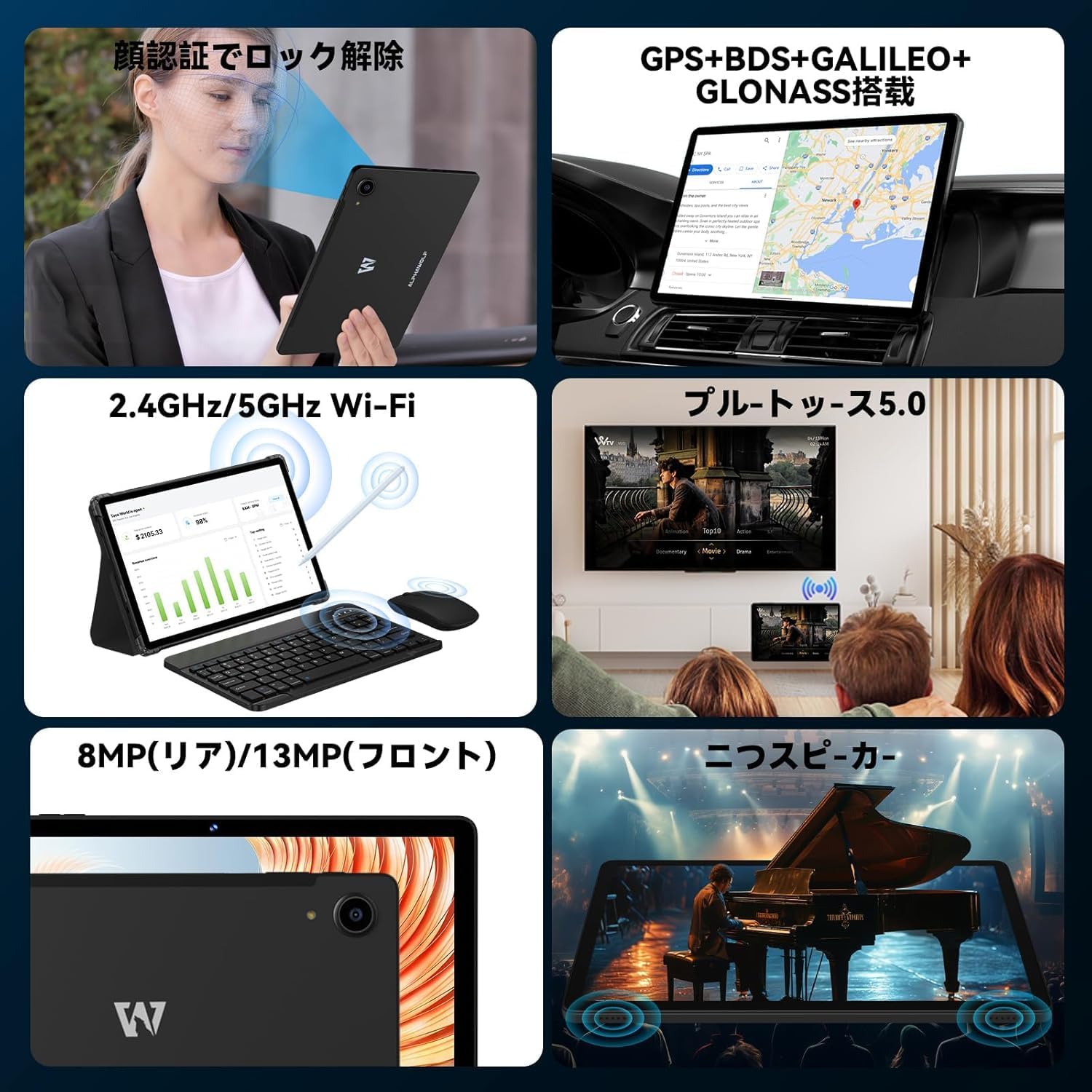
Image: A collage showing the tablet's features including face recognition, GPS, 2.4G/5G WiFi, Bluetooth 5.0, 8MP rear/13MP front cameras, and dual speakers.
4. Setup
4.1 Initial System Update
Upon receiving your LPad3A tablet, it is highly recommended to perform a system update. This ensures you have the latest software and optimal performance.
- Current Build Number: L3A_V1.0_20250612
- Proċedura ta' Aġġornament: Mur fuq Settings → Dwar tablet → Aġġornament tas-sistema → Iċċekkja għal aġġornament.
Nota Importanti: Performing this update will automatically restore factory settings. If you do not manually update, the tablet may automatically update when connected to the internet, leading to initialization. This automatic initialization occurs only once after the first update.

Image: A notice in Japanese regarding the recommended system update upon product arrival, specifying the build number and update steps.
4.2 Power On/Off
- Biex Tixgħel: Press and hold the Power button until the Alphawolf logo appears.
- Biex Tifi: Agħfas u żomm il-buttuna tal-Power, imbagħad agħżel 'Power off' mill-għażliet.
- Biex terġa' tibda: Agħfas u żomm il-buttuna tal-Power, imbagħad agħżel 'Restart' mill-għażliet.
4.3 Konnessjoni tan-Netwerk (Wi-Fi)
Connect your tablet to a Wi-Fi network for internet access.
- Mur fuq Settings → Netwerk u internet → Wi-Fi.
- Ixgħel il-Wi-Fi On.
- Agħżel in-netwerk mixtieq tiegħek mil-lista.
- Daħħal il-password jekk tintalab, imbagħad tektek Qabbad.
4.4 Face Recognition Setup
Set up face recognition for convenient and secure unlocking.
- Mur fuq Settings → Sigurtà u privatezza → Wiċċ nisfruttaw.
- Segwi l-istruzzjonijiet fuq l-iskrin biex tirreġistra wiċċek.
5. Istruzzjonijiet Operattivi
5.1 Karatteristiċi tal-Wiri
The LPad3A features an 11-inch FHD incell display with a resolution of 1920x1200 pixels, offering a wide viewing angle and vibrant colors. It supports Widevine L1 for high-definition streaming on platforms like Netflix, Amazon Prime Video, Disney+, and Hulu.

Image: The tablet display showing vibrant colors and high resolution, emphasizing its 10.95-inch FHD incell screen, 300+ Nits brightness, 1920x1200 resolution, and 16:10 aspect ratio.

Image: A visual demonstrating the 11-inch IPS wide viewing angle, 16:10 aspect ratio, and 1920x1200 high resolution of the tablet's display.
5.2 Prestazzjoni u Ħażna
The LPad3A is equipped with a high-performance UNISOC T615 octa-core processor, featuring two A75 cores and six A55 cores for efficient multitasking. It comes with 8GB of physical RAM, expandable virtually by an additional 12GB, totaling 20GB for smooth operation. Internal storage is 128GB, which can be expanded up to 2TB using a MicroSD card (sold separately).

Image: A graphic illustrating the UNISOC T615 octa-core processor, highlighting its A75 and A55 cores, 12nm process, and suitability for gaming.

Image: A visual showing the 20GB (8GB + 12GB virtual) RAM and 128GB internal storage, with an arrow indicating 2TB expandable storage via MicroSD card.

Image: A graphic demonstrating the storage capacity, indicating approximately 249,300 photos, 29,700 short videos, and 450,000 music files can be stored with 128GB ROM and 2TB expansion.
5.3 Użu tal-Kamera
The tablet features a 13MP rear camera and a 5MP front camera, suitable for capturing moments and video calls.
- Kamera ta' wara: 13 Megapixels for general photography.
- Kamera ta' quddiem: 5 Megapixels for selfies and video conferencing.

Image: A close-up of the tablet's rear camera and examples of photos taken with the front camera, indicating 13MP back camera and 5MP front camera.
5.4 Ġestjoni tal-batterija
The LPad3A is equipped with an 8000mAh large-capacity battery, providing extended usage time. It supports Type-C charging.
- Iċċarġjar: Use the provided Type-C cable and charging adapter.
- Ħajja tal-batterija: Offers up to 700-800 hours of standby time.

Image: A visual emphasizing the 8000mAh battery capacity and Type-C charging port, with a tablet displaying a charging animation.

Image: A graphic detailing the 8000mAh large capacity battery, Type-C charging, 5V/2A power, and 3.5mm audio jack.
5.5 Konnettività
The tablet supports various connectivity options for versatile use.
- Wi-Fi: Supports 2.4G and 5G Wi-Fi for fast and stable internet connections.
- Bluetooth 5.0: Għall-konnessjoni ta' aċċessorji mingħajr fili bħal headphones u tastieri.
- GPS: Integrated GPS, BDS, GALILEO, and GLONASS for accurate navigation.
- Projezzjoni bla fili: Allows mirroring your tablet screen to compatible displays.
- OTG (Fuq il-Mixi): Supports connecting USB devices such as flash drives or external keyboards.

Image: A collage illustrating split-screen functionality, 2.4G/5G WiFi connectivity, face recognition, and wireless projection to a TV.
5.6 Parental Controls (Google Kids Space)
The tablet is compatible with Google Kids Space, allowing parents to manage screen time, monitor app usage, remotely lock the device, and track its location for a safe digital environment for children.

Image: A child using the tablet with Google Kids Space interface, demonstrating parental control features for healthy child development.
6. Manutenzjoni
6.1 Tindif
Biex iżżomm it-tablet tiegħek nadif u funzjonali:
- Uża drapp artab u mingħajr suf biex timsaħ l-iskrin u l-qafas.
- Evita li tuża kimiċi ħarxa, prodotti tat-tindif li joborxu, jew sprejs tal-ajrusol.
- Kun żgur li l-apparat ikun mitfi u splaggjat qabel it-tindif.
6.2 Ħażna
When not in use, store your tablet in a cool, dry place away from direct sunlight and extreme temperatures. Avoid placing heavy objects on the tablet.
7 Issolvi l-problemi
7.1 Kwistjonijiet Komuni
- It-tablet mhux qed jixgħel: Kun żgur li l-batterija hija ċċarġjata. Qabbad il-ċarġer u stenna ftit minuti qabel ma tipprova tixgħelha mill-ġdid.
- L-iskrin ma jirrispondix: Try restarting the tablet. If the issue persists, perform a factory reset (note: this will erase all data).
- Kwistjonijiet ta' konnessjoni Wi-Fi: Check if other devices can connect to the Wi-Fi network. Restart your router and the tablet. Ensure the Wi-Fi password is correct.
- Prestazzjoni bil-mod: Agħlaq l-applikazzjonijiet fl-isfond li mhumiex meħtieġa. Neħħi l-cache u l-applikazzjonijiet temporanji files. Ikkunsidra li tneħħi l-apps mhux użati.
7.2 Ikkuntattja l-Appoġġ
If you encounter issues that cannot be resolved with the troubleshooting steps, please contact Alphawolf customer support.
- Metodu ta' Kuntatt: Via your Amazon account.
- Passi: Go to "Your Amazon Account" → "Your Orders" → "Select the relevant order" → "Order Details" → "Seller" → "Ask a question".
8. Speċifikazzjonijiet
| Brand | Alphawolf |
| Isem tal-Mudell | LPad3A |
| Sistema Operattiva | Android 15 |
| Daqs tal-Wiri | 11 pulzieri |
| Riżoluzzjoni tal-Wiri | 1920 x 1200 pixel (FHD IPS) |
| Proċessur | UNISOC T615 Octa-core |
| RAM | 20GB (8GB fiżiku + 12GB virtwali) |
| Ħażna Interna | 128GB |
| Ħażna espansibbli | Sa 2TB permezz ta' kard MicroSD (tinbiegħ separatament) |
| Kapaċità tal-batterija | 8000mAh |
| Kamera ta' Quddiem | 5MP |
| Kamera ta' wara | 13MP |
| Konnettività | Wi-Fi (2.4G/5G), Bluetooth 5.0, GPS (GPS+BDS+GALILEO+GLONASS) |
| Portijiet | Jack tal-Headphone tat-Tip Ċ, 3.5mm |
| Dimensjonijiet | 29.3 x 20 x 5.3 ċm |
| Piż | 950 g |
9. Garanzija u Appoġġ
Your Alphawolf LPad3A tablet comes with a 1-year quality warranty from the date of purchase. In case of initial defects or any issues during use, please contact our customer support.
- Kopertura tal-garanzija: Free repair or exchange for product defects within one year.
- Ċentru ta' Tiswija: A dedicated repair center is available in Tokyo for prompt after-sales service.


Image: Icons representing 24-hour support, Amazon FBA shipping, Japanese repair center with free repair, and 365-day free warranty.