
1. Introduzzjoni
Grazzi tax-xiriasing the MZEIBO KY2020D 80W Bluetooth 5.3 Detachable Sound Bar. This versatile audio system is designed to enhance your home entertainment experience with immersive stereo sound. Its unique 2-in-1 detachable design allows for flexible placement options, adapting to various room layouts and preferences. This manual provides essential information for setting up, operating, and maintaining your sound bar to ensure optimal performance.
2. Kontenut tal-Pakkett
Jekk jogħġbok ivverifika li l-oġġetti kollha elenkati hawn taħt huma inklużi fil-pakkett tiegħek:
- MZEIBO KY2020D Sound Bar (2 detachable sections)
- Kontroll mill-bogħod
- Stand Bases (for vertical speaker setup)
- Cable AUX
- Adapter tal-Provvista tal-Enerġija
- Kejbil ottiku
- Cable HDMI
- Viti u Ankri tal-Immuntar tal-Ħajt
- Gwida għall-Utent (dan il-manwal)

Figura 2.1: Included accessories for the MZEIBO Sound Bar.
3. Karatteristiċi tal-prodott
- Premium Dolby Sound: Experience clear dialogue and powerful bass with advanced Dolby audio technology.
- Detachable 2-in-1 Design: Use as a single horizontal soundbar or split into two separate vertical speakers for flexible placement.
- Għażliet ta' Konnettività Multipli: Supports Bluetooth 5.3, HDMI ARC, Optical, and 3.5mm AUX for broad compatibility.
- 80W Qawwa tal-Ħruġ: Delivers robust audio performance for movies, music, and gaming.
- Kompatt u Stylish: Sleek, modern design integrates seamlessly into any home decor.
- Modi tal-Ħoss Ottimizzati: Dedicated modes for Music, Movie, and News to enhance specific audio content.

Figura 3.1: Internal speaker configuration and audio specifications.
4. Setup
4.1. Assembly and Placement
The MZEIBO Sound Bar offers two primary configurations:
- Single Sound Bar: Connect the two sections by aligning the connectors and gently pushing them together until they click into place. This configuration is ideal for placement directly below your TV on a tabletop or mounted on a wall.
- Two Vertical Speakers: Separate the two sound bar sections. Attach the provided stand bases to the bottom of each section. Place one speaker to the left and one to the right of your TV for a wider stereo soundstage.
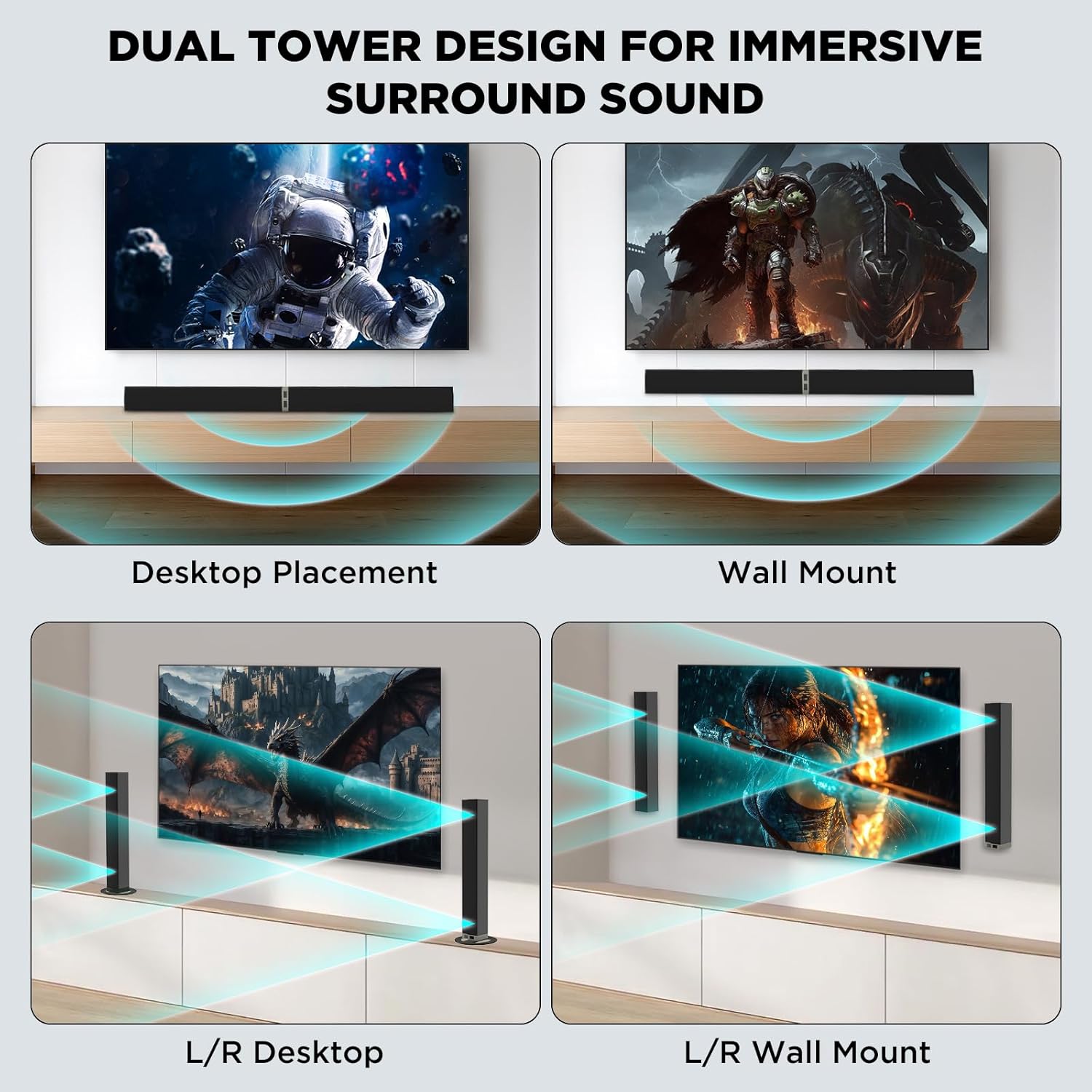
Figura 4.1: Versatile placement options for the sound bar.
4.2. Konnessjoni mal-Enerġija
Connect the provided power supply adapter to the DC IN port on the sound bar and then plug it into a wall outlet.
4.3. Konnessjonijiet tal-Awdjo
Choose one of the following methods to connect the sound bar to your audio source (TV, PC, etc.):
- HDMI ARC: Connect one end of the HDMI cable to the HDMI ARC port on your TV and the other end to the HDMI ARC port on the sound bar. Ensure your TV's HDMI ARC function is enabled.
- Ottiċi: Connect one end of the optical cable to the Optical Out port on your TV and the other end to the OPTICAL port on the sound bar. Remove protective caps from the optical cable before use.
- 3.5mm AUX: Connect one end of the 3.5mm AUX cable to the headphone jack or AUX Out port on your device and the other end to the AUX port on the sound bar.
- Bluetooth 5.3:
- Qawwa fuq il-bar tal-ħoss.
- Press the 'BT' button on the remote control or the 'Mode' button on the sound bar until 'BT' appears on the display. The indicator light will flash, indicating pairing mode.
- On your device (e.g., smartphone, smart TV), enable Bluetooth and search for 'MZEIBO Soundbar'.
- Select 'MZEIBO Soundbar' to pair. Once connected, the indicator light will stop flashing and remain solid.
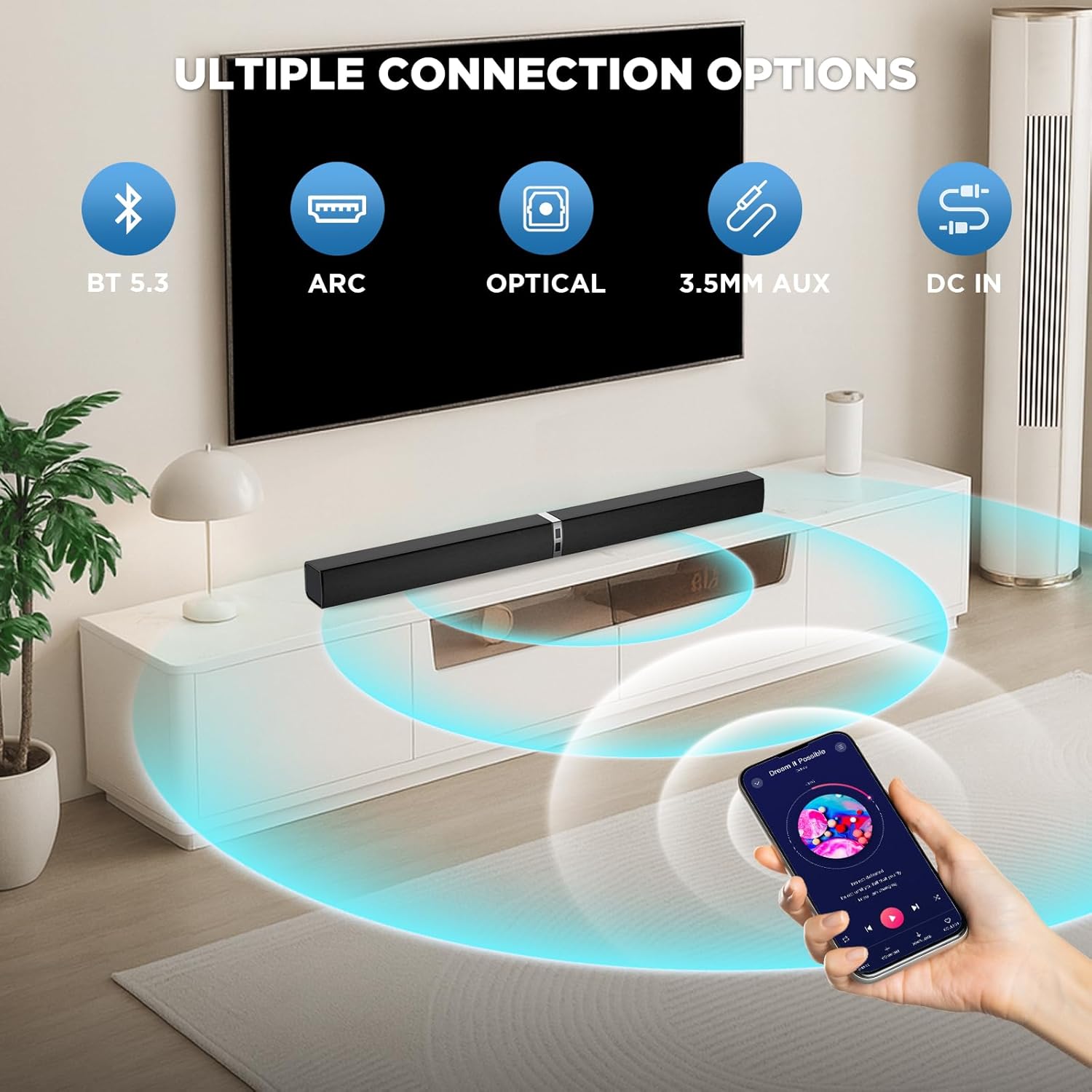
Figura 4.2: Available connection options for the sound bar.
5. Operazzjoni
5.1. Power On/Off
Agħfas il- Qawwa button on the remote control or the sound bar unit to turn it on or off.
5.2. Kontroll tal-Volum
Uża l- Volum + u Volum - buttons on the remote control or the sound bar unit to adjust the volume.
5.3. Għażla tas-Sors tal-Input
Agħfas il- Modalità button on the remote control or the sound bar unit to cycle through available input sources: Bluetooth (BT), HDMI ARC, Optical (OPT), and AUX.
5.4. Modi tal-Ħsejjes
The sound bar features optimized sound modes for different content types. Press the corresponding button on the remote control to select:
- Modalità Mużika: Enhances musical clarity and bass.
- Modalità tal-Film: Provides an immersive cinematic experience with enhanced dialogue and effects.
- Modalità Aħbarijiet: Ottimizza ċ-ċarezza vokali għal xandiriet tal-aħbarijiet u programmi ta' diskussjoni.

Figura 5.1: Sound modes for different content.
6. Manutenzjoni
- Tindif: Uża drapp artab u niexef biex tnaddaf il-wiċċ tas-sound bar. Tużax prodotti tat-tindif likwidi jew materjali li joborxu.
- Ħażna: Meta ma tkunx qed tużaha għal perjodi twal, aħżen is-sound bar f'post frisk u niexef 'il bogħod mix-xemx diretta u minn temperaturi estremi.
- Evita Likwidi: Keep the sound bar away from water and other liquids to prevent damage.
- Ventilazzjoni: Aċċerta ruħek li jkun hemm ventilazzjoni xierqa madwar is-sound bar biex tevita li tissaħħan iżżejjed. Timblokkax il-fetħiet tal-ventilazzjoni.
7 Issolvi l-problemi
If you encounter issues with your MZEIBO Sound Bar, please refer to the following common solutions:
- Ebda Ħsejjes:
- Ensure the sound bar is powered on and the volume is not muted or set too low.
- Verify that the correct input source (BT, ARC, OPT, AUX) is selected on the sound bar.
- Check all audio cables (HDMI, Optical, AUX) for secure connections.
- If using HDMI ARC, confirm that your TV's ARC function is enabled and the TV's audio output is set to the sound bar.
- Kwistjonijiet ta' Tqabbil tal-Bluetooth:
- Ensure the sound bar is in Bluetooth pairing mode (indicator light flashing).
- Kun żgur li l-Bluetooth tat-tagħmir tiegħek huwa attivat u fil-medda (tipikament 10 metri).
- Jekk qabel kien imqabbad, ipprova neħħi l-akkoppjar u erġa' qabbad l-apparat.
- Il-Kontroll mill-bogħod Mhux Jaħdem:
- Check if the batteries are correctly inserted and not depleted. Replace if necessary (requires 2x AAA batteries, not included).
- Ensure there are no obstructions between the remote control and the sound bar's sensor.
8. Speċifikazzjonijiet
| Isem tal-Mudell | KY2020D |
| Brand | MZEIBO |
| Tip ta' Kelliem | Soundbar |
| Qawwa tal-Ħruġ Massimu tal-Ispeaker | 80 Watts |
| Rispons ta' Frekwenza | 20 KHz |
| Teknoloġija tal-Konnettività | Bluetooth 5.3, Optical, HDMI ARC, 3.5mm AUX |
| Modalità tal-Ħruġ tal-Awdjo | Stereo |
| Dimensjonijiet tal-Prodott | 31"D x 2.35"W x 2.3"H |
| Piż tal-oġġett | 2.43 Kilogrammi (5.35 libbra) |
| Tip ta 'Immuntar | Immonta fuq il-mejda, Immonta fuq il-ħajt |
| Materjal | Plastic Or Metal |
9. Garanzija u Appoġġ
MZEIBO offers a lifetime warranty for the KY2020D Sound Bar. This includes super free replacement for lost, defective, or damaged units, with no shipping fees and no return required. To activate your warranty, please scan the QR code provided on the product packaging or included documentation.
For further assistance or technical support, please refer to the contact information provided with your product or visit the official MZEIBO websit.