
1. Introduzzjoni
This manual provides detailed instructions for the safe and effective use of the CEM ILDM-150 Laser Distance Measure. The ILDM-150 is a precision instrument designed for accurate distance, area, and volume measurements, featuring Bluetooth connectivity for data transfer and management via the Meterbox Pro application. Please read this manual thoroughly before operating the device to ensure proper functionality and safety.

Figure 1.1: CEM ILDM-150 Laser Distance Measure and included accessories.
2. Karatteristiċi tal-prodott
The CEM ILDM-150 Laser Distance Measure offers a range of features designed for efficiency and accuracy:
- Preċiżjoni Għolja: Utilizes a Class II Laser with 1mW output, providing accuracy up to ±1/16 inch (1.5mm) over a measuring range of up to 229 feet (70 meters).
- Modi ta' Kejl Multipli: Supports single distance, continuous measurement, area, volume, and Pythagorean (three-point) calculations.
- Qlib tal-Unità: Easily switch between meters (M), inches (In), and feet (Ft).
- Konnettività Bluetooth 4.0: Seamlessly transfer measured data to a smartphone or tablet using the Meterbox Pro application for analysis and sharing.
- Ħażna tad-Data: Stores up to 99 groups of measurement data, with manual deletion capability.
- Dawl ta' wara LCD: Large backlit screen for improved visibility in low-light conditions.
- Issettjar Mute: Option to turn the measurement beep on or off for use in quiet environments.
- Disinn Durabbli: IP54 rated for water and dust resistance, featuring a hard rubber body for enhanced grip and protection.
- Iffrankar tal-Enerġija: Automatic shut-down after 150 seconds of inactivity to conserve battery life.
- Indikazzjoni Baxxa tal-Batterija: Javża lill-utent meta l-batteriji jeħtieġu li jinbidlu.

Figura 2.1: Aktarview of CEM ILDM-150 key features.
3. Informazzjoni dwar is-Sigurtà
The CEM ILDM-150 is a Class II laser product. Adhere to the following safety guidelines:
- Tħaresx direttament fir-raġġ tal-lejżer.
- Timmirax ir-raġġ tal-lejżer lejn nies jew annimali.
- Evita li tuża strumenti ottiċi (eż., binokli, teleskopji) biex view ir-raġġ tal-lejżer.
- Żomm l-apparat fejn ma jintlaħaqx mit-tfal.
- Tippruvax timmodifika jew iżarma l-apparat.
- Uża biss batteriji speċifikati.
4. L-Ibda (Setup)
4.1 Kontenut tal-Pakkett
Malli tiftaħ il-pakkett, ivverifika li l-oġġetti kollha huma preżenti:
- CEM ILDM-150 Laser Distance Measure
- 1.5V AAA Batteries (Note: While typically included, please check the packaging upon receipt as specifications may vary.)
- Borża portabbli
- Manwal għall-Utent
- Ċinga tal-Idejn
- Kaxxa tal-Pakkett
4.2 Installazzjoni tal-batterija
The ILDM-150 requires 1.5V AAA batteries for operation.
- Sib l-għatu tal-kompartiment tal-batterija fuq wara tal-apparat.
- Żerżaq il-kopertura miftuħa fid-direzzjoni indikata mill-vleġġa.
- Insert the AAA batteries, ensuring correct polarity (+/-) as marked inside the compartment.
- Agħlaq l-għatu tal-kompartiment tal-batterija sew.
4.3 Tixgħel/Jitfi
- Biex Tixgħel: Agħfas il- MEAS buttuna. Id-displej se jixgħel.
- Biex Tifi: Agħfas u żomm il- CLR/OFF button for approximately 2 seconds. The device will also automatically shut down after 150 seconds of inactivity.
5. Istruzzjonijiet Operattivi
5.1 Kejl Bażiku
Biex twettaq kejl ta' distanza waħda:
- Ipponta l-lejżer lejn il-wiċċ fil-mira.
- Agħfas il- MEAS button once. The laser will activate.
- Agħfas il- MEAS Agħfas il-buttuna mill-ġdid biex tieħu l-kejl. Ir-riżultat se jintwera fuq l-iskrin.
5.2 Tibdil tal-Unità
To change the measurement unit (M/In/Ft):
- Agħfas il- Unità Agħfas il-buttuna ripetutament sakemm tintwera l-unità mixtieqa.
5.3 Backlight and Mute Settings
- The backlight automatically activates when the device is in use.
- To toggle the measurement beep (mute/unmute), refer to the specific button or menu option in your device's interface, typically indicated by a speaker icon.
5.4 Modi ta' Kejl Avvanzati
The ILDM-150 supports various measurement functions:
- Kejl taż-Żona: Press the Area/Volume button once. Follow the on-screen prompts to measure length and width. The device will calculate and display the area.
- Kejl tal-Volum: Press the Area/Volume button twice. Follow the on-screen prompts to measure length, width, and height. The device will calculate and display the volume.
- Kejl Pitagoriku (Kejl Indirett): Use this mode to calculate distances indirectly (e.g., height of a building). Press the Pythagorean button. Follow the on-screen prompts to take the required measurements (e.g., hypotenuse and one leg). The device will calculate the unknown side.
- Kejl Kontinwu (Traċċar): Agħfas il- MEAS button and hold it down. The device will continuously measure and display the distance as you move it, showing real-time minimum and maximum values. Release the button to stop.
- Żieda u Tnaqqis: After taking a measurement, use the '+' or '-' buttons to add or subtract subsequent measurements from the current total.

Figure 5.1: Multiple measurement modes supported by the ILDM-150.
5.5 Tailstock Function
The multi-functional tailstock allows for measurements from corners or edges, ensuring accuracy when the device cannot be placed flush against a surface.

Figure 5.2: Multi-functional use of the tailstock.
6. Konnettività u App Bluetooth
The ILDM-150 features Bluetooth 4.0 for seamless data transfer to your smartphone or tablet via the Meterbox Pro application.
6.1 Installing Meterbox Pro
- Fittex għal "Meterbox Pro" in your device's app store (iOS App Store or Google Play Store).
- Niżżel u installa l-applikazzjoni.
6.2 It-tqabbil tal-Apparat
- Kun żgur li l-Bluetooth huwa attivat fuq l-ismartphone/tablet tiegħek.
- Power on the ILDM-150.
- Open the Meterbox Pro application. The app should automatically detect and connect to the ILDM-150.
- A Bluetooth icon on the ILDM-150's display will indicate a successful connection.

Figure 6.1: Bluetooth connectivity with Meterbox Pro app.
6.3 Data Transfer and Management
Once connected, measurements taken with the ILDM-150 can be transferred to the Meterbox Pro app. The app allows you to:
- View and organize measurement data.
- Create reports or charts.
- Share data via email, social media, or other applications.

Figure 6.2: Convenient data analysis and sharing via Meterbox Pro.
6.4 Data Storage on Device
The device can store up to 99 groups of historical data values.
- Tifkira tad-Data: Use the memory buttons (e.g., up/down arrows) to scroll through stored measurements.
- Tħassar Dejta: Agħfas il- CLR button to manually delete the currently displayed data.
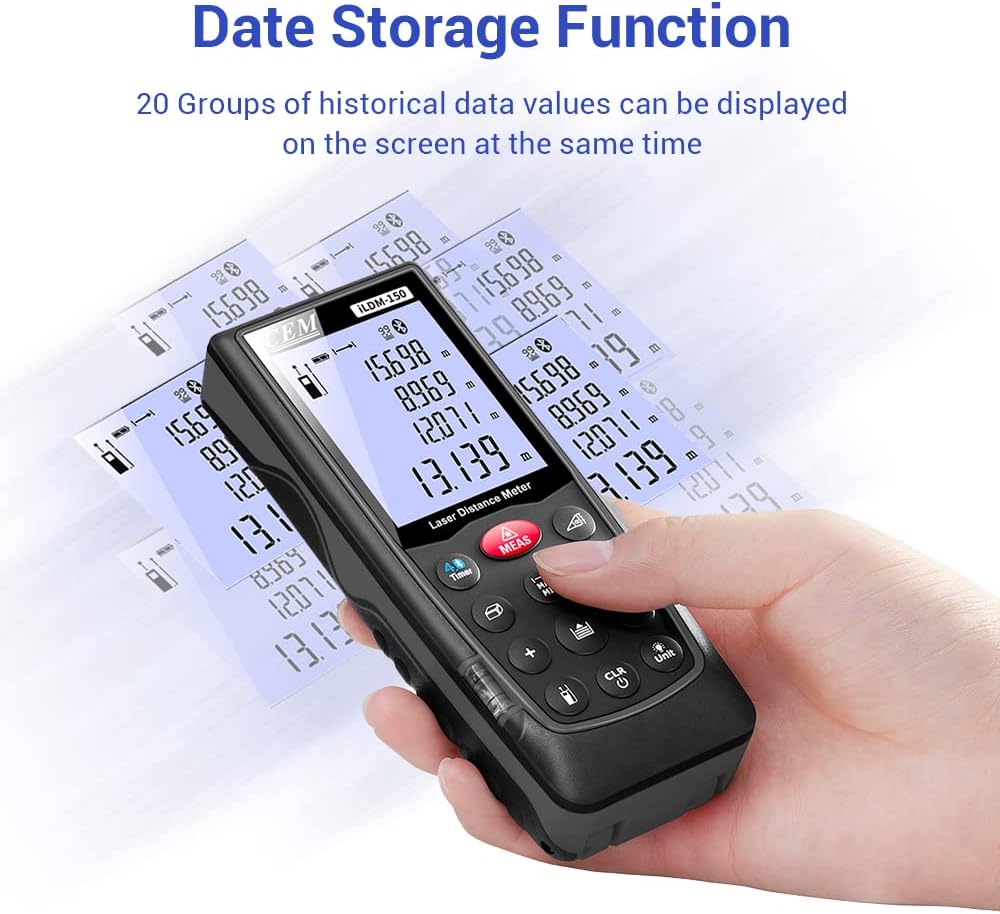
Figure 6.3: On-device data storage and display.
7. Manutenzjoni u Kura
Proper maintenance ensures the longevity and accuracy of your ILDM-150.
- Tindif: Uża artab, damp cloth to clean the device. Do not use abrasive cleaners or solvents. Pay special attention to the laser lens, cleaning it gently with a lens cloth if necessary.
- Ħażna: Aħżen l-apparat fil-borża portabbli tiegħu f'post frisk u niexef meta ma jkunx qed jintuża. Evita temperaturi estremi u dawl tax-xemx dirett.
- Kura tal-batterija: Neħħi l-batteriji jekk l-apparat ma jkunx se jintuża għal perjodu estiż biex tevita t-tnixxija.
- Protezzjoni tal-Impatt: While durable, avoid dropping the device or subjecting it to strong impacts.

Figure 7.1: The ILDM-150 features IP54 water and dust protection.
8 Issolvi l-problemi
If you encounter issues with your CEM ILDM-150, refer to the following table for common problems and solutions:
| Problema | Kawża Possibbli | Soluzzjoni |
|---|---|---|
| L-apparat ma jixgħelx. | Low or dead batteries; Incorrect battery installation. | Replace batteries; Ensure correct polarity. |
| Kejl mhux preċiż. | Laser lens dirty; Unstable measurement surface; Device not held steady; Measurement taken over reflective or transparent surfaces. | Clean laser lens; Ensure stable placement; Use a target plate for difficult surfaces. |
| Il-konnessjoni Bluetooth tfalli. | Bluetooth off on smartphone; Device out of range; App not running. | Enable Bluetooth; Ensure device is within 10m range; Restart Meterbox Pro app. |
| Id-displej huwa mċajpar jew ma jistax jinqara. | Low battery; Extreme temperature. | Ibdel il-batteriji; Ħaddem fil-medda ta' temperatura speċifikata. |
| L-apparat jintefa bla mistenni. | Auto-off feature activated; Low battery. | This is normal after 150 seconds of inactivity; Replace batteries if low battery indicator is on. |
9. Speċifikazzjonijiet Tekniċi
Detailed specifications for the CEM ILDM-150 Laser Distance Measure:
| Speċifikazzjoni | Valur |
|---|---|
| Brand | CEM |
| Isem tal-Mudell | ILDM-150 |
| Numru tal-Parti | CEM ILDM-150 |
| Kulur | iswed 1 |
| Medda ta' Kejl | 229 pied jew 70 metri |
| Eżattezza | ±1/16 inch (1.5mm) |
| Klassi tal-Laser | Klassi II, <1mW |
| Klassifikazzjoni tal-Protezzjoni Internazzjonali | IP54 (Reżistenti għall-Ilma, Reżistenti għat-Trab) |
| Materjal | Double Injection Molding Machine, Plastic |
| Piż tal-oġġett | 203 Gramm |
| Tip ta 'batterija | Alkalin (AAA) |
| Itfi Awtomatiku | 150-il sekonda (madwar) |
| Memorja tad-Dejta | 99 gruppi |
| Verżjoni Bluetooth | 4.0 |
| Dimensjonijiet tal-oġġett (L x W x H) | 5.31 x 2.09 x 1.18 pulzieri |
| UPC | 887327150034 |
| Manifattur | Shenzhen Everbest Machinery Industry Co.,Ltd. |
| Data L-Ewwel Disponibbli | 9 ta’ Lulju, 2018 |

Figure 9.1: Dimensions of the ILDM-150.
10. Garanzija u Appoġġ
10.1 Informazzjoni dwar Garanzija
The CEM ILDM-150 Laser Distance Measure comes with a 12-il xahar garanzija mid-data tax-xiri. Din il-garanzija tkopri difetti fil-materjali u l-abbilità taħt użu normali. Ma tkoprix ħsara kkawżata minn użu ħażin, inċidenti, modifiki mhux awtorizzati, jew manutenzjoni mhux xierqa.
10.2 Appoġġ għall-Klijent
For technical assistance, warranty claims, or further inquiries, please contact CEM customer support through their official website or the contact information provided with your purchase documentation. Please have your model number (ILDM-150) and purchase date ready when contacting support.