
bemi KIX-M
bemi Smartwatch Fitness Tracker User Manual
Model: KIX-M (B0FCYD6VV2)
Introduzzjoni
This manual provides detailed instructions for the setup, operation, and maintenance of your bemi Smartwatch Fitness Tracker. Please read this manual thoroughly before using the device to ensure proper functionality and to maximize your user experience.
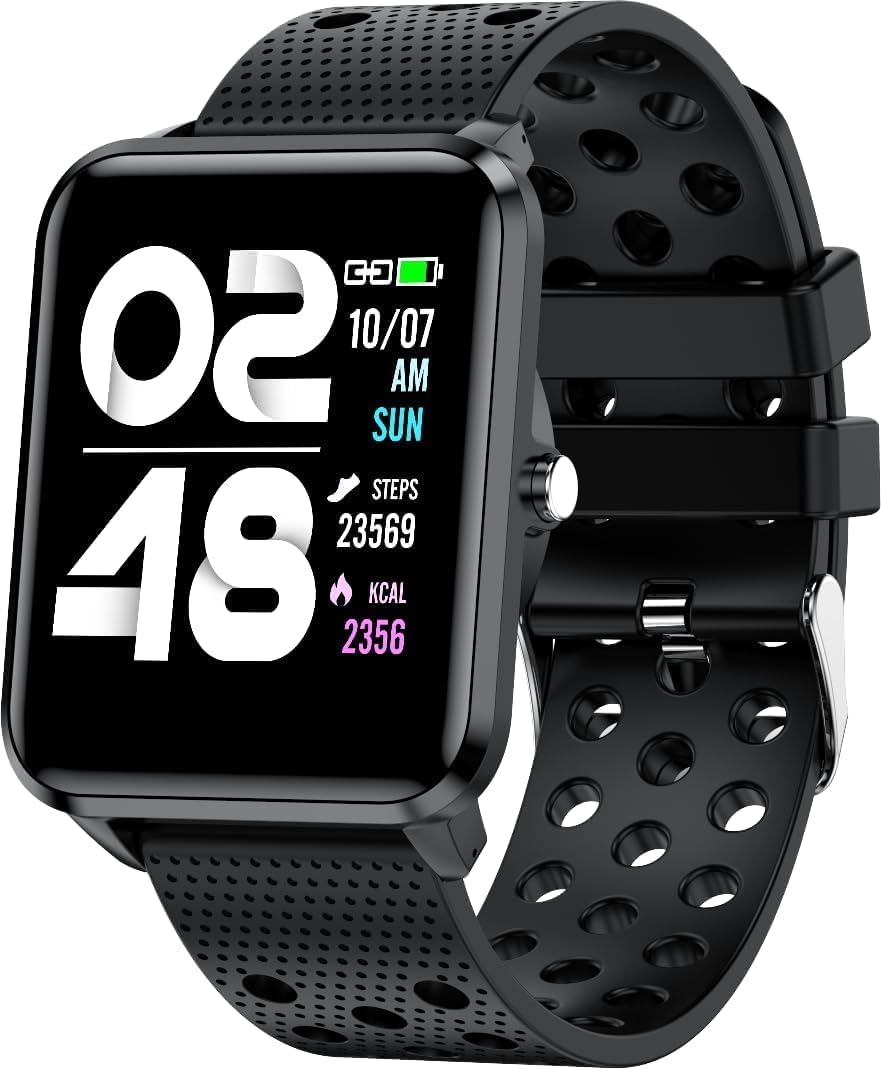
Immaġni: Quddiem view of the bemi Smartwatch, showing the digital display with time, date, steps, and calories burned. The watch has a black perforated silicone band.
X'hemm fil-Kaxxa
- Kix-m Smartwatch
- USB Cable (Charging Cable)
- Manwal għall-utent
- Kaxxa tar-rigali
Setup
1. Iċċarġjar tal-Ismartwatch
Before first use, fully charge your smartwatch. Connect the provided USB charging cable to the magnetic charging points on the back of the watch and to a USB power source. The watch display will indicate charging status.

Immaġni: Wara view of the bemi Smartwatch, highlighting the magnetic charging contacts and the optical heart rate sensor.
2. Installazzjoni tal-App tal-Kompann
The smartwatch operates with the "H Band" application. Download the app from the App Store (for iOS devices) or Google Play Store (for Android devices).
- Fittex għal "H Band" in your device's app store.
- Niżżel u installa l-applikazzjoni.
- Kun żgur li l-Bluetooth tal-ismartphone tiegħek huwa attivat.
3. Pairing the Smartwatch with Your Phone
- Open the "H Band" app on your smartphone.
- Segwi l-istruzzjonijiet fuq l-iskrin biex toħloq kont jew tidħol.
- Innaviga lejn it-taqsima tal-akkoppjar tat-tagħmir fl-app.
- Select your bemi Smartwatch from the list of available devices. The app will guide you through the pairing process.
- Ikkonferma t-talba ta' tqabbil kemm fuq it-telefon tiegħek kif ukoll fuq l-ismartwatch jekk tintalab.
Note: The smartwatch is compatible with Android (4.4 or newer) and iOS (8.0 or newer) operating systems.
Istruzzjonijiet Operattivi
Navigazzjoni Bażika
- Touchscreen: Skrolla lejn ix-xellug/lemin, 'il fuq/'l isfel biex tinnaviga fil-menus u l-karatteristiċi. Tektek biex tagħżel.
- Buttuna tal-ġenb: Press to wake the screen, return to the home screen, or confirm selections.
Karatteristiċi u Funzjonijiet Ewlenin
Uċuħ ta 'l-arloġġi customizable
Choose from 24 clock faces available in the "H Band" application. You can also set a photo from your phone as the watch face.

Image: The smartwatch screen showing different digital and analog watch face designs, indicating customization options available through the app.
Traċċar tal-Attività
The smartwatch monitors your steps, distance, and calories burned. All activity data is recorded and can be viewed in the "H Band" app.

Image: A person running outdoors with the bemi Smartwatch visible on their wrist, showing the step tracking interface with current steps, distance, and calories.
Monitoraġġ tar-Rata tal-Qalb u l-Ossiġnu fid-Demm
The watch provides 24-hour monitoring of pulse and blood oxygen levels. View real-time data on the watch or detailed historical data in the app.

Image: A close-up of the smartwatch screen showing heart rate (BPM) and blood pressure (mmHg) readings with a graph of historical data.
Monitoraġġ tal-irqad
Track your sleep patterns, including deep sleep, light sleep, and awake times. The app provides detailed analysis of your sleep quality.

Image: The "H Band" app interface displaying sleep quality data, including total sleep duration, deep sleep, light sleep, and awake times, with a corresponding graph.
Daqq tal-Mużika
The KIX-M features a built-in audio player with 512MB of internal memory. You can store music directly on the watch and connect Bluetooth headphones or speakers for wireless listening.

Image: The bemi Smartwatch showing its music player interface with play/pause and skip controls, alongside a pair of wireless earbuds, demonstrating its audio capabilities.
Notifiki
Receive notifications for calls, messages, and various applications directly on your smartwatch. Configure notification settings within the "H Band" app.

Image: The smartwatch screen showing an incoming message notification, with icons for various social media and communication apps like SMS, Twitter, WeChat, Skype, YouTube, Facebook, Google+, Instagmuntun, u LinkedIn.
Karatteristiċi Smart oħra
- 10 Modi Sportivi: Track specific workouts like running, cycling, and more.
- Tfakkira tal-Moviment: Get alerts to move if you've been sedentary for too long.
- Special Mode for Women: Track menstrual cycles and ovulation.
- Kontroll tal-Kamera: Ikkontrolla l-kamera tat-telefon tiegħek mill-bogħod.
- Allarm: Issettja allarmi direttament mill-arloġġ jew mill-app.
- Stopwatch u Timer: Funzjonijiet bażiċi taż-żamma tal-ħin.
- Sib Telefon: Sib l-ismartphone imqabbad tiegħek.
- GPS Position Tracking: Requires carrying your phone with you for GPS data.

Image: The "H Band" app interface displaying the female health tracking calendar, allowing users to log menstrual periods and predict ovulation.
Manutenzjoni
Tindif tal-Ismartwatch Tiegħek
Regularly clean your smartwatch and band to prevent skin irritation and maintain device performance.
- Imsaħ l-iskrin u l-qafas tal-arloġġ b'ċarruta ratba u mingħajr suf.
- For stubborn spots, dampLaħlaħ id-drapp ftit bl-ilma. Evita li tuża kimiċi ħarxa jew materjali li joborxu.
- Naddaf il-kuntatti tal-iċċarġjar perjodikament biex tiżgura konnessjoni tajba.
Reżistenza għall-Ilma (IP68)
The smartwatch is IP68 waterproof, meaning it is resistant to dust and can withstand immersion in water up to 1.5 meters for up to 30 minutes. It is suitable for daily use, hand washing, and light rain. Avoid hot water, steam, or prolonged immersion in water, especially saltwater.

Image: The bemi Smartwatch with water splashing over its screen and band, illustrating its IP68 water resistance rating.
Kura tal-batterija
- Iċċarġja l-batterija kompletament qabel l-ewwel użu.
- Evita li l-batterija tixxotta kompletament ta' spiss.
- Aħżen l-apparat f'post frisk u niexef jekk ma jintużax għal perjodi twal.
Issolvi l-problemi
| Problema | Kawża Possibbli | Soluzzjoni |
|---|---|---|
| Watch ma tixgħel | Batterija baxxa | Iċċarġja l-arloġġ għal mill-inqas 30 minuta. |
| Ma nistax nqabbad mat-telefon | Bluetooth off, app not open, watch not discoverable, phone OS not compatible | Ensure Bluetooth is on. Open "H Band" app. Restart watch and phone. Check OS compatibility (Android 4.4+/iOS 8.0+). |
| Dejta tas-saħħa mhux preċiża (HR, SpO2) | Improper fit, sensor obstruction, movement during measurement | Ensure watch is snug but comfortable on wrist. Clean sensor. Remain still during measurement. |
| Notifiki mhux riċevuti | App permissions, notification settings, Bluetooth disconnected | Check app permissions for notifications. Verify notification settings in "H Band" app. Ensure watch is connected via Bluetooth. |
| L-iskrin ma jirrispondix | Software glitch, low battery | Restart the watch (if possible). Charge the watch. |
Speċifikazzjonijiet
| Karatteristika | Dettall |
|---|---|
| Mudell | KIX-M |
| Daqs tal-Iskrin | 1.5 Pulzier |
| Tip ta 'Wiri | Touchscreen |
| Reżistenza għall-Ilma | IP68 |
| Konnettività | Bluetooth (Dual Bluetooth module) |
| Memorja Interna | 512 MB (for music storage) |
| Kapaċità tal-batterija | 200 Milliamp Sigħat (mAh) |
| Sistema Operattiva | ROTS |
| OS kompatibbli | Android 4.4+ / iOS 8.0+ |
| Sensuri | Heart Rate Monitor, Blood Oxygen Sensor, Accelerometer |
| Karatteristiċi | Activity Tracker, Sleep Tracking, Pedometer, Calorie Tracker, Music Player, Notifications, Gesture Control, 10 Sport Modes, Female Health Tracking, Camera Control, Alarm, Stopwatch, Timer, Find Phone, GPS via Smartphone |
| Piż tal-oġġett | 4.4 uqija |
| Dimensjonijiet | 5.35 x 2.64 x 2.44 pulzieri (Dimensjonijiet tal-Pakkett) |
Garanzija u Appoġġ
For warranty information and technical support, please refer to the contact details provided with your purchase or visit the official bemi websit. Żomm il-prova tax-xiri tiegħek għal kwalunkwe talba ta' garanzija.
Note: The manufacturer is Minrek.
Ask a question about this manual
Ask about setup, troubleshooting, compatibility, parts, safety, or missing instructions. Manuals+ will review the question and use this page’s manual context to help answer it.