
1. Introduzzjoni
The LILYGO T-Display S3 Pro LR1121 is an advanced development board built upon the T-Display S3 Pro External Expansion Module. It integrates the LR1121 chip, offering dual LoRa band capabilities (Sub-G band and 2.4G band). This board features a 2.33-inch touch IPS TFT SPI LCD for interactive applications.
Key integrated functions include motor vibration, Real-Time Clock (RTC), speaker, and microphone. It is powered by a built-in high-capacity 2000mAh Li-ion battery. The robust ABS+PC material shell is designed with two external LoRa antenna ports, ensuring optimal wireless performance without internal interference. A 1/4-inch screw mount at the bottom allows for attachment to outdoor fixtures like tripods.
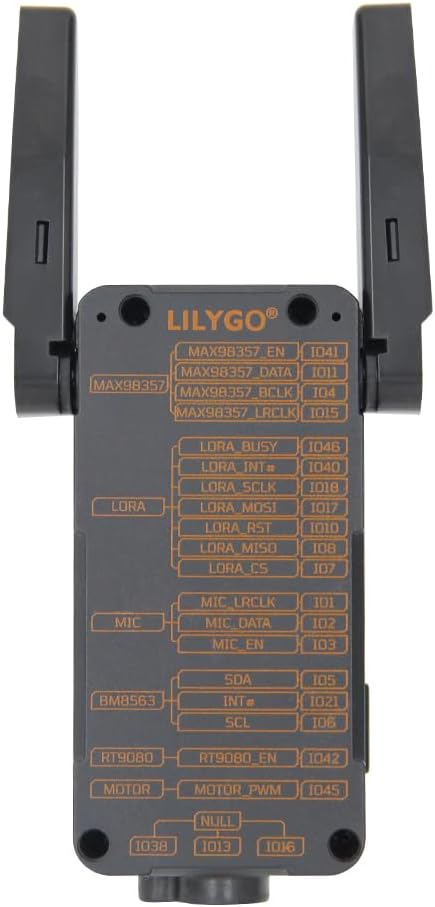
Figure 1.1: LILYGO T-Display S3 Pro LR1121 front view with antennas extended.

Figura 1.2: Dettaljat fuqview of LILYGO T-Display S3 Pro LR1121 features.
2. Setup
2.1 Konfigurazzjoni Inizjali tal-Ħardwer
- Installazzjoni tal-antenna: Carefully connect the two LoRa external antennas to the designated ports on the side of the device. Ensure they are securely fastened. The LR1121 antenna can be rotated 180 degrees in the direction of the screen; avoid rotating it backward.
- Konnessjoni tal-Enerġija: Connect the LILYGO T-Display S3 Pro LR1121 to a power source using a standard USB-C cable. The device has a built-in 2000mAh Li-ion battery.

Figura 2.1: Lura view with pinout diagram.

Figure 2.2: Detailed Pinmap Diagram.
2.2 Software Environment Setup
For programming and development, refer to the official GitHub repository for detailed instructions on setting up your development environment, including Arduino-IDE or VS Code.
- Repożitorju tal-GitHub: github.com/Xinyuan-LilyGO/T-Display-S3-Pro-MVSRLora
3. Istruzzjonijiet Operattivi
3.1 Operazzjoni Bażika
- Power On/Off: Use the designated power button (if available) or connect/disconnect USB power to turn the device on or off.
- Interazzjoni tal-Wiri: The 2.33-inch touch IPS TFT SPI LCD supports touch input. Interact with on-screen elements as programmed.

Figure 3.1: Display showing touch information.
3.2 Komunikazzjoni bla fili
The board supports multiple wireless communication protocols:
- LoRa: Utilizes the LR1121 chip for Sub-G band and 2.4G band LoRa communication. Ensure antennas are properly connected for optimal range.
- Wi-Fi: Supports Wi-Fi 802.11 for network connectivity.
- Bluetooth: Features BLE 5 and Bluetooth mesh for short-range communication.
3.3 Integrated Functions
The T-Display S3 Pro LR1121 includes several integrated peripherals:
- Motor Vibration: Jipprovdi feedback tattili.
- RTC (Arloġġ f'ħin reali): Maintains accurate timekeeping.
- Kelliem: Għall-output tal-awdjo.
- Mikrofonu: Għal input awdjo.
Video 3.1: Official video demonstrating the LILYGO T-Display S3 Pro LR1121 development board's features and functionality.
4. Manutenzjoni
4.1 Kura Ġenerali
- Tindif: Uża drapp artab u niexef biex tnaddaf l-apparat. Evita li tuża prodotti tat-tindif likwidi jew solventi.
- Ħażna: Aħżen l-apparat f'post frisk u niexef 'il bogħod mix-xemx diretta u minn temperaturi estremi.
- Protezzjoni Fiżika: The ABS+PC shell provides good protection, but avoid dropping the device or subjecting it to strong impacts.
4.2 Kura tal-Batterija
- Iċċarġjar: Charge the built-in 2000mAh Li-ion battery using a compatible USB-C power adapter (5V, 500mA recommended).
- Ħażna fit-Tul: If storing the device for an extended period, charge the battery to approximately 50% to prolong its lifespan. Avoid fully discharging or fully charging the battery for long-term storage.
5 Issolvi l-problemi
If you encounter issues with your LILYGO T-Display S3 Pro LR1121, consider the following steps:
- L-Apparat Mhux Jixgħel: Ensure the battery is charged or the device is connected to a stable USB power source. Check the USB-C cable and port for damage.
- Kwistjonijiet tal-Wiri: If the display is blank or unresponsive, try restarting the device. Verify that the software is correctly loaded and initialized the display.
- Connectivity Problems (LoRa, Wi-Fi, Bluetooth): Check antenna connections for LoRa. For Wi-Fi and Bluetooth, ensure your software configuration is correct and that the device is within range of the network/peer.
- Kwistjonijiet Relatati mas-Softwer: Refer to the official GitHub repository for common issues, firmware updates, and community support. Many problems can be resolved by ensuring you are running the latest stable firmware or by consulting the project's documentation.
- Apparat li ma jirrispondix: If the device becomes unresponsive, perform a hard reset by disconnecting and reconnecting the power source.
6. Speċifikazzjonijiet
| Karatteristika | Dettall |
|---|---|
| Brand | LILYGO |
| Isem tal-Mudell | LILYGO T-Display S3 Pro LR1121 |
| Teknoloġija tal-Konnettività | Bluetooth, Wi-Fi, LoRa (Sub-G, 2.4G) |
| Komponenti Inklużi | Manwal għall-Utent |
| Sistema Operattiva | FreeRTOS |
| Brand tal-proċessur | Espressif (ESP32-S3R8 Dual-core LX7 microprocessor) |
| Teknoloġija tal-Memorja RAM | LPDDR4 |
| Għadd tal-proċessur | 1 |
| Portijiet USB totali | 1 (USB-C) |
| Wiri | 2.33 inch Touch IPS TFT SPI LCD (Resolution: 222(H) RGB x 480(V), Drive Chip: ST7796) |
| Trasmettitur LoRa | LR1121 (LoRa/(G)FSK half-duplex, 150-960MHz, 2.4GHz, 2GHz S-band, 1.55GHz L-band) |
| Voice Communication Kit | Microphone (MP34DT05-A), Speaker (MAX98357A) |
| Other Integrated Features | Vibration Motor (PWM Motor), RTC (BM8563) |
| Batterija | Mibnija fil-batterija Li-ion 2000mAh |
| Dimensjonijiet (L x W x H) | 111 x 36 x 52 mm |
| UPC | 717382831206 |
7. Garanzija u Appoġġ
7.1 Informazzjoni dwar Garanzija
This product is covered by the manufacturer's standard warranty. Please refer to the LILYGO official webis-sit jew ikkuntattja s-servizz tal-klijenti tagħhom għal termini u kundizzjonijiet speċifiċi tal-garanzija.
7.2 Appoġġ Tekniku
For technical assistance, documentation, and community support, please visit the official LILYGO GitHub repository:
If you have any questions or suggestions regarding the product, you may also contact LILYGO directly through their official channels.