
LD Systems LDS-DAVE15G4X
LD Systems DAVE 15 G4X PA System User Manual
Model: LDS-DAVE15G4X
1. Introduzzjoni
The LD Systems DAVE 15 G4X is a powered compact PA system designed for various live sound applications, including DJs, live bands, and solo entertainers. This system comprises a 15-inch subwoofer and two 8-inch satellites, delivering a total peak power of 2060 Watts. It features an integrated 6-channel mixer, versatile input options, Bluetooth connectivity, and advanced DSP technology for clear and powerful sound reproduction.
This manual provides essential information for the safe and efficient setup, operation, and maintenance of your DAVE 15 G4X PA system. Please read it thoroughly before initial use and keep it for future reference.
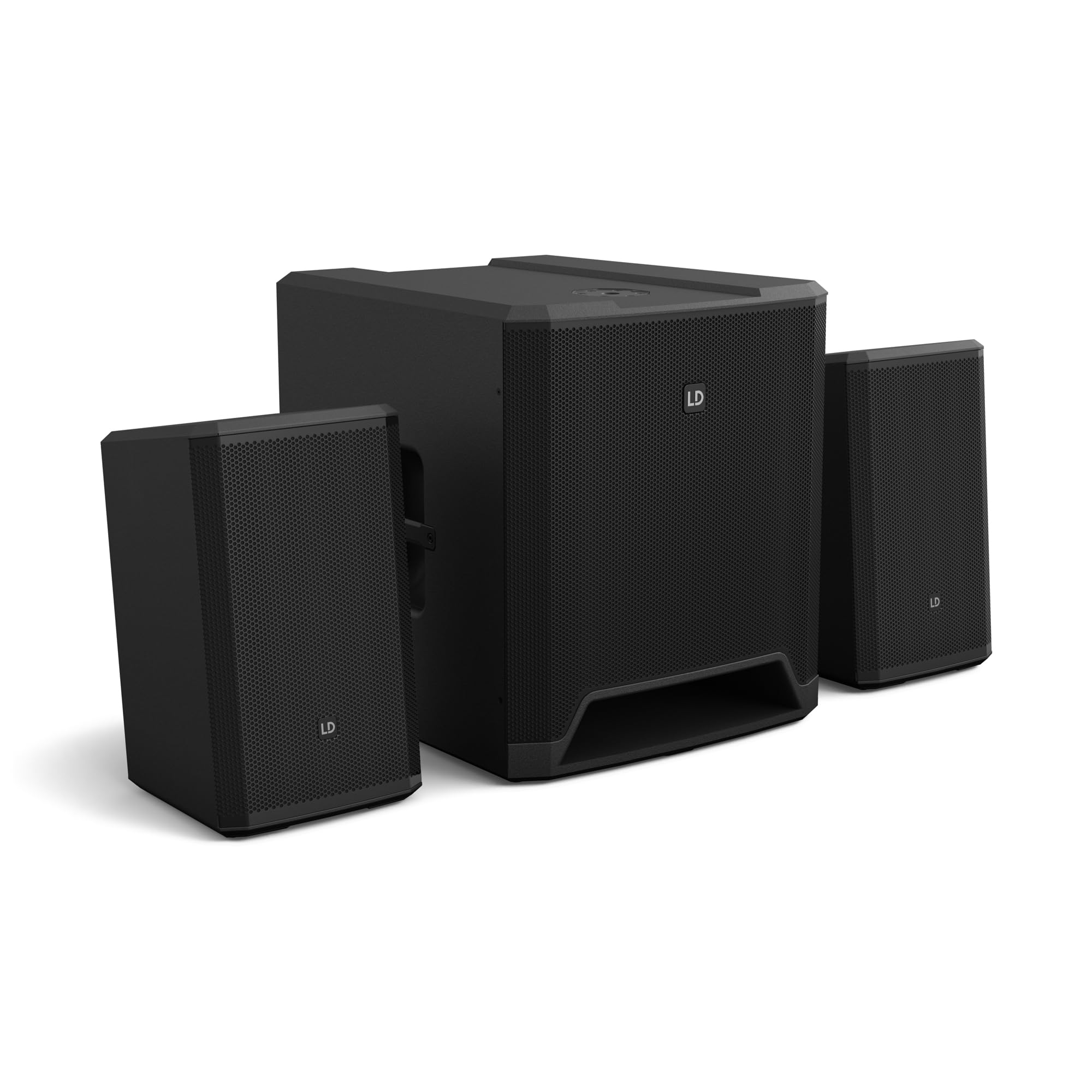
Figura 1: Aktarview of the LD Systems DAVE 15 G4X PA System components.
2. Istruzzjonijiet tas-Sigurtà
Dejjem osserva l-prekawzjonijiet ta' sigurtà li ġejjin biex tevita xokk elettriku, nar, jew korriment:
- Tiżgura l-provvista tal-enerġija voltage jaqbel mal-klassifikazzjoni fuq l-unità.
- Tesponix l-unità għax-xita jew l-umdità.
- Tiftaħx is-casing; irreferi s-servizz kollu lil persunal kwalifikat.
- Poġġi l-unità fuq wiċċ stabbli u livell.
- Aċċerta ruħek li jkun hemm ventilazzjoni adegwata madwar l-unità.
- Evita li tpoġġi oġġetti fuq l-unità.
- Disconnect power before cleaning or moving the unit.
3. Setup
Proper setup is crucial for optimal performance and safety. Follow these steps to assemble your DAVE 15 G4X system:
3.1 Spakkjar u Tqegħid
- Carefully unpack all components: one 15-inch subwoofer and two 8-inch satellite speakers.
- Place the subwoofer on a stable, flat surface.
- Position the satellite speakers. They can be placed on speaker stands (not included) or mounted on a T-stand above the subwoofer (accessories sold separately).

Figura 2: Eżample of a stereo setup with one satellite speaker mounted on a pole above the subwoofer. Speaker pole not included.

Figura 3: Eżample of a stereo setup with both satellite speakers on separate poles. Speaker poles not included.

Figura 4: Eżample of a cluster mode setup with both satellite speakers mounted on a T-stand above the subwoofer. Speaker pole not included.
3.2 Konnessjoni tal-Ispeakers
- Connect the two satellite speakers to the "SAT LEFT" and "SAT RIGHT" outputs on the rear panel of the subwoofer using appropriate speaker cables.
- Ensure secure connections.

Figure 5: Rear panel connections of the DAVE 15 G4X subwoofer, including power input, satellite outputs, and various audio inputs.
3.3 Konnessjoni tal-Enerġija
- Connect the supplied power cable to the "POWER INPUT" on the subwoofer's rear panel.
- Plug the other end into a suitable AC power outlet.
- Ensure the power switch is in the "OFF" position before connecting to power.
4. It-tħaddim tal-Mixer
The DAVE 15 G4X features an integrated 6-channel mixer for connecting various audio sources. Familiarize yourself with the control panel:

Figura 6: Dettaljat view of the DAVE 15 G4X mixer control panel, showing input controls, EQ, reverb, and mode selection.
4.1 Input Channels 1 & 2 (Mono)
- Input Type Selection: Use the "SELECT" button to toggle between Microphone (MIC), High-Impedance Instrument (HI-Z), or Line-level (LINE) input.
- Gwadan Kontroll: Adjust the "HIGH" knob for input sensitivity.
- 2-Band EQ: Use the "LOW" and "HIGH" knobs to adjust bass and treble frequencies for each channel.
- Reverb: Select one of three reverb presets (SMALL, LARGE, PLATE) and adjust the "REVERB" knob for the desired effect level.
4.2 Input Channels 3 & 4 (Stereo Line)
- These inputs are designed for stereo line-level sources such as keyboards, synthesizers, or drum machines.
- Adjust the "INPUT 3/4" knob for the overall volume of these channels.
4.3 Input Channels 5 & 6 (Digital/Bluetooth)
- Input SPDIF: Connect a digital audio source via the SPDIF TOSLINK input on the rear panel.
- Tqabbil Bluetooth: Press and hold the "HOLD TO LINK" button to activate Bluetooth pairing mode. Fittex għal "LD Systems DAVE 15 G4X" on your device and connect.
- Għażla tas-Sors: Use the "SOURCE" button to switch between SPDIF and Bluetooth inputs.
- Adjust the "INPUT 5/6" knob for the overall volume of these channels.
4.4 Kontrolli Prinċipali
- Volum Prinċipali: The large "MAIN" knob controls the overall output volume of the system.
- SUB Volume: Adjust the "SUB" knob to control the volume level of the subwoofer.
- Volum GĦOLI: Adjust the "HIGH" knob to control the volume level of the satellite speakers.
- Presets tal-Modalità: Use the "SELECT" button under "MODE" to choose between different setup presets (e.g., Stereo, Cluster Mode) for optimized sound dispersion.
5. Manutenzjoni
Regular maintenance ensures the longevity and optimal performance of your DAVE 15 G4X PA system.
- Tindif: Uża drapp artab u niexef biex timsaħ l-uċuħ. Għal ħmieġ iebes, neħħi ftit drapp.amp cloth can be used, followed by a dry cloth. Avoid abrasive cleaners or solvents, as they may damage the polyurea coating.
- Ventilazzjoni: Kun żgur li l-fetħiet kollha tal-ventilazzjoni jibqgħu ħielsa mit-trab u l-fdalijiet biex tevita li jisħnu żżejjed.
- Ħażna: When not in use for extended periods, store the system in a dry, dust-free environment. Consider using protective covers or bags (accessories sold separately) to prevent damage.
- Ġestjoni tal-Kejbil: Iċċekkja l-kejbils kollha regolarment għal sinjali ta’ xedd jew ħsara. Ibdel kwalunkwe kejbil bil-ħsara immedjatament.
6 Issolvi l-problemi
If you encounter issues with your DAVE 15 G4X system, refer to the following common problems and solutions:
6.1 L-ebda Ħruġ tal-Ħoss
- Iċċekkja l-Enerġija: Ensure the system is powered on and the power cable is securely connected. Verify the "POWER" indicator light is illuminated.
- Livelli tal-Volum: Confirm that the "MAIN," "SUB," and "HIGH" volume knobs are turned up. Check individual channel gain controls.
- Għażla tal-Input: Ensure the correct input source is selected for the active channel (e.g., MIC, HI-Z, LINE, SPDIF, Bluetooth).
- Konnessjonijiet tal-kejbil: Verify all audio cables (input sources, satellite speakers) are correctly and securely connected.
- Apparat Sors: Check if your audio source device (microphone, instrument, media player) is functioning correctly and outputting sound.
6.2 Ħoss Distort jew Mhux Ċar
- Qligħ tal-Input: Reduce the input gain for the affected channel if the "SIGNAL" or "LIMIT" indicator lights are constantly red.
- Volum Master: Lower the "MAIN" volume if the overall sound is distorted.
- Settings EQ: Adjust the EQ (LOW, HIGH) settings on individual channels to improve clarity.
- Kwalità tal-Kejbil: Ensure you are using high-quality, shielded audio cables.
6.3 Kwistjonijiet ta' Konnessjoni Bluetooth
- Mod ta 'tqabbil: Ensure the DAVE 15 G4X is in Bluetooth pairing mode (press and hold "HOLD TO LINK").
- Viżibilità tal-Apparat: Make sure Bluetooth is enabled on your source device and it is discoverable.
- Distanza: Keep your Bluetooth device within the effective range of the PA system.
- Interferenza: Tbiegħed minn apparati bla fili oħra li jistgħu jikkawżaw interferenza.
- Tinsa l-Apparat: If previously paired, try "forgetting" the DAVE 15 G4X on your device and re-pairing.
7. Speċifikazzjonijiet
Detailed technical specifications for the LD Systems DAVE 15 G4X PA System:
| Karatteristika | Speċifikazzjoni |
|---|---|
| Isem tal-Mudell | LDS-DAVE15G4X |
| Tip ta' Kelliem | Powered 2.1 PA System |
| Daqs tas-subwoofer | 15 pulzieri |
| Daqs tal-Ispeaker tas-Satellita | 2 x 8 pulzier |
| L-ogħla qawwa tal-ħruġ | 2060 Watts |
| Kanali Mixer | 6-Channel Integrated Mixer |
| Teknoloġija tal-Konnettività | Bluetooth, SPDIF TOSLINK, XLR, 1/4" Jack, RCA |
| Tip ta 'Immuntar | Floor Standing (Subwoofer), Pole Mount (Satellites) |
| Dimensjonijiet tal-Prodott (Subwoofer) | 20"D x 19"W x 21"Għ (madwar) |
| Piż tal-oġġett | 119 pounds (total system approximate) |
| Komponenti Inklużi | LDDAVE15G4X (Subwoofer, 2 Satellites, Power Cable) |
| Teknoloġija DSP | DynX DSP (Gen.2), FIR Filters |
| Materjal tal-Kabinett | Durable Polyurea Coating |
8. Informazzjoni dwar Garanzija
Warranty terms and conditions for the LD Systems DAVE 15 G4X PA System are typically provided with your purchase documentation or can be found on the official LD Systems websit. Jekk jogħġbok żomm il-prova tax-xiri tiegħek għal kwalunkwe talba ta' garanzija.
Għal informazzjoni dettaljata dwar il-garanzija, jekk jogħġbok żur il- LD Systems official websit or contact your authorized dealer.
9. Appoġġ għall-Klijent
Should you require technical assistance, service, or have questions regarding your LD Systems DAVE 15 G4X PA System, please contact LD Systems customer support or your local authorized dealer.
For further support and resources, please visit the LD Systems official websit.
Ask a question about this manual
Ask about setup, troubleshooting, compatibility, parts, safety, or missing instructions. Manuals+ will review the question and use this page’s manual context to help answer it.