
1. Prodott Aktarview
The MOVE SPEED 3-in-1 Portable Charger Power Bank (Model: MSP14) is a versatile charging solution designed for convenience and efficiency. It integrates a 20,000mAh power bank, a built-in retractable USB-C cable, and a foldable AC wall plug, allowing for charging on the go or directly from a wall outlet. This device supports 65W GaN fast charging and features a smart digital display to monitor battery status and power output.

Image: The MOVE SPEED 3-in-1 Portable Charger Power Bank, showcasing its compact design, integrated retractable USB-C cable, and foldable AC wall plug. The digital display shows 100% charge.
Karatteristiċi ewlenin:
- Funzjonalità 3-in-1: Combines a 20,000mAh power bank, a built-in 70cm (27.6in) retractable USB-C cable, and a foldable AC wall plug for comprehensive charging.
- Iċċarġjar Mgħaġġel ta' 65W GaN: Provides high-speed charging for compatible devices, including laptops like MacBook Air, and ensures efficient power delivery.
- Kapaċità Għolja ta' 20,000mAh: Offers multiple charges for smartphones (e.g., iPhone 16 up to 4.5 times) and other portable electronics.
- Wiri Diġitali Intelliġenti: Real-time display shows exact battery percentage (0-100%) and current input/output power status.
- Iċċarġjar b'diversi Apparat: Equipped with a built-in USB-C cable, an additional USB-C port, and a USB-A port, allowing simultaneous charging of up to three devices.
- Iċċarġjar Pass-Through: The power bank can be recharged while simultaneously charging connected devices.
- Disinn li jiffavorixxi l-ivvjaġġar: Compact, lightweight (1.08 pounds), and airline-approved (77Wh), making it suitable for travel.
2. Kontenut tal-Pakkett
Jekk jogħġbok iċċekkja l-pakkett għall-oġġetti li ġejjin:
- MOVE SPEED 3-in-1 Portable Charger Power Bank (MSP14)
- Manwal għall-Utent (dan id-dokument)
Note: Charging cables for external devices are not included unless specified. The device features a built-in USB-C cable.
3. Twaqqif u Użu Inizjali
3.1 Ħlas Inizjali
Before first use, it is recommended to fully charge the power bank. Connect the foldable AC plug directly into a wall outlet (AC 100-240V~50/60Hz). The digital display will show the charging progress, indicating 100% when fully charged.

Image: The power bank plugged into a wall outlet, demonstrating its ability to recharge itself and simultaneously charge a smartphone and a smartwatch via its ports and built-in cable.
3.2 Retractable USB-C Cable Operation
To extend the built-in USB-C cable, gently pull both ends of the cable simultaneously until it reaches the desired length (up to 27.6 inches / 70 cm). To retract, pull both ends slightly further, then release, and the cable will automatically retract into the unit. Avoid pulling only one side to prevent tangling or damage to the retraction mechanism.
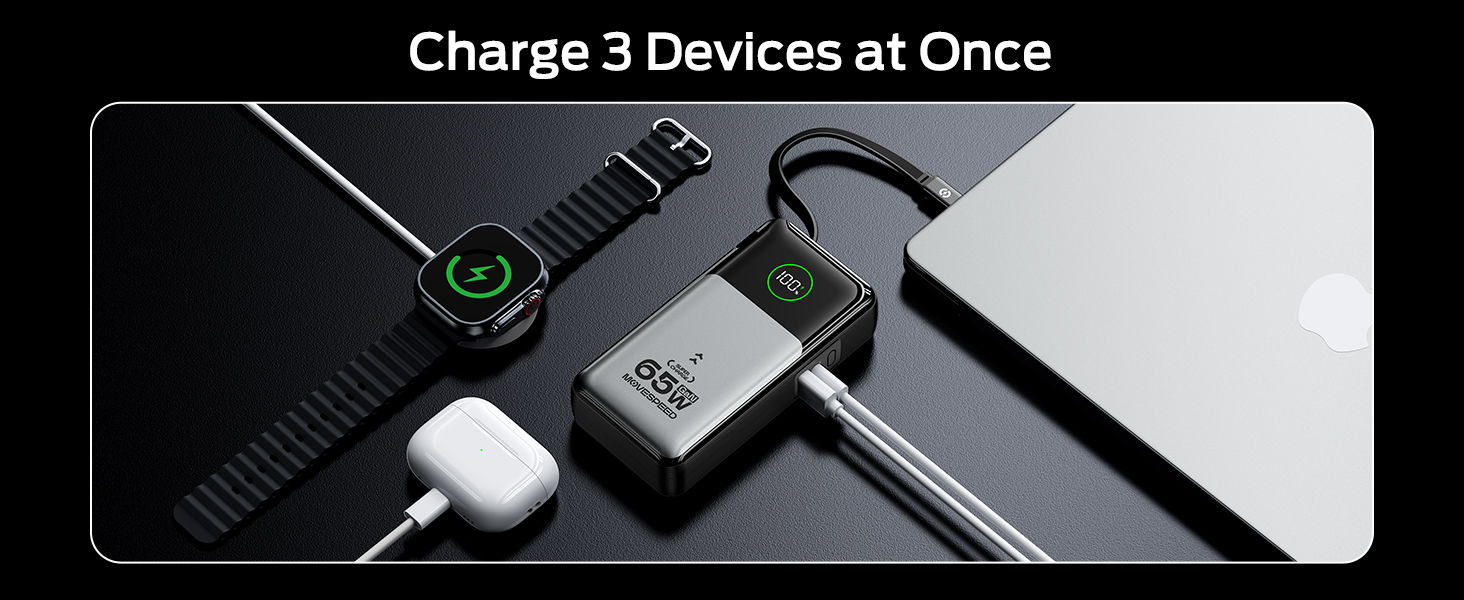
Image: A person demonstrating the extension of the 27.6-inch retractable USB-C cable from the power bank, highlighting its flexible and convenient design.
4. Istruzzjonijiet Operattivi
4.1 Charging Devices (Portable Charger Mode)
To charge your devices using the power bank function:
- Connect your device to the power bank using the built-in retractable USB-C cable, or an external USB-C to USB-C cable, or a USB-A to compatible cable.
- The power bank will automatically begin charging your device. The digital display will show the current battery percentage u qawwa tal-ħruġ.
- You can charge up to three devices simultaneously using the built-in USB-C cable, the USB-C port, and the USB-A port.

Image: A woman charging her phone from the power bank, which is stored in her bag, illustrating the convenience of the retractable cable for on-the-go charging without cable stress.
4.2 Charging Devices (Wall Charger Mode)
To use the device as a wall charger:
- Fold out the AC plug and insert the power bank directly into a wall outlet.
- Connect your device(s) to the power bank using the built-in retractable USB-C cable, or an external USB-C to USB-C cable, or a USB-A to compatible cable.
- The power bank will charge your device(s) and simultaneously recharge itself (pass-through charging).

Image: The power bank plugged into a wall outlet, charging a smartphone. This demonstrates its function as a direct wall charger, eliminating the need for a separate adapter.
4.3 Informazzjoni dwar id-Displej Diġitali
The integrated digital display provides real-time information:
- Batterija Percentage: Shows the remaining charge of the power bank from 0-100%.
- Input/Output Power Status: Indicates the current power being drawn by the power bank (input) or delivered to connected devices (output).
5. Manutenzjoni u Kura
- Żomm il-power bank 'il bogħod minn temperaturi estremi, dawl tax-xemx dirett, u ambjenti umdi.
- Tesponix l-apparat għall-ilma jew likwidi oħra.
- Naddaf il-wiċċ b'ċarruta ratba u niexfa. Tużax prodotti tat-tindif jew solventi li joborxu.
- Store the power bank in a cool, dry place when not in use. For long-term storage, it is recommended to charge the power bank to approximately 50-70% every three months to maintain battery health.
- Evita li twaqqa’ jew tissuġġetta l-apparat għal impatti qawwija.
- Ensure the retractable cable is fully retracted when not in use to protect it from damage.
6 Issolvi l-problemi
| Problema | Kawża Possibbli | Soluzzjoni |
|---|---|---|
| Il-power bank mhux qed jiċċarġja l-apparati. | Low battery on power bank; incorrect cable connection; device not compatible. | Recharge the power bank; ensure cables are securely connected; verify device compatibility. |
| Il-power bank mhux qed jiċċarġja mill-ġdid. | AC plug not fully inserted; wall outlet issue; damaged power bank. | Ensure AC plug is fully inserted into a working wall outlet; try a different outlet; contact support if issue persists. |
| Id-displej diġitali mhux qed jaħdem. | Power bank is off or completely drained; internal malfunction. | Charge the power bank; if still unresponsive, contact customer support. |
| Retractable cable not extending/retracting smoothly. | Improper pulling technique; internal mechanism issue. | Ensure you pull both ends simultaneously; avoid forcing the cable; if damaged, use external cables. |
7. Speċifikazzjonijiet
| Karatteristika | Dettall |
|---|---|
| Numru tal-Mudell | MSP14 |
| Kapaċità tal-batterija | 20,000mAh (77Wh) |
| Dimensjonijiet tal-Prodott | 8.19 x 4.49 x 1.56 pulzieri |
| Piż tal-oġġett | 1.08 liri |
| Kulur | Fidda |
| Tip ta' Konnettur | USB Tip-Ċ, USB Tip-A |
| Tul tal-Cable Mibni | 70 ċm (27.6-il pulzier) |
| Input tal-Ċarġer tal-Ħajt | AC 100-240V~50/60Hz 1A |
| Portable Charger Input (USB-C / Retractable Cable) | 65W Max |
| Single Port Output (Portable Charger Mode) | USB-C: 65W, USB-A: 22.5W, Retractable USB-C Cable: 65W |
| Dual/Triple Port Output (Portable Charger Mode) | Combined output up to 15W per port (e.g., Type-C + Retractable Cable: 15W, Type-C + USB-A: 15W, Type-C + Retractable Cable + USB-A: 15W) |
| Single Port Output (Wall Charger Mode) | USB-C: 30W, USB-A: 22.5W, Retractable USB-C Cable: 30W |
| Dual/Triple Port Output (Wall Charger Mode) | Combined output up to 15W per port (e.g., Type-C + Retractable Cable: 15W, Type-C + USB-A: 15W, Type-C + Retractable Cable + USB-A: 15W) |
| Karatteristiċi Speċjali | GaN Technology, Smart Digital Display, Flight-approved |
Note: Output power may vary based on the number of devices connected and their power requirements.
8. Informazzjoni dwar is-Sigurtà
- Tiżżarmax, timmodifikax, jew issewwiex l-apparat int stess.
- Avoid using the device in environments with high humidity or extreme temperatures.
- Żomm fejn ma jintlaħaqx mit-tfal.
- Armi l-prodott b'mod responsabbli skont ir-regolamenti lokali għall-iskart elettroniku.
- Uża biss kejbils tal-iċċarġjar u adapters kompatibbli.
9. Garanzija u Appoġġ
MOVE SPEED products are manufactured with high-quality standards. For information regarding warranty coverage, technical support, or customer service, please refer to the warranty card included with your product or visit the official MOVE SPEED websit.
You may also contact the seller directly through the platform where the purchase was made for assistance.
Manufacturer: Shenzhen Speedmobile Technology Co.,Ltd.