
1. Introduzzjoni
This manual provides essential information for the safe and effective use of your Mibro GS Pro2 Multisport Smartwatch. Please read this manual thoroughly before using the device and retain it for future reference.
Prodott Overview
The Mibro GS Pro2 is a versatile multisport smartwatch designed for various activities, featuring a 1.43-inch AMOLED display, Bi-Band GNSS for precise positioning, and extensive health and fitness tracking capabilities.

Image 1.1: Mibro GS Pro2 Smartwatch. This image displays the Mibro GS Pro2 smartwatch from an angled perspective, showcasing its round dark gray casing, black silicone strap, and the digital watch face with various data points like time, date, and weather.
2. Setup
2.1 Iċċarġjar inizjali
Before first use, fully charge your Mibro GS Pro2 smartwatch. Connect the magnetic charging cable to the charging contacts on the back of the watch and plug the USB end into a standard USB power adapter (not included).
- Ċarġ sħiħ tipikament jieħu madwar 2.5 sigħat.
- The watch will display a charging indicator on the screen.
2.2 It-tqabbil mal-Ismartphone Tiegħek
To unlock the full functionality of your Mibro GS Pro2, pair it with your smartphone via the dedicated Mibro Fit application.
- Niżżel l-App: Fittex għal "Mibro Fit" in your smartphone's app store (iOS or Android) and install it.
- Oħloq Kont: Open the Mibro Fit app and follow the on-screen instructions to create an account or log in.
- Ippermetti Bluetooth: Kun żgur li l-Bluetooth huwa attivat fuq l-ismartphone tiegħek.
- Żid Apparat: In the Mibro Fit app, navigate to the "Device" or "Add Device" section.
- Select Watch: Select "Mibro GS Pro2" from the list of available devices.
- Ikkonferma l-Imqabbad: A pairing request will appear on both your watch and smartphone. Confirm the pairing on both devices.
Once paired, the watch will synchronize data with the app, and you can customize settings, receive notifications, and view detailed activity reports.
3. It-tħaddim tal-Apparat
3.1 Navigazzjoni Bażika
The Mibro GS Pro2 features a responsive touchscreen and physical buttons for navigation.
- Touchscreen: Skrolla 'l fuq, 'l isfel, lejn ix-xellug, jew lejn il-lemin biex tinnaviga fil-menus u l-widgets. Tektek biex tagħżel l-oġġetti.
- Buttuni tal-ġenb: Use the physical buttons on the side of the watch to access specific functions (e.g., power on/off, return to home screen, quick access to sports modes). Refer to the watch's on-screen prompts for specific button assignments.
3.2 Power On/Off
- Qawwa Mixgħul: Press and hold the power button (usually the top right button) until the Mibro logo appears.
- Itfi: Press and hold the power button, then select "Power Off" from the options displayed on the screen.
3.3 Tagħmel u Riċeviment Sejħiet
When connected to your smartphone, the Mibro GS Pro2 allows you to manage calls directly from your wrist.
- Jirċievu Sejħiet: When a call comes in, the watch will display the caller ID. You can tap the green icon to answer or the red icon to reject the call.
- Tagħmel Sejħiet: Access the call function on your watch (usually through the phone icon or a dedicated widget) to dial numbers or select contacts from your synced phonebook.
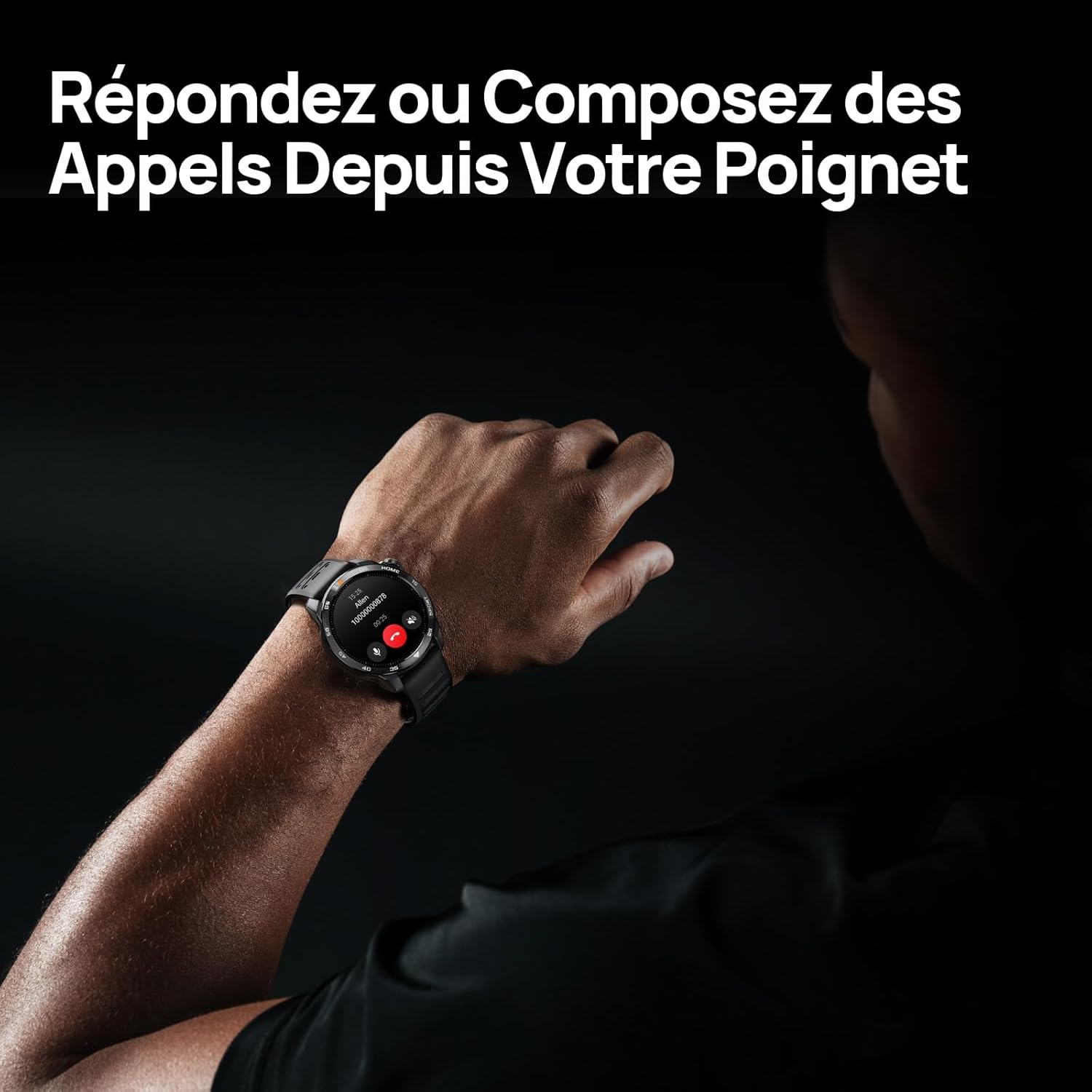
Image 3.1: Responding to calls on the Mibro GS Pro2. This image shows a person's wrist with the Mibro GS Pro2 smartwatch displaying an incoming call notification, illustrating the ability to answer or decline calls directly from the watch.
4. Karatteristiċi
4.1 Wiri
The Mibro GS Pro2 features a vibrant 1.43-inch AMOLED display, offering clear visibility even in bright outdoor conditions.
- Daqs: 1.43 pulzieri
- Tip: AMOLED
- Riżoluzzjoni: 466x466 pixel
- Luminożità: Luminożità massima sa 1200 nits
- Karatteristiċi: Touchscreen, Anti-fingerprint coating.

Image 4.1: Mibro GS Pro2 1.43" AMOLED High Brightness Screen. This image highlights the smartwatch's display specifications, including 1200 nits peak brightness, 466x466 resolution, and 60 fps refresh rate, demonstrating its clarity and responsiveness.
4.2 Modi Multisport
The watch supports over 150 sports modes, providing tailored data analysis for each activity. This includes intelligent transitions for multi-discipline events like triathlons.
- Aquatic Sports: Suitable for open water swimming and pool swimming, calculating parameters such as distance, pace, and trajectory. The watch is 5ATM water resistant.
- Ċikliżmu: Tracks various cycling metrics, including outdoor cycling, indoor cycling, mountain biking, and short-distance modes.
- Running: Offers professional running algorithms, including running dynamics, performance index, and physical analysis based on real-time data. It records trajectories and provides long-term training plans.
- Other Sports: Includes modes for hiking, skiing, padel, and many more.

Image 4.2: Mibro GS Pro2 with 150+ Sports Modes. This image shows the smartwatch displaying various sports icons, indicating its extensive support for over 150 different physical activities, including swimming, cycling, and running.

Image 4.3: Mibro GS Pro2 5ATM Water Resistant. This image depicts a swimmer wearing the Mibro GS Pro2 smartwatch, with on-screen data showing swimming metrics like distance, stroke count, and calories burned, highlighting its water resistance and aquatic sport tracking capabilities.
4.3 GPS and Outdoor Navigation
The smartwatch features precise dual-frequency geolocation (Bi-Band GNSS) with real-time deviation alerts. It provides accurate route data and altitude variation measurements for outdoor activities like cycling tours or hiking.
- Dynamically adjust start/end points directly on the watch.
- Store up to 10 backup routes for navigation in areas without signal.
- Includes Barometer and Altimeter functions for environmental data.

Image 4.4: Mibro GS Pro2 Dual-Frequency GPS for Precise Outdoor Navigation. This image shows the smartwatch displaying a map and route tracking, alongside a smartphone app showing a detailed outdoor run trajectory, emphasizing its accurate GPS capabilities for outdoor activities.

Image 4.5: Mibro GS Pro2 Barometer and Altimeter. This image displays the watch showing barometric pressure, a compass, and altitude readings, with a person climbing in the background, illustrating its environmental sensing capabilities.
4.4 Monitoraġġ tas-Saħħa
The Mibro GS Pro2 provides comprehensive health tracking features to help you monitor your well-being.
- Monitoraġġ tar-Rata tal-Qalb: Traċċar kontinwu tar-rata tal-qalb.
- Monitoraġġ tal-Ossiġenu tad-Demm (SpO2): Ikejjel il-livelli ta' saturazzjoni tal-ossiġnu fid-demm.
- Traċċar tal-irqad: Jimmonitorja l-irqadtages (ħafif, profond, REM) u jipprovdi punteġġ tal-irqad.
- Monitoraġġ tal-istress: Jirreġistra l-livelli ta' stress matul il-ġurnata.
- VO2 Max & Recovery Time: Professional metrics for training optimization.
- Traċċar tal-Attività: Records calories burned, total distance, and steps taken.

Image 4.6: Mibro GS Pro2 VO2 Max & Recovery Time. This image shows the smartwatch displaying VO2 Max percentage and recovery time recommendations, along with training effect metrics, aiding in professional workout analysis.

Image 4.7: Mibro GS Pro2 Blood Oxygen (SpO2) Monitoring. This image illustrates the watch's ability to track blood oxygen saturation levels over a 24-hour period, displayed as a graph on the watch face.

Image 4.8: Mibro GS Pro2 Sleep Tracking. This image shows the smartwatch displaying sleep quality metrics (Good, BPM, Stress) and a breakdown of sleep stages (Awake, Light Sleep, Deep Sleep), with a person sleeping in the background.
4.5 Ħajja tal-batterija
The Mibro GS Pro2 offers extended battery life to support prolonged use.
- Modalità ta' Kuljum: Madwar 20 jum.
- Modalità GPS: Madwar sagħtejn.
- Mod ta 'Iffrankar tal-Enerġija: Up to 50+ days.

Image 4.9: Mibro GS Pro2 Ultra-Long Battery Life and Fast Charging. This image illustrates the watch's battery performance, showing 2.5 hours for a full charge and estimated usage times for daily mode (20+ days), power-saving mode (50+ days), and GPS mode (20 hours).
4.6 Funzjonijiet Intelliġenti
Beyond fitness tracking, the Mibro GS Pro2 integrates seamlessly with your digital life.
- Notifiki tal-messaġġi: Receive alerts for calls, SMS, and app notifications (e.g., TikTok, WhatsApp, Telegram, Instagram, Facebook, Snapchat).
- Kontroll tal-Mużika: Ikkontrolla d-daqq tal-mużika fuq l-ismartphone tiegħek direttament mill-arloġġ.
- Sib it-Telefon Tiegħi: Locate your paired smartphone using the watch.
- Uċuħ ta' l-arloġġi personalizzabbli: Personalize your watch with various watch face designs.

Image 4.10: Mibro GS Pro2 New Daily Health & Well-being Features. This image shows icons representing sleep tracking, wake-up reminders, music control, and 'find my phone' functionality, indicating the watch's smart features for daily use.

Image 4.11: Mibro GS Pro2 Message Push Notifications. This image shows the smartwatch displaying a message notification, surrounded by logos of popular social media and messaging apps, illustrating its capability to receive alerts from various platforms.

Image 4.12: Mibro GS Pro2 Personalized Watch Faces. This image displays a variety of digital watch faces, showcasing the customization options available to users for personalizing their smartwatch display.
5. Manutenzjoni
5.1 Tindif tal-Ismartwatch Tiegħek
- Regularly clean the watch casing and strap with a soft, damp drapp.
- Għal ħmieġ iebes, uża soluzzjoni ta’ sapun ħafif u laħlaħ sewwa b’ilma nadif.
- Kun żgur li l-kuntatti tal-iċċarġjar huma nodfa u niexfa qabel ma tiċċarġja biex tevita l-korrużjoni.
- Evita li tuża kimiċi ħarxa, prodotti tat-tindif li joborxu, jew solventi, għax dawn jistgħu jagħmlu ħsara lill-finitura u s-siġilli tal-arloġġ.
5.2 Reżistenza għall-Ilma
The Mibro GS Pro2 is 5ATM water resistant, meaning it can withstand pressures equivalent to a depth of 50 meters. This makes it suitable for swimming and showering. However, it is not recommended for diving or high-pressure water activities.
- Tħaddimx il-buttuni taħt l-ilma.
- Wara l-espożizzjoni għall-ilma mielaħ, laħlaħ l-arloġġ b'ilma frisk u nixxef sew.
5.3 Kura tal-Batterija
- Evita li tiċċarġja l-batterija kompletament ta' spiss.
- Aħżen l-arloġġ f'post frisk u niexef meta ma jkunx qed jintuża għal perjodi twal.
- Uża biss il-kejbil tal-iċċarġjar ipprovdut.
6 Issolvi l-problemi
6.1 L-Arloġġ Mhux qed Jixgħel
- Kun żgur li l-arloġġ ikun iċċarġjat kompletament. Qabbad mal-ċarġer għal mill-inqas 30 minuti.
- Agħfas u żomm il-buttuna tal-qawwa għal 10-15-il sekonda biex tipprova terġa' tibda bil-forza.
6.2 Unable to Pair with Smartphone
- Kun żgur li l-Bluetooth huwa attivat fuq l-ismartphone tiegħek u fuq l-arloġġ.
- Kun żgur li l-arloġġ jinsab fil-firxa tal-Bluetooth tat-telefon tiegħek.
- Ibda mill-ġdid kemm l-ismartphone tiegħek kif ukoll l-arloġġ.
- Neħħi l-cache tal-Bluetooth fuq it-telefon tiegħek (jekk applikabbli) u erġa' pprova tqabbad.
- Kun żgur li l-app Mibro Fit hija aġġornata għall-aħħar verżjoni.
6.3 Qari tal-GPS Mhux Preċiż
- Kun żgur li tinsab f'żona miftuħa fil-beraħ b'dawl ċar view tas-sema.
- Wait for the watch to acquire a stable GPS signal before starting your activity.
- Ensure the watch's firmware is up to date via the Mibro Fit app.
6.4 Notifiki li Ma Jidhrux
- Check notification settings in the Mibro Fit app to ensure they are enabled for desired applications.
- Verify that your phone's notification permissions are granted to the Mibro Fit app.
- Kun żgur li l-arloġġ huwa konness mat-telefon tiegħek permezz tal-Bluetooth.
7. Speċifikazzjonijiet
| Karatteristika | Dettall |
|---|---|
| Brand | Mibro |
| Numru tal-Mudell | GS Pro2 |
| Daqs tal-Wiri | 1.43 pulzieri |
| Tip ta 'Wiri | AMOLED |
| Sistema Operattiva | RTOS |
| Konnettività | Bluetooth |
| Karatteristiċi Speċjali | Touchscreen, Water Resistant (5ATM), Bi-Band GNSS, Health Monitoring |
| Apparati Kompatibbli | Smartphone |
| Kompożizzjoni tal-batterija | Lithium-ion |
| Ħajja tal-Batterija (Modalità ta' Kuljum) | Appross. 20 ijiem |
| Ħajja tal-Batterija (Modalità GPS) | Appross. 20 sigħat |
| Reżistenza għall-Ilma | 5ATM |
| Dimensjonijiet (Korp tal-Arloġġ) | 48mm (dijametru) x 12mm (ħxuna) |
| Tul taċ-ċinga | 265mm |
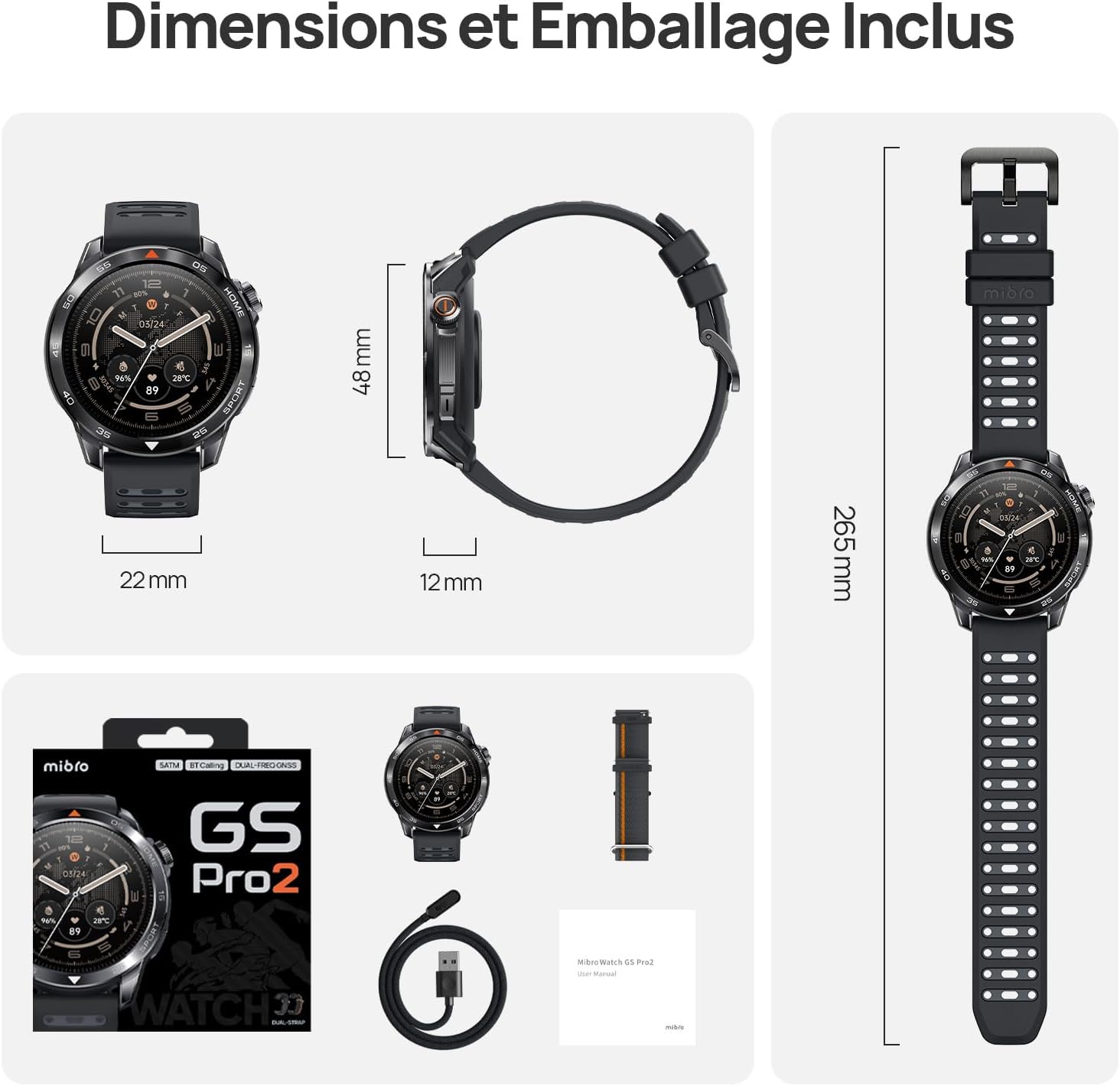
Image 7.1: Mibro GS Pro2 Dimensions and Included Packaging. This image provides a visual representation of the watch's dimensions (48mm diameter, 12mm thickness, 265mm strap length) and shows the contents of the product packaging, including the watch, charging cable, and user manual.
8. Garanzija u Appoġġ
8.1 Garanzija tal-Manifattur
The Mibro GS Pro2 comes with a Garanzija ta' 1 snin mill-manifatturDin il-garanzija tkopri difetti fil-materjali u fix-xogħol taħt użu normali. Jekk jogħġbok żomm il-prova tax-xiri tiegħek għal talbiet ta' garanzija.
Il-garanzija ma tkoprix ħsara kkawżata minn użu ħażin, inċidenti, modifiki mhux awtorizzati, jew xedd u kedd normali.
8.2 Appoġġ għall-Klijent
For technical assistance, troubleshooting, or warranty inquiries, please refer to the official Mibro website or contact their customer support channels. Specific contact details may be found on the product packaging or the official Mibro websit.