
1. Matulview
The Roku Select Series HD TV provides a streamlined entertainment experience. This 32-inch 720p HD television integrates the Roku operating system for easy access to streaming content, live TV, and various applications. It features a voice remote for convenient control and includes technologies like Bluetooth Headphone Mode and Dolby Audio for enhanced sound.
Karatteristiċi Ewlenin
- Streaming bla xkiel: Fast Wi-Fi and quick app launches for immediate entertainment access.
- Extensive Content: Access to thousands of streaming apps, free movies, shows, and live TV channels.
- Skrin tad-Dar Personalizzabbli: Organize apps and content for personalized viewing.
- Aġġornamenti Awtomatiċi tas-Softwer: Ensures access to the latest features and applications.
- Integrazzjoni tad-Dar Intelliġenti: Compatible with Roku Voice, Siri, Alexa, and Google Assistant for voice control. Supports Apple AirPlay for content sharing.
- Clear HD Picture: 720p HD resolution with Roku Smart Picture technology for optimized visuals.
- Voice Remote: Search, play, and control streaming with voice commands.
- Awdjo Mtejba: Designed for clear speech and louder sound with Dolby Audio technology.
- Modalità tal-Headphones Bluetooth: Private listening with wireless headphones.

Image: Roku 32-inch Select Series HD Smart TV with included remote control.
2. X'hemm fil-Kaxxa
Ivverifika li l-komponenti kollha huma preżenti qabel ma tipproċedi bis-setup.
- Roku Select Series 32" HD TV
- Stands u viti
- Roku Voice Remote with batteries (2 AAA)
- Kejbil tal-Enerġija
- Manwal għall-Utent (dan id-dokument)

Image: Contents of the Roku Select Series TV packaging.
3. Setup
3.1 Disimballaġġ
Neħħi t-TV u l-aċċessorji kollha mill-imballaġġ bir-reqqa. Żomm l-imballaġġ għal bżonnijiet futuri ta’ trasport jew servizz.
3.2 It-twaħħil tal-Istand
- Poġġi l-iskrin tat-TV 'l isfel fuq wiċċ artab u nadif biex tevita l-grif.
- Allinja l-istands tat-TV mat-toqob tal-kamin fil-qiegħ tat-TV.
- Waħħal l-istands billi tuża l-viti pprovduti. Kun żgur li huma ssikkati sew.
3.3 Konnessjoni tal-Periferali
Qabbad l-apparati tiegħek mal-portijiet xierqa fuq wara tat-TV.
- HDMI: Connect up to three HDMI devices (e.g., cable box, gaming console, Blu-ray player) to the HDMI ports.
- USB: Use the USB port for media playback or connecting compatible accessories.
- Ottiku (S/PDIF): Għall-konnessjoni ma' sistema awdjo esterna.
- Cable tal-Enerġija: Qabbad il-kejbil tal-enerġija mat-TV u mbagħad ma' sokit tal-ħajt.
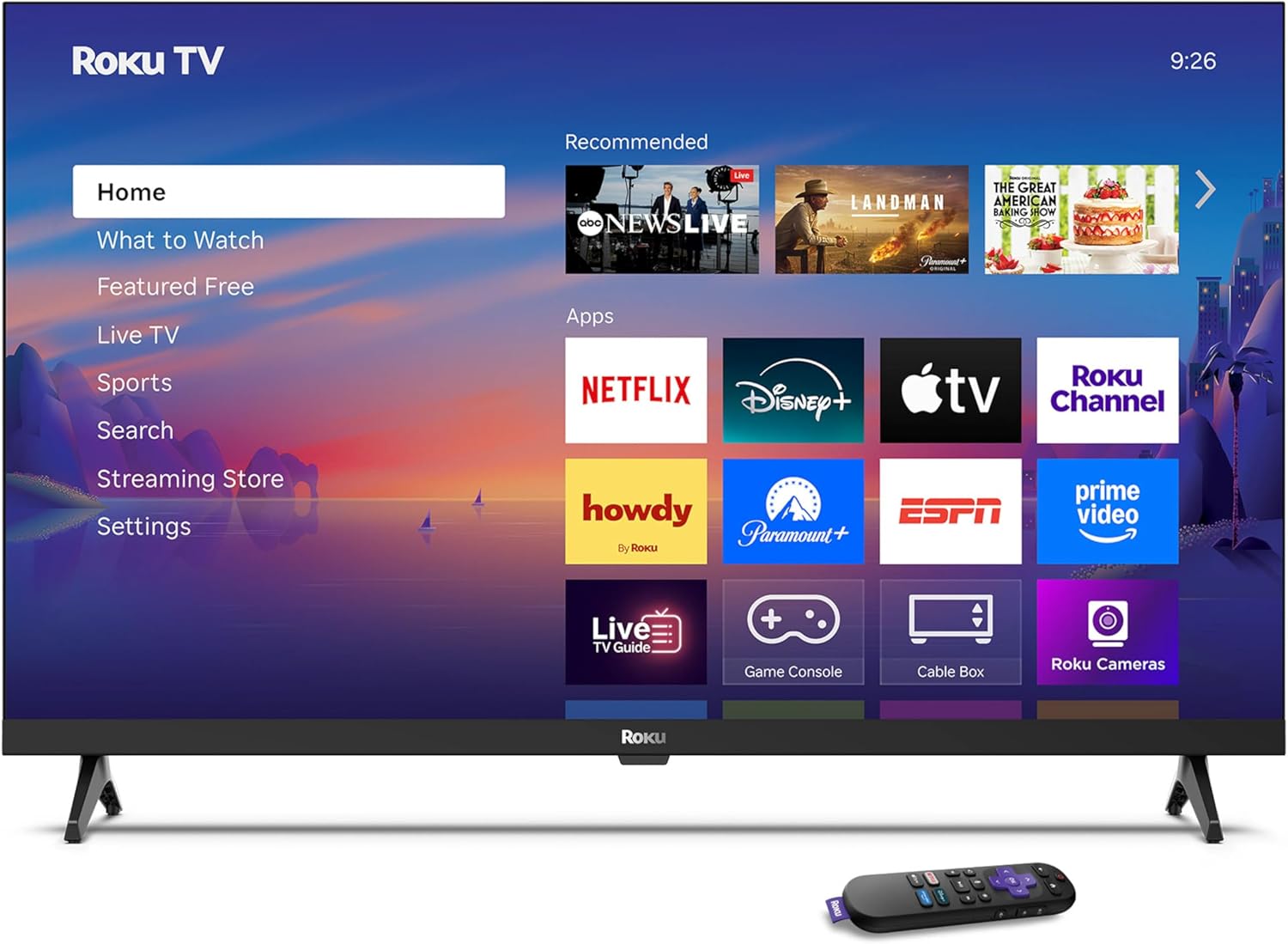
Image: Rear panel connections including HDMI, USB, and optical ports.
3.4 L-Ewwel Tixgħel u l-Konnessjoni man-Netwerk
- Plug in the TV and press the power button on the remote or TV.
- Follow the on-screen instructions to select your language and connect to your Wi-Fi network.
- Activate your Roku account or create a new one.
Vidjo: Overview of the Roku TV operating system, demonstrating its user interface and features. This video is provided by Roku, Inc.
4. Istruzzjonijiet Operattivi
4.1 L-Użu tal-Kontroll mill-Bogħod bil-Vuċi
The Roku Voice Remote allows for intuitive control of your TV and streaming content.
- Tiftix bil-Vuċi: Press and hold the voice button and speak your command to search for content, launch apps, or control playback.
- Navigazzjoni: Use the directional pad to move through menus and select items.
- Shortcuts tal-App: Buttuni ddedikati jipprovdu aċċess rapidu għal servizzi ta' streaming popolari.

Image: Features of the Roku Voice Remote, highlighting voice control and shortcut buttons.
4.2 Navigating the Home Screen
The Roku Home Screen provides access to all your installed apps, inputs, and settings.
- Dar: Jirritornak għall-iskrin prinċipali tad-dar.
- X'għandek Tara: Discover recommended content.
- Live TV: Access free live television channels.
- Ħanut tal-istriming: Browse and add new streaming channels.
- Settings: Adjust TV and system preferences.

Image: The Roku TV home screen interface.
4.3 Aġġustament tas-Settings tal-Immaġni u l-Ħoss
Ippersonalizza tiegħek viewesperjenza ta' awdjo u smigħ permezz tal-menu tas-settings.
- Modalità Stampa: Select from predefined modes like Standard, Vivid, Sports, or Movie. Roku Smart Picture automatically optimizes settings.
- Modalità tal-Ħoss: Agħżel sound profiles or enable features like Night Mode for reduced volume fluctuations.
- Modalità tal-Headphones Bluetooth: Pair your wireless headphones for private audio.

Image: Picture mode settings on the Roku TV.

Image: Bluetooth Headphone Mode in use.

Image: Dolby Audio technology for clear sound.
5. Manutenzjoni
5.1 Tindif tal-Iskrin
Biex tnaddaf l-iskrin tat-TV, imsaħ bil-mod b'ċarruta ratba, niexfa u mingħajr suf. Għal marki persistenti, imsaħ bil-modampNaddaf id-drapp bl-ilma jew b'soluzzjoni tat-tindif li ma tagħmilx ħsara lill-iskrin. Evita li tuża kimiċi ħarxa jew materjali li joborxu.
5.2 Aġġornamenti tas-Software
It-TV Roku tiegħek jirċievi awtomatikament aġġornamenti tas-softwer meta jkun imqabbad mal-internet. Dawn l-aġġornamenti jipprovdu karatteristiċi ġodda, titjib fil-prestazzjoni, u tiswija ta' żbalji. Kun żgur li t-TV tiegħek jibqa' konness mal-internet għal prestazzjoni ottimali.
6 Issolvi l-problemi
If you encounter issues with your Roku TV, refer to the following common solutions:
- Ebda Qawwa: Kun żgur li l-kejbil tal-enerġija huwa pplaggjat sew kemm fit-TV kif ukoll f'sokit elettriku li jaħdem. Ipprova sokit differenti.
- Ebda Stampa/Ħoss: Verify that the correct input source is selected. Check all cable connections (HDMI, audio). Restart the TV by unplugging it for 30 seconds and plugging it back in.
- Remote Mhux Taħdem: Replace the AAA batteries in the remote. Ensure there are no obstructions between the remote and the TV. For voice remote issues, re-pair the remote if necessary (refer to Roku support for specific steps).
- Kwistjonijiet ta' Konnessjoni man-Netwerk: Restart your Wi-Fi router and modem. Go to the TV's settings menu, then Network, and try reconnecting to your Wi-Fi network.
- L-App Mhux Qed Tiċċarġja/Tiġġarraf: Try restarting the app. If the issue persists, remove the app from the home screen, restart the TV, and then re-add the app from the Streaming Store.
7. Speċifikazzjonijiet
| Karatteristika | Dettall |
|---|---|
| Daqs tal-Iskrin | 32 Pulzier |
| Teknoloġija tal-Wiri | LED |
| Riżoluzzjoni | 720p |
| Riffriskar Rata | 60 Hz |
| Karatteristiċi Speċjali | Bluetooth Headphone Mode, Dolby Audio, Voice Remote |
| Teknoloġija tal-Konnettività | Bluetooth, WiFi |
| Portijiet HDMI totali | 3 |
| Portijiet USB totali | 1 |
| Input Awdjo | HDMI |
| Sistema Operattiva | Roku OS |
| Tip ta 'Immuntar | Immuntar fuq il-Mejda, Immuntar fuq il-Ħajt |
| Standard tal-Immuntar VESA | 200 x 200 mm |
| Dimensjonijiet tal-Prodott (P x W x H) | 7"D x 28.3"W x 18.3"H |
| Piż tal-oġġett | 7.5 Liri |
| Numru tal-Mudell | 32R2D5 |
| UPC | 829610008974 |
8. Informazzjoni dwar Garanzija
8.1 Garanzija Limitata
Roku warrants the hardware against defects in materials and workmanship under normal use for a period of one (1) year from the date of purchase ("Warranty Period"). If Roku determines that the device’s hardware is defective during the Warranty Period, Roku’s sole obligation, and your exclusive remedy, will be to either repair or replace the unit with either a new or rebuilt device, at its option. This warranty applies if the product is used in accordance with the provided documentation.
8.2 Politika ta' Ritorn
You may return a device for any reason:
- Within thirty (30) days from the date of purchase from Roku.
- Within the applicable return period if purchased from an authorized reseller or distributor.
Additional details regarding product returns can be found on the Roku support site.
9. Appoġġ
For further assistance, troubleshooting guides, and frequently asked questions, please visit the official Roku support websit: