
1. Introduzzjoni
Thank you for choosing the VCHICS 3D Holographic Fan PD42-P65. This device is designed to create stunning 3D visual effects for advertising, displays, and events. This manual provides essential information for the safe and efficient use of your holographic fan, including setup, operation, maintenance, and troubleshooting.
2. Informazzjoni dwar is-Sigurtà
Please read all safety warnings and instructions carefully before installation and operation.
- Installazzjoni: Ensure the device is securely mounted in a location where it cannot be easily accessed or struck by people or objects.
- Provvista tal-Enerġija: Use only the provided power adapter. Ensure the power source matches the voltage rekwiżiti tal-apparat.
- Partijiet li jiċċaqilqu: The fan blades rotate at high speed. MA touch the blades while the device is operating or connected to power. Keep hands, hair, and loose clothing away from the fan.
- Ventilazzjoni: Kun żgur li jkun hemm ventilazzjoni adegwata madwar l-apparat biex tevita li jisħon iżżejjed. Timblokkax il-fetħiet tal-ventilazzjoni.
- Ambjent: Avoid exposing the device to water, moisture, extreme temperatures, or direct sunlight.
- Manutenzjoni: Skonnettja l-enerġija qabel ma tnaddaf jew tagħmel xi manutenzjoni.
- Tfal: Żomm fejn ma jintlaħaqx mit-tfal. Dan mhux ġugarell.
3. Kontenut tal-Pakkett
Ivverifika li l-komponenti kollha huma preżenti fil-pakkett:
- VCHICS 3D Holographic Fan Unit
- Adapter tal-Enerġija
- Kontroll mill-bogħod
- Ħardwer tal-Immuntar
- Manwal għall-Utent

Image 3.1: The VCHICS 3D Holographic Fan unit, its remote control, and the product packaging box.
4. Istruzzjonijiet ta' Setup
4.1 Assembly and Mounting
The VCHICS 3D Holographic Fan requires assembly before use. Follow these steps for proper installation:
- Ippakkja: Neħħi bir-reqqa l-komponenti kollha mill-imballaġġ.
- Arma x-Xfafar: Attach the fan blades to the central motor unit. Ensure they are securely fastened according to the included assembly diagram.
- Agħżel Post: Select a suitable mounting location. The fan should be installed at a height where the rotating blades are out of reach.
- Immuntar: Use the provided mounting hardware to securely fix the fan unit to a wall or ceiling. Ensure the mounting surface can support the weight of the device.
- Konnessjoni tal-Enerġija: Connect the power adapter to the fan unit and then plug it into a power outlet.
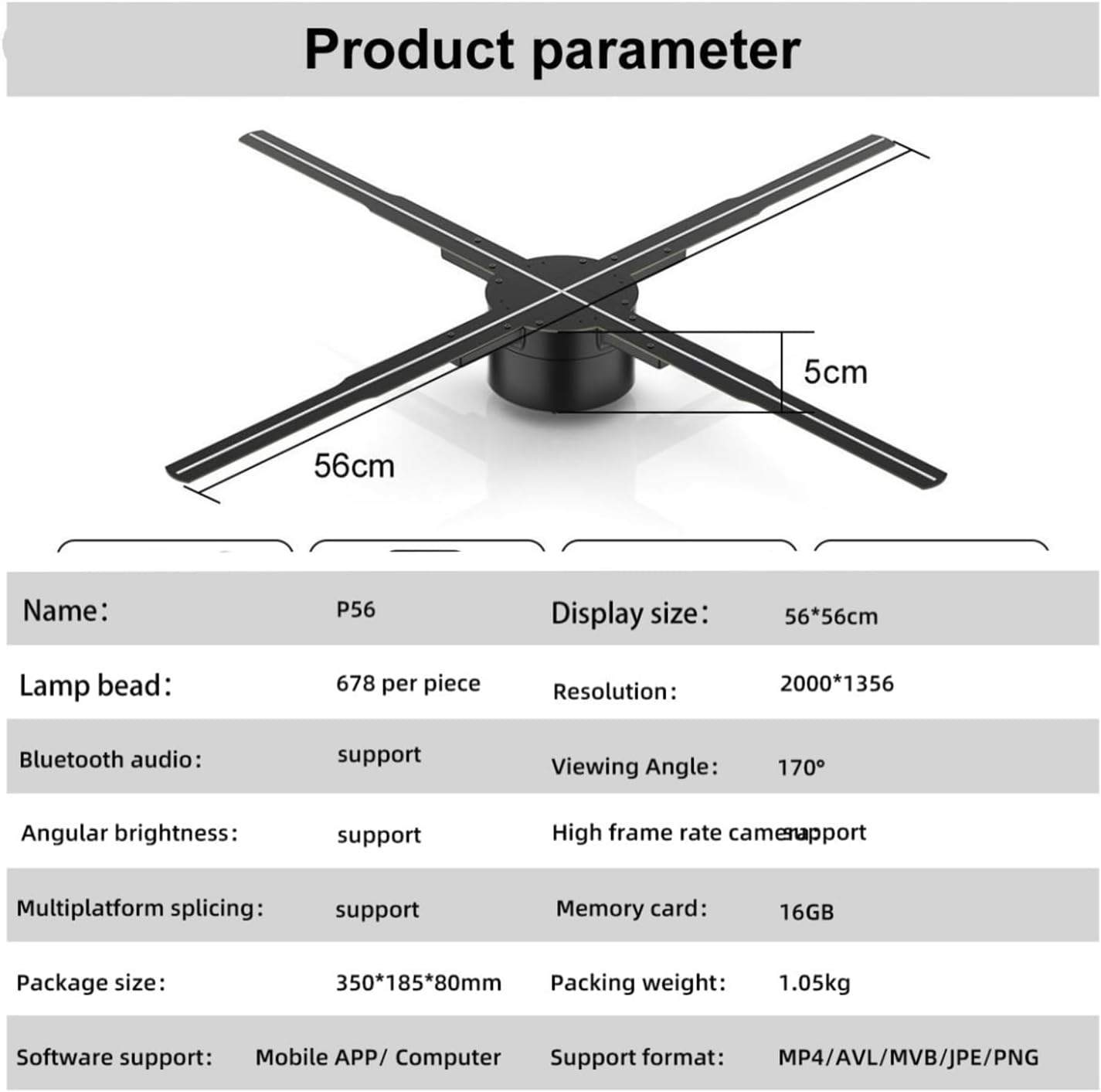
Image 4.1: The VCHICS 3D Holographic Fan unit, illustrating its approximate dimensions of 56cm in width and 5cm in height.
4.2 Content Preparation and Upload
The holographic fan supports various media formats for display. You can upload images, videos, or logos. For creating 3D images, contact customer service for assistance.
- Formati appoġġjati: MP4, AVL, MVB, JPE, PNG.
- Appoġġ tas-Softwer: Content can be managed via a Mobile APP or Computer software.
- Kard tal-memorja: The device includes a 16GB memory card for storing content.
Refer to the specific Mobile APP or Computer software instructions for detailed steps on uploading and managing your display content.
5. Istruzzjonijiet Operattivi
The VCHICS 3D Holographic Fan can be controlled via a remote control or a dedicated mobile application/computer software.
5.1 Tixgħel/Jitfi
- Qawwa Mixgħul: Once connected to power, the fan will typically enter a shutdown state. Use the remote control or app to initiate startup.
- Sekwenza tal-Istartjar: The fan blades will begin to rotate, and after a brief initialization period, the holographic effect will appear.
- Itfi: Use the remote control or app to shut down the device. The blades will slow down and stop.
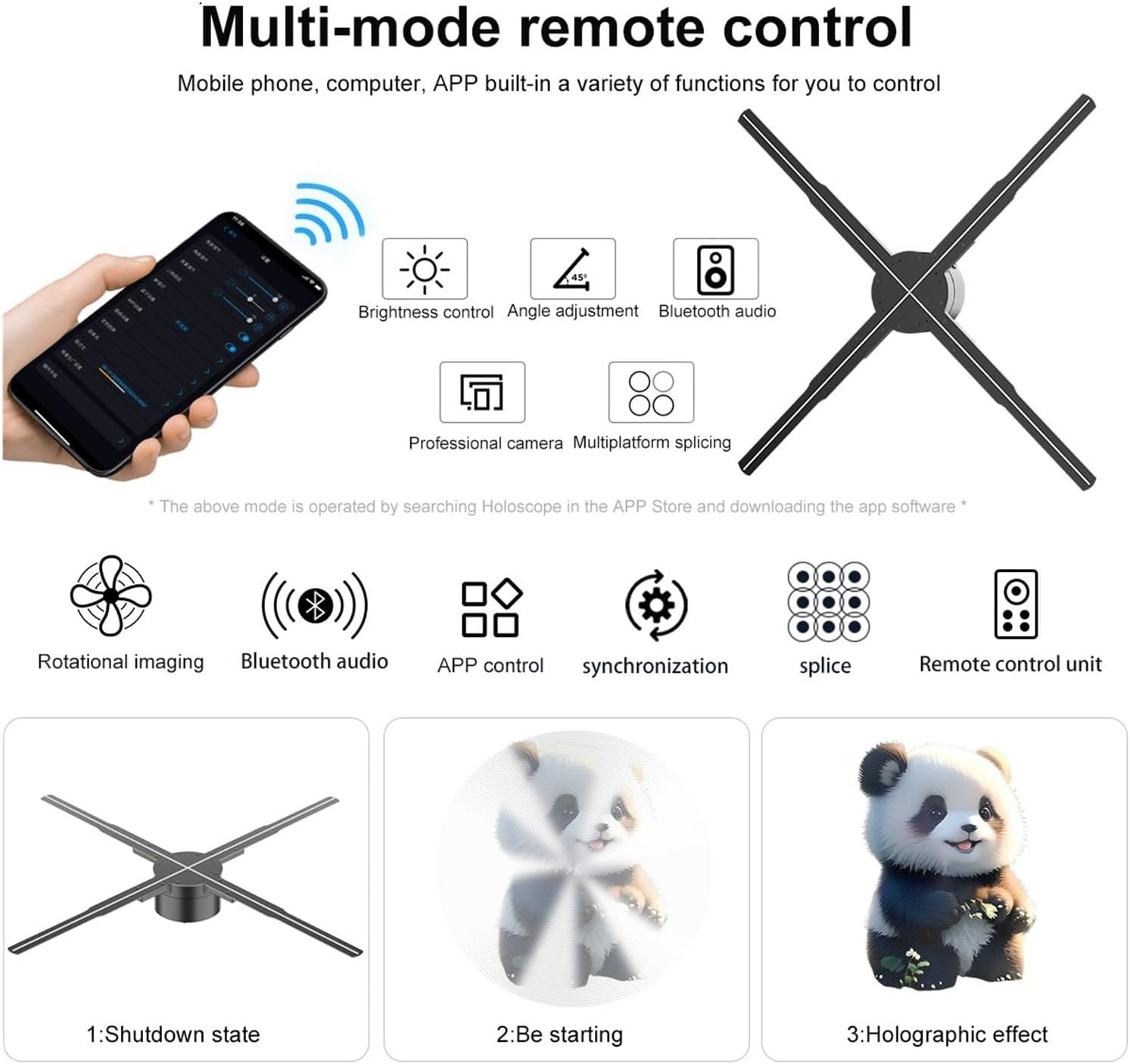
Image 5.1: Illustration of multi-mode control options via mobile phone app and remote, depicting the shutdown state, starting sequence, and the final holographic effect.
5.2 Kontroll mill-Bogħod u Funzjonijiet tal-App
The remote control and mobile application offer various functions for managing the display:
- Kontroll tal-luminożità: Adjust the intensity of the LED display.
- Aġġustament tal-Angolu: Modify the display angle for optimal viewing.
- Awdjo Bluetooth: Connect to external Bluetooth speakers for synchronized audio.
- Għażla tal-Kontenut: Choose from uploaded videos, animations, or images.
- Multiplatform Splicing: If using multiple units, control their synchronization for a larger display.

Image 5.2: The VCHICS 3D Holographic Fan demonstrating its Bluetooth audio capability by connecting to an external Bluetooth speaker, enhancing the 3D visual experience with sound.
5.3 Multi-Unit Splicing
For larger display areas, multiple VCHICS 3D Holographic Fan units can be synchronized to create a seamless, expansive holographic image. This feature is supported by the device and can be configured through the control software.

Immaġni 5.3: Eksample of multiple VCHICS 3D Holographic Fans being spliced together to create a larger, continuous holographic display, showcasing a shark image.
6. Manutenzjoni
Regular maintenance ensures the longevity and optimal performance of your VCHICS 3D Holographic Fan.
- Tindif: Disconnect the power before cleaning. Use a soft, dry cloth to wipe the fan blades and housing. Do not use liquid cleaners or abrasive materials.
- Tneħħija tat-Trab: Periodically check for dust accumulation on the blades and motor unit. Use compressed air or a soft brush to gently remove dust.
- Ħażna: If storing the device for an extended period, ensure it is clean, dry, and stored in its original packaging or a protective case in a cool, dry place.
7 Issolvi l-problemi
If you encounter issues with your VCHICS 3D Holographic Fan, refer to the following common problems and solutions:
| Problema | Kawża Possibbli | Soluzzjoni |
|---|---|---|
| Il-fann ma jixgħelx | No power supply; Loose connection | Check power adapter connection; Ensure power outlet is functional. |
| No holographic image | Incorrect content format; Fan not fully started | Verify content format (MP4, AVL, MVB, JPE, PNG); Allow fan to complete startup sequence. |
| L-immaġni teptip jew distorta | Damaged content file; Loose blade connection | Re-upload content; Check if blades are securely attached. |
| Il-kontroll mill-bogħod ma jaħdimx | Dead batteries; Obstruction | Replace remote control batteries; Ensure no objects are blocking the signal path. |
| Bluetooth audio not connecting | Speaker not in pairing mode; Distance too far | Ensure Bluetooth speaker is in pairing mode; Reduce distance between fan and speaker. |
Jekk il-problema tippersisti wara li tipprova dawn is-soluzzjonijiet, jekk jogħġbok ikkuntattja l-appoġġ għall-klijenti.
8. Speċifikazzjonijiet
The following table details the technical specifications of the VCHICS 3D Holographic Fan PD42-P65:
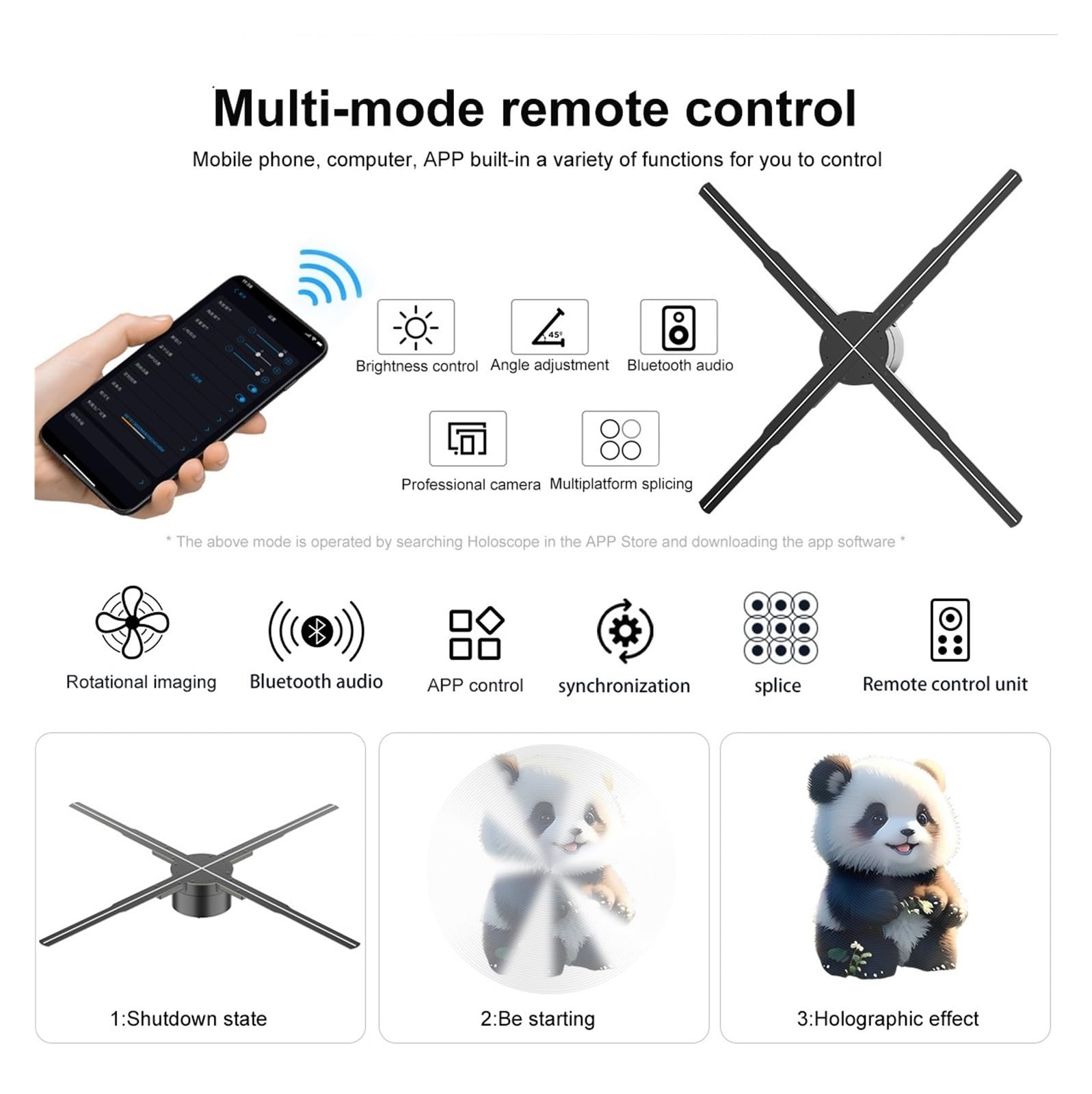
Image 8.1: Detailed product parameters for the VCHICS 3D Holographic Fan PD42-P65.
| Karatteristika | Speċifikazzjoni |
|---|---|
| Brand | VCHICS |
| Mudell | PD42-P65 |
| Daqs tal-Wiri | 56 x 56 ċm |
| Lamp Żibeġ | 678 per piece |
| Riżoluzzjoni | 2000 x 1356 |
| ViewIng Angolu | 170° |
| Awdjo Bluetooth | Appoġġjati |
| Angular Brightness | Appoġġjati |
| High Frame Rate Camera | Appoġġjati |
| Multiplatform Splicing | Appoġġjati |
| Kard tal-Memorja | 16GB |
| Appoġġ tas-Softwer | APP Mobbli / Kompjuter |
| Formati appoġġjati | MP4, AVL, MVB, JPE, PNG |
| Dimensjonijiet tal-Pakkett | 48.01 x 8 x 7.01 ċm |
| Piż tal-oġġett | 4.5 kg |
9. Garanzija u Appoġġ
For warranty information and technical support, please refer to the documentation provided with your purchase or contact VCHICS customer service directly. Keep your purchase receipt as proof of purchase for warranty claims.
Kuntatt tas-Servizz tal-Klijent: Please refer to the contact details provided on the product packaging or the official VCHICS websit.