
ASUS ROG-STRIX-RTX5070-O12G-GAMING
ASUS ROG Strix GeForce RTX 5070 OC Edition Graphics Card User Manual
1. Introduzzjoni
This manual provides essential information for the installation, operation, and maintenance of your ASUS ROG Strix GeForce RTX 5070 OC Edition graphics card. This high-performance graphics card features an advanced cooling system, including Axial-tech fans, a phase-change GPU thermal pad, and MaxContact design, engineered to optimize GPU temperature for enhanced performance. The integrated Aura Sync lighting offers extensive customization options for visual effects.
Karatteristiċi ewlenin:
- Prestazzjoni AI: 1044 AI TOPS for advanced artificial intelligence tasks.
- Edizzjoni OC: Operates at 2685 MHz in OC mode and 2655 MHz in default mode.
- 3.2-slot design: Features a substantial fin array optimized for airflow from three Axial-tech fans.
- Fannijiet Axial-tech: Enlarged fans designed to increase airflow through the card, resulting in lower temperatures and improved performance.
- Teknoloġija ta' 0dB: Enables silent operation during light workloads.
- MaxContact Design: Utilizes a vapor chamber to ensure efficient heat transfer.
- Kuxxinett Termali tal-GPU li Jibdel il-Fażi: Enhances heat transfer by filling microscopic gaps, contributing to lower GPU temperatures.
- Premium Power Delivery: Digital power control and 15K capacitors ensure stable and high-performance operation.
- Kisi protettiv tal-PCB: Guards the circuit board against moisture, dust, and debris to prevent short-circuits.
- Sinkronizzazzjoni tal-Aura: Customizable ARGB lighting on the shroud and perimeter for personalized aesthetics.
- Softwer tal-GPU Tweak III: Provides intuitive tools for performance tuning, thermal control, and system monitoring.

Figure 1: ASUS ROG Strix GeForce RTX 5070 OC Edition graphics card and its retail packaging.
2. Kontenut tal-Pakkett
Ivverifika li l-oġġetti kollha huma preżenti fil-pakkett qabel ma tipproċedi bl-installazzjoni.
- Karta Grafika ROG-STRIX-RTX5070-O12G-GAMING
- Manwal tas-setup tal-veloċità
- ROG Graphics Card Holder
- ROG Velcro Hook & Loop
- Kalamita ROG
- Riga tal-PCB ROG
- Grazzi Card
- Kejbil tal-Adapter (1 sa 2)

Figure 2: All items included in the ASUS ROG Strix GeForce RTX 5070 OC Edition retail package.
3. Setup u Installazzjoni
Proper installation is crucial for optimal performance and system stability. Ensure your system is powered off and unplugged before beginning installation.
Rekwiżiti tas-Sistema:
- Motherboard konformi mal-PCI Express b'slott grafika wieħed x16.
- Minimum recommended power supply unit (PSU) wattage. Irreferi għat-taqsima tal-ispeċifikazzjonijiet għal aktar dettalji.
- Sufficient space within your PC case for a 3.2-slot graphics card.
Passi ta' Installazzjoni:
- Ipprepara s-Sistema Tiegħek: Power off your computer and disconnect all cables. Open your PC case.
- Sib is-Slott tal-PCIe: Identifika slott PCI Express x16 disponibbli fuq il-motherboard tiegħek.
- Neħħi l-Għotjien tas-Slott: Remove the necessary expansion slot covers from your PC case to accommodate the 3.2-slot card.
- Installa Karta Grafika: Carefully align the graphics card with the PCIe slot and press down firmly until it is securely seated. Secure the card to the case with screws.
- Qabbad l-Enerġija: Connect the appropriate power cables from your power supply to the graphics card's power connectors. Use the provided adapter cable if necessary.
- Agħlaq il-Kaxxa u Qabbad il-Periferali: Close your PC case, reconnect all cables, and connect your display to one of the graphics card's output ports (HDMI or DisplayPort).
- Installa Sewwieqa: Power on your system. Once the operating system loads, install the latest graphics drivers from the ASUS support webis-sit uffiċjali ta' NVIDIA websit.

Figure 3: The graphics card requires adequate power from a compatible power supply unit.
4. It-Tħaddim tal-Karta Grafika Tiegħek
The ASUS ROG Strix GeForce RTX 5070 OC Edition is designed for high-performance computing and gaming. Understanding its features will help you maximize your experience.
Sistema tat-tkessiħ:
- Fannijiet Axial-tech: These fans are designed with a smaller hub that facilitates longer blades and a barrier ring to increase downward air pressure. The outer two fans spin counter-clockwise to reduce turbulence and improve airflow through the heatsink.
- Teknoloġija ta' 0dB: For less demanding tasks, the fans will stop spinning entirely, providing a silent computing environment. They will automatically engage when GPU temperature rises.
- MaxContact Design: This technology involves a precision-machined heat spreader surface that makes up to 5% more contact with the GPU die, improving thermal transfer.
- Kuxxinett Termali tal-GPU li Jibdel il-Fażi: This specialized thermal pad melts at specific temperatures to fill microscopic imperfections between the GPU and heatsink, enhancing thermal conductivity and heat dissipation.

Figure 4: Axial-tech fan design for enhanced cooling performance.
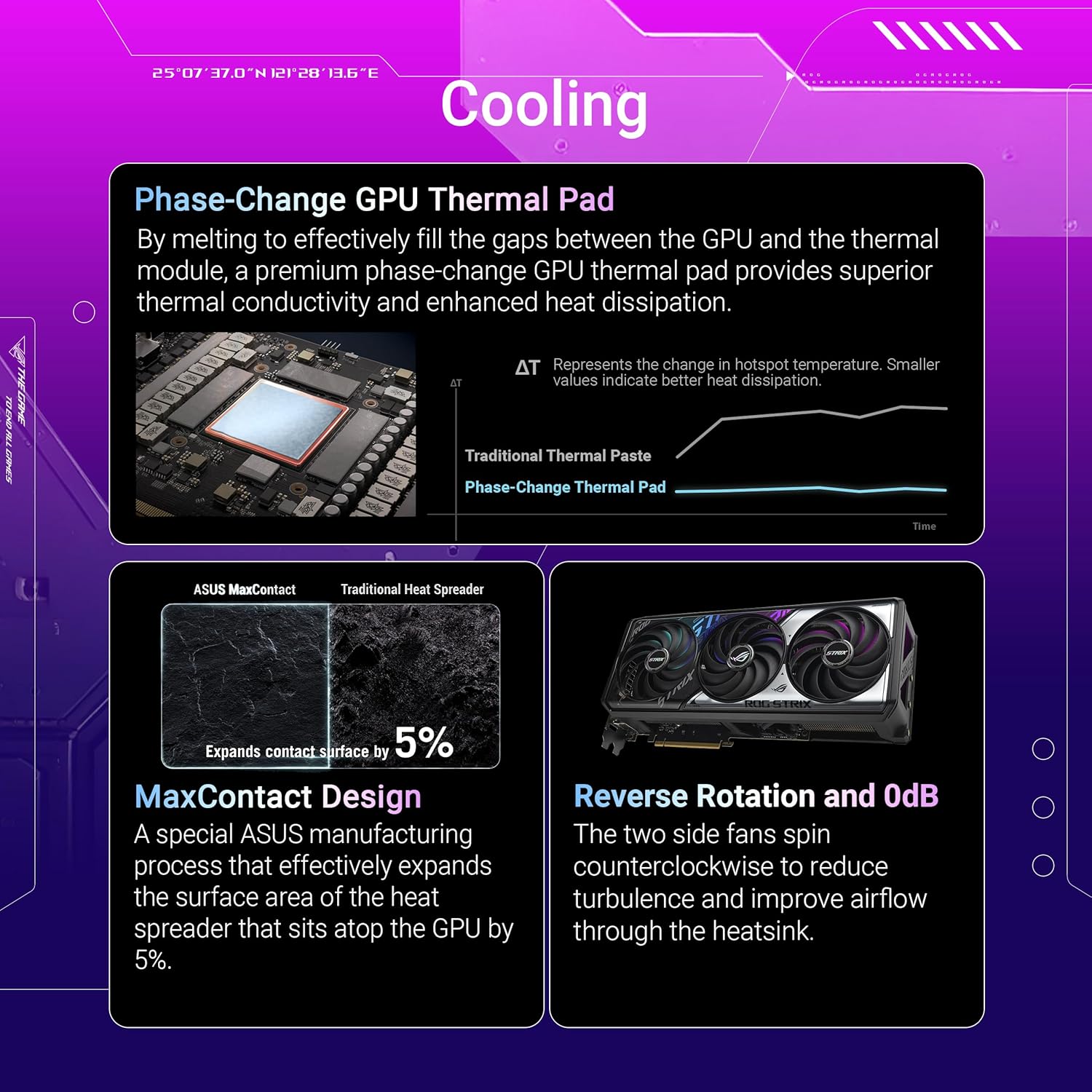
Figure 5: Illustration of Phase-Change GPU Thermal Pad, MaxContact Design, and Reverse Rotation with 0dB technology.
Dawl tas-Sinkronizzazzjoni tal-Aura:
The graphics card features integrated ARGB lighting compatible with ASUS Aura Sync. This allows for synchronization of lighting effects across compatible components in your system, offering extensive personalization options.

Figure 6: The graphics card with its customizable Aura Sync RGB lighting activated.
Software Utilities:
- Aġġustament tal-GPU III: This utility provides comprehensive control over your graphics card. You can monitor vital parameters, adjust clock speeds, memory frequencies, and fan curves to optimize performance or reduce noise.
- MuseTree: An AI-powered image generation application designed to spark creativity and manage visual ideas.

Figure 7: GPU Tweak III for performance tuning and MuseTree for AI-powered image generation.
5. Manutenzjoni
Manutenzjoni regolari tgħin biex tiżgura l-lonġevità u l-prestazzjoni ottimali tal-karta grafika tiegħek.
Tindif:
- Naddaf it-trab mill-fannijiet u s-sink tas-sħana perjodikament bl-użu ta' arja kkompressata. Kun żgur li s-sistema tkun mitfija u skonnettjata qabel ma tnaddafha.
- Żomm ix-xfafar tal-fann bil-mod biex tevita li jduru malajr waqt it-tindif, għax dan jista' jagħmel ħsara lill-bearings.
Aġġornamenti tas-sewwieq:
- Iċċekkja regolarment l-appoġġ tal-ASUS webis-sit uffiċjali ta' NVIDIA website for the latest graphics drivers. Keeping drivers updated ensures compatibility, performance improvements, and access to new features.
6 Issolvi l-problemi
Jekk tiltaqa' ma' problemi bil-karta grafika tiegħek, ikkunsidra l-passi li ġejjin għas-soluzzjoni tal-problemi:
Ebda Display jew Skrin Iswed:
- Ensure the monitor cable is securely connected to both the graphics card and the display.
- Ivverifika li l-karta grafika tkun imdaħħla sew fl-islott tal-PCIe.
- Confirm that all necessary power cables are connected to the graphics card from the PSU.
- Ittestja b'kejbil tad-displej jew monitor differenti jekk possibbli.
Performance Issues or Crashes:
- Kun żgur li s-sewwieqa tal-grafika tiegħek huma aġġornati.
- Monitor GPU temperatures using software like GPU Tweak III. Overheating can lead to performance throttling or crashes. Ensure adequate case airflow.
- Ivverifika li l-unità tal-provvista tal-enerġija tiegħek tissodisfa l-qawwa minimatagIr-rekwiżiti e għall-kard tal-grafika u komponenti oħra tas-sistema.
- Check for system stability by running diagnostic tools or stress tests.
Aura Sync Not Working:
- Ensure the Aura Sync software is installed and updated.
- Check connections to the motherboard's ARGB headers if applicable, though this card's lighting is typically integrated.
- Restart the Aura Sync software or your system.
7. Speċifikazzjonijiet
Detailed technical specifications for the ASUS ROG Strix GeForce RTX 5070 OC Edition graphics card.
| Karatteristika | Speċifikazzjoni |
|---|---|
| Numru tal-Mudell | ROG-STRIX-RTX5070-O12G-GAMING |
| Koproċessur tal-Grafika | NVIDIA GeForce RTX 5070 |
| Memorja | 12 GB GDDR7 |
| Veloċità tal-Memorja | 2655 MHz |
| Veloċità tal-Arloġġ tal-Modalità OC | 2685 MHz |
| Riżoluzzjoni Massima tal-Iskrin | 7680x4320 Pixel |
| Interface tal-Output tal-Vidjo | HDMI 2.1b x2, Native DisplayPort 2.1b x3 |
| Dimensjonijiet tal-oġġett (LxWxH) | 13.07 x 5.79 x 0.04 pulzieri |
| Piż tal-oġġett | 4.3 liri |
| Kulur | ISWED |
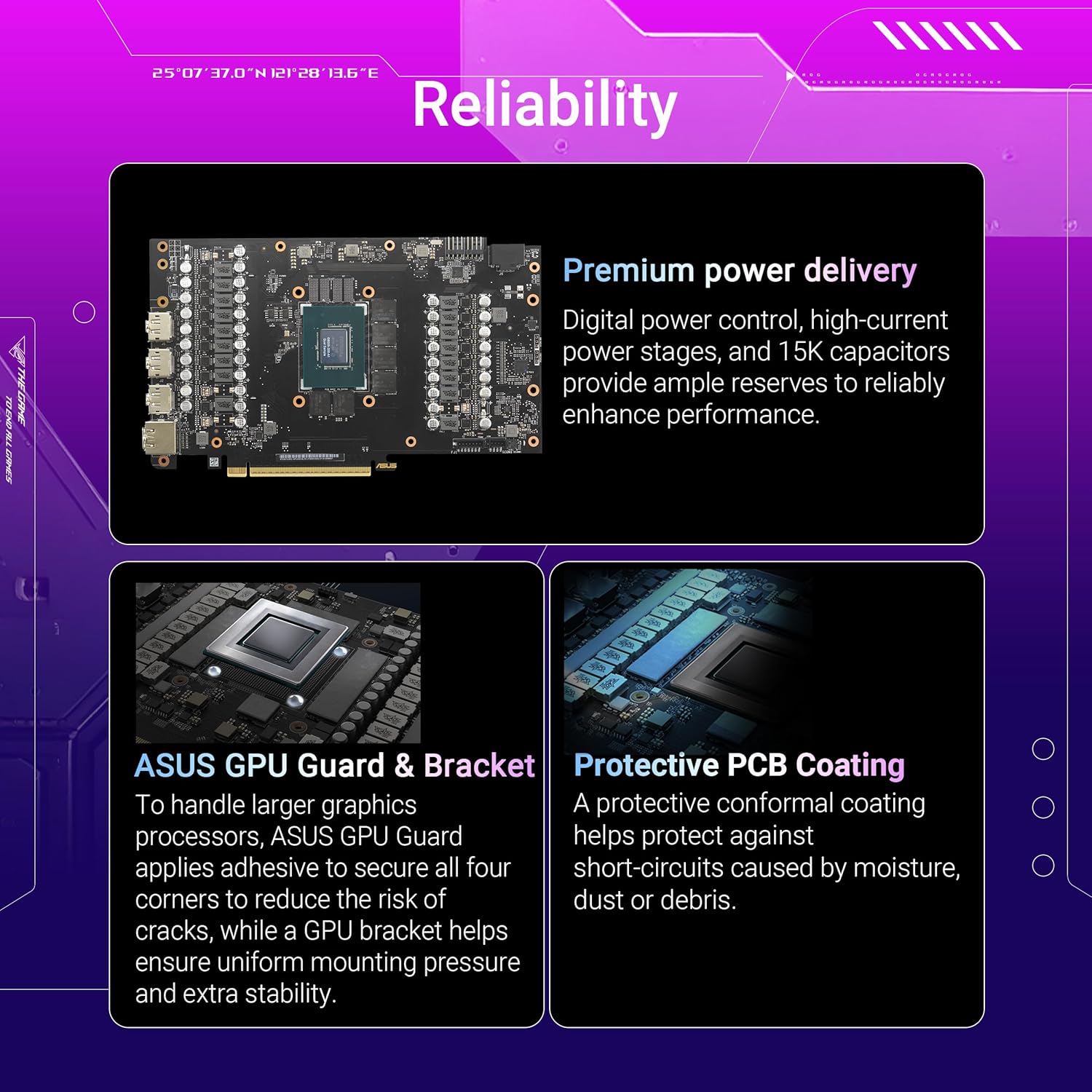
Figura 8: Intern view highlighting premium power delivery and protective PCB coating.
8. Garanzija u Appoġġ
For warranty information, please refer to the warranty card included in your product packaging or visit the official ASUS support websit. ASUS tipprovdi appoġġ tekniku u riżorsi għall-prodotti tagħha.
Ikkuntattja l-Appoġġ:
- Żur l-appoġġ tal-ASUS websit għal FAQs, downloads ta' sewwieqa, u għażliet ta' kuntatt.
- Have your product model number (ROG-STRIX-RTX5070-O12G-GAMING) and serial number ready when contacting support.
Ask a question about this manual
Ask about setup, troubleshooting, compatibility, parts, safety, or missing instructions. Manuals+ will review the question and use this page’s manual context to help answer it.