Introduzzjoni
This manual provides essential information for setting up, operating, maintaining, and troubleshooting your Thunderobot Zero 18 Pro 5070 Ti Gaming Laptop. Please read this guide thoroughly to ensure optimal performance and longevity of your device.
X'hemm fil-Kaxxa
Meta tiftaħ il-pakkett, ivverifika li l-oġġetti kollha elenkati hawn taħt huma preżenti:
- THUNDEROBOT Zero Laptop
- Adapter tal-Enerġija
- Manwal għall-Utent (dan id-dokument)
- Karta ta' Garanzija
If any items are missing or damaged, contact your retailer or Thunderobot customer support immediately.
Setup
Power-On Inizjali
- Connect the power adapter to the laptop's power input port and then to a wall outlet.
- Iftaħ l-għatu tal-laptop.
- Agħfas il-buttuna tal-qawwa biex tixgħel il-laptop.
- Follow the on-screen instructions to complete the Windows 11 Home setup.
Konnessjoni Periferali
Utilize the available ports to connect external devices such as a mouse, keyboard, external display, or other accessories. Refer to the "Connectivity (Ports)" section for port details.
Istruzzjonijiet Operattivi
Qawwa mixgħul/mitfi
- To power on: Press the power button located on the keyboard deck.
- To shut down: Click the Start button, then Power, and select "Shut down".
- To restart: Click the Start button, then Power, and select "Restart".
- To sleep: Close the laptop lid or click the Start button, then Power, and select "Sleep".
Keyboard and RGB Lighting
The laptop features a full-size keyboard with per-key customizable RGB backlighting and a dedicated numeric keypad.
- Per-Key RGB Backlight: Customize individual key lighting through the AI Intelligent Control Center software.
- Ċwievet tal-Funzjoni: Uża l- Fn key in combination with other keys for various functions (e.g., volume control, screen brightness, keyboard backlight adjustment).
- Performance Mode Switching: Dedicated keys (Fn+Space) allow for quick toggling between performance profiles.
- One-Click Cooling: A dedicated key (often near the numeric keypad) can activate maximum cooling. Ensure cooling mode is exited before using the first three keys to switch modes.
Karatteristiċi tal-Wiri
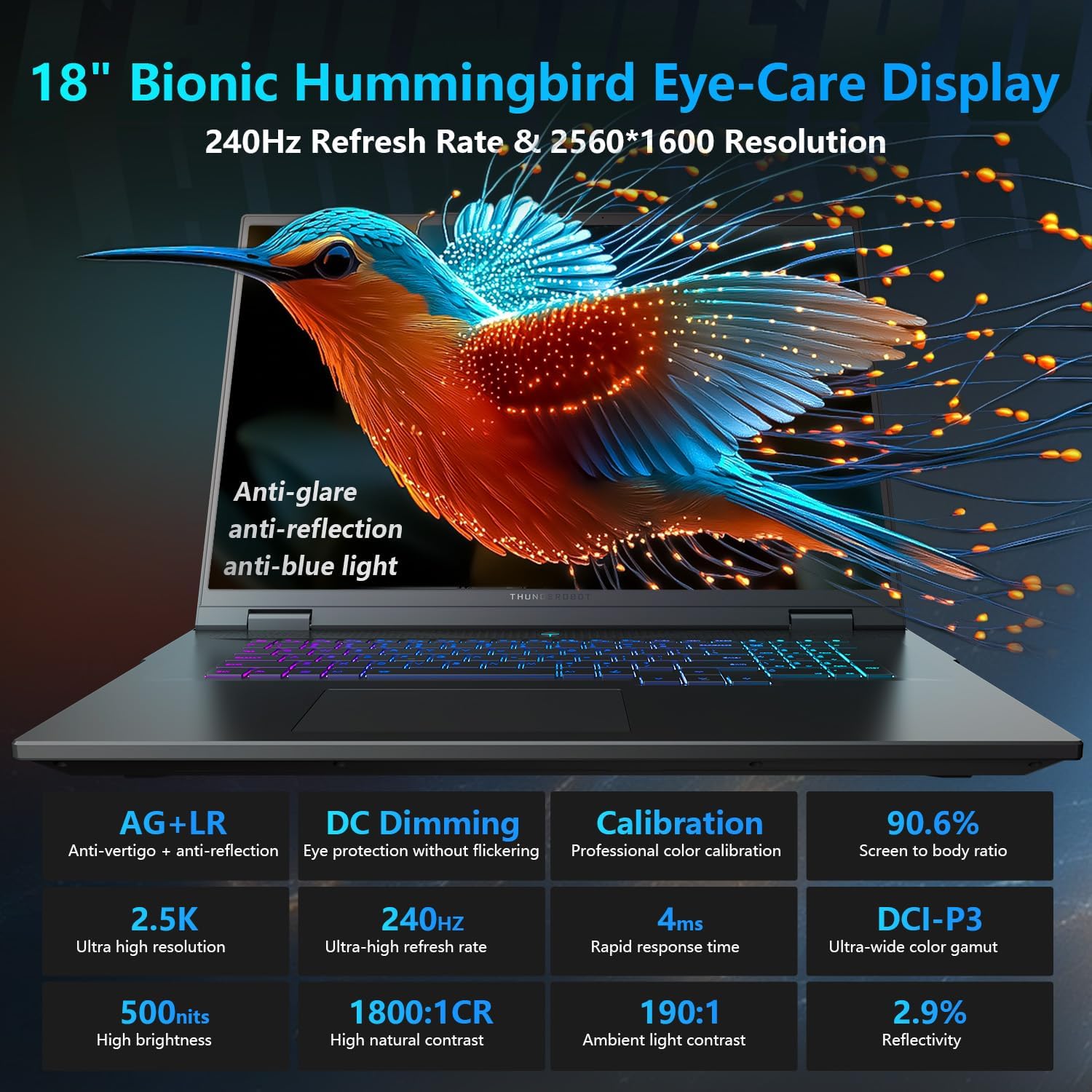
The 18-inch QHD+ (2560x1600) Bionic Hummingbird Eye-Care display offers a 240Hz refresh rate and 4ms response time for clear and fluid visuals. It includes anti-glare, anti-reflection, and anti-blue light technologies for eye comfort.

Connectivity (Ports)
The laptop is equipped with various ports for extensive connectivity:
- 3 x Superspeed USB Type-A ports
- 2 x Superspeed USB Type-C ports (including Thunderbolt 5 support)
- 1 x HDMI port (HDMI 2.1)
- 1 x RJ-45 Ethernet port
- 1 x Port tal-Awdjo (3.5mm)
- UHS-II SD Card Reader
- Wi-Fi 6E for high-speed wireless internet
- Bluetooth for wireless peripheral connections

Sistema tat-tkessiħ
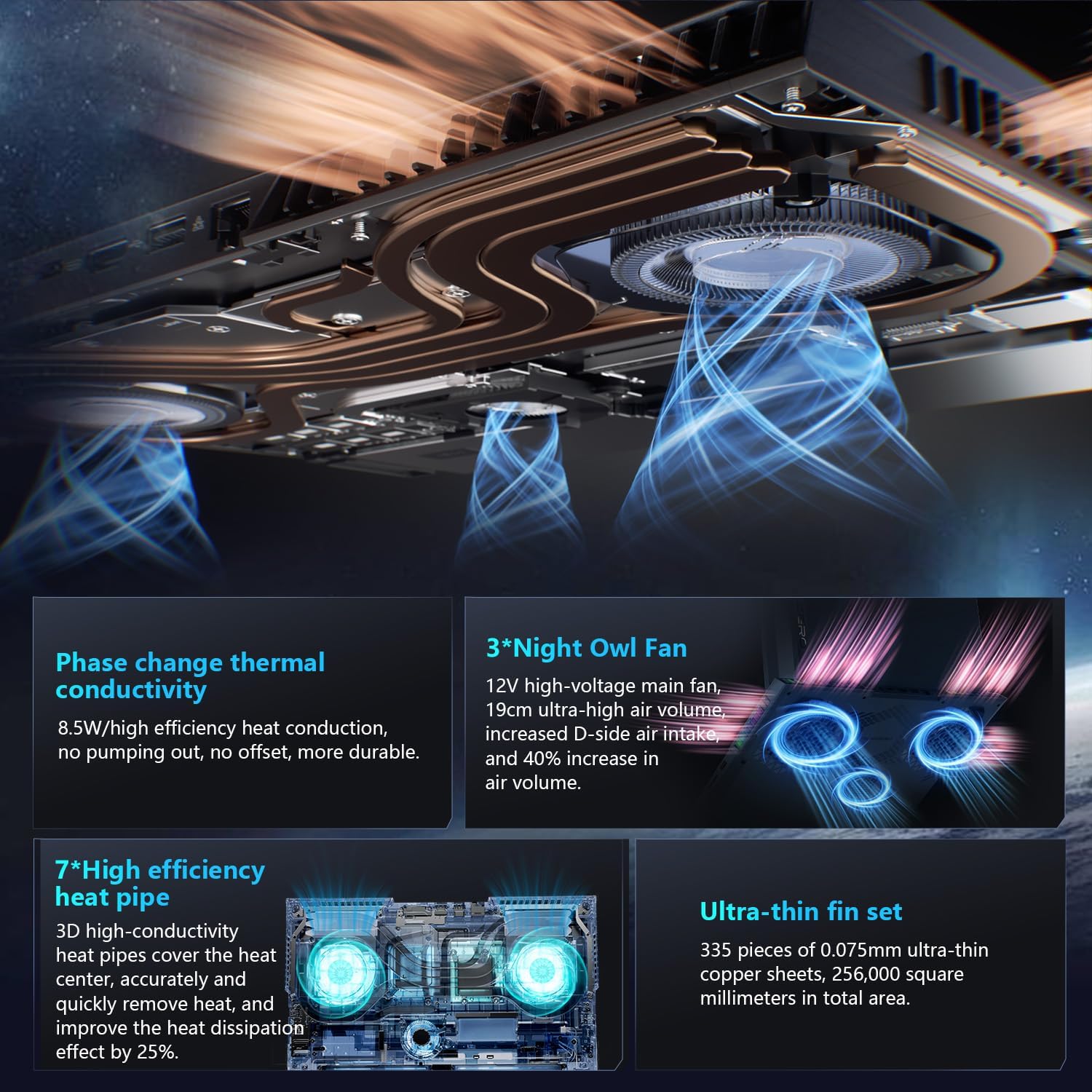
The advanced cooling system features 3 Night Owl fans, 7 high-efficiency heat pipes, and 338 ultra-thin copper fins to ensure optimal thermal management during intensive use, allowing for 270W super performance release.
AI Intelligent Control Center
The AI Intelligent Control Center software allows for comprehensive system management, including performance tuning, intelligent light adjustment, and personalized customization. This includes monitoring CPU/GPU temperatures and fan speeds.
- Irfinar tal-Prestazzjoni: Adjust power settings for quiet, balanced, or turbo modes.
- Intelligent Light Adjustment: Customize keyboard, strip, and logo RGB lighting effects.
- Monitoraġġ tas-Sistema: View real-time CPU and GPU status.
Nota: Il-bdil tal-modalità tas-sistema fiċ-Ċentru tal-Kontroll jirrikjedi li l-apparat ikun imqabbad ma' sors ta' enerġija.
Manutenzjoni
Tindif tal-Laptop Tiegħek
- Skrin: Uża ċarruta ratba u mingħajr ħelu dampLaħlaħ bl-ilma jew b'tindif tal-iskrin. Evita kimiċi ħarxa.
- Tastiera u Chassis: Uża drapp artab biex timsaħ l-uċuħ. Għat-trab fix-xquq, uża arja kkompressata.
- Ventijiet: Naddaf il-ventijiet tat-tkessiħ perjodikament b'arja kkompressata biex tevita l-akkumulazzjoni tat-trab, li jista' jaffettwa l-prestazzjoni.
Kura tal-batterija
- Evita li tiċċarġja l-batterija kompletament ta' spiss.
- Aħżen il-laptop f'post frisk u niexef jekk ma tużahx għal perjodi twal.
- For optimal battery health, avoid extreme temperatures.
Aġġornamenti tas-Software
Regularly check for and install operating system updates (Windows Update) and driver updates (via Thunderobot's official website or the AI Intelligent Control Center) to ensure system stability and performance.
Issolvi l-problemi
| Problema | Kawża Possibbli | Soluzzjoni |
|---|---|---|
| Il-laptop ma jixgħelx. | Ebda enerġija, batterija skarikata, jew problema bil-hardware. |
|
| L-iskrin huwa vojt jew iswed. | Display settings, external monitor connected, or hardware issue. |
|
| Is-sħana żejda waqt l-użu. | Blocked vents, high performance settings, or dust buildup. |
|
| Problemi bil-konnessjoni tal-Wi-Fi. | Wi-Fi disabled, driver issues, or router problems. |
|
For further assistance, please contact Thunderobot customer support.
Speċifikazzjonijiet
| Karatteristika | Dettall |
|---|---|
| Isem tal-Mudell | Żero 18 Pro |
| Proċessur | Intel Core Ultra 9 275HX (24 Qlub, 24 Ħjut, sa 5.40GHz) |
| Grafika | NVIDIA GeForce RTX 5070 Ti (8 GB GDDR6 Dedicated) |
| RAM | 32 GB DDR5 (4800 MHz) |
| Ħażna | SSD PCIe M.2 ta' 2 TB |
| Wiri | Wiri għall-Kura tal-Għajnejn Bionic Hummingbird ta' 18-il pulzier QHD+ (2560x1600) 240Hz |
| Sistema Operattiva | Windows 11 Home |
| Konnettività | Wi-Fi 6E, Bluetooth, 3x USB-A, 2x USB-C (Thunderbolt 5), HDMI 2.1, RJ-45, Audio Port |
| Tastiera | Tastiera Numerika b'Dawl RGB għal Kull Tastatura |
| Dimensjonijiet (LxWxH) | 16.04 x 11.78 x 1.41 pulzieri |
| Piż tal-oġġett | 15 liri |
| Sors tal-Enerġija | AC & Battery |
Garanzija u Appoġġ
Kull laptop Thunderobot jinkludi 12-il xahar garanzija, li joffru appoġġ espert, dijanjostika bir-reqqa, u partijiet ġenwini jekk ikun hemm bżonn ta’ tiswija. Barra minn hekk, a Garanzija ta '90 jum hija pprovduta fuq il-partijiet kollha ta' sostituzzjoni garantiti, u b'hekk tiżgura tiswijiet mingħajr problemi. Is-sodisfazzjon sħiħ tiegħek huwa l-impenn tagħna.
For technical support, warranty claims, or service inquiries, please visit the official Thunderobot website or contact their customer service department. Keep your purchase receipt and serial number handy for faster service.