
1. Introduzzjoni
This manual provides detailed instructions for the setup, operation, and maintenance of your Dangbei DBOX02 Pro 4K Projector. Please read this manual thoroughly before using the product to ensure proper and safe operation. Keep this manual for future reference.
2. X'hemm fil-Kaxxa
Upon opening the packaging, verify that all the following items are included:
- Dangbei DBOX02 Pro Projector
- Adapter tal-Enerġija
- Kontroll mill-bogħod
- Batteriji AAA (2)
- Manwal għall-Utent (dan id-dokument)
The projector and its accessories are securely packaged to prevent damage during transit. The main product box is protected by air-filled cushioning within an outer shipping box.

Figura 2.1: The Dangbei DBOX02 Pro Projector and its packaging, showing the secure internal cushioning.
3. Prodott Aktarview
The Dangbei DBOX02 Pro is a compact and versatile 4K projector designed for home theater use. It features a sleek, dark grey cubic design with a built-in gimbal stand for flexible positioning.
3.1 Quddiem u Fuq View
The front of the projector houses the lens and various sensors for automatic image adjustments. The top surface is smooth and reflective.
Figura 3.1: Quddiem u fuq view of the Dangbei DBOX02 Pro, highlighting the lens and sleek design.
3.2 Il-Pannell ta' Wara u l-Portijiet
The rear panel provides all necessary connectivity options for your home entertainment system:
- HDMI 2.1 (eARC): For connecting audio devices with Audio Return Channel support.
- HDMI 2.1: For connecting video sources such as Blu-ray players, gaming consoles, or streaming devices.
- USB 2.0 (x2): Għall-konnessjoni ta' apparati ta' ħażna esterni jew periferali USB oħra.
- S/PDIF: Digital audio output for connecting to sound systems.
- LAN: Port Ethernet għal konnessjoni man-netwerk bil-fili.
- Awdjo Jack: 3.5mm audio output for headphones or external speakers.

Figura 3.2: Rear panel of the projector, illustrating the HDMI, USB, S/PDIF, LAN, and Audio ports.
4. Setup
Follow these steps for initial setup of your Dangbei DBOX02 Pro projector.
4.1 Tqegħid
Position the projector on a stable, flat surface. The built-in gimbal stand allows for 360° horizontal rotation and 120° vertical tilt, offering flexibility in placement. Ensure the lens is unobstructed and facing the projection surface (wall or screen).
The DBOX02 Pro can project images from 40 inches up to 300 inches diagonally. For optimal viewing quality, a projection size between 80" and 150" is recommended. The projection distance will vary based on the desired screen size.

Figura 4.1: The projector's capability to project a large 300-inch image, demonstrating its suitability for various room sizes.
4.2 Konnessjoni tal-Enerġija
- Connect the power adapter to the projector's DC-IN port.
- Ipplaggja l-adapter tal-enerġija f'iżbokk tal-ħajt.
- Agħfas il-buttuna tal-qawwa fuq il-proġettazzjoni jew fuq il-kontroll remot biex tixgħelu.
4.3 InstanPro AI Image Setup
The DBOX02 Pro features InstanPro AI Image Setup for automatic image optimization:
- Auto Focus: Automatically adjusts the image for sharpness.
- Korrezzjoni Auto Keystone: Corrects image distortion to ensure a rectangular picture.
- Screen Fit: Automatically adjusts the image to fit the projection surface.
- Evitar ta' Ostakli: Detects and adjusts the projection to avoid obstacles in the path.
- Protezzjoni tal-għajnejn: Automatically lowers brightness when people or pets are detected nearby (requires manual activation).
- AI Brightness Adjustment: Adjusts brightness based on ambient room lighting.
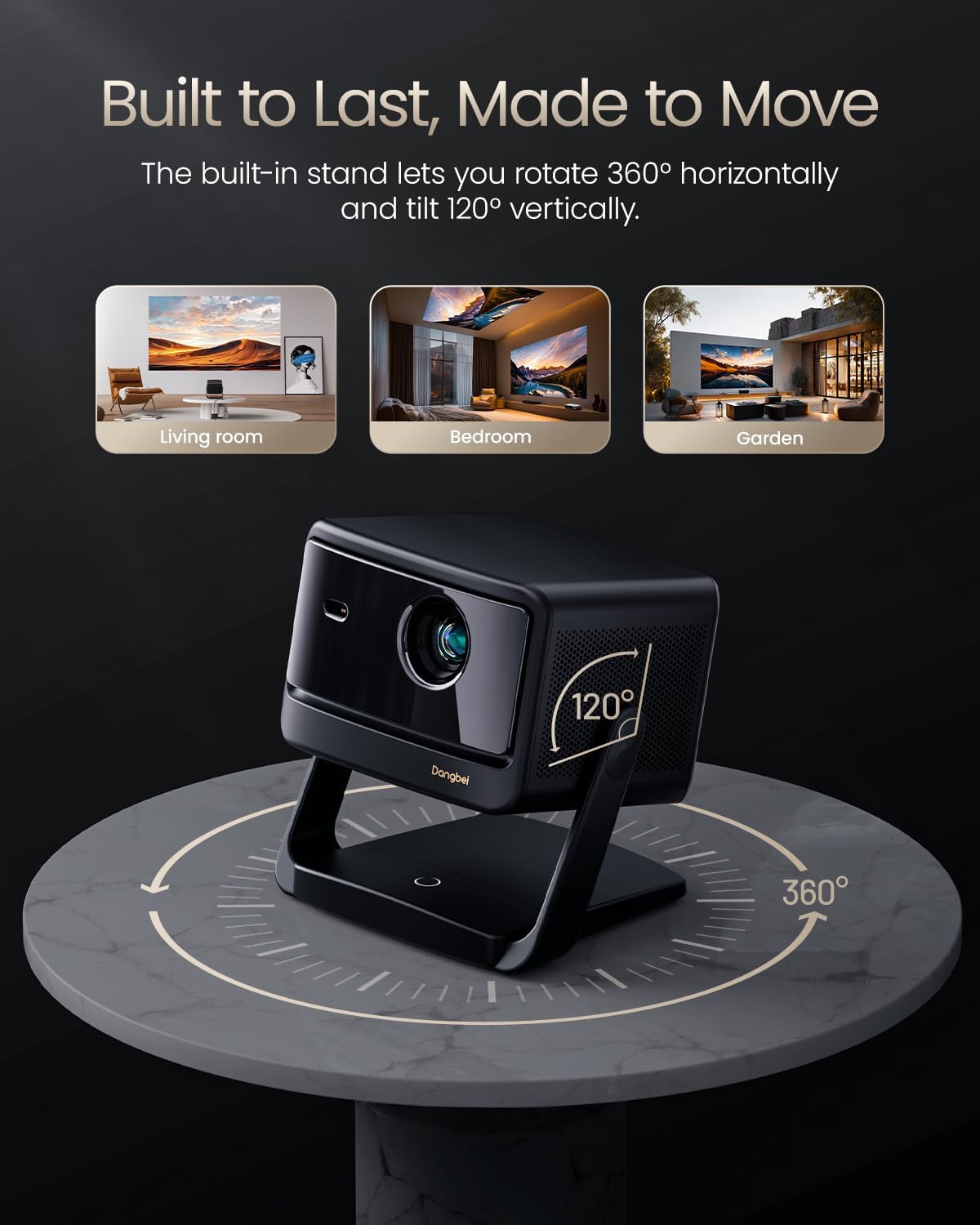
Figura 4.2: Visual representation of the InstanPro AI Image Setup features, showing how the projector automatically optimizes the display.
5. Istruzzjonijiet Operattivi
5.1 L-Interfaċċja tat-TV tal-Google
The projector comes with built-in Google TV, providing access to a wide range of streaming services and applications. Navigate the interface using the remote control.

Figura 5.1: The Google TV home screen displayed on the projector, showing various streaming app icons.
5.2 Kontroll mill-Bogħod
The custom remote control offers intuitive navigation and quick access to key functions:
- Buttuna tal-Qawwa: Short press to manually focus, long press to activate Auto Focus.
- Kontroll tal-Vuċi: Activate "Hey Google" for hands-free operation.
- Buttuni tal-Volum: Aġġusta l-volum tal-awdjo.
- One-Click Wake & Play: Instantly launch Netflix, YouTube, or Prime Video from sleep mode.
- Buttuna tal-issettjar: Short press to enter the Projector settings menu.

Figura 5.2: The remote control for the DBOX02 Pro, detailing its various buttons and their functions.
5.3 Konnettività
The projector supports both wired and wireless connections:
- Wi-Fi 6: For high-speed wireless internet access and 4K streaming.
- Bluetooth 5.2: For connecting wireless headphones, speakers, or other Bluetooth devices.
- HDMI & USB: Utilize the physical ports on the rear for direct connections to various devices.
6. Karatteristiċi Avvanzati
6.1 Cinematic 4K Laser Brilliance
The DBOX02 Pro utilizes advanced laser technology to deliver stunning 4K UHD (3840x2160) resolution with 2000 ISO lumens. It supports HDR10+/HLG for enhanced contrast and a 108% REC-709 wide color gamut for accurate color reproduction.

Figura 6.1: A visual comparison demonstrating the superior color and clarity of the DBOX02 Pro's 4K laser projection.
6.2 Dolby Audio & Dual 12W Theater Sound
Experience immersive audio with dual 12W speakers and a 600cc acoustic chamber. The projector supports Dolby Audio and DTS Virtual:X, providing rich bass and clear dialogue for a cinema-quality sound experience.
6.3 Lest għat-3D
The projector is 3D ready, allowing you to enjoy compatible 3D content. Please note that active shutter 3D glasses are required and sold separately for 3D viewing.
7. Manutenzjoni
Manutenzjoni xierqa tiżgura l-lonġevità u l-prestazzjoni ottimali tal-proġettazzjoni tiegħek.
7.1 Tindif
- Lenti: Imsaħ il-lenti tal-proġettazzjoni bil-mod b'ċarruta ratba u mingħajr suf iddisinjata speċifikament għal uċuħ ottiċi. Evita materjali li joborxu jew kimiċi ħarxa.
- Barra: Naddaf il-parti ta' barraasinNaddaf b'ċarruta ratba u niexfa. Tużax prodotti tat-tindif likwidi direttament fuq il-proġettazzjoni.
- Ventijiet: Periodically check the air vents for dust accumulation. As the DBOX02 Pro is a completely enclosed projector, it requires minimal complex maintenance efforts.
7.2 Ħajja tas-Sors tad-Dawl
The DBOX02 Pro uses an ALPD 2.0 laser light source with an estimated lifespan of 30,000 hours, significantly reducing the need for lamp sostituzzjonijiet.
8 Issolvi l-problemi
Jekk tiltaqa' ma' problemi bil-proġettur tiegħek, irreferi għall-problemi u s-soluzzjonijiet komuni li ġejjin:
- Ebda Immaġni: Ensure the power adapter is securely connected and the projector is turned on. Check the input source selection.
- Immaġni mċajpra: Use the auto-focus feature via the remote control. If needed, manually adjust focus in the settings menu. Ensure the projection surface is flat.
- Ebda Ħsejjes: Verify that the volume is not muted and is turned up. Check audio cable connections (if using external speakers). Ensure the correct audio output is selected in the projector settings.
- Il-Kontroll mill-bogħod ma Jirrispondix: Check the batteries in the remote control and replace them if necessary. Ensure there are no obstructions between the remote and the projector.
- Kwistjonijiet ta' Konnettività (Wi-Fi/Bluetooth): Restart the projector and your router/Bluetooth device. Re-enter Wi-Fi passwords or re-pair Bluetooth devices.
For persistent issues not covered here, please contact Dangbei customer support.
9. Speċifikazzjonijiet
| Karatteristika | Dettall |
|---|---|
| Brand | Dangbei |
| Numru tal-Mudell | DBOX02 |
| Riżoluzzjoni tal-Wiri | 3840 x 2160 (4K UHD) |
| Luminożità | 2000 ISO Lumens |
| Sors tad-Dawl | Laser (ALPD 2.0) |
| Teknoloġija tal-Konnettività | Bluetooth 5.2, HDMI 2.1 (eARC), USB 2.0, LAN, Wi-Fi 6 |
| Karatteristiċi Speċjali | Auto Focus, Auto Keystone Correction, Screen Fit, Obstacle Avoidance, Eye Protection, AI Brightness Adjustment |
| Awdjo | Dual 12W Speakers, Dolby Audio, DTS Virtual:X |
| Dimensjonijiet tal-Prodott | 11.81 x 11.81 x 4.72 pulzieri |
| Piż tal-oġġett | 7.7 liri |
| Sistema Operattiva | Google TV |
10. Garanzija u Appoġġ
10.1 Informazzjoni dwar Garanzija
The Dangbei DBOX02 Pro comes with a Servizz ta' garanzija ta' 12 xahar. This warranty covers quality issues under normal use, providing free repair or replacement services.
10.2 Politika ta' Ritorn
Dan il-prodott huwa eliġibbli għal 30-day return for refund or replacement from the date of purchase, subject to the retailer's return policy.
10.3 Appoġġ Tekniku
Dangbei offers appoġġ tekniku tul il-ħajja for the DBOX02 Pro. If you require assistance with setup, troubleshooting, or any other product-related queries, please contact our dedicated support team. Contact details can typically be found on the official Dangbei webis-sit jew permezz tal-pjattaforma tax-xiri tiegħek.