
1. Introduzzjoni
This manual provides detailed instructions for the setup, operation, and maintenance of your ASUS ROG Strix XG32UCWG 32-inch 4K OLED Gaming Monitor. The XG32UCWG features a TrueBlack Glossy WOLED panel, offering sharp visuals and a versatile dual-mode function for seamless switching between 4K at 165Hz and FHD at 330Hz. It incorporates the Neo Proximity Sensor within the ASUS OLED Care Pro suite to prevent panel burn-in by automatically transitioning to a black screen when the user is away. The monitor is designed with a compact stand to optimize desktop space and provides extensive connectivity options, including DisplayPort 1.4 (DSC), HDMI 2.1, and USB-C with 15-watt Power Delivery.
2. Kontenut tal-Pakkett
Ivverifika li l-oġġetti kollha elenkati hawn taħt huma preżenti fil-pakkett tal-prodott tiegħek. Jekk xi oġġett huwa nieqes jew bil-ħsara, ikkuntattja lill-bejjiegħ tiegħek.
- XG32UCWG Gaming OLED monitor
- Cable DisplayPort
- Drapp tal-mikrofibra
- Adapter tal-enerġija
- Korda tal-enerġija
- Quick release stand
- Gwida tal-bidu ta 'malajr
- borża ROG
- Stiker tar-ROG
- Kejbil USB 3.2
- Kit ta' muntatura VESA
- Karta ta' Garanzija
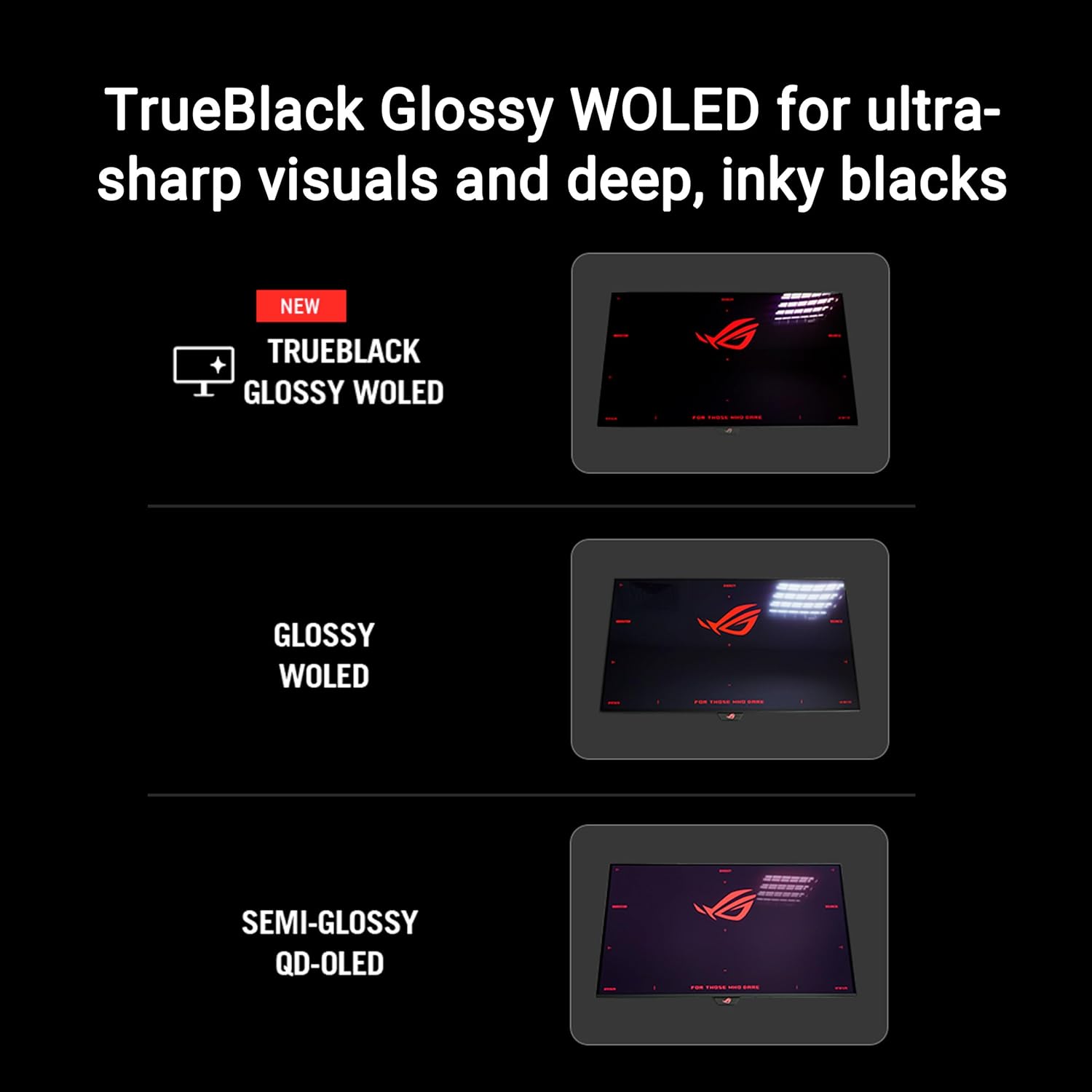
Image: Contents of the ASUS ROG Strix XG32UCWG monitor box, showing the monitor, DisplayPort cable, USB 3.2 cable, microfiber cloth, VESA mount kit, ROG pouch, ROG sticker, quick start guide, warranty card, and power cord with adapter.
3. Setup u Assemblea
3.1 It-twaħħil tal-Istand
Carefully remove the monitor from its packaging. Attach the quick release stand base to the monitor panel. Ensure it clicks securely into place. The stand offers ergonomic adjustments for height, swivel, and tilt.

Image: The monitor stand is shown with indicators for height adjustment (0-80mm), swivel (-15° to +15°), and tilt (-5° to +20°). The stand occupies 45% less desktop space compared to previous designs.
3.2 Immuntar mal-Ħajt VESA (Mhux obbligatorju)
If you prefer to wall-mount your monitor, use the provided VESA mount kit. Follow the instructions included with your VESA mount for proper installation. Ensure the VESA mount is compatible with the monitor's specifications.
4. Konnettività
The ASUS ROG Strix XG32UCWG monitor offers a variety of input and output ports for connecting to your devices.
- DisplayPort 1.4 (DSC): Għal input tal-vidjow b'riżoluzzjoni għolja u rata għolja ta' aġġornament.
- HDMI 2.1: Supports 4K resolution at high refresh rates, ideal for gaming consoles.
- USB-C (with 15W Power Delivery): Provides video input, data transfer, and power delivery for compatible devices.
- Portijiet USB 3.2: Għall-konnessjoni ta' periferali bħal tastieri, ġrieden, jew ħażna esterna.

Image: The back of the monitor displays the arrangement of connectivity ports, including DisplayPort 1.4 (DSC), HDMI 2.1, and USB-C with 15W Power Delivery.
5. It-tħaddim tal-Monitor
5.1 Funzjonalità tal-Modalità Doppja
The monitor supports a versatile dual-mode feature, allowing you to switch between two distinct display settings:
- 4K (3840 x 2160) at 165Hz: Ideal for high-resolution gaming and detailed content creation.
- FHD (1920 x 1080) at 330Hz: Provides ultra-smooth motion for competitive gaming where higher frame rates are critical.
Use the monitor's OSD (On-Screen Display) menu or the DisplayWidget Center software to switch between these modes.
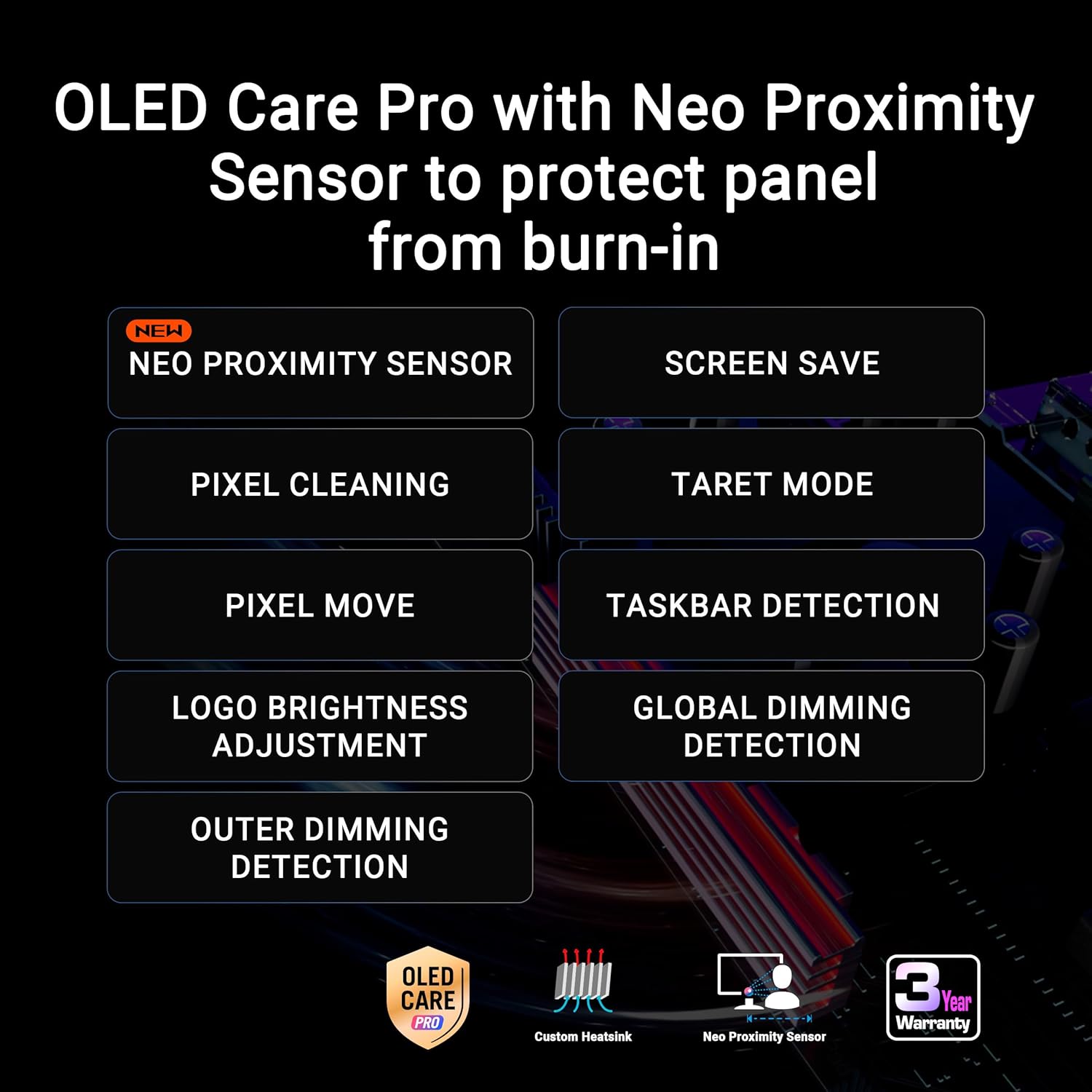
Image: A visual representation of the monitor's dual-mode capability, highlighting the 4K 165Hz and FHD 330Hz options, accessible via a hotkey.
5.2 ASUS OLED Care Pro
ASUS OLED Care Pro is a suite of features designed to protect the OLED panel and prevent burn-in. Key features include:
- Sensor tal-Prossimità Neo: Automatically detects when the user is away and switches to a black screen to reduce burn-in risk.
- Tindif tal-Pixels: A maintenance function that refreshes the pixels.
- Screen Save: Activates a screen saver to prevent static images from remaining on the screen for extended periods.
- Moviment tal-Pixel: Slightly shifts the image to prevent static pixel usage.
- Aġġustament tal-Luminożità tal-Logo: Reduces the brightness of static logos to minimize burn-in risk.
- Sejbien tat-Taskbar: Automatically dims the taskbar area to protect against burn-in.
- Sejbien ta' Dimming Globali: Adjusts overall screen brightness based on content.
- Modalità Mira: Allows specific areas of the screen to be highlighted or dimmed.
These features can be configured via the DisplayWidget Center software or the monitor's OSD menu.

Immaġni: Aktar minnview of ASUS OLED Care Pro features, emphasizing the Neo Proximity Sensor and other burn-in prevention technologies.
5.3 Ċentru DisplayWidget
The DisplayWidget Center is a software utility that allows you to easily access and adjust monitor settings using your mouse. This includes OLED Care Pro functions, color settings, game visuals, and other display parameters.
5.4 AI Assistant
The new AI Assistant provides enhanced gaming experiences with features such as:
- Crosshair Dinamiku: An on-screen crosshair that adapts to game environments.
- Spinta Dinamika tad-Dell: Enhances visibility in dark areas without overexposing bright regions.
- AI Visual Functions: Optimizes visual settings based on game content.
6. Karatteristiċi tal-Wiri
6.1 TrueBlack Glossy WOLED Panel
The monitor features an exclusive TrueBlack Glossy WOLED panel, which provides a zero-haze surface for exceptionally sharp imagery and deep, inky blacks. This technology enhances contrast and color vibrancy.

Image: A visual comparison demonstrating the deep blacks and sharp visuals achieved with the TrueBlack Glossy WOLED panel.
6.2 HDR Performance
The XG32UCWG is VESA DisplayHDR 400 True Black compliant, offering outstanding HDR performance. It supports a 99% DCI-P3 gamut and true 10-bit color with a Delta E < 2 color difference, making it suitable for professional photo and video editing in addition to gaming.
6.3 G-SYNC Compatible
This monitor is G-SYNC Compatible, ensuring a smooth, tear-free gaming experience by synchronizing the display's refresh rate with the GPU's frame rate.
7. Manutenzjoni u Kura
To ensure the longevity and optimal performance of your OLED monitor, regular maintenance and proper care are essential. Utilize the ASUS OLED Care Pro features as described in Section 5.2.
- Tindif: Use the provided microfiber cloth to gently wipe the screen. For stubborn smudges, slightly dampLaħlaħ id-drapp b'ilma distillat. Evita kimiċi ħarxa jew materjali li joborxu.
- Burn-in Prevention: Always enable OLED Care Pro features. Avoid displaying static images for extended periods. Utilize screen savers and power-saving modes when not actively using the monitor.
- Ventilazzjoni: Kun żgur li jkun hemm fluss tal-arja adegwat madwar il-monitor biex tevita li jisħon iżżejjed.
8 Issolvi l-problemi
If you encounter issues with your monitor, refer to the following basic troubleshooting steps:
- Ebda Qawwa: Ensure the power cord is securely connected to both the monitor and a working power outlet. Check the power adapter.
- Ebda Sinjal: Verify that the video cable (DisplayPort, HDMI, or USB-C) is correctly connected to both the monitor and your computer/device. Ensure the correct input source is selected on the monitor's OSD menu.
- Immaġni Teptip/Distorta: Check cable connections. Update your graphics card drivers. Try a different video cable.
- Burn-in Concerns: Ensure all ASUS OLED Care Pro features are enabled and functioning correctly.
- Kwistjonijiet tas-Software: If using DisplayWidget Center, ensure it is the latest version. Reinstall if necessary.
Għal soluzzjoni ta' problemi aktar avvanzata jew problemi persistenti, ikkonsulta l-appoġġ tal-ASUS websit jew ikkuntattja lis-servizz tal-konsumatur.
9. Speċifikazzjonijiet
| Karatteristika | Speċifikazzjoni |
|---|---|
| Brand | ASUS |
| Serje | XG32UCWG |
| Numru tal-Mudell tal-Oġġett | XG32UCWG |
| Daqs tal-Wiri tal-Iskrin Permanenti | 32 Pulzier |
| Riżoluzzjoni tal-Iskrin | 3840 x 2160 Pixel (4K UHD) |
| Riżoluzzjoni Massima tal-Iskrin | 3840 x 2160 Pixels |
| Proporzjon ta' l-aspett | 16:9 |
| Deskrizzjoni tal-wiċċ tal-iskrin | Glossy (TrueBlack Glossy WOLED) |
| Modalità Doppja | 4K@165Hz, FHD@330Hz |
| Ħin ta' Rispons | 0.03ms (GtG) |
| Teknoloġija ta' Sinkronizzazzjoni Adattiva | G-SYNC Kompatibbli |
| Konnettività | DisplayPort 1.4 (DSC), HDMI 2.1, USB-C (15W PD), USB 3.0 Ports |
| Piż tal-oġġett | 16.1 liri |
| Dimensjonijiet tal-Prodott (LxWxH) | 10.8 x 28.1 x 22.8 pulzieri |
| Kulur | ISWED |
10. Garanzija u Appoġġ
The ASUS ROG Strix XG32UCWG monitor comes with a 3-year warranty. For warranty claims, technical support, or service inquiries, please visit the official ASUS support website or contact your local ASUS customer service center. Keep your purchase receipt and warranty card for reference.