
Introduzzjoni
This manual provides detailed instructions for the proper use and maintenance of your MOVE SPEED SP20 Portable SSD. Please read this guide thoroughly before using the device to ensure optimal performance and longevity. The MOVE SPEED SP20 is a high-speed portable solid-state drive designed for reliable data transfer and storage across various devices.
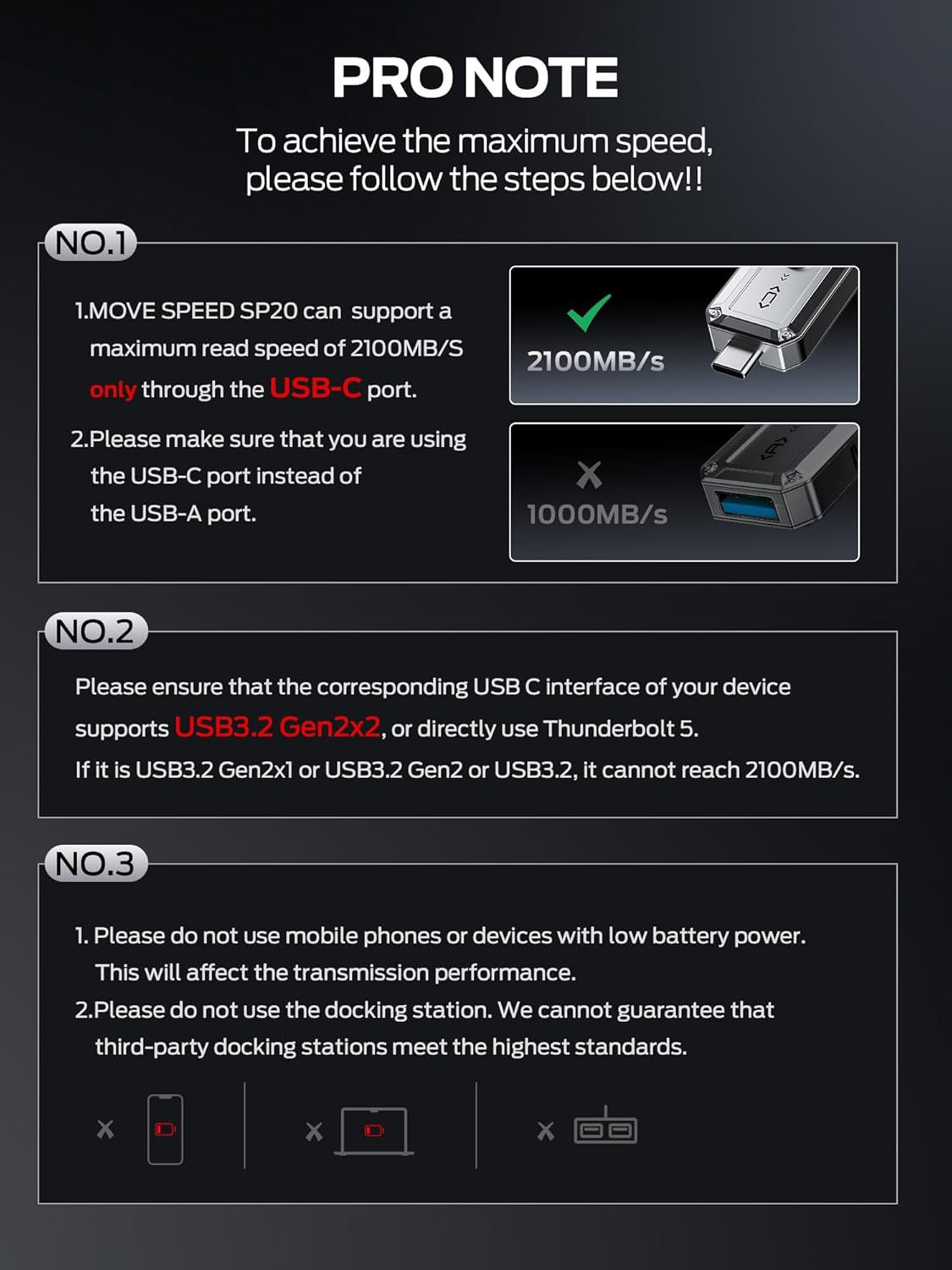
Image: The MOVE SPEED SP20 Portable SSD, showcasing its compact design and dual USB-C and USB-A connectors.
Setup u Konnessjoni
To achieve the maximum advertised speeds, specific connection requirements must be met. The device features both USB-C and USB-A interfaces for broad compatibility.
Interface Requirements for Maximum Speed
- Port USB-C: The MOVE SPEED SP20 supports a maximum read speed of 2100MB/s exclusively through its USB-C port.
- Port USB-A: The maximum read speed through the USB-A port is 1000MB/s.
For optimal performance (up to 2100MB/s), ensure your device's USB-C interface supports USB 3.2 Gen2x2 or directly use a Thunderbolt 5 interface. Devices with USB 3.2 Gen2x1, USB 3.2 Gen2, or standard USB 3.2 interfaces will not reach 2100MB/s. Avoid using docking stations, as the speed will be limited by the lowest interface speed in the chain.

Image: A visual guide detailing the required USB-C interface (USB 3.2 Gen2x2 or Thunderbolt 5) for achieving 2100MB/s read speed, compared to 1000MB/s for USB-A.
Konnessjoni ma 'Tagħmir
The dual interfaces allow for convenient data transfer between various devices:
- Interfaċċja tal-USB-A: Primarily for computers (Windows, Mac).
- Interface USB-C: For mobile phones (e.g., iPhone 15 Pro or later) and computers with compatible USB-C ports.

Image: The portable SSD connected to various devices, demonstrating its wide compatibility with USB-A and USB-C ports.
Istruzzjonijiet Operattivi
Trasferiment tad-Data
Simply plug the appropriate connector (USB-A or USB-C) into your device. The drive should be recognized automatically. You can then drag and drop files, or use your device's file management system to transfer data.
4K ProRes Video Capture
The MOVE SPEED SP20 supports 4K 60Hz ProRes HDR video capture for compatible devices such as the iPhone 15 series (iPhone 15 Pro or later). Ensure your device supports 4K video recording to utilize this feature.
Video: An official demonstration of the MOVE SPEED External SSD 2100MB/s, highlighting its features and usage.
Informazzjoni dwar il-Kapaċità
It is important to understand the difference between how hard drive manufacturers calculate capacity and how operating systems display it.
Decimal vs. Binary Calculation
Hard disk manufacturers calculate capacity in decimal (1TB = 1,000,000,000,000 bytes). Operating systems, however, display capacity in binary (1TB ≈ 1,099,511,627,776 bytes or 1024GB). This difference results in the actual available space being approximately 7% to 10% less than the nominal value.
Per example, a 2TB hard drive will typically show approximately 1.81TB on a computer. Additionally, formatting the drive will occupy a small amount of space, resulting in a final available capacity between approximately 1.75TB and 1.81TB. This is a standard practice across all hard drives and is not indicative of a quality issue.
Formatting and File Sistema
The hard disk needs to be formatted, and a file system (such as NTFS or FAT32) needs to be established. If your computer has a pre-installed system, there may be space reserved for system recovery partitions or pre-installed software by the manufacturer. File system overhead usually accounts for 1% to 3% of the total capacity. Recovery partitions can take up to 10 to 20GB for both Windows and Mac systems.

Image: A detailed chart explaining the capacity difference between manufacturer's decimal calculation and operating system's binary display, including space occupied by formatting.
Noti ta ’Prestazzjoni
Ultra-Fast Speed
The MOVE SPEED SP20, with its USB 3.2 Gen2x2 interface, offers a read speed of up to 2100MB/s and a write speed of 1800MB/s. These speeds are laboratory-derived. To achieve these rates, professional software, equipment, and a compatible USB 3.2 Gen2x2 or Thunderbolt 5 interface are required.

Image: A comparison graphic highlighting the significantly faster data transfer speeds of the MOVE SPEED SP20 for large files like 500GB Blu-ray movies.
TLC Reliable Transfer
The device utilizes TLC (Triple-Level Cell) NAND technology, which ensures stable and continuous data transfer, even when handling large files (over 100GB) or during demanding tasks like gaming. This technology helps maintain consistent speed throughout the transfer process, enhancing data security and user experience.

Image: An illustration of the internal High Quality TLC NAND and High Performance Controller, alongside a graph showing consistent write speeds for the SP20, preventing frame drops during 4K video recording.
Manutenzjoni
To ensure the longevity and optimal performance of your MOVE SPEED SP20 Portable SSD, consider the following:
- Tkeċċija Sikura: Dejjem oħroġ id-drajv mis-sistema operattiva tiegħek b'mod sigur qabel ma tiskonnettjah fiżikament biex tevita l-korruzzjoni tad-dejta.
- Temperatura: The device may get warm during extended use, especially during large data transfers. This is normal. Allow it to cool if it becomes excessively hot.
- Protezzjoni Fiżika: The zinc alloy enclosure provides shock resistance. However, avoid dropping the device from significant heights or subjecting it to extreme physical impact.
- Tindif: Uża drapp artab u niexef biex tnaddaf il-barra tad-drajv. Evita prodotti tat-tindif likwidi.
Issolvi l-problemi
Veloċitajiet ta' Trasferiment Baxxi
- Interface Check: Verify that you are using the USB-C port for maximum speed and that your device supports USB 3.2 Gen2x2 or Thunderbolt 5. Using a lower-spec port (e.g., USB 3.2 Gen2x1, USB 3.2, or USB-A) will result in lower speeds.
- Konnessjoni Diretta: Avoid using docking stations or USB hubs, as they can limit transfer speeds. Connect the SSD directly to a compatible port on your computer or phone.
- Qawwa tal-Apparat: Do not use the SSD with mobile phones or devices that have low battery power, as this can affect transmission performance.
- Kwalità tal-Kejbil: Ensure you are using a high-quality USB 3.2 Gen2x2 compatible cable.
Sewqan Mhux Rikonoxxut
- Erġa' pplaggja: Disconnect and reconnect the drive.
- Try Another Port: Test the drive with a different USB port on your device.
- Check Device Manager (Windows) / Disk Utility (Mac): Ensure the drive is visible in your system's disk management tools. It may need to be initialized or formatted if it's a new drive or if the file system is incompatible.
- Aġġornamenti tas-sewwieq: Kun żgur li d-drajvers tal-USB tal-kompjuter tiegħek huma aġġornati.
Speċifikazzjonijiet
| Kapaċità tal-Ħażna Diġitali | 2 TB |
| Interface Hard Disk | USB 3.0 (Note: Supports USB 3.2 Gen2x2 via Type-C) |
| Teknoloġija tal-Konnettività | USB |
| Brand | VELOĊITÀ TA 'ĊAQLIQ |
| Karatteristika Speċjali | Portable, Shock Resistant |
| Fattur tal-Formola tad-Disk Ribd | 1 Pulzier |
| Deskrizzjoni Hard Disk | Solid State Hard Drive |
| Apparati Kompatibbli | Desktop, Gaming Console, Laptop, Smartphone |
| Tip ta' Installazzjoni | Hard Drive Estern |
| Kulur | Fidda |
| Aqra Veloċità | 2100 Megabytes Kull Sekonda |
| Ikteb Veloċità | 1800 Megabytes Per Second (approximate, based on feature bullets) |
| Rata ta' Trasferiment tad-Data | 2100 Megabytes Kull Sekonda |
| Fattur tal-Formola | 2.5-il pulzier |
| Pjattaforma tal-Ħardwer | Mac, PC |
| Materjal tal-għeluq | Liga taż-żingu |
| Piż tal-oġġett | 48.4 Gramm |
| Dimensjonijiet tal-oġġett (L x W x Ħxuna) | 3"T x 0.9"W x 0.5"Ħ |
Garanzija u Appoġġ
MOVE SPEED provides a one-year warranty for this product. If you encounter any quality problems, please contact MOVE SPEED customer support for assistance. They are committed to arranging an immediate replacement if necessary.
For further support, please refer to the official MOVE SPEED webis-sit jew ikkuntattja lis-servizz tal-konsumatur tagħhom direttament. L-informazzjoni ta' kuntatt tipikament tista' tinstab fuq l-imballaġġ tal-prodott jew fuq il-preżenza online uffiċjali tal-marka.