
1. Introduzzjoni
The ALIGATOR AZA930B is a mobile phone designed with ease of use in mind, particularly for seniors. It features a large keypad, a clear 2.8-inch color display, and essential safety functions such as an SOS button and SOS locator. This manual provides detailed instructions on how to set up, operate, maintain, and troubleshoot your device to ensure optimal performance and safety.
2. Informazzjoni dwar is-Sigurtà
Please read this section carefully before using your phone to ensure safe and proper operation.
- Sigurtà tal-batterija: Use only ALIGATOR approved batteries and chargers. Do not short-circuit, puncture, or expose the battery to extreme temperatures. Dispose of batteries properly.
- Iċċarġjar: The phone does not include a charger. Use a compatible USB-C charger (recommended model ALIGATOR CHA0047) with a power output of 2.5-3W. Avoid charging in damp kundizzjonijiet.
- Protezzjoni tas-Smigħ: Evita smigħ għal żmien twil f'livelli għoljin ta' volum biex tevita ħsara fis-smigħ.
- Sigurtà tas-Sewqan: Always prioritize driving safety. Use hands-free accessories and obey all local laws and regulations regarding mobile phone use while driving.
- Apparat Mediku: Maintain a safe distance between the phone and medical devices such as pacemakers. Consult your physician and the medical device manufacturer for specific guidelines.
- Reżistenza għall-Ilma: Dan it-telefon mhuwiex reżistenti għall-ilma. Evita l-espożizzjoni għal-likwidi.
3. Kontenut tal-Pakkett
Ivverifika li l-oġġetti kollha huma preżenti fil-pakkett tal-prodott tiegħek:
- ALIGATOR AZA930B Mobile Phone
- Baċir tal-Iċċarġjar
- Manwal għall-Utent (dan id-dokument)
- Note: Charger is not included and must be purchased separately.
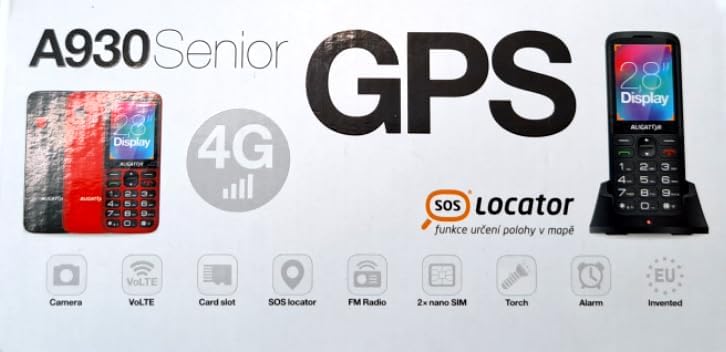
Figure 3.1: Product packaging illustrating the phone, charging dock, and various features such as 4G connectivity, GPS, SOS Locator, camera, VoLTE, card slot, FM radio, torch, and alarm. The box also indicates the 2.8-inch display.
4. Setup
4.1. Daħħal SIM Cards
The ALIGATOR AZA930B supports Dual SIM (2 x Nano SIM) functionality. To insert SIM cards:
- Itfi t-telefon.
- Neħħi l-qoxra ta 'wara u l-batterija.
- Locate the SIM card slots. Insert your Nano SIM cards into the designated slots, ensuring the gold contacts face down and the cut corner aligns correctly.
- Ibdel il-batterija u l-qoxra ta 'wara.
4.2. Daħħal Karta Mikro SD
The phone supports a Micro SD memory card up to 256 GB for additional storage.
- Follow steps 1 and 2 from "4.1. Inserting SIM Cards".
- Locate the Micro SD card slot. Insert the Micro SD card with the gold contacts facing down until it clicks into place.
- Ibdel il-batterija u l-qoxra ta 'wara.
4.3. Iċċarġjar Inizjali
Before first use, fully charge the phone's 1700 mAh Li-ion battery.
- Connect the USB-C cable (not included) to the phone's USB-C port or place the phone in the charging dock.
- Connect the other end of the cable to a compatible charger (e.g., ALIGATOR CHA0047, 2.5-3W) or a powered USB port.
- The charging indicator will illuminate. A full charge may take several hours.

Figure 4.1: The ALIGATOR AZA930B phone placed in its dedicated charging dock. The phone's screen shows the current time and network signal indicators.

Figure 4.2: Detail from the product box, explicitly showing an icon indicating that a charger is not included and specifying a recommended charger power of 2.5-3W.
5. Istruzzjonijiet Operattivi
5.1. Power On/Off
- Biex Tixgħel: Agħfas u żomm il-buttuna Power/End Call (buttuna ħamra) sakemm l-iskrin jixgħel.
- Biex Tifi: Agħfas u żomm il-buttuna Power/End Call sakemm jidhru l-għażliet tat-tifi, imbagħad agħżel "Power off".
5.2. Funzjonijiet Bażiċi ta' Sejħiet
- Tagħmel Sejħa: Enter the phone number using the large keypad and press the Call button (green button).
- Tweġiba għal Sejħa: When the phone rings, press the Call button (green button).
- Tmiem Sejħa: Agħfas il-buttuna tal-Enerġija/Tmiem tas-Sejħa (buttuna ħamra).
- Ħieles bl-idejn: During a call, activate hands-free mode via the on-screen option or a dedicated button if available.
5.3. SOS Button and SOS Locator
The SOS button is a critical safety feature, allowing quick contact in emergencies.
- Buttuna SOS: Located on the back of the phone (often red). Press and hold this button to activate the emergency sequence.
- SOS Presets: You can set up to 5 preset emergency contacts. When the SOS button is pressed, the phone will automatically call these numbers in sequence and send an emergency SMS.
- SOS Locator: This function sends the phone's location via SMS to the emergency contacts after the SOS button is pressed. The recipient can then view the location on a map via a web link provided in the SMS. This feature utilizes both GSM and GPS for location accuracy.

Figura 5.1: Wara view of the ALIGATOR AZA930B, showing the prominent red SOS button and the speaker grille for clear audio.

Figura 5.2: Wara angolata view of the ALIGATOR AZA930B, demonstrating the activated flashlight feature.
5.4. "Zachranka" Rescue Application
The "Zachranka" application is a mobile emergency call application pre-installed on the device.
- It provides quick contact with emergency medical services or mountain rescue.
- The application is valid in Austria, Hungary, the Czech Republic, and in the territories of the Slovak mountains.
- For more information, refer to the "Zachranka" app's official resources.

Figura 5.3: Quddiem u wara views of the ALIGATOR AZA930B, accompanied by the "Zachranka" rescue application logo, indicating its integration with the device.
5.5. Karatteristiċi oħra
- Ktieb tat-telefon: Aħżen sa 500 kuntatt.
- Messaġġi: Send and receive SMS messages (memory for 100 SMS). Supports sending photos via MMS.
- Multimedja:
- Radju FM: Listen to FM radio stations.
- Media Player: Ilgħab awdjo u vidjo files stored on the phone or Micro SD card.
- Reġistratur tal-Vuċi: Irrekordja memorandum bil-vuċi.
- Flashlight: Attiva l-flashlight integrata għad-dawl.
- Għodod: Includes Alarm, Calculator, and SIM toolkit support.
- Bluetooth: Qabbad ma' headsets Bluetooth jew apparati oħra.
- Allarm tal-Vibrazzjoni: Set the phone to vibrate for incoming calls or notifications.
- Melodiji: Choose from 10+1 pre-installed melodies.
- Aġġustament Awtomatiku tal-Ħin: The phone can automatically adjust its time.

Figura 5.4: Quddiem view of the ALIGATOR AZA930B, highlighting its user-friendly large keypad and vibrant color display.
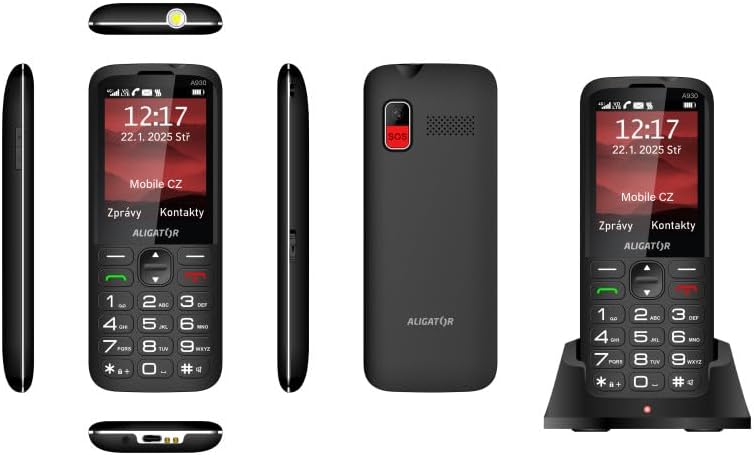
Figura 5.5: Komprensiva views of the ALIGATOR AZA930B, illustrating its design from the top, sides, front, back, and when seated in its charging dock.
6. Manutenzjoni
- Tindif: Uża drapp artab u niexef biex tnaddaf il-wiċċ tat-telefon. Evita li tuża kimiċi ħarxa jew materjali li joborxu.
- Kura tal-batterija: To prolong battery life, avoid fully discharging the battery frequently. Store the phone in a cool, dry place if not used for extended periods.
- Ħażna: Żomm it-telefon 'il bogħod minn temperaturi estremi, dawl tax-xemx dirett, u ambjenti bit-trab.
7 Issolvi l-problemi
| Problema | Kawża Possibbli | Soluzzjoni |
|---|---|---|
| It-telefon ma jixgħelx. | Il-batterija hija eżawrita jew mhux imdaħħla sew. | Iċċarġja l-batterija. Kun żgur li l-batterija hija mdaħħla sew. |
| L-ebda sinjal tan-netwerk. | SIM card not inserted correctly or out of network coverage. | Reinsert SIM card. Move to an area with better network coverage. |
| Ma nistax nagħmel jew nirċievi telefonati. | No credit, SIM card issue, or network problem. | Check your account balance. Verify SIM card insertion. Contact your network provider. |
| Il-buttuna SOS mhux qed taħdem. | SOS numbers not set up or incorrect. | Ensure SOS numbers are correctly configured in settings. Check network signal. |
| Il-batterija tiskula malajr. | High usage, background apps, or aging battery. | Reduce screen brightness. Close unnecessary applications. Consider replacing the battery if it's old. |
8. Speċifikazzjonijiet
| Karatteristika | Dettall |
|---|---|
| Numru tal-Mudell | AZA930B |
| Wiri | Wiri bil-Kulur TFT ta' 2.8 pulzieri |
| Slots tal-Kard SIM | Dual SIM (2 x Nano SIM) |
| Appoġġ tal-Kard tal-Memorja | Mikro SD sa 256 GB |
| Batterija | 1700 mAh Li-ion |
| Ħin tat-Tkellem | Sa 480 minuta |
| Ħin ta' Standby | Sa 10 jum |
| Kamera | 1.9 MP |
| Konnettività | 4G/LTE/VoLTE, Bluetooth |
| Port tal-Iċċarġjar | USB-C |
| Jack tal-headphone | 3.5 mm |
| Dimensjonijiet | 14.3 x 5.8 x 1.36 ċm |
| Piż | 95 g |
| Sistema Operattiva | Symbian 9.1 |
| Kulur | Iswed |
Nota: L-ispeċifikazzjonijiet huma soġġetti għal tibdil mingħajr avviż minn qabel.
9. Garanzija u Appoġġ
ALIGATOR products are designed and manufactured to the highest quality standards. For detailed warranty information, including terms, conditions, and duration, please refer to the warranty card included with your product or visit the official ALIGATOR websit.
For technical support, service, or inquiries regarding your ALIGATOR AZA930B mobile phone, please contact ALIGATOR customer service or visit their official support channels. Keep your purchase receipt and product serial number (IMEI) handy when seeking support.
- IMEI 1: 357140835088496
- IMEI 2: 357140835088504
- Barcode/UPC: 8596426108267