
1. Introduzzjoni
This manual provides essential information for setting up, operating, maintaining, and troubleshooting your GIGABYTE AORUS Elite 16 BWH gaming laptop. The AORUS Elite 16 BWH is designed for high-performance gaming and demanding applications, featuring an Intel Core Ultra 9 processor, NVIDIA GeForce RTX 5070 laptop GPU, a 16-inch WQXGA 165Hz display, and Windows 11 Pro.
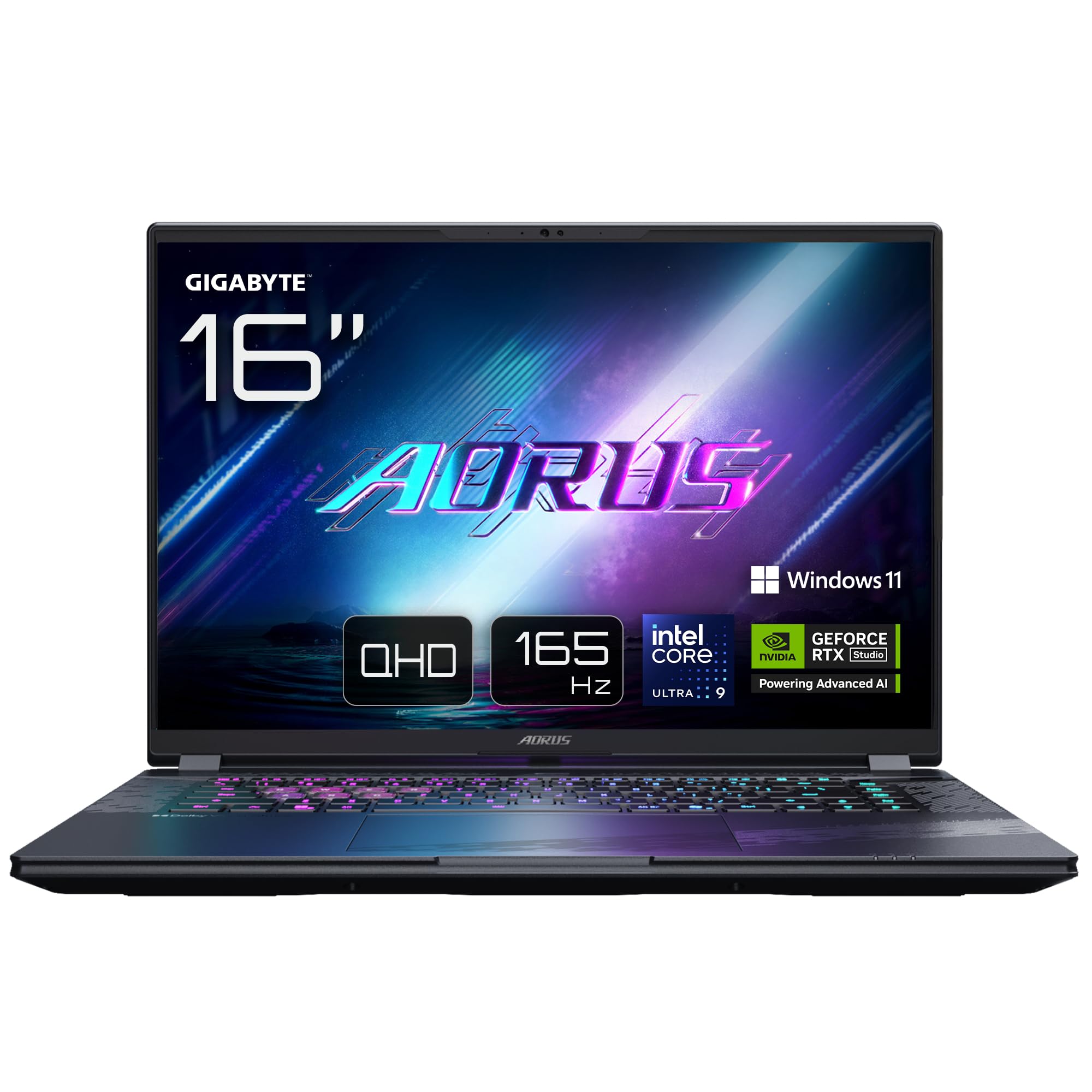
Image: The GIGABYTE AORUS Elite 16 BWH gaming laptop, showcasing its open display and keyboard.
2. Setup
2.1 Tneħħija tal-kaxxa u Spezzjoni Inizjali
Carefully remove the laptop and all accessories from the packaging. Verify that all components listed in the "What's in the Box" section are present and undamaged.
- GIGABYTE AORUS ELITE 16 BWHC3FRC65SP Laptop
- Adapter tal-Enerġija u Cable
- Dokumentazzjoni (dan il-manwal, karta tal-garanzija)
2.2 Qawwa tal-Konnessjoni
Connect the power adapter to the laptop's power input port and then plug the power cable into an electrical outlet. It is recommended to fully charge the battery before initial use.
2.3 L-Ewwel Qawwa
Agħfas il-buttuna tal-qawwa biex tixgħel il-laptop. Segwi l-istruzzjonijiet fuq l-iskrin biex tlesti l-proċess tas-setup tal-Windows 11 Pro, inkluż l-għażla tal-lingwa, il-konnessjoni tan-netwerk, u l-ħolqien tal-kont tal-utent.
2.4 Konnessjoni tal-Periferali u n-Netwerk
The laptop features various ports for connecting external devices and networks.
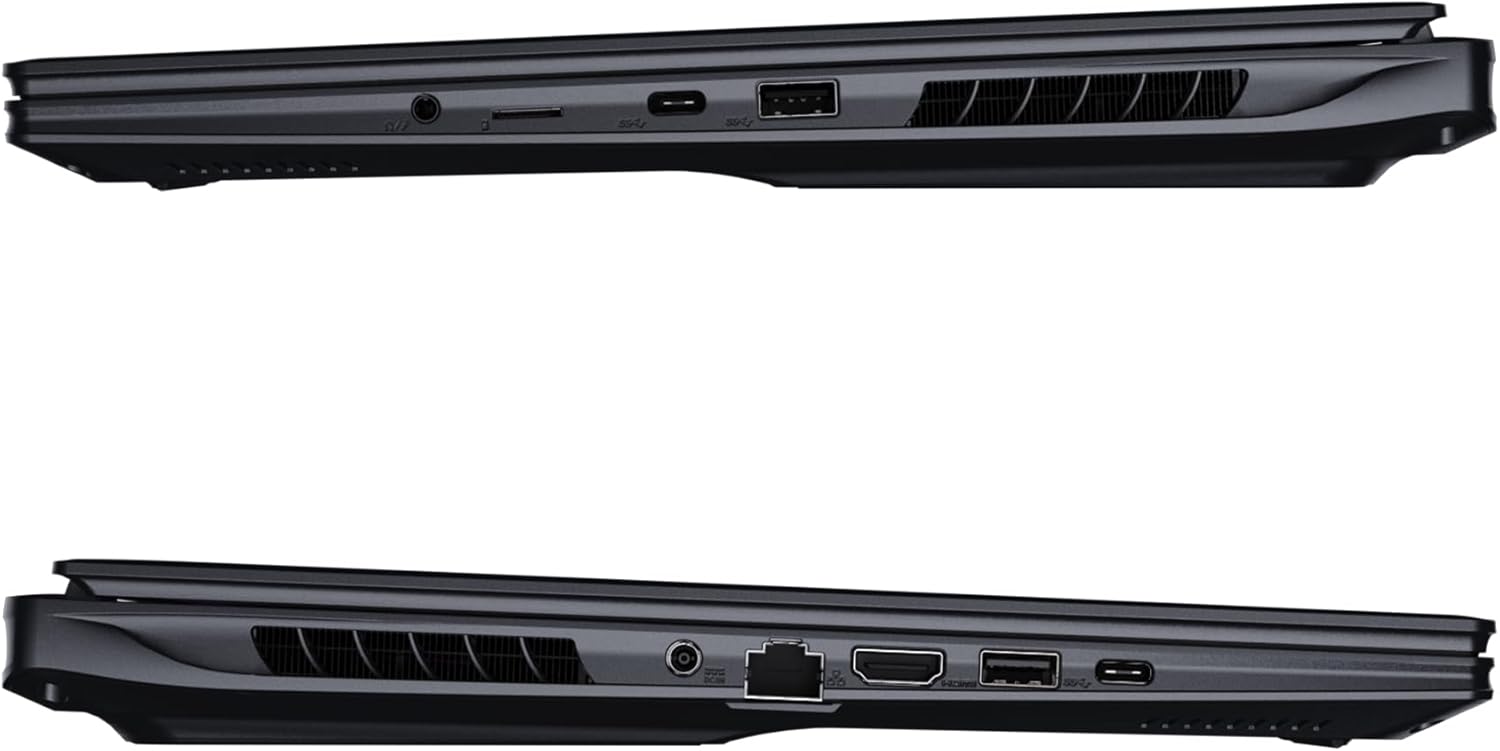
Immaġni: Ġenb view tal-laptop li juri l-portijiet disponibbli għall-konnettività.
- Portijiet USB: Connect USB devices such as mice, keyboards, or external storage.
- Port HDMI: Connect to an external display or TV.
- Port Thunderbolt 4: Għal trasferiment ta' dejta b'veloċità għolja u output tal-wiri.
- Port Ethernet: Għal konnessjoni ta' netwerk bil-fili.
- Jack tal-headphone: Għall-ħruġ tal-awdjo għal headphones jew kelliema esterni.
- Wi-Fi 7: Connect to wireless networks via the integrated Wi-Fi 7 module.
- Bluetooth 5.4: Imqabbad ma' apparati li jaħdmu bil-Bluetooth.
3. It-Tħaddim tal-Laptop Tiegħek
3.1 Karatteristiċi tal-Wiri
Your AORUS Elite 16 BWH features a 16-inch WQXGA (2560x1600) IPS display with a 165Hz refresh rate and 16:10 aspect ratio, offering a wide viewing experience. It supports Dolby Vision for enhanced visual quality and is Pantone validated for color accuracy.

Image: The laptop's 16:10 aspect ratio display, highlighting its IPS panel and Pantone validation.
3.2 Tastiera u Touchpad
The laptop is equipped with a backlit keyboard for comfortable typing in various lighting conditions and a responsive touchpad for navigation.
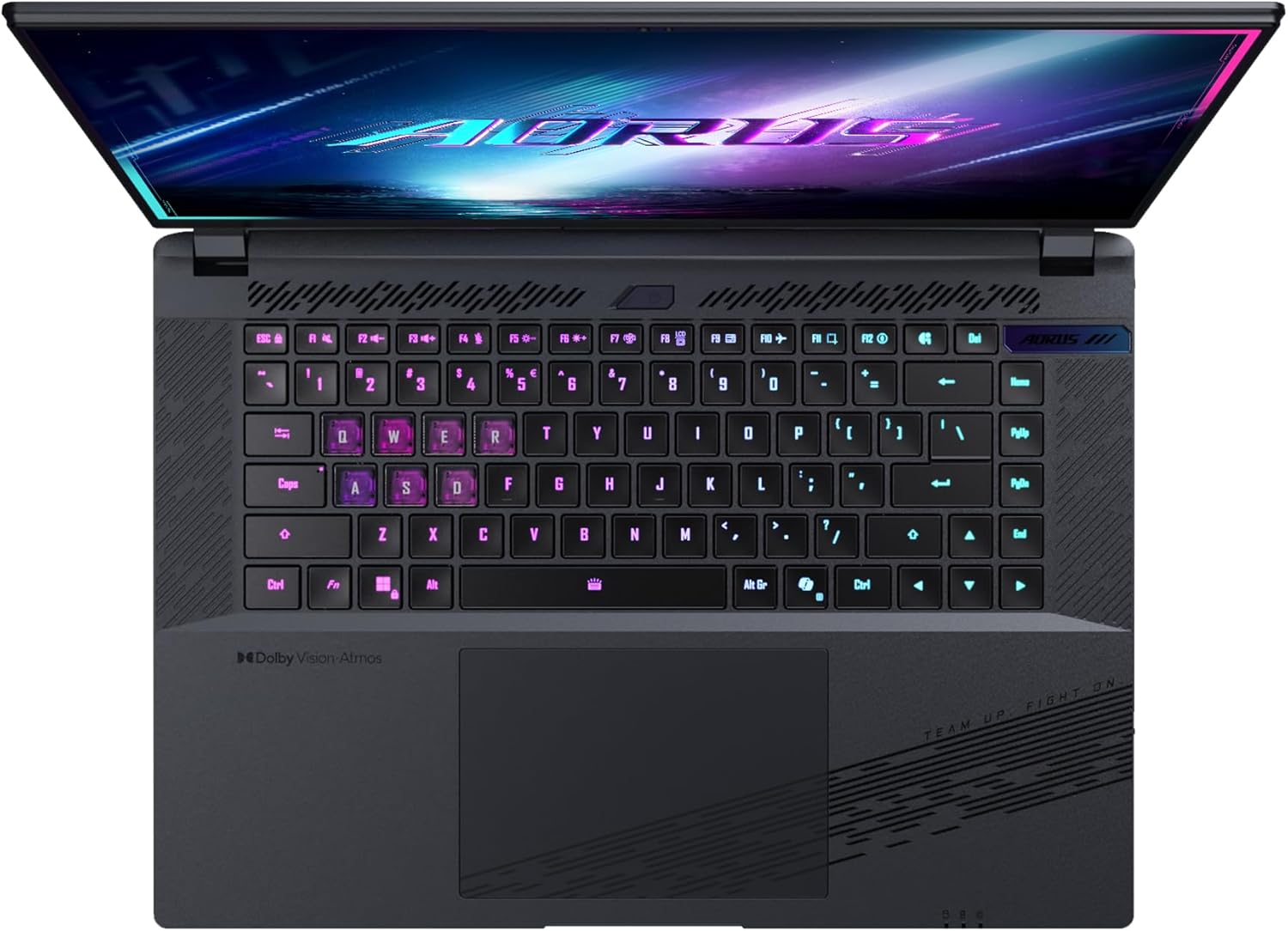
Immaġni: Minn fuq għal isfel view tat-tastiera tal-laptop, wirjaasing its backlit keys.
The keyboard also features a dedicated Copilot Key for quick access to AI functionalities in Windows 11.

Image: Close-up of the keyboard, highlighting the Copilot Key for AI features.
3.3 Sistema Awdjo
Experience immersive audio with Dolby Atmos support and integrated 2W speakers. The laptop also includes a built-in microphone for communication.

Image: Visual representation of Dolby Atmos and Dolby Vision audio and visual enhancements.
3.4 Karatteristiċi tal-Prestazzjoni
The AORUS Elite 16 BWH is powered by an Intel Core Ultra 9 processor with an integrated NPU for AI acceleration and an NVIDIA GeForce RTX 5070 laptop GPU, ensuring high performance for gaming and demanding tasks. It also features Advanced Optimus with DDS Technology for optimized graphics performance.

Immaġni: Dettaljata view of the Intel Core Ultra 9 processor chip.
Immaġni: Dettaljata view of the NVIDIA GeForce RTX 50 Series laptop GPU chip.
3.5 Aġent tal-AI GiMATE
Utilize GiMATE, your personal AI agent, to optimize performance, manage smart cooling, enhance privacy, control power settings, and improve audio and voice functionalities.

Image: GiMATE AI Agent interface showing various optimization features.
4. Manutenzjoni
4.1 Sistema tat-tkessiħ
The laptop features the WINDFORCE Infinity cooling system to maintain optimal temperatures during intensive use. Ensure the vents are clear of obstructions to allow proper airflow.

Image: Representation of the WINDFORCE Infinity cooling system.
4.2 Tindif
Uża drapp artab u mingħajr suf biex tnaddaf l-iskrin u l-uċuħ ta' barra. Għal marki persistenti, dampen the cloth slightly with water or a screen-cleaning solution. Avoid harsh chemicals.
4.3 Kura tal-Batterija
Biex ittawwal il-ħajja tal-batterija, evita temperaturi estremi u tħallix il-laptop iċċarġjat kompletament jew skarikat kompletament għal perjodi twal.
4.4 Aġġornamenti tas-Software
Regularly update your Windows operating system, drivers, and GIGABYTE software to ensure optimal performance and security.
5 Issolvi l-problemi
5.1 Kwistjonijiet tal-Enerġija
- Il-laptop ma jixgħelx: Kun żgur li l-adapter tal-enerġija huwa konness sew u li s-sokit jaħdem sew. Iċċekkja l-livell tal-iċċarġjar tal-batterija.
- Il-batterija mhix qed tiċċarġja: Iċċekkja li l-adapter tal-enerġija u l-kejbil mhumiex imħassra. Ipprova sokit differenti.
5.2 Kwistjonijiet tal-Wiri
- Ebda wiri: Connect an external monitor to check if the issue is with the laptop's screen. Ensure the laptop is powered on.
- Wirja teptip jew distorta: Aġġorna s-sewwieqa tal-grafika. Iċċekkja l-konnessjonijiet tal-kejbil tad-displej jekk qed tuża monitor estern.
5.3 Kwistjonijiet ta' Konnettività
- Il-Wi-Fi mhux qed jikkonnettja: Iċċekkja jekk il-Wi-Fi huwiex attivat fis-settings tal-Windows. Erġa' ibda r-router u l-laptop tiegħek.
- Apparat Bluetooth mhux qed jitqabbad: Kun żgur li l-apparat jinsab fil-modalità ta' tqabbil u fil-medda tiegħu. Aġġorna d-drajvers tal-Bluetooth.
5.4 Kwistjonijiet Ġenerali tal-Prestazzjoni
- Prestazzjoni bil-mod: Close unnecessary applications. Check for malware. Ensure sufficient free disk space.
- Is-sħana żejda: Ensure cooling vents are clear. Use the laptop on a hard, flat surface.
For more complex issues, refer to the GIGABYTE support websit jew ikkuntattja lis-servizz tal-konsumatur.
6. Speċifikazzjonijiet
| Karatteristika | Dettall |
|---|---|
| Brand | GIGABYTE |
| Isem tal-Mudell | AORUS ELITE 16 BWHC3FRC65SP |
| Daqs tal-Iskrin | 16 Pulzier |
| Kulur | Griż |
| Daqs tal-Hard Disk | 2000 GB (2x 1TB SSD Gen4) |
| Mudell tas-CPU | Intel Core Ultra 9 275HX |
| Daqs tar-RAM Installata | 32 GB DDR5 |
| Sistema Operattiva | Windows 11 Pro |
| Karatteristika Speċjali | Backlit Keyboard, Memory Card Slot |
| Deskrizzjoni tal-Kard Grafika | Dedikat |
| Koproċessur tal-Grafika | NVIDIA GeForce RTX 5070 |
| Hard Disk Technology | SSD |
| Piż tal-oġġett | 2300 Gramm |
| Webcam Capability | Yes (Frontal) |
| Daqs tar-RAM tal-Karta tal-Grafika | 8 GB GDDR6 |
| RAM Massima Appoġġjata | 64 GB |
| Kontenut tal-Enerġija tal-Batterija | 99 Watt-hours (Lithium-polymer, 4 cells) |
| Konnettività | Bluetooth 5.4, Ethernet (10/1000 Mbit/s), HDMI (1 port), Thunderbolt 4 (1 port), USB 3.2 Gen 2 (2 ports), Wi-Fi 7 (802.11.be) |
| Veloċità tal-Proċessur | 2.7 GHz (Max 5.4 GHz) |
| Numru ta' Proċessuri | 24 |
| Riżoluzzjoni tal-Iskrin | 2560 x 1600 pixel (WQXGA) |
| Tip ta 'Wiri | IPS LCD |
| Karatteristiċi Awdjo | Dolby Atmos, 2x 2W Integrated Speakers, Integrated Microphone |
7. Informazzjoni dwar Garanzija
Your GIGABYTE AORUS Elite 16 BWH laptop comes with a Garanzija limitata ta 'sena. This warranty covers manufacturing defects and hardware malfunctions under normal use. Please retain your proof of purchase for warranty claims. For detailed terms and conditions, refer to the warranty card included with your product or visit the official GIGABYTE websit.
8. Appoġġ
For technical assistance, driver downloads, and further product information, please visit the official GIGABYTE support websit. Tista’ ssib ukoll FAQs u fora tal-komunità hemmhekk.
- Uffiċjali tal-GIGABYTE Websit: www.gigabyte.com
- Servizz tal-Klijent: Refer to your regional GIGABYTE websit għal informazzjoni ta 'kuntatt lokali.