
1. Introduzzjoni
L-Innex DS200 huwa skaner tal-kotba USB professjonali ddisinjat għad-diġitalizzazzjoni effiċjenti ta’ diversi dokumenti, inklużi kotba, rivisti, u karti sfużi. Għandu kamera ta’ 26MP, kapaċità ta’ skennjar A3, u funzjonijiet avvanzati ta’ softwer biex itejjeb il-kwalità tal-iskennjar u l-fluss tax-xogħol. Dan il-manwal jipprovdi struzzjonijiet dettaljati għat-twaqqif, it-tħaddim, u l-manutenzjoni tal-iskaner DS200 tiegħek.

Figura 1.1: Skaner Innex DS200 waqt l-operazzjoni b'ktieb miftuħ.
2. Kontenut tal-Pakkett
Iċċekkja li l-oġġetti kollha elenkati hawn taħt huma inklużi fil-pakkett tiegħek. Jekk xi oġġetti huma neqsin jew bil-ħsara, jekk jogħġbok ikkuntattja l-appoġġ għall-klijenti.
- Unità tal-Iskaner Innex DS200
- Skennjar Pad
- Cable USB
- Adapter tal-Enerġija (Tip A)
- Plakek tal-Enerġija (Tip C, Tip G)
- Buttuna tal-idejn
- Pedal tas-saqajn
- Adapter (USB-C għal USB-A)
- Gwida Quick Start
- Karta tas-Servizz
- Dikjarazzjoni tal-GPSR
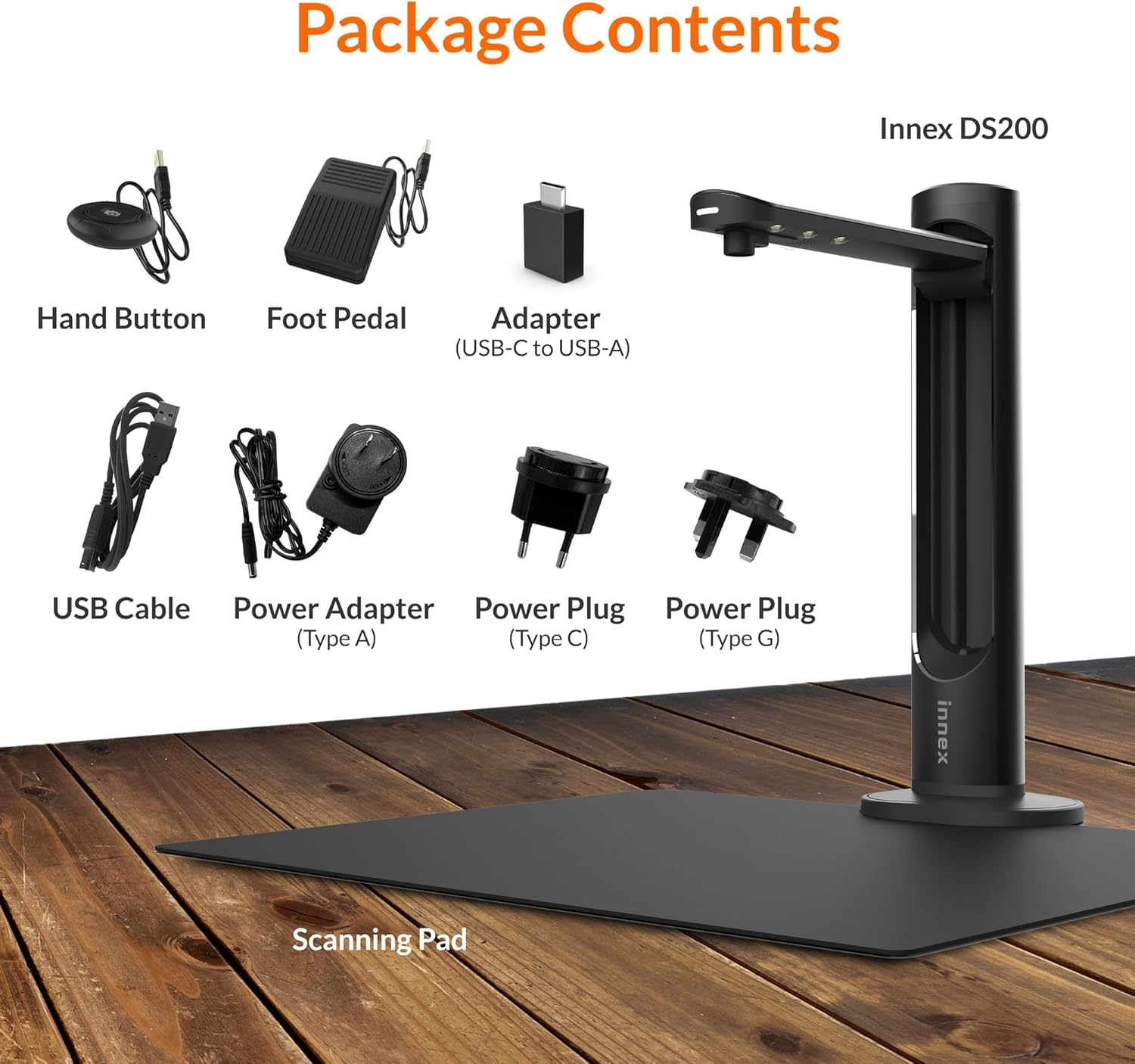
Figura 2.1: Kontenut tal-pakkett Innex DS200.
3. Setup
- Ħoll il-Komponenti: Neħħi bir-reqqa l-oġġetti kollha mill-imballaġġ.
- Pożizzjona l-Iskaner: Poġġi l-unità tal-iskaner Innex DS200 fuq wiċċ stabbli u ċatt.
- Poġġi l-Iskannjar fuq il-Pad: Poġġi l-kuxxinett iswed tal-iskannjar direttament taħt ir-ras tal-iskannjar. Kun żgur li jkun iċċentrat u ċatt.
- Qabbad l-Enerġija: Qabbad l-adapter tal-enerġija mal-iskaner u daħħalha f'sokit elettriku. Uża l-plagg tal-enerġija xieraq għar-reġjun tiegħek.
- Qabbad mal-Kompjuter: Qabbad l-iskaner mal-kompjuter tiegħek billi tuża l-kejbil USB provdut. Jekk il-kompjuter tiegħek għandu biss portijiet USB-C, uża l-adapter USB-C għal USB-A inkluż.
- Installa Software: Niżżel u installa s-softwer Innex Scan mill-websajt uffiċjali ta' Innex websit. Segwi l-istruzzjonijiet fuq l-iskrin għall-installazzjoni. Is-softwer huwa kompatibbli mal-Windows u l-macOS.
- Qabbad Aċċessorji: Ipplaggja l-buttuna tal-idejn u l-pedala tas-saqajn fil-portijiet magħżula fuq l-unità tal-iskaner.
4. Istruzzjonijiet Operattivi
4.1. Proċedura Bażika ta' Skennjar
- Niedi s-Softwer tal-Iskennjar Innex: Iftaħ l-applikazzjoni Innex Scan fuq il-kompjuter tiegħek.
- Dokument tal-Post: Poġġi d-dokument jew il-ktieb li tixtieq tiskennja fuq il-pjattaforma tal-iskennjar. Kun żgur li jinsab fiż-żona tal-iskennjar. Il-gwida tal-lejżer tista' tgħin bl-allinjament.
- Aġġusta Settings: Fis-softwer, agħżel il-modalità tal-iskennjar mixtieqa tiegħek (eż. Dokument, Ktieb, Ritratt) u aġġusta s-settings bħall-modalità tal-kulur, ir-riżoluzzjoni, u l-format tal-output.
- Ibda l-Iskennjar: Ibda l-iskennjar billi tuża wieħed mill-metodi disponibbli: il-buttuna tal-qbid tas-softwer, il-buttuna tal-idejn, jew il-pedala tas-saqajn.
- Review u Ħlief: Wara l-iskennjar, erġa'view l-immaġni fis-softwer. Applika kwalunkwe korrezzjoni meħtieġa u ssejvja l- file għall-post u l-format preferut tiegħek.

Figura 4.1: L-użu tal-gwida tal-lejżer għall-allinjament tad-dokumenti.

Figura 4.2: Għażliet multipli biex tinbeda skenn.
4.2. Karatteristiċi tas-softwer
Is-softwer Innex Scan jinkludi diversi karatteristiċi biex jottimizza l-esperjenza tal-iskennjar tiegħek:
- Iċċattjar tal-Kurva: Jikkoreġi awtomatikament il-kurvatura tal-paġni tal-ktieb għal skens ċatti u leġġibbli.
- OCR (Rikonoxximent Ottiku tal-Karattri): Jikkonverti immaġni skenjati f'test li jista' jiġi editjat u mfittex f'aktar minn 120 lingwa.
- Qtugħ Awtomatiku: Jidentifika u jaqta’ t-truf tad-dokument awtomatikament.
- Sejbien ta' Dawwar il-Paġna: Għall-iskennjar ta' kotba, is-softwer jista' jinduna meta paġna tkun inqalbet u awtomatikament jibda l-iskennjar li jmiss.
- Tneħħija tas-Swaba': Ineħħi b'mod intelliġenti immaġni ta' swaba' li qed iżommu l-paġni 'l isfel waqt l-iskennjar.
- Modalità ta' Skennjar Multiplu: Jippermetti l-iskennjar ta' diversi oġġetti żgħar simultanjament, bħal business cards jew ritratti, u jisseparahom f'partijiet individwali files.
- Modalità tal-Viżwalizzatur: Jippermetti lill-iskaner jiffunzjona bħala kamera tad-dokumenti għal preżentazzjonijiet jew dimostrazzjonijiet diretti.
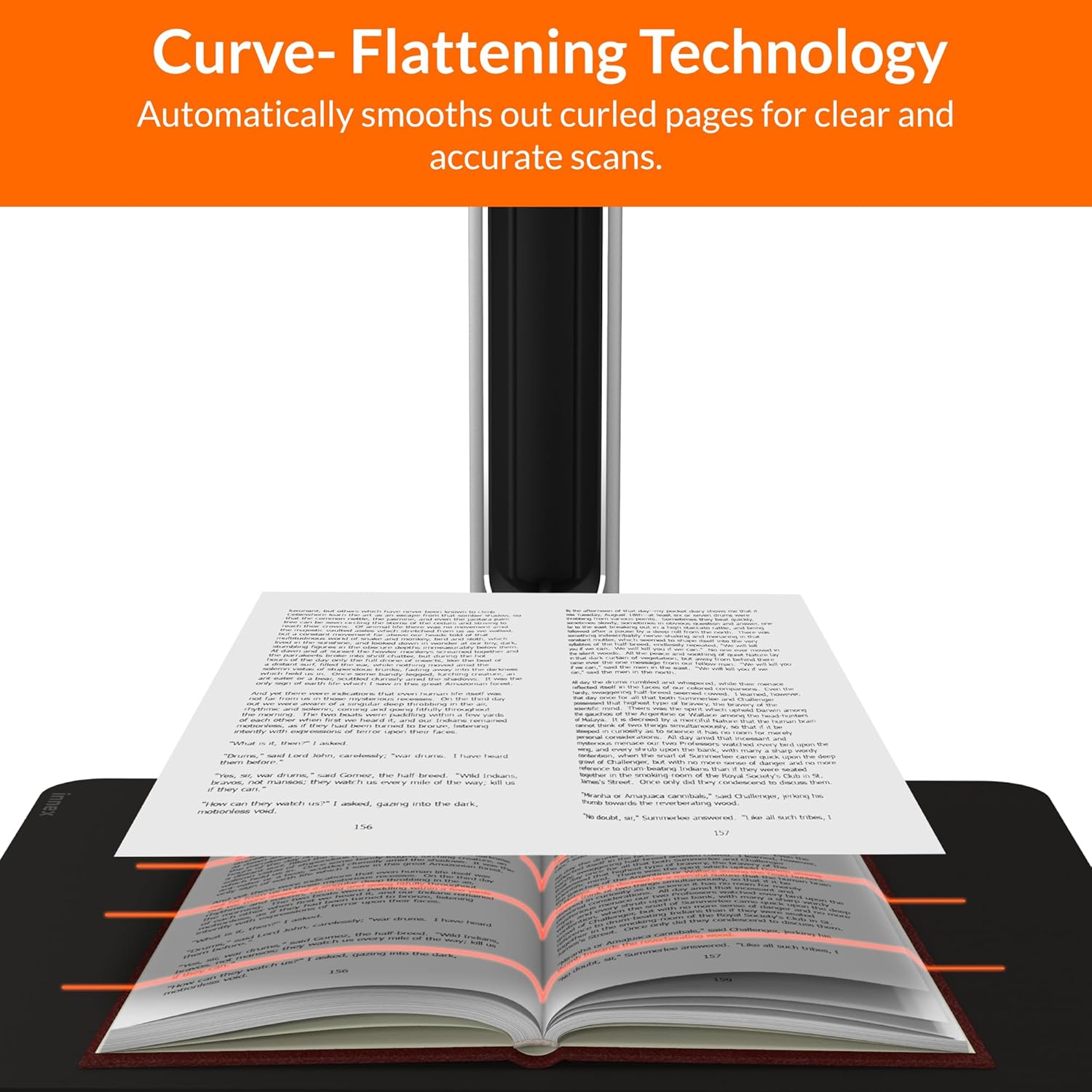
Figura 4.3: It-Teknoloġija tal-Iċċattjar tal-Kurva fl-użu.

Figura 4.4: Għażliet ta' Rikonoxximent u esportazzjoni tat-Test OCR.

Figura 4.5: Aktarview tal-karatteristiċi tas-softwer Innex Scan.
4.3. Għażliet ta' Esportazzjoni
L-Innex DS200 jappoġġja diversi formati ta' esportazzjoni kemm għall-immaġni kif ukoll għat-test files:
- Immaġni Files: JPEG, PNG, BMP, TIFF
- Dokument Files: PDF (li jista' jiġi mfittex), DOC, EXCEL, TEXT
- E-book Files: EPUB
- Awdjo Files (Test għal Diskors): MP3, WAV
- Video Files (Modalità tal-Viżwalizzatur): MP4, AVI, FLV, WMV

Figura 4.6: Formati ta' esportazzjoni disponibbli fis-softwer Innex Scan.
5. Manutenzjoni
- Tindif: Imsaħ il-lenti tal-iskaner u l-LED regolarmentamp b'ċarruta ratba, niexfa u mingħajr suf biex tiżgura kwalità ottimali tal-iskannjar. Naddaf il-kuxxinett tal-iskannjar b'ċarrutaamp drapp jekk meħtieġ.
- Aġġornamenti tas-Software: Iċċekkja l-Innex uffiċjali perjodikament websit għal aġġornamenti tas-softwer biex tiżgura li għandek l-aħħar karatteristiċi u titjib fil-prestazzjoni.
- Ħażna: Meta ma tkunx qed tuża l-iskaner, aħżenh f'ambjent nadif u niexef, 'il bogħod mix-xemx diretta u minn temperaturi estremi.
6 Issolvi l-problemi
6.1. Kwistjonijiet Komuni u Soluzzjonijiet
| Ħruġ | Kawża Possibbli | Soluzzjoni |
|---|---|---|
| Skaner mhux skopert | Konnessjoni USB maħlula, problema tas-sewwieq, problema tal-enerġija | Kun żgur li l-kejbil tal-USB huwa konness sew. Iċċekkja l-konnessjoni tal-enerġija. Erġa' installa d-drajvers jew is-softwer tal-iskaner. Ipprova port USB differenti. |
| Kwalità fqira tal-iskennjar | Lenti maħmuġa, dawl insuffiċjenti, settings mhux korretti, dokument mhux ċatt | Naddaf il-lenti tal-iskaner. Kun żgur li hemm dawl ambjentali adegwat jew uża l-LED integrat.ampAġġusta r-riżoluzzjoni u s-settings tal-kulur fis-softwer. Kun żgur li d-dokumenti jkunu ċatti fuq il-pjattaforma tal-iskannjar. |
| Is-softwer jiġġarraf jew jiffriża | Softwer skadut, inkompatibilità tas-sistema, riżorsi tas-sistema insuffiċjenti | Aġġorna s-softwer Innex Scan għall-aħħar verżjoni. Kun żgur li l-kompjuter tiegħek jissodisfa r-rekwiżiti minimi tas-sistema. Agħlaq applikazzjonijiet oħra li jeħtieġu ħafna attenzjoni. Erġa' ibda s-softwer u l-kompjuter. |
| L-OCR mhux qed jaħdem sew | Kwalità fqira tal-iskennjar, issettjar tal-lingwa mhux korrett, font kumpless | Ittejjeb il-kwalità tal-iskennjar. Ivverifika li l-lingwa tal-OCR korretta hija magħżula fis-softwer. Għal test stilizzat ħafna jew miktub bl-idejn, l-eżattezza tal-OCR tista' tvarja. |
7. Speċifikazzjonijiet
Speċifikazzjonijiet tekniċi dettaljati għall-iskaner Innex DS200:

Figura 7.1: Speċifikazzjonijiet Tekniċi tal-Innex DS200.
- Mudell: DS200
- Sensor tal-Immaġni: Sensor CMOS
- Max. Riżoluzzjoni: 5800 x 4522 Pixels (26MP)
- DPI tal-ħruġ: Madwar 300 dpi (A3)
- Max. Żona tal-Isparar: A3 (16.77" x 12.59" / 426 x 320mm)
- Fond tal-Kulur: 24-bit
- Fokus tal-Lenti: Fiss
- Veloċità tal-Iskanjar: 1.5 sek għal kull paġna A3
- Trigger tal-Iskanjar: Buttuna tal-idejn, Pedala tas-saqajn, Buttuna tas-softwer, Skennjar awtomatiku
- Formati ta' Output: Stampa (JPG, TIFF, BMP, PNG), Dokument (PDF, Immaġni, PDF li jista' jiġi mfittex), Test (DOC, EXCEL, TEXT), Ktieb Elettroniku (EPUB), Awdjo (MP3, WAV), Vidjo (AVI, MPEG, FLV, WMV)
- Projezzjoni bil-Lejżer: Mibnija fil-
- Sors tad-Dawl: LED ta' luminożità għolja integrat
- Interface: USB 2.0 Tip B x 1 (għal Konnessjoni mal-PC), USB 2.0 Tip-A x 1 (għal Estensjoni tal-USB)
- Qawwa: 5V/2A
- Rekwiżiti Minimi tas-Sistema: Windows 10, 11, macOS 11 jew aktar tard; Proċessur Intel i5 jew ogħla; 8GB RAM (Rakkomandat 16GB jew aktar); 20GB Spazju Disponibbli fuq l-HDD; Port USB 2.0
- Dimensjonijiet tal-Prodott (Mitwija): 4.33"D x 5.91"W x 15.75"Għ (110 x 150 x 400mm)
- Dimensjonijiet tal-Prodott (Waqt l-Użu): 12.05"D x 5.91"W x 15.75"Għ (307 x 150 x 400mm)
- Piż Nett: Appross. 2.64 lbs (1.2 kg)
8. Garanzija u Appoġġ
Għal informazzjoni dwar il-garanzija u appoġġ tekniku, jekk jogħġbok irreferi għall-karta tas-servizz inkluża fil-pakkett tiegħek jew żur is-sit uffiċjali ta' Innex websit. Tista' wkoll tikkuntattja lil FunTech Innovation, il-manifattur, għall-assistenza.
Manifattur: Innovazzjoni FunTech