
1. Introduzzjoni
This manual provides instructions for the safe and efficient use of your Brother CP2160F Computerized Sewing Machine. Please read this manual thoroughly before operating the machine to ensure proper function and to prevent damage or injury. Keep this manual in a safe place for future reference.
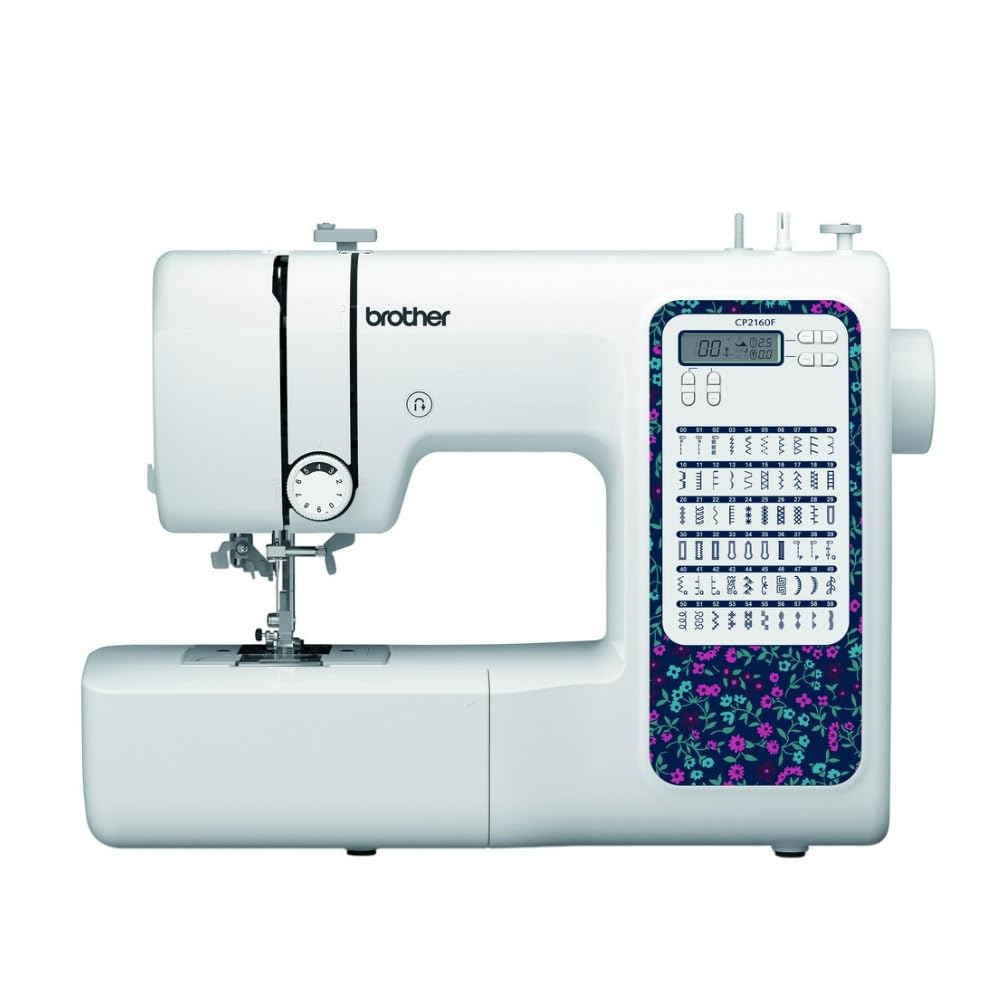
Figure 1: Brother CP2160F Computerized Sewing Machine. This image shows the overall view of the sewing machine, highlighting its compact design and the LCD screen for stitch selection.
2. Istruzzjonijiet Importanti dwar is-Sigurtà
Meta tuża apparat elettriku, għandhom dejjem jiġu segwiti prekawzjonijiet bażiċi tas-sigurtà, inklużi dawn li ġejjin:
- Aqra l-istruzzjonijiet kollha qabel tuża din il-magna tal-ħjata.
- Żomm is-swaba '' l bogħod mill-partijiet kollha li jiċċaqalqu. Kura speċjali hija meħtieġa madwar il-labra tal-magna tal-ħjata.
- Dejjem uża l-pjanċa tal-labra xierqa. Il-pjanċa ħażina tista 'tikkawża li l-labra tinkiser.
- Itfi l-magna tal-ħjata meta tagħmel xi aġġustamenti fiż-żona tal-labra, bħal meta ddaħħal il-ħajta fil-labra, tibdel il-labra, ddaħħal il-ħajta fil-bobina, jew tibdel is-sieq tal-presser.
- Dejjem aqla 'l-magna tal-ħjata mill-iżbokk ta' l-elettriku meta tneħħi l-għata, tillubrikha, jew meta tagħmel xi aġġustamenti oħra ta 'manutenzjoni ta' l-utent imsemmi fil-manwal ta 'struzzjoni.
- Qatt twaqqa’ jew daħħal xi oġġett fi kwalunkwe fetħa.
- Tużax barra.
- Tħaddimx fejn qed jintużaw prodotti tal-ajrusol (sprej) jew fejn ikun qed jingħata l-ossiġnu.
- Biex tiskonnettja, dawwar il-kontrolli kollha fil-pożizzjoni mitfija, imbagħad neħħi l-plagg mill-iżbokk.
3. Kontenut tal-Pakkett
Ivverifika li l-komponenti kollha huma preżenti fil-pakkett:
- Brother CP2160F Computerized Sewing Machine
- Korda tal-Enerġija
- Kontrollur tas-Saqajn
- Accessory Bag (containing bobbins, needle set, twin needle, screwdriver, spool caps, extra spool pin, seam ripper, cleaning brush)
- 7 Sewing Feet: Buttonhole foot, Zipper foot, Blind stitch foot, Button sewing foot, Overcasting foot, Monogramming foot, Zigzag foot (on machine)
- Manwal ta 'Istruzzjoni (dan id-dokument)
4. Setup
4.1 Konnessjoni tal-Enerġija
- Poġġi l-magna fuq wiċċ stabbli u ċatt.
- Insert the machine plug into the jack on the right side of the machine.
- Insert the power supply plug into a standard electrical outlet.
- Turn on the main power switch, located on the right side of the machine. The LCD screen will illuminate.
4.2 Tkebbib tal-Bobina
- Poġġi rukkell tal-ħajt fuq il-pin tar-rukkell.
- Guide the thread through the upper thread guide and around the pre-tension disc.
- Place an empty bobbin onto the bobbin winder shaft and push it to the right.
- Kebbeb il-ħajta lejn l-arloġġ madwar il-bobina ftit drabi.
- Press the foot controller (or Start/Stop button) to begin winding. The machine will stop automatically when the bobbin is full.
- Cut the thread, push the bobbin winder shaft to the left, and remove the wound bobbin.
4.3 Threading the Machine (Upper Thread)
- Għolli l-lieva tas-sieq tal-presser.
- Poġġi rukkell tal-ħajt fuq il-pin tar-rukkell.
- Iggwida l-ħajta mill-gwida tal-ħajta ta' fuq.
- Follow the numbered threading path indicated on the machine, ensuring the thread passes through the tension discs and takes up lever.
- Use the advanced needle threading system: Lower the presser foot, lower the needle, then push down the needle threader lever to engage it. Guide the thread through the hook and release the lever.
- Pull the thread loop through the needle eye.
4.4 Installazzjoni tal-Labra
- Itfi l-qawwa tal-magna.
- Ħoll il-labra clamp screw by turning it counter-clockwise.
- Neħħi l-labra l-qadima.
- Daħħal il-labra l-ġdida bin-naħa ċatta tħares lejn wara tal-magna, billi imbottaha 'l fuq kemm tista'.
- Issikka l-labra clamp kamin sew.
5. Operazzjoni
5.1 Għażla tal-Punti
The CP2160F features 60 built-in stitches. Use the stitch selector buttons (usually '+' and '-') to navigate through the stitch patterns displayed on the LCD screen. The recommended stitch length and width will be displayed automatically, but can be adjusted if desired.
5.2 Automatic Buttonholes
This machine includes 7 auto-size buttonhole styles. Attach the buttonhole foot. Place the button you wish to match into the buttonhole foot's holder. Select the desired buttonhole stitch. The machine will automatically sew a buttonhole to the correct size.
5.3 Free-Arm Sewing
To convert to free-arm sewing, slide off the accessory box located at the front of the machine. This exposes the free arm, ideal for sewing cylindrical items like cuffs, sleeves, and pant hems.
5.4 Ħjata ta' Drappijiet Ħoxnin
The CP2160F's robust feed system and fixed needle bar are designed to handle thick materials such as denim and tweed. Ensure you use the correct needle type and size for the fabric thickness to prevent needle breakage and ensure smooth feeding.
5.5 Using Included Sewing Feet
The machine comes with seven specialized sewing feet. Refer to the specific stitch instructions for which foot to use. To change a presser foot:
- Għolli l-labra u s-sieq tal-presser.
- Agħfas il-lieva sewda fuq wara tad-detentur tas-sieq tal-presser biex tirrilaxxa s-sieq attwali.
- Align the new foot with the pin on the presser foot holder and lower the presser foot lever until it snaps into place.
6. Manutenzjoni
6.1 Tindif tal-Magni
Regular cleaning helps maintain optimal performance. Always unplug the machine before cleaning.
- Klieb tal-għalf: Remove the needle plate and use the cleaning brush to remove lint and dust from the feed dogs and bobbin area.
- Hook Race: Carefully remove the bobbin case and clean the hook race area with the brush.
- Barra: Wipe the exterior surfaces with a soft, dry cloth. Do not use liquid cleaners or harsh chemicals.
Note: This machine does not require user lubrication.
7 Issolvi l-problemi
Qabel ma tikkuntattja l-appoġġ għall-klijenti, erġa'view these common issues and their solutions:
| Problema | Kawża Possibbli | Soluzzjoni |
|---|---|---|
| Labar jinkiser | Incorrect needle size/type for fabric; bent needle; needle not fully inserted; pulling fabric while sewing. | Use correct needle; replace bent needle; re-insert needle correctly; guide fabric gently. |
| Punti maħlula | Needle bent or dull; incorrect needle insertion; improper threading; wrong needle for fabric. | Replace needle; re-insert needle; re-thread machine; use appropriate needle. |
| Thread jams | Improper threading; lint in bobbin case; bobbin wound unevenly. | Re-thread machine; clean bobbin area; re-wind bobbin evenly. |
| Il-magna ma tixgħelx | Power cord not connected; power switch off; electrical outlet issue. | Check power cord connections; ensure switch is ON; test outlet with another appliance. |
8. Speċifikazzjonijiet
- Mudell: Brother CP2160F
- Stitch Count: 60 ponti inkorporati
- Buttonholes: 7 One-step auto-size buttonholes
- Ħajt tal-labra: Advanced Needle Threading System
- Wiri: Skrin LCD
- Sewing Area: Free-arm capability
- Sistema tal-Għalf: Exceptional feed for thick fabrics
- Included Feet: 7 (Buttonhole, Zipper, Blind Stitch, Button Sewing, Overcasting, Monogramming, Zigzag)
- Kulur: Abjad
- Materjal: Metall, plastik
- Dimensjonijiet tal-Prodott (P x W x H): 6.65" x 12.2" x 16.26"
- Piż tal-oġġett: 226 Uqija (madwar 14.1 lbs)
- Sors tal-Enerġija: Corded Elettriku
- UPC: 196271536956
9. Appoġġ għall-Klijent u Garanzija
For technical assistance, warranty information, or service inquiries, please contact Brother customer support. Refer to the official Brother website or the documentation included with your purchase for the most current contact details and warranty terms.
Appoġġ onlajn: www.brother-usa.com/support
Nota: It-termini tal-garanzija jistgħu jvarjaw skont ir-reġjun u l-bejjiegħ bl-imnut. Żomm il-prova tax-xiri tiegħek għal talbiet ta' garanzija.