
1. Introduzzjoni
The Marstek Venus-E is an advanced 5.12 kWh AC-coupled all-in-one energy storage system designed for balcony power plants. This system allows for efficient storage and utilization of solar energy, optimizing self-consumption and providing backup power. This manual provides essential information for the safe and effective installation, operation, and maintenance of your Venus-E unit.
2. Informazzjoni dwar is-Sigurtà
Jekk jogħġbok aqra l-istruzzjonijiet kollha tas-sigurtà bir-reqqa qabel l-installazzjoni u t-tħaddim. Jekk ma ssegwix dawn l-istruzzjonijiet, dan jista' jirriżulta f'xokk elettriku, nar, korriment serju, jew ħsara lill-proprjetà.
- Sigurtà Elettrika: Ensure all connections are secure and correctly wired. Do not attempt to open or modify the unit. Only qualified personnel should perform electrical work.
- Pjazzament: Install the unit in a well-ventilated area, away from flammable materials, direct sunlight, and extreme temperatures. Ensure the unit is stable and cannot be easily knocked over.
- Espożizzjoni għall-Ilma: Although the unit is IP65 rated for water resistance, avoid submerging it or exposing it to high-pressure water jets. Ensure all covers and seals are properly closed.
- Tfal u Pets: Keep the unit out of reach of children and pets to prevent accidental injury or damage.
- Emerġenza: In case of fire, use a CO2 or dry chemical extinguisher. Do not use water. In case of electric shock, immediately disconnect power if safe to do so and seek medical attention.
3. Prodott Aktarview
3.1. Karatteristiċi ewlenin
- 5.12 kWh Capacity: High-capacity energy storage for extended use.
- AC-Coupled System: Seamless integration with existing AC grids and balcony power plants.
- Plug and Play: Simplified installation for quick setup.
- Batterija LiFePO4: Utilizes exceptionally safe and durable Lithium Iron Phosphate battery technology with 6000+ cycle life.
- Island Operation (Backup): Provides up to 2500W of power for essential loads during grid outages.
- Smart Meter Integration: Supports anti-feed-in protection and optimizes 100% self-consumption.
- Kontroll tal-App: Dual Bluetooth and WiFi modules for real-time data monitoring and remote control via the Marstek App.
- Disinn robust: IP65 waterproof rating and operational in ultra-low temperatures down to -20°C.
- Universal PV Compatibility: Compatible with various photovoltaic (PV) systems.
3.2. Components (What's in the Box)
The Marstek Venus-E system typically includes the following:
- Marstek Venus-E Main Unit (referred to as Navi 2000 x 1)
- Kejbils tal-Enerġija
- Manwal għall-Utent (dan id-dokument)
- Additional accessories may vary by package.

Figure 3.2.1: Marstek Venus-E 5kW High-Performance Plug and Play Storage connected to a wall socket, illustrating its AC-coupled nature and ease of connection.
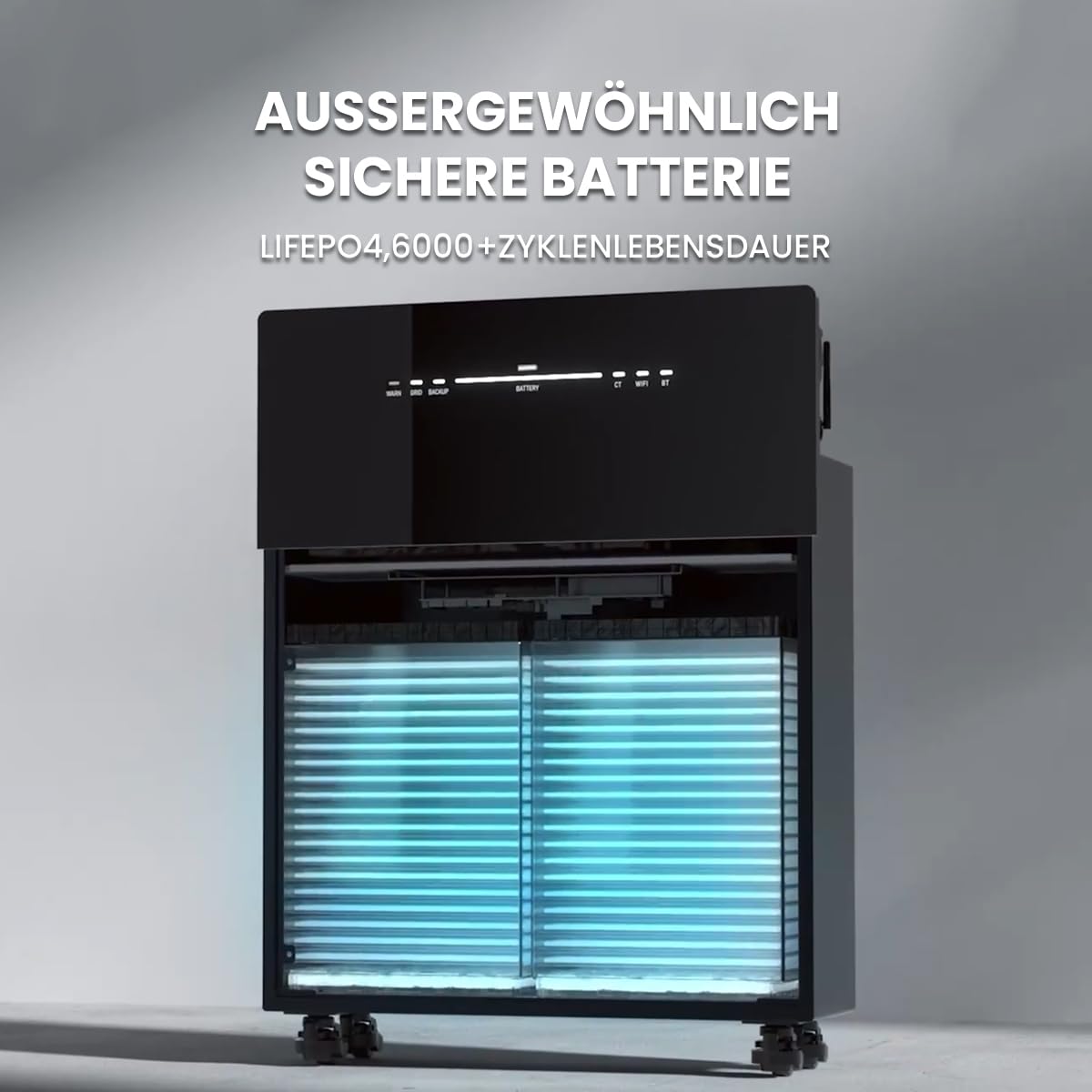
Figura 3.2.2: Intern view of the Marstek Venus-E, highlighting its LiFePO4 battery cells, designed for exceptional safety and a long cycle life of over 6000 cycles.
4. Setup
4.1. Spakkjar u Spezzjoni
- Carefully unpack the Marstek Venus-E unit and all accessories.
- Spezzjona l-unità għal kwalunkwe sinjal ta' ħsara waqt it-trasport. Jekk tinstab ħsara, ikkuntattja lill-fornitur tiegħek immedjatament.
- Kun żgur li l-komponenti kollha elenkati fit-Taqsima 3.2 huma preżenti.
4.2 Tqegħid
- Choose a location that is dry, well-ventilated, and protected from direct sunlight.
- Ensure the ambient temperature is within the operating range specified in Section 7.
- The unit is IP65 waterproof, allowing for outdoor installation, but protection from extreme weather conditions is recommended for longevity.
- Place the unit on a flat, stable surface. The unit is equipped with wheels for easier positioning.

Figure 4.2.1: The Marstek Venus-E is designed for operation in ultra-low temperatures down to -20°C and features an IP65 waterproof rating, making it suitable for various environmental conditions.
4.3. Konnessjoni Elettrika
- Connect the Marstek Venus-E to a standard AC wall outlet using the provided power cable. This establishes the AC-coupled connection to your home grid.
- For optimal energy management and anti-feed-in protection, integrate a compatible smart meter (e.g., Shelly) into your main electrical distribution panel. Follow the smart meter's installation instructions for proper wiring.
- Ensure your balcony PV system is connected according to its manufacturer's instructions. The Venus-E is compatible with various PV systems.

Figure 4.3.1: The Marstek Venus-E demonstrates compatibility with various photovoltaic (PV) systems, allowing flexible integration into existing solar setups.

Figure 4.3.2: Illustration of the Marstek Venus-E system with smart meter integration, enabling anti-feed-in protection and optimizing for 100% self-consumption within the household.
5. Istruzzjonijiet Operattivi
5.1. Tixgħil / Mitfi
- Qawwa Mixgħul: Locate the power button on the unit and press it to turn on the system. Status indicators will illuminate.
- Itfi: Agħfas u żomm il-buttuna tal-qawwa sakemm l-unità tintefa.
5.2. Marstek App Control
The Marstek App provides real-time monitoring and remote control capabilities for your Venus-E system. It connects via dual Bluetooth and WiFi modules.
- Download the Marstek App from your device's app store.
- Register an account and follow the in-app instructions to connect your Venus-E unit via Bluetooth or WiFi.
- Once connected, you can monitor battery status, power flow, and configure operating modes.

Figure 5.2.1: The Marstek App interface, offering easy control and real-time data monitoring for the Venus-E system via dual Bluetooth and WiFi modules. It includes modes like 'Electricity Trading Mode', 'Self-Adaptation Mode', and 'Manual Mode'.
5.3. Modi Operattivi
The Marstek App allows you to select various operating modes to optimize energy usage:
- Electricity Trading Mode (Stromhandel Modus): Optimizes charging and discharging based on dynamic electricity tariffs to maximize savings.
- Self-Adaptation Mode (Selbstanpassung Modus): The system intelligently learns your energy consumption patterns and solar generation to automatically optimize self-consumption.
- Manual Mode (Manueller Modus): Allows you to manually set charging and discharging schedules and parameters.

Figure 5.3.1: This graph illustrates how the AC-coupled energy storage system can achieve greater savings by adapting to dynamic electricity tariffs, optimizing charge and discharge cycles based on price fluctuations.
5.4. Island Operation / Backup Mode
Fil-każ ta 'grid outage, the Venus-E can automatically switch to island operation, providing up to 2500W of backup power for essential household loads.
- Ensure critical appliances are connected to circuits supported by the backup function.
- The system will automatically detect a grid failure and provide power from the stored energy.
- Monitor the remaining battery capacity via the Marstek App during backup operation.
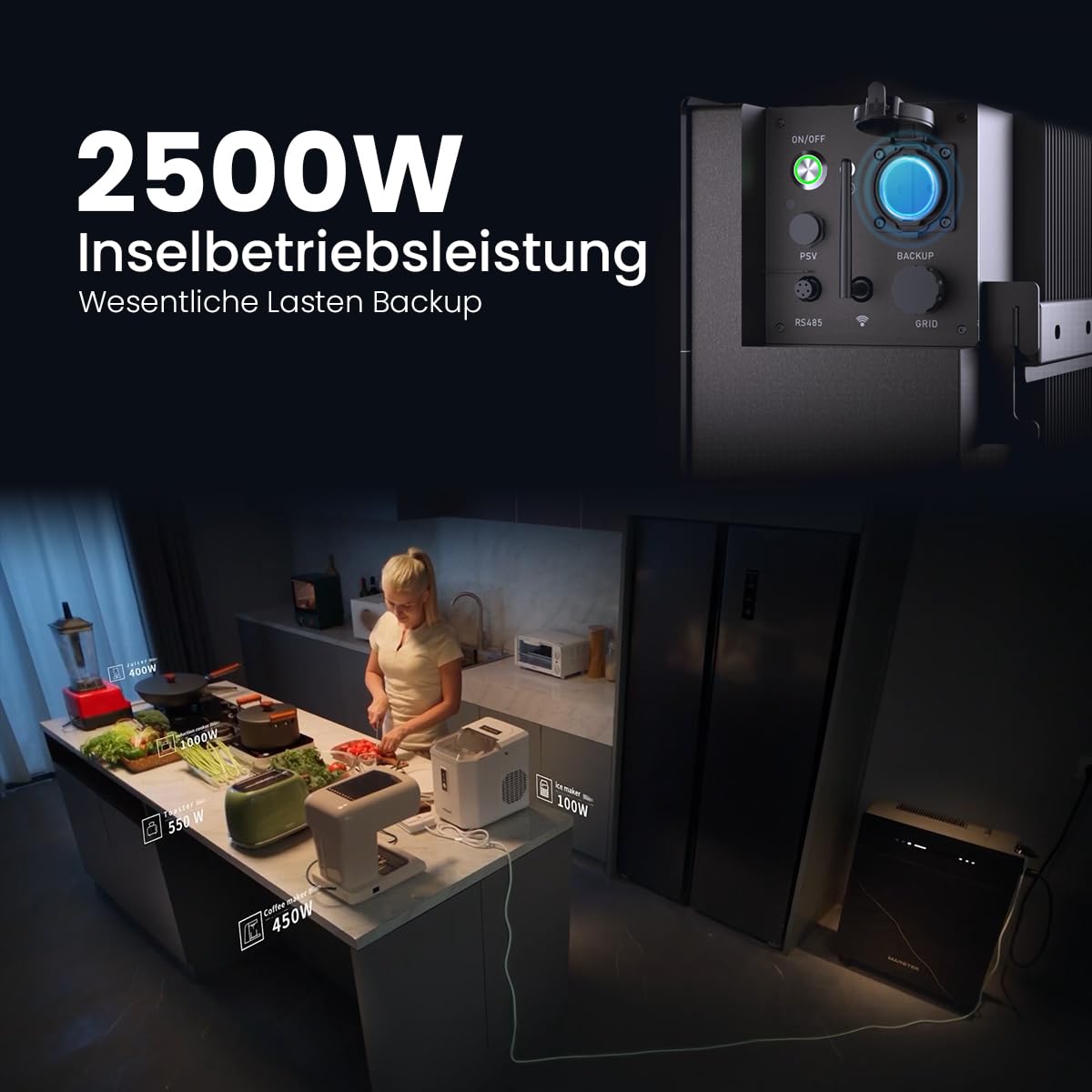
Figure 5.4.1: The Marstek Venus-E providing 2500W of power in island operation mode, demonstrating its capability to serve as a backup power source for essential household loads during grid interruptions.
6. Manutenzjoni
Manutenzjoni regolari tiżgura l-lonġevità u l-prestazzjoni ottimali tas-sistema Marstek Venus-E tiegħek.
- Tindif: Periodically clean the exterior of the unit with a soft, dry cloth. Do not use abrasive cleaners or solvents. Ensure ventilation openings are free from dust and debris.
- Aġġornamenti tal-Firmware: Check the Marstek App regularly for available firmware updates. Install updates to ensure your system has the latest features and performance enhancements.
- Kontrolli tal-Konnessjoni: Periodically inspect all electrical connections for tightness and signs of wear or corrosion.
- Kundizzjonijiet Ambjentali: Ensure the unit remains within its specified operating temperature range and is not exposed to excessive moisture or heat.
7 Issolvi l-problemi
If you encounter issues with your Marstek Venus-E, refer to the following common troubleshooting steps:
| Problema | Kawża Possibbli | Soluzzjoni |
|---|---|---|
| L-unità ma tixgħelx. | L-ebda provvista tal-enerġija; Il-buttuna tal-enerġija mhux ippressata sew. | Check AC power cable connection. Ensure the power button is pressed firmly. |
| No power output in backup mode. | Battery depleted; Overload; Incorrect wiring. | Check battery level via app. Reduce connected load. Verify backup circuit wiring. |
| App cannot connect to the unit. | Bluetooth/WiFi off; Unit too far; Network issues. | Ensure Bluetooth/WiFi is enabled on unit and phone. Move closer to the unit. Check home WiFi network. Restart unit and app. |
| Solar energy not being stored. | PV system not generating; Incorrect settings; Full battery. | Check PV system operation. Verify operating mode in the app. Battery may be at 100% charge. |
Jekk il-problema tippersisti wara li tipprova dawn is-soluzzjonijiet, jekk jogħġbok ikkuntattja l-appoġġ għall-klijenti.
8. Speċifikazzjonijiet
| Karatteristika | Dettall |
|---|---|
| Isem tal-Mudell | Venere-E |
| Manifattur | Powerness |
| Numru ta' Referenza / Mudell | 1 |
| Kapaċità tal-batterija | 5.12 kWh |
| Tip ta 'batterija | LiFePO4 (Lithium Iron Phosphate) |
| Ċiklu Ħajja | 6000+ ċiklu |
| Tip ta' Sistema | AC-Coupled, All-in-One |
| Island Operation Power | 2500W |
| Konnettività | Dual Bluetooth, WiFi |
| Klassifikazzjoni tal-Protezzjoni tad-Dħul (IP). | IP65 (Li ma jgħaddix ilma) |
| Temperatura operattiva | Down to -20°C (Ultra-low temperature operation) |
| Partijiet Inklużi | Navi 2000 x 1 (Main Unit) |
| Disponibbiltà ta' Spare Parts | Informazzjoni mhux disponibbli |
9. Garanzija u Appoġġ
9.1. Informazzjoni dwar Garanzija
The Marstek Venus-E comes with a manufacturer's warranty. Please refer to the warranty card included with your product or visit the official Powerness websit għal termini u kundizzjonijiet dettaljati. Żomm il-prova tax-xiri tiegħek għal talbiet ta' garanzija.
9.2. Appoġġ għall-Klijent
For technical assistance, troubleshooting beyond this manual, or warranty inquiries, please contact Powerness customer support:
- Websit: Żur il- Powerness Brand Store għal informazzjoni ta' kuntatt u FAQs.
- Email: Irreferi għall-imballaġġ tal-prodott jew għall-informazzjoni uffiċjali websit għall-indirizz elettroniku tal-appoġġ.
- Telefon: Irreferi għall-imballaġġ tal-prodott jew għall-informazzjoni uffiċjali website for the support phone number.
When contacting support, please have your product model (Venus-E) and ASIN (B0F444MXGP) ready.