
CAMECHO 2G+64G
CAMECHO Android 13 Car Stereo User Manual
Model: 2G+64G for Chevrolet Chevy Sonic Aveo 2012-2015
1. Prodott Aktarview
This manual provides detailed instructions for the installation, operation, and maintenance of your CAMECHO Android 13 Car Stereo. This unit features a 9-inch touch screen, wireless CarPlay and Android Auto, GPS navigation, Bluetooth, WiFi, FM radio, and supports an AHD backup camera. It is designed for specific Chevrolet Chevy Sonic (2012-2015) and Aveo (2011-2015) models.
2. Kompatibilità
Dan l-istereo tal-karozza huwa kompatibbli mal-mudelli ta' vetturi li ġejjin:
- Chevrolet Chevy Sonic: 2012, 2013, 2014, 2015
- Chevrolet Chevy Aveo: 2011, 2012, 2013, 2014, 2015
Ensure your vehicle's dashboard matches the compatible configuration shown below. Incorrect center console or CD backplate types may prevent proper installation.

Image: Compatible and incompatible car models for installation. Verify your vehicle's dashboard and original radio unit against these examples.
3. X'hemm fil-Kaxxa
Jekk jogħġbok iċċekkja l-kontenut tal-pakkett tiegħek mal-lista t'hawn taħt:
- 1 x Unità Prinċipali Android
- 1 x Kamera tal-Backup AHD
- 1 x Mikrofonu Estern
- 1 x Dekoder tal-Canbus
- 1 x Antenna GPS
- 1 x Antenna tar-Radju
- 1 x Kejbil tal-Enerġija
- 1 x Kejbil tad-Dħul tal-Kamera ta' Wara
- 1 x Sett ta' Kejbils RCA
- 2 x Kejbils USB
- 1 x Kejbil USB Oriġinali
- 1 x Installation Tool Kit
- 1 x Manwal tal-Utent (dan id-dokument)

Image: Complete packing list and dimensions of the head unit.
4. Setup u Installazzjoni
4.1 Għodod Meħtieġa
- Għodda pry
- Tornavit
- Wire strippers/crimpers (if custom wiring is needed)
4.2 Disassembly of Original Unit
- Use a pry tool to carefully open and remove the outer frame of the original radio.
- Unscrew the four screws securing the radio on both sides.
- Remove the original radio and disconnect all cables.
- Finally, remove the air vents on both sides from the original car frame.
4.3 Installation of New Unit
Importanti: If the wiring harness does not match your vehicle, please contact customer service for the correct wiring harness before proceeding.
- Install the air vents on both sides onto the new radio panel.
- Secure the new radio to the panel.
- Tighten the five screws.
- Connect the wires of the new radio to the original car harness.
- Attach the Canbus protocol box.
- Reinstall the new radio into the car dashboard, completing the installation.

Image: Disassembly and installation steps for the car stereo.
4.4 Canbus Connection and Steering Wheel Control Setup
Ensure the Canbus box is connected. Plug the 8-pin cable into the head unit's connector for steering wheel control functionality.

Image: Canbus and steering wheel control wiring diagram.
Nota: After connecting the Canbus, you need to set the Protocol correctly for steering wheel controls to work. Follow these steps:
- Go to "Car Settings" > "Factory Setting".
- Daħħal il-password: 1234.
- Select "Protocol Settings".
- Choose "Raise - Chevrolet" for your car model.
4.5 Installazzjoni tal-Kamera tar-Revers
The reversing input must be plugged in even if the reversing camera is not used.
- Connect the positive pole of the power supply of the car's reversing light to the camera's positive wire.
- Connect the negative pole of the power supply of the car's reversing light to the camera's negative wire.
- The reversing trigger is controlled by the stereo, so a separate trigger wire connection is not required.

Image: Reversing camera wiring diagram.
Nota: If the backup camera does not work, adjust the resolution via: Settings > Factory Settings > Password: 1234 > Video Source.
5. Istruzzjonijiet Operattivi
5.1 CarPlay mingħajr fili u Android Auto
The unit supports wireless Apple CarPlay and Android Auto, allowing seamless integration with your smartphone for navigation, music, calls, and messages.

Image: Wireless Apple CarPlay and Android Auto interfaces.
Connecting Wireless Apple CarPlay:
- Connect the car radio Bluetooth (Bluetooth name: "Car BT0", Bluetooth PIN: 1234). Ensure "phone audio, music audio" is successfully connected.
- Click "SpeedPlay" on the head unit.
- Allow Contacts and Favorites Sync.
- Select "Use CarPlay with SpeedPlay".
- Wait for connection. The first connection may take longer.
Konnessjoni bla fili ta' Android Auto:
- Click "SpeedPlay" on the head unit.
- Connect your phone to the rear 4-pin USB port using the original data cable.
- Allow USB debugging on your phone.
- Wait for connection. The first connection may take longer.
5.2 Navigazzjoni GPS
The unit has a built-in GPS navigation system with a pre-loaded "Here Wego" offline map app. You can use both online and offline navigation.

Image: GPS Navigation interface and WiFi connection options.
5.3 Konnessjoni WiFi
Built-in Wi-Fi allows you to connect to a hotspot for online browsing, streaming media, and using online applications.
5.4 Bluetooth Hands-free and Music Streaming
Connect your phone via Bluetooth for hands-free calling and wireless music streaming, enhancing driving safety.

Image: Bluetooth hands-free calling and music streaming features.
Radju 5.5 FM/RDS
The unit supports FM RDS radio, allowing you to preset up to 18 radio stations and receive news and traffic information.

Immaġni: Interfaċċja tar-Radju FM/RDS.
5.6 Kontroll tar-rota tal-isteering
After proper Canbus configuration, you can use your original steering wheel controls to manage music, calls, and navigation.

Image: Steering Wheel Control interface for programming functions.
5.7 Aġġustament tal-Equalizer
The built-in preset EQ allows you to choose from various EQ curves (e.g., Rock, Pop, Jazz) to customize your audio experience.
5.8 Multiple UI Themes
Customize the appearance of your multimedia system by selecting from multiple UI desktop themes.
5.9 Link tal-Mera
Cast your smartphone's screen to the car radio touchscreen for viewing content directly on the larger display.

Immaġni: Funzjonalità Mirror Link.
6. AHD Backup Camera
L-AHD ta' wara inkluż view camera provides a clear and sharp reverse image, enhancing safety during parking and reversing maneuvers. It features night vision and IP68 waterproof rating.
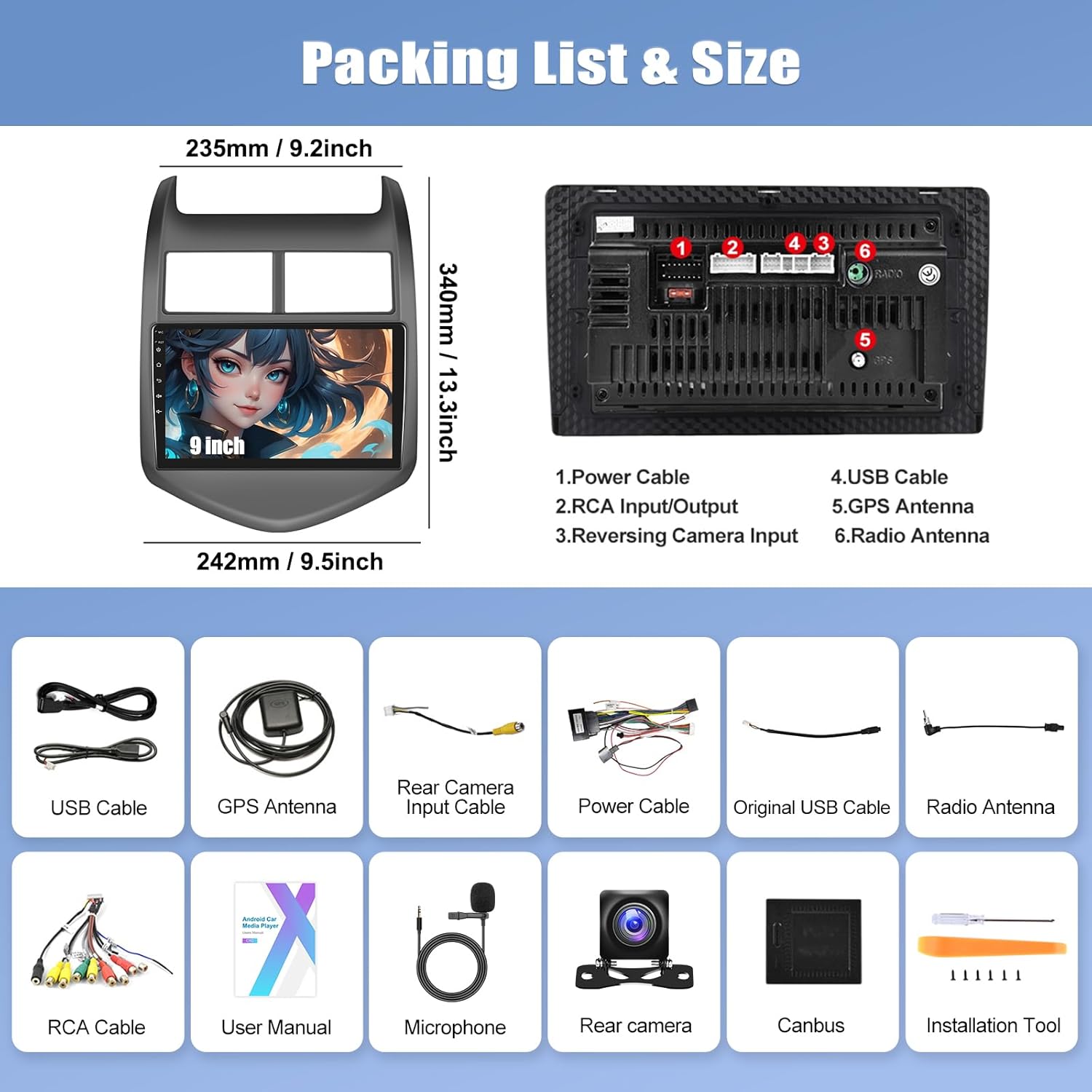
Image: AHD Reverse Camera features and view.
To activate the reverse image, shift your vehicle into reverse gear. The stereo will automatically display the camera feed.
7. Manutenzjoni
Biex tiżgura l-lonġevità u l-prestazzjoni ottimali tal-istereo tal-karozza tiegħek, segwi dawn il-linji gwida ta' manutenzjoni:
- Tindif: Uża drapp artab u niexef biex tnaddaf l-iskrin u l-barra. Evita prodotti tat-tindif jew solventi li joborxu.
- Temperatura: Evita li tesponi l-unità għal temperaturi estremi, kemm sħan kif ukoll kesħin, għal perjodi twal.
- Aġġornamenti tas-Software: Periodically check for available software updates to ensure the system runs efficiently and has the latest features.
- Konnessjonijiet tal-kejbil: Kun żgur li l-kejbils kollha huma konnessi sew. Konnessjonijiet laxki jistgħu jwasslu għal problemi intermittenti.
8 Issolvi l-problemi
Jekk tiltaqa' ma' problemi bl-istereo tal-karozza tiegħek, irreferi għall-problemi u s-soluzzjonijiet komuni li ġejjin:
| Problema | Kawża Possibbli | Soluzzjoni |
|---|---|---|
| L-unità ma tixgħelx | Konnessjoni tal-enerġija maħlula, fjus maħruq, problema bil-batterija tal-vettura. | Check power cable connections. Inspect vehicle fuses. Verify car battery voltage. |
| Ebda output tal-ħoss | Volume too low, mute activated, incorrect audio settings, loose speaker wires. | Increase volume. Check mute status. Verify audio output settings. Inspect speaker wire connections. |
| Bluetooth not connecting or no audio | Incorrect pairing, Bluetooth disabled, phone compatibility, software glitch. | Ensure Bluetooth is enabled on both devices. Re-pair the device. Check Bluetooth PIN (1234). Restart both devices. Verify "phone audio, music audio" is selected during pairing. |
| Il-kontrolli tal-istering ma jaħdmux | Canbus not connected, incorrect protocol settings. | Ensure Canbus is properly connected. Follow instructions in Section 4.4 to set the correct protocol. |
| Backup camera not displaying image | Incorrect wiring, camera malfunction, video source setting. | Verify camera wiring (Section 4.5). Check camera power. Adjust video source settings (Settings > Factory Settings > 1234 > Video Source). |
| GPS signal issues | L-antenna tal-GPS mhix installata sew jew hija mblukkata. | Kun żgur li l-antenna tal-GPS hija konnessa sew u mqiegħda f'post mingħajr ostakli (eż. id-dashboard). |
| Touch screen ma jirrispondix | Software freeze, temporary glitch. | Erġa' ibda l-unità. Jekk il-problema tippersisti, ikkuntattja l-appoġġ. |
9. Speċifikazzjonijiet
| Karatteristika | Dettall |
|---|---|
| Brand | CAMECHO |
| Numru tal-Mudell | 2G+64G |
| Sistema Operattiva | Android 13 |
| RAM | 2GB |
| ROM (Ħażna Interna) | 64GB |
| Daqs tal-Iskrin | 9 pulzieri |
| Tip ta' Kontrollur | Touch Screen |
| Teknoloġija tal-Konnettività | Bluetooth, Wi-Fi, USB, RCA |
| Karatteristiċi Speċjali | Wireless Apple CarPlay, Wireless Android Auto, GPS Navigation, FM RDS Radio, Mirror Link, Steering Wheel Control Support, EQ Adjustable |
| Modalità tal-Ħruġ tal-Awdjo | Stereo |
| Qawwa tal-Ħruġ | 45 Watts |
| Appoġġ għall-Kodifikazzjoni tal-Vidjo | H.264, H.265/HEVC, MPEG-4 |
| Apparati Kompatibbli | Chevrolet Chevy Aveo 2011-2015, Chevrolet Chevy Sonic 2012-2015 |
| Dimensjonijiet tal-oġġett (D x W x H) | 2.8"D x 9.5"W x 13.4"H |
10. Informazzjoni dwar Garanzija
This CAMECHO car stereo unit comes with a 1-Sena Garanzija from the date of purchase. This warranty covers manufacturing defects and malfunctions under normal use. It does not cover damage caused by improper installation, accident, misuse, abuse, unauthorized modifications, or natural disasters.
Jekk jogħġbok żomm il-prova tax-xiri tiegħek għal pretensjonijiet ta' garanzija.
11. Appoġġ għall-Klijent
For technical assistance, installation queries, or warranty claims, please contact CAMECHO customer support. We are committed to providing high-quality support to ensure your satisfaction.
Email: CAMECHOVIP@126.com
Please include your product model number and a detailed description of your issue when contacting support to facilitate a quicker resolution.

Image: CAMECHO Customer Support.