1. Introduzzjoni
This manual provides detailed instructions for the installation, operation, and maintenance of the QUASAR X99 H5 Motherboard. The X99 H5 is a robust solution designed for workstations and servers, supporting LGA 2011-3 socket processors, including Intel Xeon V3/V4 series. It features DDR4 REG ECC memory support in a Dual Channel configuration, ensuring reliable stability and high performance for demanding applications such as rendering, virtualization, and intensive data processing.
Key features include PCIe 16X slots for expansion, an M.2 NVMe slot for high-speed storage, and multiple SATA 3.0 ports for additional drives. High-speed USB 3.0 ports are also integrated for rapid data transfer and peripheral connectivity. Its well-planned layout simplifies system assembly and maintenance, while quality components contribute to operational longevity and stability.
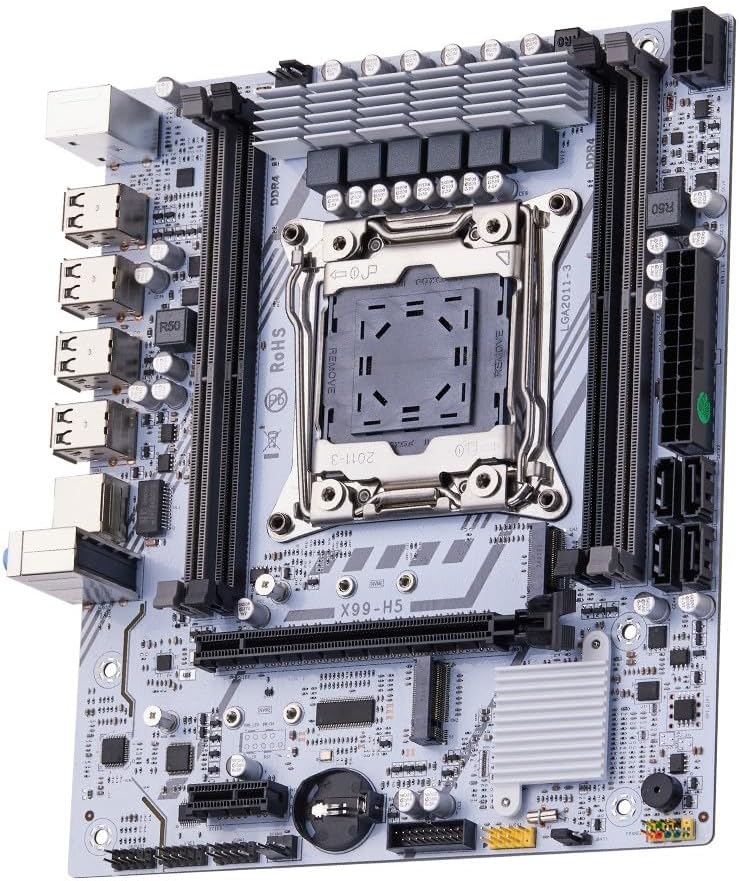
Figura 1.1: Aktarview of the QUASAR X99 H5 Motherboard. This image displays the full motherboard, highlighting its compact and efficient design, including the CPU socket, memory slots, and various expansion ports.
2. Informazzjoni dwar is-Sigurtà
Please read all safety instructions carefully before installing or operating the motherboard. Failure to follow these guidelines may result in personal injury, damage to the product, or damage to other components.
- Dejjem skonnettja l-provvista tal-enerġija mis-sokit tal-ħajt qabel ma tinstalla jew tneħħi xi komponenti.
- Ilbes ċinga tal-polz anti-statika jew tmiss spiss oġġett tal-metall ertjat biex teħles mill-elettriku statiku qabel ma timmaniġġja l-motherboard jew komponenti oħra.
- Immaniġġja l-motherboard mit-truf tagħha biex tevita li tmiss komponenti sensittivi.
- Kun żgur li jkun hemm ventilazzjoni xierqa fil-kaxxa tal-kompjuter biex tevita li jisħon iżżejjed.
- Tesponix il-motherboard għall-umdità jew temperaturi estremi.
- Żomm fejn ma jintlaħaqx mit-tfal.
3. Setup u Installazzjoni
3.1. Identifikazzjoni tal-Komponent
Iffamiljarizza ruħek mad-diversi komponenti u konnetturi fuq il-motherboard qabel tibda l-installazzjoni.

Figure 3.1: Labeled diagram of the QUASAR X99 H5 Motherboard. This image indicates the location of key components such as the CPU socket, DDR4 memory slots, PCIe slots, M.2 NVMe slot, SATA ports, USB ports, and power connectors.
- Sokit tas-CPU LGA 2011-3: For Intel Xeon V3/V4 processors.
- DDR4 Memory Slots (4x): Supports DDR4 REG ECC memory up to 128GB.
- PCIe 16X Slots: Għal karti grafiċi u karti oħra ta' espansjoni.
- M.2 NVMe Slot: For high-speed solid-state drives.
- Portijiet SATA 3.0: For connecting traditional hard drives and SSDs.
- Konnettur tal-Enerġija ATX ta' 24-pin: Dħul tal-enerġija prinċipali.
- Konnettur tal-Enerġija tas-CPU b'8 pinnijiet: Additional power for the CPU.
- Portijiet USB 3.0/2.0: For peripheral connectivity.
- Port Gigabit Ethernet: Għall-konnettività tan-netwerk.
- Ġakki tal-Awdjo: Għad-dħul/ħruġ tal-awdjo.
- Portijiet PS/2: Għat-tastiera u l-maws tradizzjonali.
3.2. Lista ta' Kontroll ta' Qabel l-Installazzjoni
- Compatible CPU (Intel Xeon V3/V4 series, LGA 2011-3 socket).
- Compatible DDR4 REG ECC memory modules.
- ATX power supply unit.
- Computer case with ATX form factor support.
- Storage devices (M.2 NVMe SSD, SATA SSD/HDD).
- Graphics card (if CPU does not have integrated graphics or for dedicated performance).
- Screwdriver set, anti-static wrist strap.
3.3. Passi ta 'installazzjoni
- Ipprepara l-Każ: Installa l-ilqugħ tal-I/O fil-ftuħ ta' wara tal-kaxxa tal-kompjuter tiegħek.
- Installa s-CPU:
- Open the CPU socket retention mechanism.
- Allinja s-CPU bir-reqqa mas-sokit, filwaqt li tiżgura li l-marka trijangulari fuq is-CPU taqbel mal-marka fuq is-sokit.
- Poġġi s-CPU bil-mod fis-sokit mingħajr ma tisforzah.
- Agħlaq il-mekkaniżmu taż-żamma biex twaħħal is-CPU.
- Installa l-CPU Cooler: Apply thermal paste (if not pre-applied) and install the CPU cooler according to its manufacturer's instructions. Connect the CPU fan cable to the CPU_FAN header on the motherboard.
- Installa l-Moduli tal-Memorja:
- Open the clips on the DDR4 memory slots.
- Align the notch on the memory module with the key in the slot.
- Press down firmly on both ends of the module until the clips snap into place. For Dual Channel configuration, refer to the motherboard's silkscreen for recommended slot pairing (e.g., A1 and B1).
- Immonta l-Motherboard: Carefully place the motherboard into the computer case, aligning it with the standoffs. Secure the motherboard with screws.
- Installa Apparati tal-Ħażna:
- For M.2 NVMe SSDs: Insert the M.2 SSD into the M.2 slot and secure it with the provided screw.
- For SATA drives: Connect SATA data cables from the motherboard's SATA ports to your drives. Connect power cables from the PSU to your drives.
- Installa l-Kards tal-Espansjoni: Insert graphics cards or other PCIe expansion cards into the appropriate PCIe slots and secure them with the case's retention mechanism.
- Qabbad il-Provvista tal-Enerġija:
- Connect the 24-pin ATX power cable from the PSU to the motherboard.
- Connect the 8-pin CPU power cable from the PSU to the motherboard.
- Qabbad il-Kejbils tal-Panel ta' Quddiem: Connect the power button, reset button, HDD LED, power LED, and front panel USB/audio cables to their respective headers on the motherboard. Refer to the motherboard's silkscreen or a detailed diagram for correct pin assignments.
- Ikkonnettja l-Periferali: Qabbad il-monitor, it-tastiera, il-maws, u periferali oħra tiegħek mal-portijiet I/O ta' wara.

Figura 3.2: Close-up view of the rear I/O panel of the QUASAR X99 H5 Motherboard. This image shows the PS/2 ports for keyboard and mouse, multiple USB ports, the Ethernet port, and the audio jacks.
4. Istruzzjonijiet Operattivi
4.1. L-Ewwel Boot u s-Setup tal-BIOS
- After connecting all components and power, press the power button on your computer case.
- Matul il-proċess tal-ibbutjar, agħfas ripetutament il-buttuna DEL or F2 key (common BIOS entry keys) to enter the BIOS/UEFI setup utility. The exact key may vary; check your screen for prompts.
- In the BIOS, verify that all installed components (CPU, RAM, storage drives) are detected correctly.
- Ikkonfigura l-ordni tal-ibbutjar biex tipprijoritizza l-midja tal-installazzjoni tas-sistema operattiva tiegħek (USB drive jew DVD).
- Salva l-bidliet u oħroġ mill-BIOS. Is-sistema terġa' tibda.
4.2. Installazzjoni tas-Sistema Operattiva
Follow the instructions provided with your operating system (e.g., Windows, Linux) to complete the installation process. Ensure you install all necessary drivers for the motherboard's chipsets, network adapter, audio, and any other integrated components. Drivers are typically available on the manufacturer's website or included on a driver disc.
4.3. Installazzjoni tas-sewwieq
For optimal performance and stability, install the latest drivers for your motherboard. These typically include:
- Sewwieqa taċ-Ċipset
- Sewwieqa tal-LAN (Ethernet)
- Sewwieqa tal-Awdjo
- USB Drivers (if specific ones are required)
- Sewwieqa tal-Ħażna SATA/NVMe
Visit the manufacturer's support website for the X99 H5 motherboard to download the most current drivers.
5. Manutenzjoni
Manutenzjoni regolari tgħin biex tiżgura l-lonġevità u l-prestazzjoni ottimali tal-motherboard u s-sistema tiegħek.
- Tneħħija tat-Trab: Periodically clean dust from inside your computer case, especially from fans, heatsinks, and the motherboard surface. Use compressed air or a soft brush. Ensure the system is powered off and unplugged before cleaning.
- Aġġornamenti tal-BIOS/UEFI: Iċċekkja l-manifattur website for BIOS/UEFI updates. Updates can improve compatibility, stability, and performance. Follow the update instructions carefully to avoid damaging the motherboard.
- Aġġornamenti tas-sewwieq: Keep your system drivers updated to the latest versions.
- Ġestjoni tal-Kejbil: Kun żgur li l-kejbils interni huma mqiegħda pulit biex itejbu l-fluss tal-arja u jipprevjenu l-interferenza.
- Kontroll Ambjentali: Operate the system in a clean, dry, and well-ventilated environment. Avoid extreme temperatures and humidity.
6 Issolvi l-problemi
Din it-taqsima tipprovdi soluzzjonijiet għal kwistjonijiet komuni li tista’ tiltaqa’ magħhom.
| Problema | Kawża Possibbli | Soluzzjoni |
|---|---|---|
| Is-sistema ma tixgħel. | No power, loose connections, faulty PSU. | Check power cable, 24-pin and 8-pin power connectors. Ensure PSU switch is ON. Test PSU if possible. |
| L-ebda wiri fuq il-monitor. | Loose graphics card, faulty RAM, incorrect monitor input. | Reseat graphics card and RAM modules. Check monitor cable and input source. Test with one RAM stick. |
| Is-sistema terġa' tibda b'mod mhux mistenni. | Tisħin żejjed, enerġija instabbli, komponenti difettużi. | Check CPU cooler installation. Ensure adequate case ventilation. Verify PSU stability. Run memory diagnostic. |
| Sistema operattiva ma nstabitx. | Incorrect boot order, unformatted drive, faulty drive. | Check BIOS boot order. Ensure storage drive is properly connected and formatted with an OS. |
| Apparati USB mhux rikonoxxuti. | Missing drivers, faulty port, device issue. | Install/update USB drivers. Try different USB ports. Test device on another system. |
If issues persist, consult the manufacturer's support resources or a qualified technician.
7. Speċifikazzjonijiet
| Karatteristika | Dettall |
|---|---|
| Brand | Generic (Manufactured by Machinist) |
| Serje tal-Mudell | X99 H5 |
| Socket tas-CPU | LGA 2011-3 |
| Proċessuri Kompatibbli | Intel Xeon V3/V4 series |
| Teknoloġija tal-Memorja | DDR4 REG ECC |
| Slots tal-Memorja | 4 x DDR4 DIMM slots (Dual Channel) |
| Memorja Massima Appoġġjata | 128 GB |
| Veloċità tal-Arloġġ tal-Memorja | Up to 3200 MHz (actual speed depends on CPU and memory modules) |
| Interfejsijiet tal-Ħażna | 1 x M.2 NVMe slot, Multiple SATA 3.0 ports |
| Slots ta 'Espansjoni | PCIe 16X slots (number not specified, but typically at least one) |
| Netwerking | 1 x Port Ethernet Gigabit |
| Portijiet USB | USB 3.0 and USB 2.0 ports (number not specified, but typically multiple) |
| Awdjo | Integrated Audio Jacks |
| Fattur tal-Formola | ATX (Dimensions: 30.5 x 24.4 cm) |
| Piż tal-Prodott | 1 Kilogramma |
8. Garanzija u Appoġġ
Għal informazzjoni dwar il-garanzija u appoġġ tekniku, jekk jogħġbok irreferi għad-dokumentazzjoni pprovduta max-xiri tiegħek jew żur is-sit uffiċjali tal-manifattur. websit. Żomm il-prova tax-xiri tiegħek għal talbiet ta' garanzija.
Typical support resources include:
- Online FAQs and Knowledge Base
- Driver and BIOS Download Section
- Customer Service Contact Information (Email/Phone)
When contacting support, please have your motherboard model (X99 H5) and any relevant error messages or system configurations ready.


