
LIECTROUX YW910
LIECTROUX YW910 Window Cleaning Robot User Manual
Mudell: YW910
1. Introduzzjoni
Thank you for choosing the LIECTROUX YW910 Window Cleaning Robot. This intelligent household appliance is designed to provide efficient and thorough cleaning for various glass surfaces, including windows, tiles, and glass floors. Equipped with a powerful 3000 PA suction motor and dual spiral cleaning heads with microfiber cloths, the YW910 ensures a streak-free clean on vertical surfaces. This manual provides detailed instructions for setup, operation, maintenance, and troubleshooting to help you get the most out of your device.
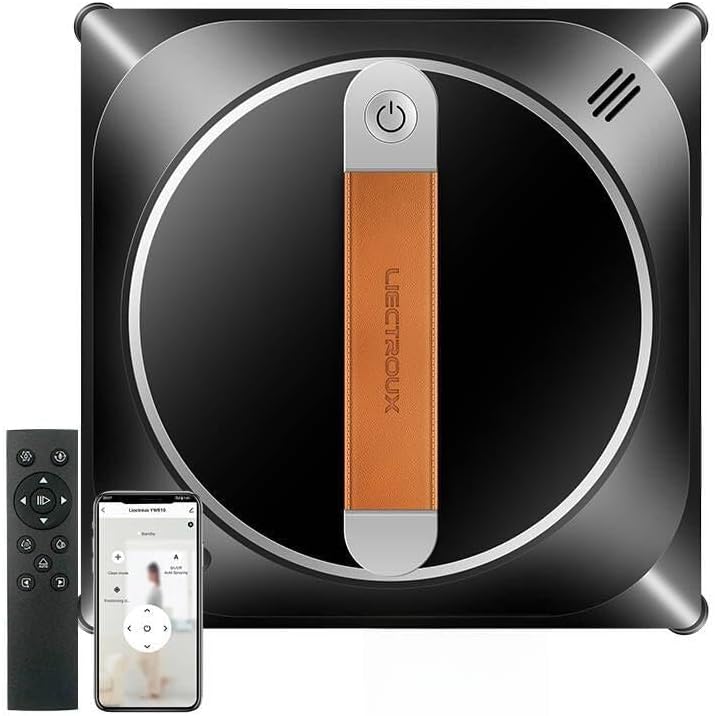
Image: The LIECTROUX YW910 Window Cleaning Robot, shown with its remote control and a smartphone displaying the control app. The robot is black with a central orange handle.
2. Informazzjoni dwar is-Sigurtà
Jekk jogħġbok aqra t-twissijiet u l-istruzzjonijiet kollha tas-sigurtà qabel ma tuża dan il-prodott biex tevita korriment jew ħsara.
- Always connect the robot to a power outlet during operation. The built-in UPS (Uninterrupted Power System) battery provides approximately 25 minutes of backup power in case of a power outage, allowing the robot to remain attached to the surface and sound an alarm.
- Attach the provided 4-meter professional safety rope to a secure anchor point before each use, especially when cleaning high-rise windows.
- Ensure the cleaning surface is free of large debris or obstacles that could interfere with the robot's movement or cause damage.
- Do not use the robot on cracked or damaged glass surfaces.
- Żomm idejk, xagħar, u ħwejjeġ maħlula 'l bogħod minn partijiet li jiċċaqilqu.
- Do not immerse the robot in water or other liquids.
- Dan l-apparat mhuwiex maħsub għall-użu minn persuni (inklużi tfal) b’kapaċitajiet fiżiċi, sensorji jew mentali mnaqqsa, jew nuqqas ta’ esperjenza u għarfien, sakemm ma jkunux ingħataw superviżjoni jew istruzzjoni dwar l-użu tal-apparat minn persuna responsabbli għas-sigurtà tagħhom.
- Aħżen ir-robot f'post frisk u niexef meta ma jkunx qed jintuża.
3. Kontenut tal-Pakkett
Ivverifika li l-oġġetti kollha huma preżenti fil-pakkett:
- LIECTROUX YW910 Window Cleaning Robot
- Kontroll mill-bogħod
- Power Adapter (5.2m cable)
- Ħabel tas-Sigurtà (4m)
- Ċraret tat-Tindif (Mikrofibra)
- Water Spray Bottle (for manual water application if needed)
- Manwal għall-Utent
4. Prodott Aktarview
Familiarize yourself with the main components of your LIECTROUX YW910 robot.

Image: An illustrative diagram highlighting key features of the LIECTROUX YW910, including APP Control, Vacuum Adsorption, 360 Guide Wheel, and Multiple Cleaning Routes. The robot is shown against a sky background.
- Buttuna tal-Qawwa: Located on the top handle for manual power on/off.
- Suction Motor: Integrated powerful motor for strong vacuum adsorption to glass.
- Dual Cleaning Heads: Two spiral cleaning heads for efficient movement and cleaning.
- Microfiber Cleaning Cloths: Removable and washable cloths for streak-free cleaning.
- Żennuni tal-Isprej tal-Ilma: Automatic two-way water spray system for constant humidity cleaning.
- Punt ta' Twaħħil tal-Ħabel tas-Sigurtà: For securing the safety rope.
- Port tal-Enerġija: Għall-konnessjoni tal-adapter tal-enerġija.
- Sensers: AI-powered sensors for frame detection and obstacle avoidance.
5. Setup
- Iċċarġja r-Robot: Although the robot operates on corded power, ensure the internal UPS battery is charged for safety backup. Connect the power adapter to the robot and a power outlet.
- Waħħal id-Drappijiet tat-Tindif: Securely attach clean microfiber cloths to the dual cleaning heads. Ensure they are properly aligned and cover the entire cleaning surface.
- Fill Water Tank (Optional): If using the automatic water spray feature, fill the internal water tank with distilled water or a recommended glass cleaning solution.
- Qabbad il-Ħabel tas-Sigurtà: Attach one end of the 4-meter safety rope to the designated attachment point on the robot. Secure the other end to a sturdy, immovable object indoors (e.g., a heavy piece of furniture, a window frame anchor).
- Qabbad l-Enerġija: Plug the 5.2-meter power adapter cable into the robot and then into a grounded power outlet. Ensure the cable has enough slack for the robot to move freely across the cleaning area.
- Ipprepara wiċċ: Remove any loose dirt, dust, or large debris from the glass surface before placing the robot. This prevents scratching and ensures optimal cleaning performance.
6. Istruzzjonijiet Operattivi
6.1 Powering On and Placement
- Press and hold the power button on the robot's handle until it powers on.
- Place the robot firmly on the glass surface. The vacuum motor will engage, creating a strong suction to hold the robot in place. Wait for the suction to stabilize before releasing the robot.
6.2 Cleaning Modes and Control
The LIECTROUX YW910 offers three automatic cleaning modes and manual control via remote or app.

Image: A graphic illustrating the Artificial Intelligence Memory Function, showing the robot's calculated cleaning path on a window against a city skyline at night.
- Automatic Cleaning Modes:
The robot uses intelligent AI technology to detect window frames and obstacles, automatically adjusting its direction and calculating an optimal cleaning path. Use the remote control or app to select one of the three automatic modes (e.g., Z-path, N-path, or combined). The robot will clean the entire window automatically.

Image: A woman operating the LIECTROUX YW910 robot on a window using a remote control, demonstrating its ease of use.
- Kontroll manwali:
For specific areas or spot cleaning, use the directional buttons on the remote control or the smartphone app to guide the robot manually.
- Automatic Water Spray:
The robot features an automatic two-way water spray system to maintain constant humidity on the glass surface, ensuring effective cleaning and preventing streaks. This function can be activated or deactivated via the remote or app.

Image: The LIECTROUX YW910 robot actively spraying water from both sides while cleaning a window, illustrating its automatic two-way water spray feature.
6.3 Finishing Cleaning
Once the cleaning cycle is complete, the robot will return to its starting position or stop. Carefully grasp the robot by its handle before turning off the power to ensure it does not lose suction and fall.
7. Manutenzjoni
Manutenzjoni regolari tiżgura prestazzjoni ottimali u testendi l-ħajja tar-robot tiegħek.
- Ċraret tat-Tindif: Remove and wash the microfiber cleaning cloths after each use. They can be hand-washed or machine-washed with mild detergent. Allow them to air dry completely before reattaching.

Immaġni: Imkabbra view of the microfiber wiping cloth, highlighting its texture designed for effective, streak-free cleaning.
- Ġisem tar-Robot: Imsaħ il-barra tar-robot b'ċarruta ratba u damp cloth. Do not use abrasive cleaners or immerse the robot in water.
- Sensers: Periodically clean the sensors located on the robot's edges with a dry, soft cloth to ensure accurate frame detection and obstacle avoidance.
- Tank tal-Ilma: If using the water spray feature, periodically empty and rinse the water tank to prevent mineral buildup. Use distilled water to minimize residue.
- Ħażna: Store the robot in its original packaging or a safe, dry place away from direct sunlight and extreme temperatures.
8 Issolvi l-problemi
| Problema | Kawża Possibbli | Soluzzjoni |
|---|---|---|
| Ir-robot ma jixgħelx. | Not plugged in; power outlet issue; internal battery depleted. | Ensure power adapter is securely plugged into robot and a working outlet. Allow battery to charge for a few minutes. |
| Ir-robot jitlef il-ġbid jew jaqa'. | Power disconnected; surface too dirty/uneven; suction motor malfunction. | Ensure continuous power supply. Clean the glass surface thoroughly before use. If problem persists, contact support. |
| Ir-robot iħalli strixxi. | Dirty cleaning cloths; insufficient water spray; improper cleaning solution. | Replace or wash cleaning cloths. Ensure water tank is filled. Use distilled water or recommended cleaning solution. |
| Robot does not move or gets stuck. | Obstacle on surface; dirty sensors; motor issue. | Remove obstacles. Clean sensors. Restart the robot. |
| Il-kontroll mill-bogħod ma jaħdimx. | Dead batteries; out of range; interference. | Replace remote control batteries. Ensure you are within range. Try using the smartphone app. |
9. Speċifikazzjonijiet
| Karatteristika | Dettall |
|---|---|
| Brand | LIECTROUX |
| Numru tal-Mudell | YW910 |
| Kulur | Iswed |
| Dimensjonijiet tal-Prodott | 21.6L x 21.6W x 6.3H ċm |
| Qawwa tal-ġbid | 3000 PA |
| Sors tal-Enerġija | Corded Elettriku |
| UPS Battery Backup | Appross. 25 minuti |
| Tul tal-Ħabel tas-Sigurtà | 4-il metru |
| Tul tal-Kejbil tal-Enerġija | 5.2-il metru |
| Modi tat-Tindif | 3 Automatic Modes, Manual Control |
| Metodu ta' Kontroll | Kontroll mill-bogħod, App tal-ismartphone |
| Karatteristiċi Speċjali | Dual Water Sprayer, Smart Glass Wet Mop, Automatic Height Adjustment, Borderless Operation, AI Map Route, Safety and Fall Protection |
| Rakkomandazzjoni tal-wiċċ | Glass (windows, tiles, glass floors) |
| Tip ta 'filtru | Cloth (Microfiber) |
10. Garanzija u Appoġġ
For warranty information and technical support, please refer to the warranty card included in your product packaging or visit the official LIECTROUX websit. Tista' wkoll tikkuntattja lid-distributur jew lill-bejjiegħ bl-imnut lokali tiegħek għall-għajnuna.
Please have your model number (YW910) and purchase date ready when contacting support.
Ask a question about this manual
Ask about setup, troubleshooting, compatibility, parts, safety, or missing instructions. Manuals+ will review the question and use this page’s manual context to help answer it.