
Introduzzjoni
This manual provides detailed instructions for the Tatybo Wireless Gaming Headset (Model WT01). Designed for an immersive gaming experience, this headset features 7.1 surround sound, a 360° adjustable microphone, and versatile connectivity options including 2.4GHz USB, Type-C, Bluetooth 5.3, and a 3.5mm audio jack. It is compatible with a wide range of devices such as PS5, PS4, PC, Switch, laptops, Mac, and mobile phones.
Prodott Overview
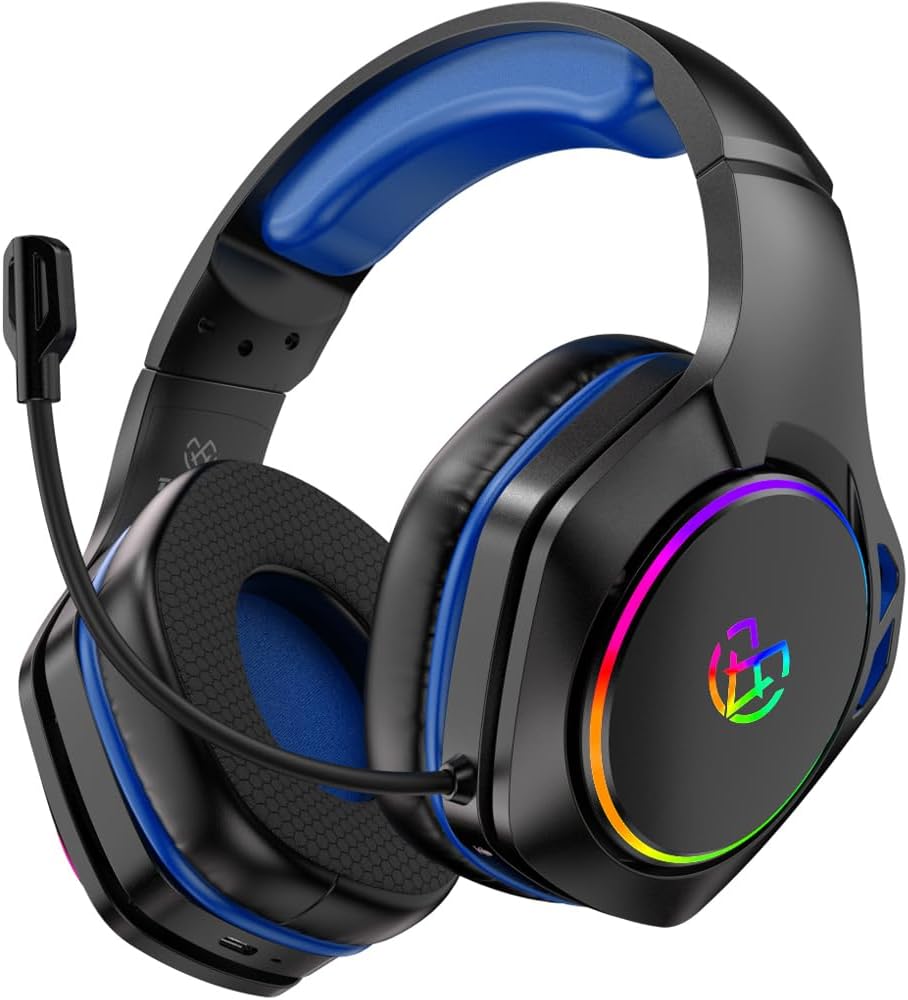
Image: The Tatybo Wireless Gaming Headset, featuring a blue headband and earcups, black exterior, an adjustable boom microphone, and colorful RGB lighting on the outer side of the earcups.
Kontenut tal-Pakkett:
- Tatybo Wireless Gaming Headset (WT01)
- 2.4GHz USB/Type-C Wireless Dongle
- Cable tal-Iċċarġjar tal-USB
- Cable Awdjo 3.5mm
- Manwal għall-Utent (dan id-dokument)
Komponenti tal-Headset:
- Faxxa tar-ras aġġustabbli: Għal tajbin komdu.
- Earkups: Over-ear design with breathable mesh cushions.
- Mikrofonu: 360° adjustable, noise-canceling boom microphone.
- Buttuna tal-Qawwa: Located on one earcup.
- Kontroll tal-Volum: Wheel or buttons for audio adjustment.
- Buttuna Mute tal-Mikrofonu: For quick muting.
- Port tal-Iċċarġjar: Port USB-C għall-iċċarġjar.
- Jack Awdjo 3.5mm: Għal konnessjoni bil-fili.
- Indikaturi LED: For power, charging, and connection status.
- Dawl RGB: Customizable lighting on earcups.
Setup
1. Iċċarġjar tal-Headset
- Connect the provided USB charging cable to the headset's USB-C charging port.
- Qabbad it-tarf l-ieħor tal-kejbil ma' sors ta' enerġija USB (eż., port USB tal-kompjuter, adapter tal-ħajt).
- The LED indicator will show charging status. A full charge typically takes approximately 3 hours, providing over 40 hours of playtime.
2. Connecting via 2.4GHz Wireless (USB/Type-C Dongle)
This mode offers ultra-low latency for optimal gaming performance on compatible devices.
- Insert the 2.4GHz USB or Type-C wireless dongle into an available port on your device (PC, PS5, PS4, Nintendo Switch in docked mode).
- Ixgħel il-headset billi tagħfas u żżomm il-buttuna tal-Power sakemm l-indikatur LED jixgħel.
- The headset should automatically pair with the dongle. The LED indicator will show a stable light once connected.
- On your device, ensure the Tatybo headset is selected as the default audio input and output device in the sound settings.
3. Konnessjoni permezz tal-Bluetooth 5.3
Ideal for mobile devices, laptops, Mac, and Nintendo Switch in handheld mode.
- Ensure the headset is powered off. Press and hold the Power button for approximately 5-7 seconds until the LED indicator flashes rapidly, indicating pairing mode.
- Fuq it-tagħmir tiegħek, ippermetti l-Bluetooth u fittex tagħmir disponibbli.
- Select "Tatybo WT01" (or similar name) from the list of found devices to pair.
- Once connected, the LED indicator on the headset will show a stable light.
4. Connecting via 3.5mm Audio Jack (Wired Mode)
For universal compatibility with any device featuring a 3.5mm audio port, or when battery is depleted.
- Qabbad tarf wieħed tal-kejbil tal-awdjo ta' 3.5mm mal-jack tal-awdjo ta' 3.5mm tal-headset.
- Connect the other end of the cable to the 3.5mm audio port on your device (e.g., controller, PC, mobile phone).
- The headset will function in passive wired mode. The microphone may or may not be active depending on the device's 3.5mm port configuration.
Istruzzjonijiet Operattivi
Qawwa mixgħul/mitfi
- Qawwa Mixgħul: Agħfas u żomm il-buttuna tal-Qawwa għal 2-3 sekondi.
- Itfi: Agħfas u żomm il-buttuna tal-Qawwa għal 3-5 sekondi.
Kontroll tal-Volum
Use the volume wheel or dedicated buttons on the earcup to adjust the audio output level.
Użu tal-mikrofonu
- Pożizzjonament: Adjust the flexible boom microphone to a comfortable position near your mouth for optimal voice pickup.
- Ixekkel/Ixekkel: Press the dedicated microphone mute button on the earcup to toggle the microphone on or off.
7.1 Surround Sound
The headset features 7.1 surround sound for an immersive audio experience. This feature is typically active when connected via 2.4GHz wireless or USB, providing enhanced directional audio cues in compatible games.
Kontroll tad-Dawl LED
The headset features RGB lighting on the earcups. To conserve battery life, you can typically turn off the LED lights by double-pressing the action button (often the power button or a dedicated LED control button).
Manutenzjoni
- Tindif: Uża drapp artab u niexef biex tnaddaf il-headset. Evita li tuża kimiċi ħarxa jew materjali li joborxu. Għall-kuxxinetti tal-widnejn, imsaħ bil-mod b'ċarruta ratba.amp drapp u ħallih jinxef kompletament.
- Ħażna: Aħżen il-headset f'post frisk u niexef 'il bogħod mix-xemx diretta u minn temperaturi estremi.
- Kura tal-batterija: Biex ittawwal il-ħajja tal-batterija, evita li tiċċarġja l-headset kompletament ta' spiss. Iċċarġjah regolarment, anke jekk ma jkunx qed jintuża għal perjodi twal.
Issolvi l-problemi
- Ebda Ħsejjes:
- Kun żgur li l-headset huwa mixgħul u ċċarġjat.
- Iċċekkja l-livelli tal-volum kemm fuq il-headset kif ukoll fuq l-apparat konness tiegħek.
- Verify the correct audio output device is selected in your device's sound settings.
- If using 2.4GHz wireless, ensure the dongle is securely inserted and paired. Try re-pairing if necessary.
- If using Bluetooth, ensure the headset is paired and connected. Try unpairing and re-pairing.
- If using 3.5mm wired, ensure the cable is fully inserted into both the headset and the device.
- Mikrofonu Mhux Jaħdem:
- Ensure the microphone is not muted (check the mute button on the headset).
- Verify the correct audio input device is selected in your device's sound settings.
- Check microphone privacy settings on your operating system.
- Kun żgur li l-boom tal-mikrofonu jkun pożizzjonat sew.
- Problemi ta' Konnessjoni (Wireless 2.4GHz):
- Ensure the dongle is within range (typically up to 10 meters) and not obstructed by physical barriers or other wireless devices causing interference.
- Try plugging the dongle into a different USB/Type-C port.
- Reboot your device and the headset.
- Ħajja Qasira tal-Batterija:
- Kun żgur li l-headset huwa kompletament iċċarġjat qabel l-użu.
- Turn off RGB lighting if not needed, as it consumes battery power.
- Reduce volume levels, as higher volumes can drain the battery faster.
Speċifikazzjonijiet
| Karatteristika | Dettall |
|---|---|
| Isem tal-Mudell | WT01 |
| Brand | Tatybo |
| Teknoloġija tal-Konnettività | Wireless (2.4GHz USB/Type-C, Bluetooth 5.3), Wired (3.5mm Audio Jack) |
| Apparati Kompatibbli | Gaming Consoles (PS5, PS4, Switch), PCs, Laptops, Mac, Mobile Phones |
| Tip ta' Sewwieq Awdjo | Sewwieq Dinamika |
| Karatteristiċi tal-Ħoss | 7.1 Surround Sound |
| Mikrofonu | 360° Adjustable, Noise-Canceling |
| Ħajja tal-batterija | 40+ hours (after 3-hour charge) |
| Medda ta' Frekwenzi | 20 Hz - 20,000 Hz |
| Forma tal-widna | Fuq il-widna |
| Piż tal-oġġett | 1.19 liri |
| Kulur | Blu |
Garanzija u Appoġġ
Tatybo products are designed for reliability and performance. For warranty information, technical support, or any inquiries regarding your WT01 Wireless Gaming Headset, please refer to the contact information provided on the product packaging or visit the official Tatybo websit. Żomm il-prova tax-xiri tiegħek għal talbiet ta' garanzija.