
Haozee HZ-WF-WV-White-DE
Haozee WiFi Smart Water Valve User Manual
Model: HZ-WF-WV-White-DE for DN20 3/4 Inch Pipes
1. Introduzzjoni
This manual provides instructions for the installation, operation, and maintenance of the Haozee WiFi Smart Water Valve. This device is designed to monitor water consumption, detect water flow, and provide automatic shutoff capabilities for DN20 3/4 inch pipe systems.

Image 1.1: The Haozee WiFi Smart Water Valve with an included water leak detector and a smartphone displaying the control app interface.
2. Karatteristiċi tal-prodott
- Konnettività WiFi: Connects to 2.4 GHz WiFi networks for remote control and monitoring via a smartphone application.
- Tifi awtomatiku: Configurable to automatically close the valve based on set water flow alarms or in conjunction with a water leak detector.
- Ultrasonic Flow Measurement: Utilizes W-shaped ultrasonic technology for accurate and reliable water flow detection.
- Smart Water Meter: Monitors daily, monthly, and recent water consumption statistics.
- Batterija rikarikabbli: Integrated 2600 mAh NiMH battery provides 3-6 months of operation, ensuring functionality during power outages.
- Kontroll mill-Bogħod tal-App: Allows users to open/close the water valve and monitor water flow in real-time via the app.
- Rabta tax-Xena: Compatible with Tuya WiFi water leak detectors (sold separately) for automated responses to detected leaks.

Image 2.1: Visual representation of the main functions including real-time display, app remote control, leak check, total water detection, flow rate detection, ultrasonic measurement, fast response, push notifications, scene linkage, AC/DC adapter, and easy installation.
3. Setup u Installazzjoni
3.1 Kontenut tal-Pakkett
- Valv tal-Ilma WiFi
- Rilevatur tat-Tnixxija tal-Ilma WiFi
- EU Power Adapter
- DN20 3/4 Inch Adapter
- Tejp li jwaħħal
- Kejbil tal-Enerġija
- Manwal għall-Utent
3.2 Konnessjoni tan-Netwerk
L-apparat jappoġġja 2.4 GHz WiFi networks only. If your router operates on both 2.4 GHz and 5 GHz bands, ensure you connect the valve to the 2.4 GHz network SSID.

Image 3.1: Illustration of dual-band network compatibility, emphasizing that the device requires a 2.4 GHz WiFi connection.
3.3 Installazzjoni Fiżika
- Kun żgur li l-provvista prinċipali tal-ilma tkun mitfija qabel l-installazzjoni.
- Install the valve onto your DN20 3/4 inch pipe. Use the provided adapter and adhesive tape as needed to ensure a secure, leak-free connection.
- Connect the power cable to the valve and plug the EU power adapter into a suitable power outlet.
- Download the Tuya Smart app from your smartphone's app store.
- Follow the in-app instructions to add the device and connect it to your 2.4 GHz WiFi network.
4. Istruzzjonijiet Operattivi
4.1 Kontroll mill-Bogħod tal-App
Once connected to the Tuya Smart app, you can remotely open or close the water valve from your smartphone. The app provides a real-time interface to control the valve's state.

Image 4.1: The smartphone app displaying an on/off toggle for the water valve, along with real-time flow rate and total water consumption.
4.2 Water Flow Monitoring
The valve uses W-shaped ultrasonic technology to detect water flow. The app displays the real-time flow rate and total water consumed. You can set alarms for specific flow rates.
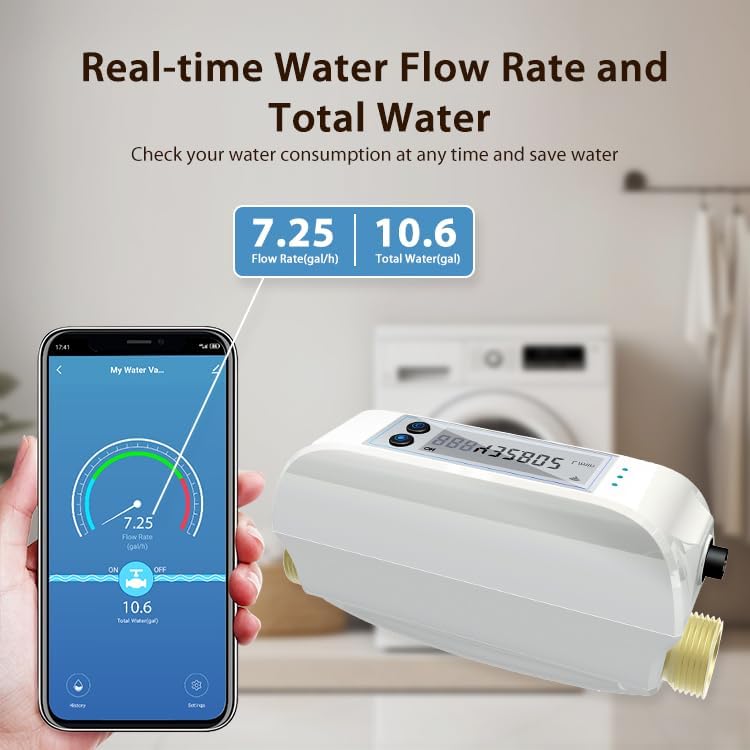
Image 4.2: A cross-section diagram showing how the ultrasonic transmitter and reflectors detect water flow within the valve.

Image 4.3: The app interface displaying current flow rate (e.g., 7.25 gal/h) and total water consumed (e.g., 10.6 gal).
4.3 Water Consumption Statistics
The app provides detailed statistics on your water consumption, including daily, monthly, and historical data. This allows for efficient water management and waste reduction.

Immaġni 4.4: Eż.amples of water consumption graphs within the app, showing usage patterns over different time periods.
4.4 Automated Scenes with Water Leak Detectors
Through the Tuya app, you can set up automated scenes. For example, if a Tuya WiFi water leak detector (sold separately) detects a leak, the smart water valve can be configured to automatically close, preventing significant water damage.
Image 4.5: The app's scene creation interface, demonstrating how to link the water valve with a water sensor for automatic actions.
5. Manutenzjoni
5.1 Ġestjoni tal-batterija
The valve includes a built-in 2600 mAh NiMH rechargeable battery. This battery provides power for 3-6 months on a full charge, allowing the valve to operate even during power outages. Nota: When operating solely on battery power, the app cannot be used to control or monitor the valve.
5.2 Kura Ġenerali
Keep the device clean and free from excessive dust or moisture. Do not use harsh chemicals for cleaning. Ensure the power connection is secure when operating on AC power.
6 Issolvi l-problemi
- Apparat mhux qed jikkonnettja mal-WiFi: Ensure your router is broadcasting a 2.4 GHz network. The device does not support 5 GHz WiFi. Verify your WiFi password and network stability.
- Il-kontroll tal-app mhux qed jaħdem: Check if the device is connected to AC power. In battery-only mode, app control and monitoring are disabled. Ensure your smartphone has an active internet connection.
- Inaccurate flow rate readings: Ensure the valve is installed correctly according to the flow direction. If issues persist after initial setup, a firmware update might be required (check the app for updates). Note that some users have reported minor discrepancies (2-3%) compared to calibrated meters.
- Slow app updates for flow/consumption: The app may update flow rate and consumption data every 60 seconds. This is normal operation and not an indication of a fault.
- Issues with third-party integrations (e.g., Home Assistant): This product is primarily designed for use with the Tuya Smart app. Integration with other smart home platforms may have limitations or require specific configurations not officially supported.
7. Speċifikazzjonijiet
| Brand | Haozee |
| Numru tal-Mudell | HZ-WF-WV-White-DE |
| UPC | 640712053385 |
| Dimensjonijiet tal-Prodott | 20 x 9 x 7 ċm |
| Piż tal-oġġett | 1.7 Kilogrammi |
| Dijametru tal-pajp | DN20 (3/4 inch) |
| Metodu ta' Kontroll | App |
| Tip ta 'Immuntar | Art |
| Teknoloġija tas-Sensers | Sensor ultrasoniku |
| Sors tal-Enerġija | Corded Elettriku |
| Tip ta 'batterija | NiMH (1 AA battery included) |
| Apparati Kompatibbli | Smartphone |
8. Garanzija u Appoġġ
For warranty information and technical support, please refer to the documentation included with your product or contact Haozee customer service directly. Contact details can typically be found on the manufacturer's official webis-sit jew l-imballaġġ tal-prodott.
Ask a question about this manual
Ask about setup, troubleshooting, compatibility, parts, safety, or missing instructions. Manuals+ will review the question and use this page’s manual context to help answer it.