
1. Prodott Aktarview
The LINOVISION ANT-4GCOMBO3 is a versatile 3-in-1 combo antenna designed to enhance cellular signals and extend Wi-Fi coverage. It integrates two 4G LTE MIMO antennas and one dual-band Wi-Fi antenna into a single, robust unit.
- 3-in-1 Combo Design: Combines 2x 4G LTE MIMO and 1x Dual-Band Wi-Fi (2.4GHz & 5GHz) for comprehensive connectivity. Each RG174 cable is 40cm (15.75 inches) in length.
- Global 4G LTE Coverage: Supports frequency ranges from 698~960MHz and 1710~2690MHz, compatible with most global 4G LTE networks. Features two 4G LTE antennas with SMA Male Connectors.
- Wi-Fi bi Faxxa Doppja: Operates on 2400~2483.5MHz and 4900~5825MHz frequencies. Includes one Wi-Fi antenna with an RP-SMA Male Connector.
- Klassifikazzjoni IP67 li ma jgħaddix ilma minnha: Engineered for reliable performance in harsh outdoor environments, with an operating temperature range of -40℃ to +85℃.
- Kompatibilità Wiesgħa: Works with various 4G LTE cellular routers that have 2 or 3 antenna interfaces, including LINOVISION IOT-R32, Inhand IR302, Teltonika RUT241, and RUT240.
- Applikazzjonijiet Diversi: Suitable for RVs, marine vehicles, remote IoT devices, surveillance systems, and industrial settings.
2. Kontenut tal-Pakkett
Ivverifika li l-oġġetti kollha huma preżenti fil-pakkett tiegħek:
- 1 x LINOVISION ANT-4GCOMBO3 4G LTE MIMO and WiFi 3-in-1 Combo Antenna
- 1 x Manwal tal-Utent (dan id-dokument)
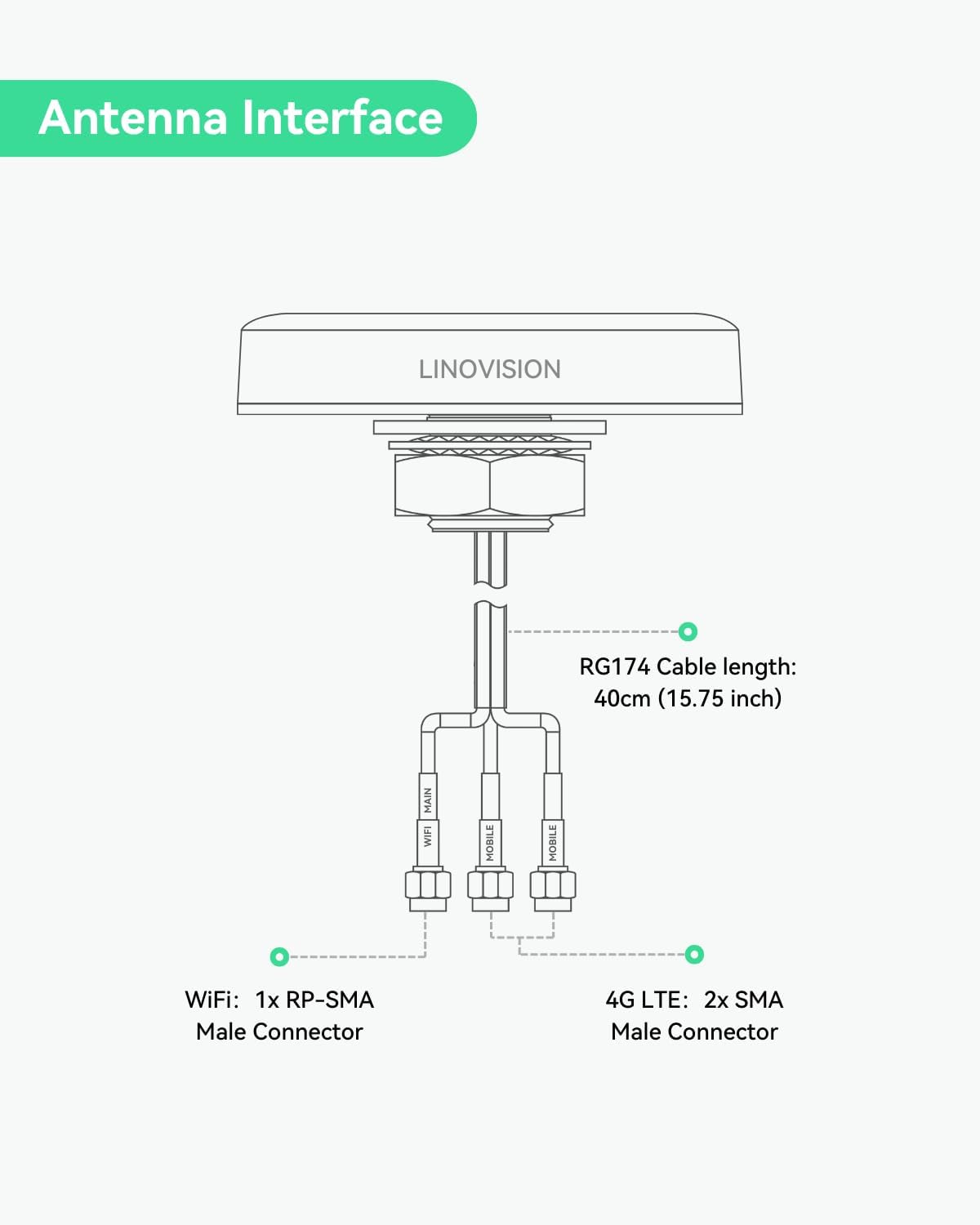
Image: LINOVISION ANT-4GCOMBO3 antenna and included user manual.
3. Speċifikazzjonijiet
| Karatteristika | Speċifikazzjoni |
|---|---|
| Numru tal-Mudell | ANT-4GCOMBO3 |
| Tip ta' Antenna | 4G LTE MIMO (2x), Dual-Band Wi-Fi (1x) |
| 4G LTE Frequency Range | 698 ~ 960MHz / 1710 ~ 2690MHz |
| Medda ta' Frekwenzi Wi-Fi | 2400 ~ 2483.5MHz / 4900 ~ 5825MHz |
| 4G LTE Connector Type | SMA Male |
| Wi-Fi Connector Type | RP-SMA Male |
| Tul tal-Cable | 40cm (15.75 inches) RG174 |
| Klassifikazzjoni tal-Protezzjoni tad-Dħul (IP). | IP67 |
| Temperatura operattiva | -40℃ to +85℃ (-40°F to 185°F) |
| Umdità Relattiva | Sa 95% |
| Impedenza | 50 Ohms |
| Medda Massimu | 100 Metri (madwar 328 pied) |
| Dimensjonijiet tal-Prodott (L x W x H) | 4.72" x 3.94" x 0.98" (120mm x 100mm x 25mm) |
| Piż tal-oġġett | 4.6 uqija (130g) |

Image: Detailed dimensions of the ANT-4GCOMBO3 antenna.
4. Setup u Installazzjoni
Follow these steps for proper installation of your LINOVISION ANT-4GCOMBO3 antenna:
4.1 Interface tal-antenna
The antenna features three cables: two for 4G LTE (SMA Male connectors) and one for Wi-Fi (RP-SMA Male connector). Ensure correct connection to your router.

Image: Diagram illustrating the antenna's cable interfaces (2x 4G LTE SMA, 1x Wi-Fi RP-SMA).
4.2 Istruzzjonijiet tal-Immuntar
The antenna is designed for outdoor roof mounting. It requires a hole for cable routing and a secure fastening mechanism.
- Ipprepara l-Wiċċ tal-Immuntar: Choose a flat, stable surface on your vehicle or structure for mounting.
- Drill Toqba: Drill a hole with a diameter of 0.98 inches (25mm) at the chosen location.
- Waħħal il-Kolla: If not pre-applied, attach the 3M double-sided tape to the base of the antenna for initial positioning and sealing.
- Insert Antenna: Pass the antenna's threaded shaft and cables through the drilled hole.
- Antenna Sikura: From the underside of the mounting surface, thread and tighten the included nut onto the antenna's shaft until secure. Ensure a tight seal to maintain IP67 rating.

Image: Step-by-step visual guide for antenna installation.

Image: The ANT-4GCOMBO3 antenna installed on a roof, demonstrating its outdoor suitability and IP67 waterproof design.
5. Operazzjoni
Once installed, connect the antenna cables to the corresponding ports on your compatible 4G LTE cellular router. The antenna will then begin to enhance cellular signal reception and extend Wi-Fi coverage for your connected devices.
5.1 Compatible Routers
This antenna is designed to work seamlessly with routers such as:
- LINOVISION IOT-R32
- Inhand IR302
- Teltonika RUT241
- Teltonika RUT240
5.2 Applikazzjonijiet Tipiċi
The robust design and multi-functionality make this antenna suitable for a variety of demanding environments:
- Vetturi Rikreattivi (RVs): Provides stable internet connectivity on the go.
- Marine Vehicles: Ensures reliable communication for boats and ships.
- Remote IoT Devices: Ideal for connecting devices in areas with weak signal.
- Sistemi ta' Sorveljanza: Enhances connectivity for remote camera setups.
- Industrial Environments: Supports robust network access in challenging industrial settings.

Immaġni: Eżamples of diverse applications for the ANT-4GCOMBO3 antenna, including RVs, transportation, marine, and construction.
6. Manutenzjoni
The LINOVISION ANT-4GCOMBO3 antenna is designed for minimal maintenance due to its durable construction and IP67 waterproof rating.
- Spezzjoni regolari: Periodically check the antenna for any physical damage or loose connections, especially after severe weather conditions.
- Tindif: If necessary, gently clean the antenna surface with a soft, damp drapp. Evita li tuża kimiċi ħarxa jew materjali li joborxu.
- Reżiljenza Ambjentali: The antenna is built to withstand extreme temperatures from -40°F to 185°F and high humidity up to 95%.

Image: Visual representation of the antenna's rugged design, highlighting its wide operating temperature range and IP67 rating.
7 Issolvi l-problemi
If you encounter issues with your antenna, consider the following troubleshooting steps:
- Ebda Sinjal jew Sinjal Dgħajjef:
- Ensure all antenna connectors (SMA for 4G LTE, RP-SMA for Wi-Fi) are securely fastened to the correct ports on your router.
- Verify that the antenna is mounted in an optimal location, free from obstructions that could block signals.
- Check your router's settings to confirm that external antennas are enabled, if applicable.
- Test with another compatible router or antenna if possible, to isolate the issue.
- Konnettività intermittenti:
- Inspect cables for any signs of damage or wear.
- Ensure the mounting is stable and the antenna is not moving, which could affect signal consistency.
- Check for potential sources of interference near the antenna or router.
- Ħsara Fiżika:
- If the antenna or cables are physically damaged, contact LINOVISION support for assistance.
8. Garanzija u Appoġġ
LINOVISION is committed to providing reliable products and customer support.
- Disponibbiltà ta' Spare Parts: EU spare parts are available for a duration of 6 years.
- Appoġġ Tekniku: 24/7 US local and global technical support is available.
- Warranty and Replacement: Warranty services and replacements are handled from Texas, USA.
For further assistance, please visit the official LINOVISION websit jew ikkuntattja lit-tim tal-appoġġ tal-klijenti tagħhom.