
1. Introduzzjoni
This manual provides essential information for the safe and effective operation of your QWORK AC Motor Speed Controller, Model QS35380. This device is designed to efficiently manage the speed of AC motors and control the power supplied to various resistive and inductive loads by adjusting the output voltage.
Jekk jogħġbok aqra dan il-manwal bir-reqqa qabel l-installazzjoni u l-użu, u żommu għal referenza futura.
2. Istruzzjonijiet tas-Sigurtà
To prevent injury or damage to the device, always observe the following safety precautions:
- Tiżgura l-input voltage is within the specified range of 110-120V AC.
- Do not exceed the maximum current rating of 15A. The device features an automatic power cutoff for overload protection.
- Connect a load to the output before attempting to regulate voltage. L-output voltage display requires a connected load to show accurate readings.
- Dan l-apparat huwa maħsub għall-użu fuq ġewwa biss.
- Żomm l-apparat 'il bogħod mill-ilma, umdità, u temperaturi estremi.
- Tippruvax tiftaħ jew timmodifika l-apparat. Irreferi kull servizz lil persunal kwalifikat.
- Always unplug the device from the power source before making any connections or disconnections.
- Ensure the connected load's power consumption does not exceed 4000W for resistive loads or 1500W for inductive loads.
3. Prodott Aktarview
The QWORK AC Motor Speed Controller is designed for ease of use and reliability. Familiarize yourself with its components:

Figura 3.1: Quddiem view of the QWORK AC Motor Speed Controller, showing the ON/OFF switch, overload protection, output voltage display, and rotary control knob.
- ON/OFF Switch with Reset: Controls the main power to the unit. Includes a reset button for the overload protection.
- 15A Overload Protection: Automatically cuts power if the current exceeds 15A, protecting the device and connected equipment.
- Ħruġ Voltage Display: A digital display showing the current output voltage. Requires a connected load to function accurately.
- Rotary Control Knob: Used to precisely adjust the output voltage and, consequently, the speed of a motor or power to a load. Marked with percentage qawwa.
- Korda tal-Enerġija tad-Dħul: Connects the controller to a standard 110-120V AC power outlet (Type A/B plug compatible).
- Socket tal-ħruġ: A standard Type A/B socket for connecting your AC motor or other electrical load.
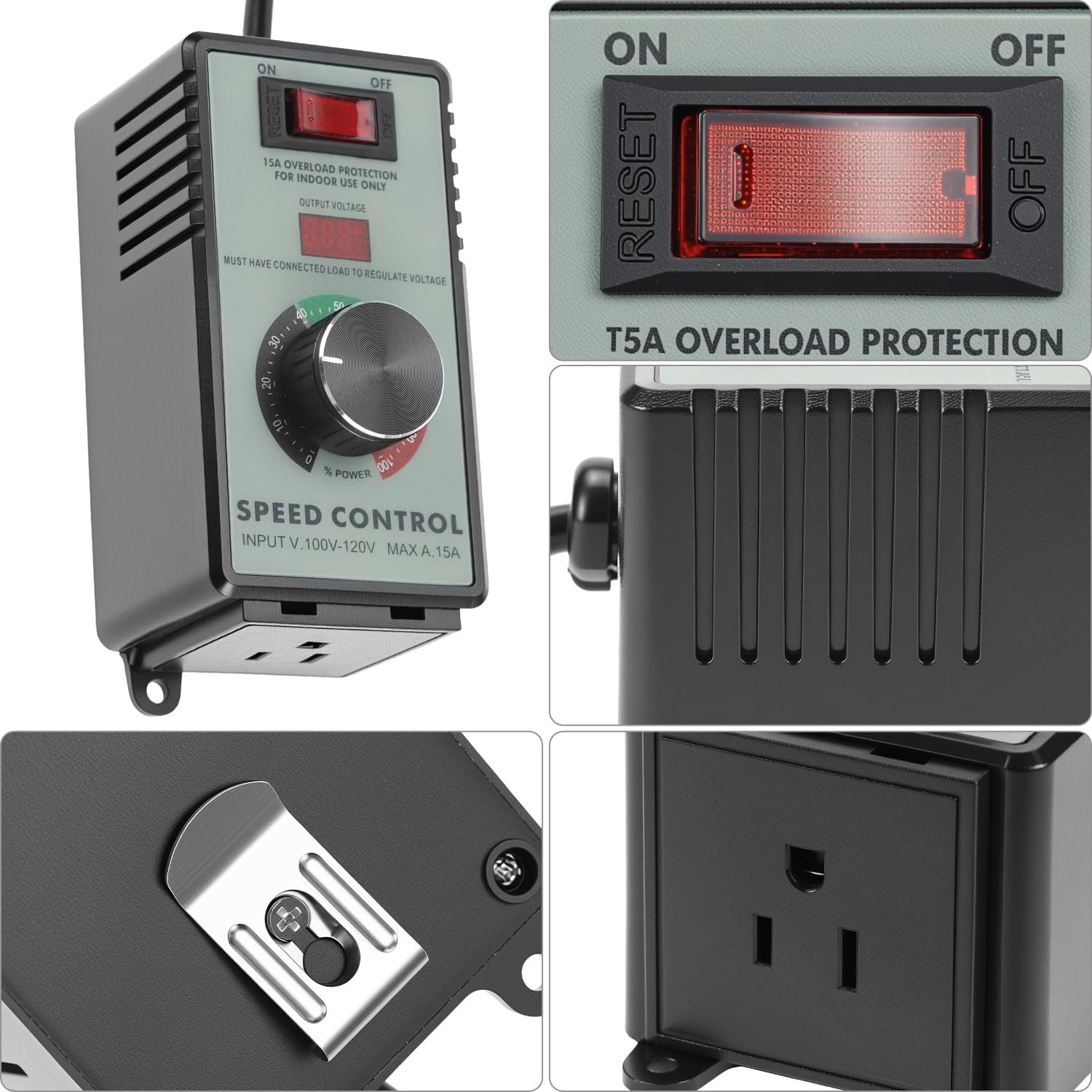
Figura 3.2: Dettaljati view of the control panel and the integrated mounting bracket on the back.

Figura 3.3: Ġenb view illustrating the output socket for connecting devices.
4. Speċifikazzjonijiet
| Karatteristika | Speċifikazzjoni |
|---|---|
| Numru tal-Mudell | QS35380 |
| Input Voltage | 110-120V AC |
| Kurrent Massimu | 15A |
| Tagħbija Reżistiva Massima | 4000W |
| Tagħbija Induttiva Massima | 1500W |
| Protezzjoni ta 'tagħbija żejda | Automatic 15A cutoff with reset |
| Kompatibilità tal-plagg | Type A and Type B (US standard) |
| Dimensjonijiet (L x W x H) | Madwar 5.59 x 4.61 x 4.02 pulzieri |
| Piż tal-oġġett | 12.3 uqija |
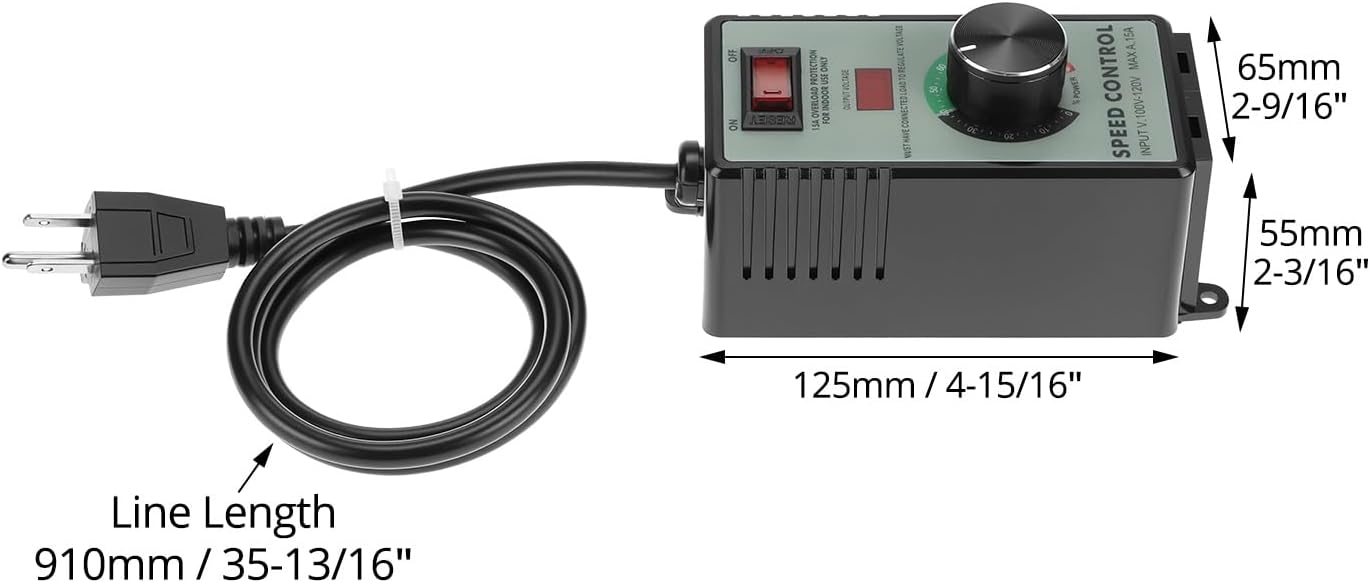
Figura 4.1: Dimensional diagram of the speed controller, showing length, width, and height measurements.
5. Setup
- Ippakkja: Carefully remove the speed controller from its packaging. Inspect for any signs of damage.
- Pjazzament: Place the controller on a stable, dry surface, away from direct sunlight, heat sources, and moisture. Ensure adequate ventilation around the unit.
- Qabbad it-Tagħbija: Ensure the device you wish to control (e.g., fan, motor, heater) is turned off. Plug the power cord of your device into the output socket of the QWORK AC Motor Speed Controller.
- Qabbad mal-Enerġija: Plug the QWORK AC Motor Speed Controller's input power cord into a standard 110-120V AC wall outlet.
Importanti: Always connect the load first before plugging the controller into the wall outlet. The output voltage display will only show a reading when a load is connected.
6. Istruzzjonijiet Operattivi
- Qawwa Mixgħul: Flip the ON/OFF switch to the "ON" position. The output voltage display may illuminate.
- Aġġusta Voltage/Speed: Slowly rotate the control knob clockwise to increase the output voltage and power to the connected device. Rotate counter-clockwise to decrease. The digital display will show the approximate output voltage.
- Monitora l-Prestazzjoni: Observe the performance of your connected device. Adjust the knob until the desired speed or power level is achieved.
- Itfi: To turn off the connected device, either rotate the control knob fully counter-clockwise to the "0" position or flip the ON/OFF switch to the "OFF" position. For complete power disconnection, unplug the controller from the wall outlet.

Figura 6.1: Adjusting the rotary control knob to set the desired output power or motor speed.
Note on Inductive Loads: When controlling inductive loads like motors, start at a lower voltage and gradually increase to avoid sudden surges. The maximum inductive load is 1500W.

Figura 6.2: The speed controller can be used with various devices such as fans, light bulbs, and small power tools to regulate their operation.
7. Manutenzjoni
- Tindif: Disconnect the controller from the power outlet before cleaning. Use a soft, dry cloth to wipe the exterior. Do not use liquid cleaners or solvents.
- Ħażna: Meta ma tkunx qed tużah, aħżen il-kontrollur f'post frisk u niexef, 'il bogħod mix-xemx diretta u minn temperaturi estremi.
- Spezzjoni: Periodically inspect the power cord and housing for any signs of damage. If damage is found, discontinue use and contact customer support.
8 Issolvi l-problemi
| Problema | Kawża Possibbli | Soluzzjoni |
|---|---|---|
| L-apparat ma jixgħelx. |
|
|
| Vol. Tal-ħruġtage display shows "0" or no reading. |
|
|
| Connected device does not respond to knob adjustment. |
|
|
| Overload protection trips frequently. |
|
|
9. Garanzija u Appoġġ
QWORK products are manufactured to high-quality standards. For information regarding warranty coverage, technical support, or service, please refer to the warranty card included with your purchase or visit the official QWORK websit.
For direct assistance, you may contact QWORK customer service through the retailer where the product was purchased or via the contact information provided on the QWORK brand store page: QWORK Amazon Store.