Introduzzjoni
Thank you for choosing the zelotes T80 Ergonomic Gaming Mouse. This wired optical mouse is designed for both gaming and office use, offering adjustable DPI, customizable LED lighting, and a comfortable ergonomic design for extended use. Please read this manual carefully to ensure proper setup and operation of your new mouse.
Karatteristiċi tal-Prodott
- 7 Buttons & Quick Fire Button: Includes forward, backward, and a rapid fire (double click) button for enhanced control in gaming and productivity.
- 5 Adjustable DPI Levels: Easily switch between 1000/1600/2400/3200/7200 DPI to match your speed and precision needs.
- 7 LED Backlit Modes: Personalize your setup with various lighting effects.
- Disinn Ergonomiku: Crafted for comfort with skin-friendly material, sweat-resistant, and anti-slip features to prevent fatigue during long sessions.
- Kompatibilità Wiesgħa: Compatible with Windows 11/10/8/7 and Mac OS, suitable for various applications including MMD, FPS games, and office tasks.
Kontenut tal-Pakkett
- 1 x zelotes T80 Wired Gaming Mouse
- 1 x Manwal ta 'Istruzzjoni
Setup
- Ippakkja: Carefully remove the mouse and its accessories from the packaging.
- Neħħi Film Protettiv: Before use, please remove the protective film from the mouse's foot pads.
- Qabbad: Plug the USB cable of the zelotes T80 Gaming Mouse into an available USB port on your computer (PC or Laptop).
- Installazzjoni tas-sewwieq: Il-maws huwa plug-and-play. Is-sistema operattiva tiegħek awtomatikament tiskopri u tinstalla d-drajvers meħtieġa. Normalment mhi meħtieġa l-ebda installazzjoni ta' softwer addizzjonali għall-funzjonalità bażika.
Istruzzjonijiet Operattivi
Spjegazzjonijiet tal-buttuni
The zelotes T80 mouse features 7 buttons for versatile control:
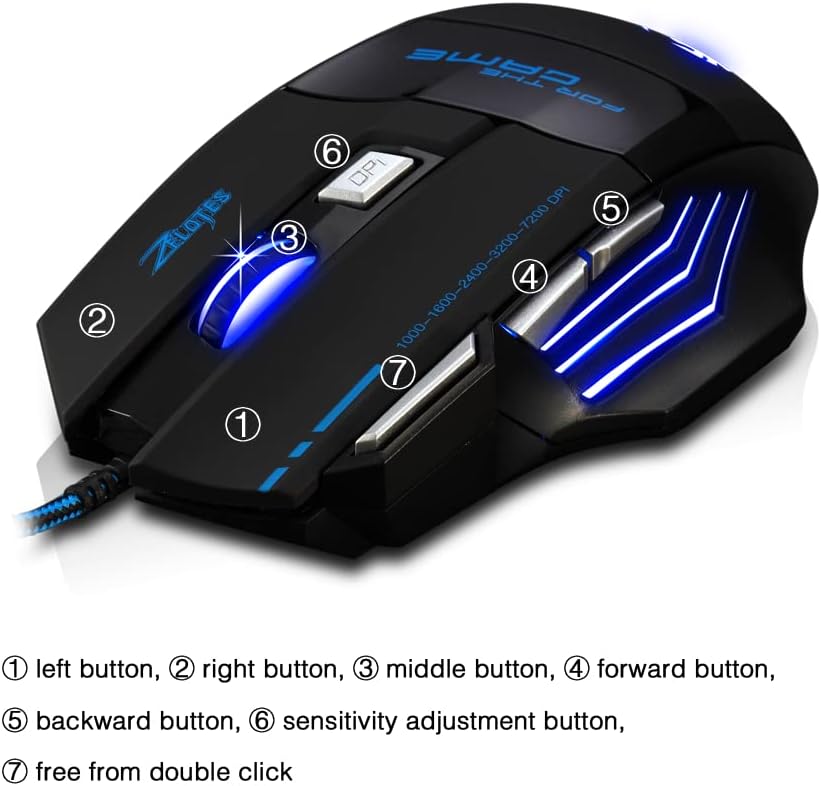
- Buttuna tax-Xellug (1): Funzjoni standard tal-ikklikkjar tax-xellug.
- Buttuna tal-Lemin (2): Funzjoni standard tal-ikklikkjar tal-lemin.
- Middle Button / Scroll Wheel (3): Scrolls up/down. Pressing it acts as a middle-click.
- Buttuna 'l Quddiem (4): Jinnaviga 'l quddiem ġewwa web browsers jew file esploraturi.
- Buttuna Lura (5): Jinnaviga lura ġewwa web browsers jew file esploraturi.
- Buttuna DPI (6): Adjusts mouse sensitivity (DPI) and changes LED colors.
- Rapid Fire Button (7): Functions as a double-click of the left button, useful for continuous firing in games.
Aġġustament DPI
The mouse offers 5 adjustable DPI levels to suit different tasks and preferences:
- 1000 DPI
- 1600 DPI
- 2400 DPI
- 3200 DPI
- 7200 DPI
Agħfas il- Buttuna DPI (6) to cycle through these sensitivity levels. Each change will be indicated by a corresponding LED color change.
Kontroll tad-Dawl LED
The mouse features 7 LED lighting modes. To change the LED color, long press the DPI button (6). The LED will flash rapidly 7 times and then remain constant on the selected color.

Manutenzjoni
- Tindif: Uża drapp artab u niexef biex tnaddaf il-wiċċ tal-maws. Għal ħmieġ iebes, neħħi ftit drapp.amp Jista' jintuża drapp, u jiżgura li ma jidħol l-ebda likwidu fil-maws.
- Kura tal-Cable: Evita liwjiet qawwija jew ġbid eċċessiv tal-kejbil USB biex tevita l-ħsara.
- Ħażna: Store the mouse in a dry, cool place away from direct sunlight and extreme temperatures.
Issolvi l-problemi
Il-maws ma jirrispondix
- Kun żgur li l-kejbil tal-USB huwa mdaħħal sew f'port tal-USB li jaħdem.
- Ipprova qabbad il-maws ma' port USB differenti fuq il-kompjuter tiegħek.
- Ittestja l-maws fuq kompjuter ieħor biex tiddetermina jekk il-problema hijiex fil-maws jew fil-kompjuter.
LED Lights Not Working/Changing
- Iċċekkja li l-maws huwa konness sew mal-kompjuter.
- Ensure you are long-pressing the DPI button to cycle through colors. A short press changes DPI.
DPI Mhux qed Jinbidel
- Ensure you are short-pressing the DPI button to cycle through DPI levels.
- If the issue persists, try reconnecting the mouse.
Speċifikazzjonijiet
| Karatteristika | Dettall |
|---|---|
| Numru tal-Mudell | T80 |
| Buttuni | 7 (with scroll wheel) |
| DPI aġġustabbli | 1000/1600/2400/3200/7200 DPI |
| Dawl LED | 7 modi tad-dawl |
| Konnettività | USB bil-fili |
| Sistema ta' Traċċar | Ottiċi |
| Disinn Ergonomiku | Iva |
| Aqleb il-Ħajja | 5 miljun ċiklu |
| Dimensjonijiet | 130x105x45mm |
| Piż | 160±5g |
| Tul tal-Cable USB | 1.5m |
| Kompatibilità | Win11, Win10, Win8, Win7, Mac OS |
Garanzija u Appoġġ
For warranty information and technical support, please refer to the product packaging or contact zelotes customer service through the retailer where the product was purchased. Keep your purchase receipt for warranty claims.