
Oilsky M303
Oilsky M303 Android 9.0 MP3 Player User Manual
Mudell: M303
1. Introduzzjoni
The Oilsky M303 is a versatile digital audio and video player running on Android 9.0. It features a 4-inch full-touch screen, 8-core processor, 2GB RAM, 16GB internal storage (expandable with a 64GB microSD card included), Wi-Fi, and Bluetooth connectivity. This manual provides essential information for operating your device.
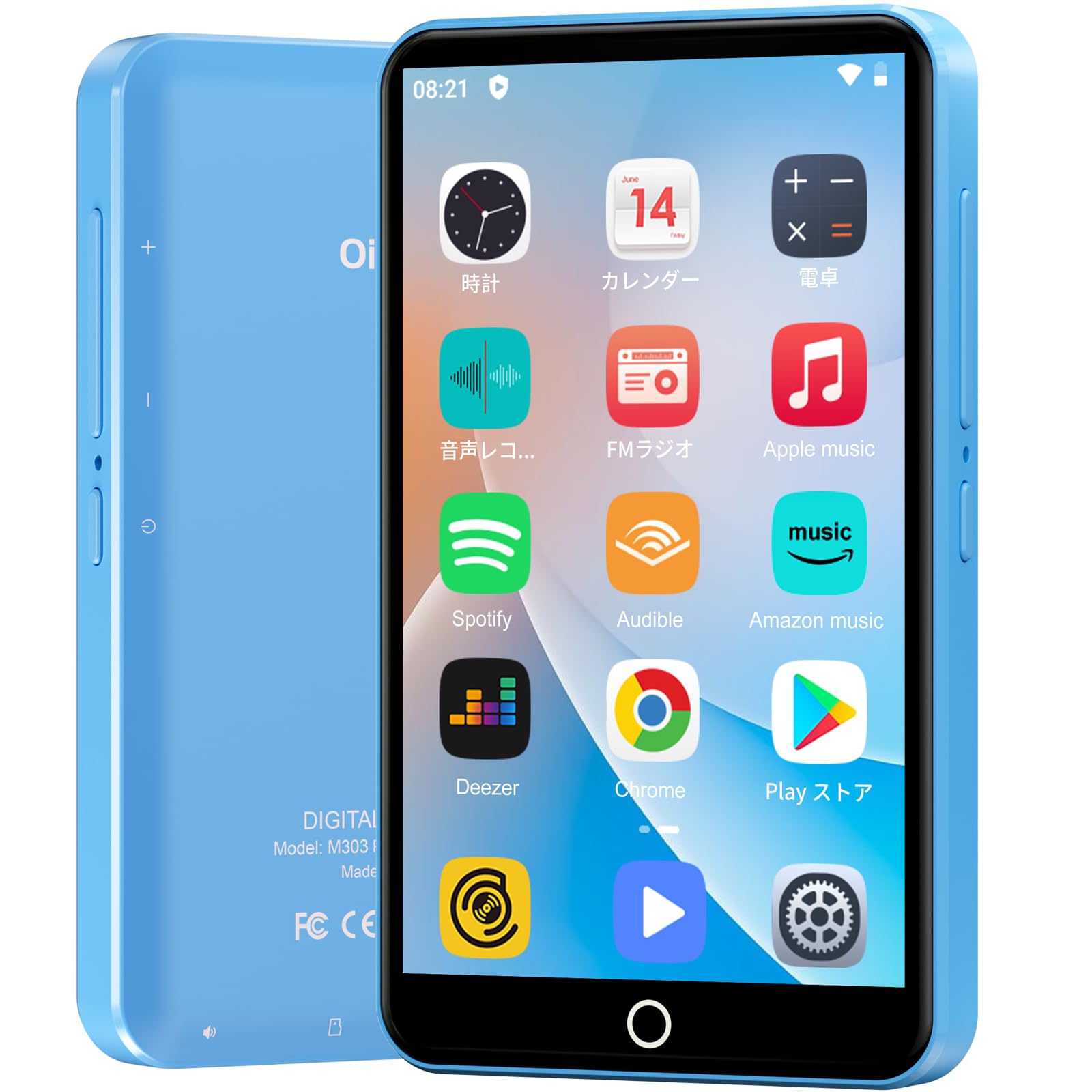
Immaġni: Quddiem view of the Oilsky M303 MP3 Player, showcasing its compact design and touchscreen interface.
2. X'hemm fil-Kaxxa
Jekk jogħġbok iċċekkja li l-oġġetti kollha li ġejjin huma inklużi fil-pakkett tiegħek:
- Oilsky M303 Main Unit
- Earphones
- Kejbil tad-Data tat-Tip-C
- Protective Film (one pre-installed, one spare)
- Multi-language User Manual (including Japanese)
- Kaxxa Protettiva tas-Silikon
- 64GB Karta tal-Memorja

Image: All included accessories for the Oilsky M303 MP3 Player, neatly arranged.
3. Prodott Aktarview
Familiarize yourself with the device's physical features and controls.
3.1. Layout tal-Apparat

Immaġni: Ġenb view of the Oilsky M303, highlighting the volume buttons, power button, and USB-C port.
- Buttuna tal-Qawwa: Agħfas u żomm biex tixgħel/titfi jew terġa' tibda. Agħfas qasir biex tixgħel/titfi l-iskrin.
- Buttuni tal-Volum: Aġġusta l-volum tal-awdjo.
- Port USB-C: Għall-iċċarġjar u t-trasferiment tad-dejta.
- Jack tal-headphones ta' 3.5mm: Connect wired earphones.
- Slott tal-Karta MicroSD: Daħħal kard microSD għal ħażna akbar.
- Kelliem inkorporat: Għad-daqq tal-awdjo mingħajr headphones.
4. Setup
4.1. Iċċarġjar Inizjali
Before first use, fully charge the device. Connect the provided Type-C data cable to the player and a USB power adapter (not included). A full charge takes approximately 3 hours. The device has a 2000mAh battery for extended use.
4.2. Power On/Off
- Biex Tixgħel: Agħfas u żomm il-buttuna Power sakemm l-iskrin jixgħel.
- Biex Tifi: Agħfas u żomm il-buttuna tal-Enerġija, imbagħad agħżel "Itfi" mill-għażliet.
- Screen mixgħul/mitfi: Short press the Power button to turn the screen on or off.
4.3. Settings tal-Lingwa
Upon first boot, you may need to set the language. Navigate to Settings > Sistema > Lingwi u input > Lingwi to select your preferred language, such as English or Japanese.
4.4. Konnessjoni Wi-Fi
To access online features and download apps, connect to a Wi-Fi network:
- Mur fuq Settings > Netwerk u internet > Wi-Fi.
- Ixgħel il-Wi-Fi On.
- Agħżel in-netwerk mixtieq tiegħek mil-lista u daħħal il-password jekk tintalab.
4.5. Il-Google Play Store
The Oilsky M303 supports Google Play Store, allowing you to download various applications.
- Ensure you are connected to Wi-Fi.
- Iftaħ il- Play Store app mill-iskrin tad-dar.
- Idħol mal-kont Google tiegħek.
- Fittex għal and install desired applications like YouTube, Spotify, or other streaming services.

Image: The Oilsky M303 screen showing the Google Play Store interface with various app icons.
5. Istruzzjonijiet Operattivi
5.1. Daqq tal-mużika
The device supports various audio formats including MP3, WMA, WAV, FLAC, OGG, AAC, APE, and M4A.
- Transfer Music: Connect the player to your computer using the Type-C cable and transfer audio files to the device's internal storage or the microSD card.
- Play Mużika: Open the Music app. You can browse by artist, album, song, or create custom playlists.
- Equalizer: Adjust sound settings using the built-in equalizer for a personalized audio experience.
- Online Lyrics: The player supports displaying online lyrics for songs.

Image: The Oilsky M303 displaying its music playback interface, showing options for song classification, search, playlist creation, and equalizer settings.
5.2. Daqq tal-vidjo
Enjoy videos on the 4-inch IPS full-touch screen with 480x800px resolution, supporting up to 1080P Full HD video playback. Supported formats include RM, AVI, RMVB, FLV, MP4, DAT, MKV, MPG, MOV, TS.
- Transfer Videos: Ittrasferixxi l-vidjo files mill-kompjuter tiegħek għall-apparat.
- Play Videos: Open the Video app and select your desired video.
- Għażliet ta' Daqq: Features include loop or random playback, variable speed playback, sleep timer, and gesture controls for zoom.

Image: The Oilsky M303 displaying a video on its 4-inch screen, illustrating its video playback capabilities.
5.3. Konnessjoni Bluetooth
Connect your player to Bluetooth headphones, speakers, or car audio systems.
- Mur fuq Settings > Apparati konnessi > Bluetooth.
- Toggle Bluetooth On.
- Make sure your Bluetooth accessory is in pairing mode.
- Agħżel l-aċċessorju mil-lista ta' apparati disponibbli biex tqabbadhom.

Image: The Oilsky M303 demonstrating its Bluetooth connectivity with various audio devices like speakers and headphones.
5.4. Radju FM
The device includes an FM radio function. Connect wired earphones to act as an antenna for optimal reception.
5.5. Voice Recorder
Use the built-in voice recorder for capturing audio notes or lectures. Open the Reġistratur tal-Ħoss app to start recording.
5.6. File Ġestjoni
The player comes with 16GB of internal storage and a 64GB microSD card, providing a total of 80GB usable storage. This can be expanded further up to 512GB using a larger microSD card. Use the File Manager app to organize your media and documents.
6. Manutenzjoni
- Tindif: Uża drapp artab u niexef biex tnaddaf l-apparat. Evita prodotti tat-tindif likwidi jew materjali li joborxu.
- Ħażna: Aħżen l-apparat f'post frisk u niexef 'il bogħod mix-xemx diretta u minn temperaturi estremi.
- Kura tal-batterija: Biex ittawwal il-ħajja tal-batterija, evita li tiċċarġja kompletament il-batterija ta' spiss. Iċċarġjaha regolarment.
- Aġġornamenti tas-Software: Check for system updates periodically in Settings > Sistema > Avvanzat > Aġġornament tas-sistema biex tiġi żgurata prestazzjoni u sigurtà ottimali.
7 Issolvi l-problemi
| Problema | Soluzzjoni Possibbli |
|---|---|
| L-apparat ma jixgħelx. | Kun żgur li l-batterija hija ċċarġjata. Qabbad ma' ċarġer għal mill-inqas 30-il minuta qabel ma tipprova tixgħelha mill-ġdid. |
| Ma tistax tikkonnettja mal-Wi-Fi. | Check if Wi-Fi is enabled in settings. Ensure the password is correct. Restart the device and your Wi-Fi router. |
| Il-konnessjoni Bluetooth mhijiex stabbli jew tiskonnettja. | Ensure the player and Bluetooth accessory are within close range. Avoid areas with strong electromagnetic interference. Try re-pairing the devices. |
| Apps are slow or unresponsive. | Close unnecessary background applications. Clear app cache (Settings > Apps & notifications > See all apps > [App Name] > Storage & cache > Clear cache). Restart the device. |
| L-apparat jisħon waqt l-użu. | It is normal for the device to warm up during intensive use (e.g., video playback, gaming). If it becomes excessively hot, close applications and let it cool down. |
| Cannot charge with USB-C PD charger. | The device may not support USB-C Power Delivery (PD) protocols. Use a standard USB-A to USB-C cable with a compatible USB-A power adapter (5V, up to 900mA). |
8. Speċifikazzjonijiet
| Brand | Oilsky |
| Mudell | M303 |
| Sistema Operattiva | Android 9.0 |
| Skrin | 4-inch Full-touch IPS LCD (480x800px) |
| Proċessur | 8-core (MTK 8-Core) |
| RAM | 2GB |
| Ħażna Interna | 16GB |
| Ħażna espansibbli | MicroSD card up to 512GB (64GB card included) |
| Batterija | 2000mAh |
| Konnettività | Wi-Fi, Bluetooth |
| Formati Awdjo Appoġġjati | MP3, WMA, WAV, FLAC, OGG, AAC, APE, M4A |
| Formati tal-Vidjo Appoġġjati | RM, AVI, RMVB, FLV, MP4, DAT, MKV, MPG, MOV, TS (up to 1080P) |
| Dimensjonijiet (D x W x H) | 1 x 6.1 x 10.3 ċm |
| Karatteristiċi | Touchscreen, Voice Recorder, Built-in Speaker, Video Playback, FM Radio, Calculator, Calendar, Alarm |
| Oriġini | Iċ-Ċina |
9. Garanzija u Appoġġ
The Oilsky M303 MP3 Player comes with a garanzija ta 'sena mid-data tax-xiri. Jekk jogħġbok żomm il-prova tax-xiri tiegħek għal talbiet ta' garanzija.
For technical support or warranty inquiries, please contact the retailer or manufacturer directly. Refer to the contact information provided in the packaging or on the official Oilsky websit.
Ask a question about this manual
Ask about setup, troubleshooting, compatibility, parts, safety, or missing instructions. Manuals+ will review the question and use this page’s manual context to help answer it.