Introduzzjoni
Thank you for choosing the Generic Dual-Headset Wireless Earbuds. This manual provides comprehensive instructions to help you set up, operate, maintain, and troubleshoot your new earbuds, ensuring an optimal audio experience. Please read this manual carefully before use and retain it for future reference.
Prodott Overview
The J40 Dual-Headset Wireless Earbuds are designed for versatile use, offering high-quality audio and convenient features. Key features include:
- Konnettività Bluetooth mingħajr fili: Enjoy freedom with advanced Bluetooth for seamless operation.
- Touch Control: Intuitive touch controls for managing audio and calls.
- Deep Bass & Crystal-Clear Sound: Immersive audio with powerful bass and a high-quality condenser microphone for clear calls.
- Kompatibilità Universali: Compatible with iPhone, Android, and all Bluetooth-enabled devices.
- Batterija fit-tul: Rechargeable Lithium-Polymer battery with USB-C fast charging for extended playtime.
- LED Display Charging Case: The charging case features an LED display to show battery status.
- Iżolazzjoni tal-Ħoss: Designed to provide an immersive listening experience.
- Mhux Waterproof: Please note these earbuds are not waterproof.
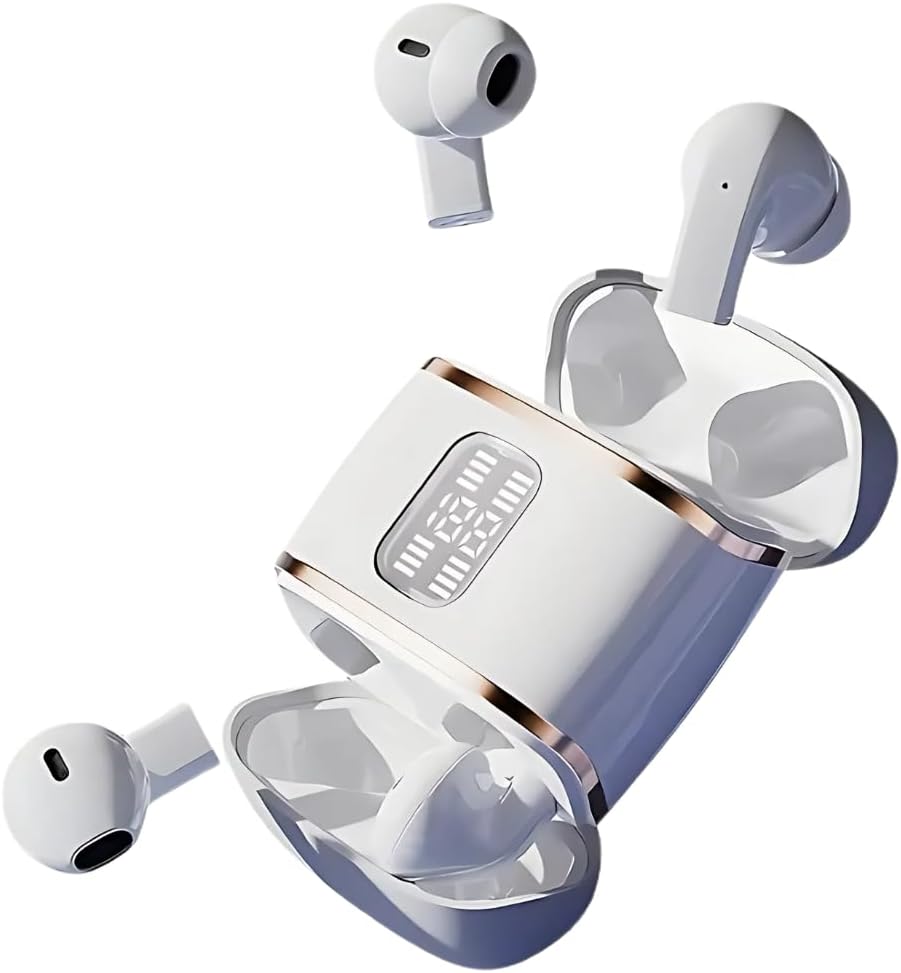
Figure 1: The J40 Dual-Headset Wireless Earbuds with their charging case, showcasing the LED display on the case.

Figure 2: A couple wearing the J40 earbuds, highlighting their design for shared listening experiences.

Figure 3: The J40 earbuds and charging case, emphasizing the strong endurance of up to 40 hours of listening time.
Setup
1. Iċċarġjar tal-Earbuds u l-Kaxxa
Before first use, fully charge the earbuds and the charging case. Connect the provided USB-C cable to the charging port on the case and a power source. The LED display on the case will indicate the charging status. Ensure both earbuds are placed correctly in the case for them to charge.
2. Tqabbil tal-Bluetooth
- Kun żgur li l-earbuds huma ċċarġjati u mneħħija mill-kaxxa tal-iċċarġjar. Huma jidħlu awtomatikament fil-modalità ta' tqabbil.
- Fuq l-apparat tiegħek (smartphone, tablet, eċċ.), attiva l-Bluetooth.
- Fittex għal "Dobles J40" or "J40" in the list of available Bluetooth devices.
- Agħżel l-isem tal-apparat biex tikkonnettja. Ladarba tkun konness, tisma' ton ta' konferma.
For detailed app-based setup and binding, refer to the AI User Manual steps shown below:

Figure 4: Step-by-step guide for using the AI app, including QR code scanning, headset pairing, and device binding. Note: One code binds one headset and cannot be changed.
Istruzzjonijiet Operattivi
Touch Kontrolli
The J40 earbuds feature intuitive touch controls on each earbud. Specific functions may vary slightly based on your device and app settings, but common controls include:
- Play/Pawsa: Tektek wieħed fuq kull earbud.
- Track li jmiss: Tektek darbtejn fuq il-earbud tal-lemin.
- Track preċedenti: Tektek darbtejn fuq il-earbud tax-xellug.
- Tweġiba/Tmiem Sejħa: Tektek wieħed fuq kull earbud.
- Irrifjuta Sejħa: Agħfas fit-tul fuq kwalunkwe earbud.
- Attiva l-Assistent tal-Vuċi: Tektek tliet darbiet fuq kull earbud.
Modalità ta' Djalogu tal-AI
The earbuds support an AI Dialogue Mode, enhancing communication and interaction. This feature is particularly useful for high-definition calls and real-time translation functionalities when used with the dedicated app.

Figure 5: A user experiencing high-definition calls with the J40 earbuds, similar to face-to-face chat quality.

Figure 6: Individuals engaging in conversation, demonstrating the use of AI Dialogue Mode for enhanced communication.
The J40 earbuds are versatile for various scenarios:

Figure 7: Depiction of the earbuds' utility in multiple scenarios, including overseas travel, work, learning, and sports.
Manutenzjoni
- Tindif: Regularly clean the earbuds and charging case with a soft, dry, lint-free cloth. Do not use abrasive cleaners or immerse them in water.
- Kura tal-batterija: To prolong battery life, avoid fully discharging the earbuds and case frequently. Store them with some charge if not used for extended periods.
- Ħażna: Aħżen il-earbuds fil-kaxxa tal-iċċarġjar tagħhom meta ma tkunx qed tużahom biex tipproteġihom mit-trab u l-ħsara. Żommhom f'post frisk u niexef 'il bogħod minn temperaturi estremi.
- Reżistenza għall-Ilma: These earbuds are NOT waterproof. Avoid exposure to water, sweat, or high humidity.
Issolvi l-problemi
| Problema | Kawża Possibbli | Soluzzjoni |
|---|---|---|
| Earbuds ma jingħaqdux | Low battery; out of range; not in pairing mode; previously paired to another device. | Charge earbuds; ensure device Bluetooth is on and within range; put earbuds back in case and remove to re-enter pairing mode; disconnect from other devices. |
| L-ebda ħoss jew volum baxx | Volume too low on device; earbuds not properly seated; connection issue. | Increase device volume; ensure earbuds are securely in ears; re-pair earbuds. |
| Każ tal-iċċarġjar mhux iċċarġjar | Cable issue; power source issue; dirty charging port. | Try a different USB-C cable; try a different power adapter/port; clean charging port gently. |
| Konnessjoni intermittenti | Interference; distance from device; obstacles. | Move closer to your device; avoid strong electromagnetic interference; ensure no large obstacles between earbuds and device. |
Speċifikazzjonijiet
| Isem tal-Mudell | Dobles J40 |
| Numru tal-Mudell tal-Oġġett | J40 |
| Teknoloġija tal-Konnettività | Wireless (Bluetooth) |
| Tqegħid tal-widnejn | Fil-widnejn |
| Fattur tal-Formola | Fil-widnejn |
| Tip ta' Kontroll | App Control / Touch Control |
| Kontroll tal-Ħoss | Kanċellazzjoni Attiva tal-Ħoss |
| Materjal | Plastik |
| Kulur | Abjad |
| Livell ta 'Reżistenza għall-Ilma | Mhux Reżistenti għall-Ilma |
| Komponenti Inklużi | Kejbil (USB-C) |
| Manifattur | NEW SENYANG |
| ASIN | B0F1DXCK86 |

Figure 8: Internal components of the earbud, illustrating the high rebound ring diaphragm for enhanced sound.

Figure 9: Visual representation of audio dynamic compensation, designed to restore 99% of the on-site listening sense.
Garanzija u Appoġġ
For warranty information and technical support, please refer to the product packaging or contact the manufacturer directly. Keep your purchase receipt as proof of purchase.


