
1. Introduzzjoni
Thank you for choosing the ZUMIMALL Dual Lens 2K Wireless Outdoor Security Camera. This manual provides detailed instructions for setting up, operating, and maintaining your camera to ensure optimal performance and security for your home or property. Please read this manual thoroughly before use and retain it for future reference.
2. Informazzjoni dwar is-Sigurtà
- Kun żgur li l-kamera hija installata f'post fejn hija protetta minn kundizzjonijiet estremi tat-temp lil hinn mill-klassifikazzjoni IP65 tagħha.
- Uża biss l-adapter tal-enerġija jew il-pannell solari speċifikat għall-iċċarġjar.
- Żarmax jew tipprova ssewwi l-apparat lilek innifsek. Ikkuntattja l-appoġġ tal-klijent għall-assistenza.
- Żomm il-kamera u l-aċċessorji tagħha fejn ma jintlaħqux mit-tfal.
- Avoid placing the camera near strong magnetic fields or sources of interference.
- Dispose of the product and battery responsibly according to local regulations.
3. Kontenut tal-Pakkett
Jekk jogħġbok iċċekkja li l-komponenti kollha huma preżenti u f'kundizzjoni tajba:
- ZUMIMALL Dual Lens 2K Wireless Outdoor Security Camera
- 5W Solar Panel
- Bracket tal-Immuntar u Viti
- Cable tal-Iċċarġjar tal-USB
- Manwal għall-Utent
4. Prodott Aktarview
The ZUMIMALL Dual Lens 2K Wireless Outdoor Security Camera offers advanced surveillance features with a focus on wide-area coverage and intelligent detection.

Image: The ZUMIMALL Dual Lens 2K Wireless Outdoor Security Camera, featuring a main PTZ camera unit, a separate smaller camera, and a solar panel for continuous power.
Karatteristiċi ewlenin:
- Sistema ta' Lenti Doppju: Combines a fixed lens and a rotating lens for simultaneous viewing of two different areas.
- Riżoluzzjoni 2K HD: Provides clear and detailed images and videos (3MP+3MP for a total of 6MP effective resolution).
- Wide Angle & PTZ: Offers a 220° ultra-wide-angle view from the fixed lens and 360° pan/tilt/zoom (PTZ) capabilities for comprehensive coverage.
- Viżjoni bil-Lejl bil-Kulur Sħiħ: Equipped with white and infrared lamps, offering full-color, infrared, or smart night vision modes.
- Li jaħdmu bix-xemx: Includes a 5W solar panel and a built-in 10000mAh battery for continuous, uninterrupted operation.
- Sejbien Smart AI: Advanced AI can identify people, vehicles, pets, and packages, reducing false alerts.
- Taħdita f'żewġ direzzjonijiet: Mikrofonu u kelliem integrati jippermettu komunikazzjoni f'ħin reali.
- Konnettività WiFi ta' 2.4GHz: Ensures a stable and reliable wireless connection.
- Reżistenza għat-temp IP65: Iddisinjat biex jiflaħ diversi kundizzjonijiet tat-temp ta' barra.
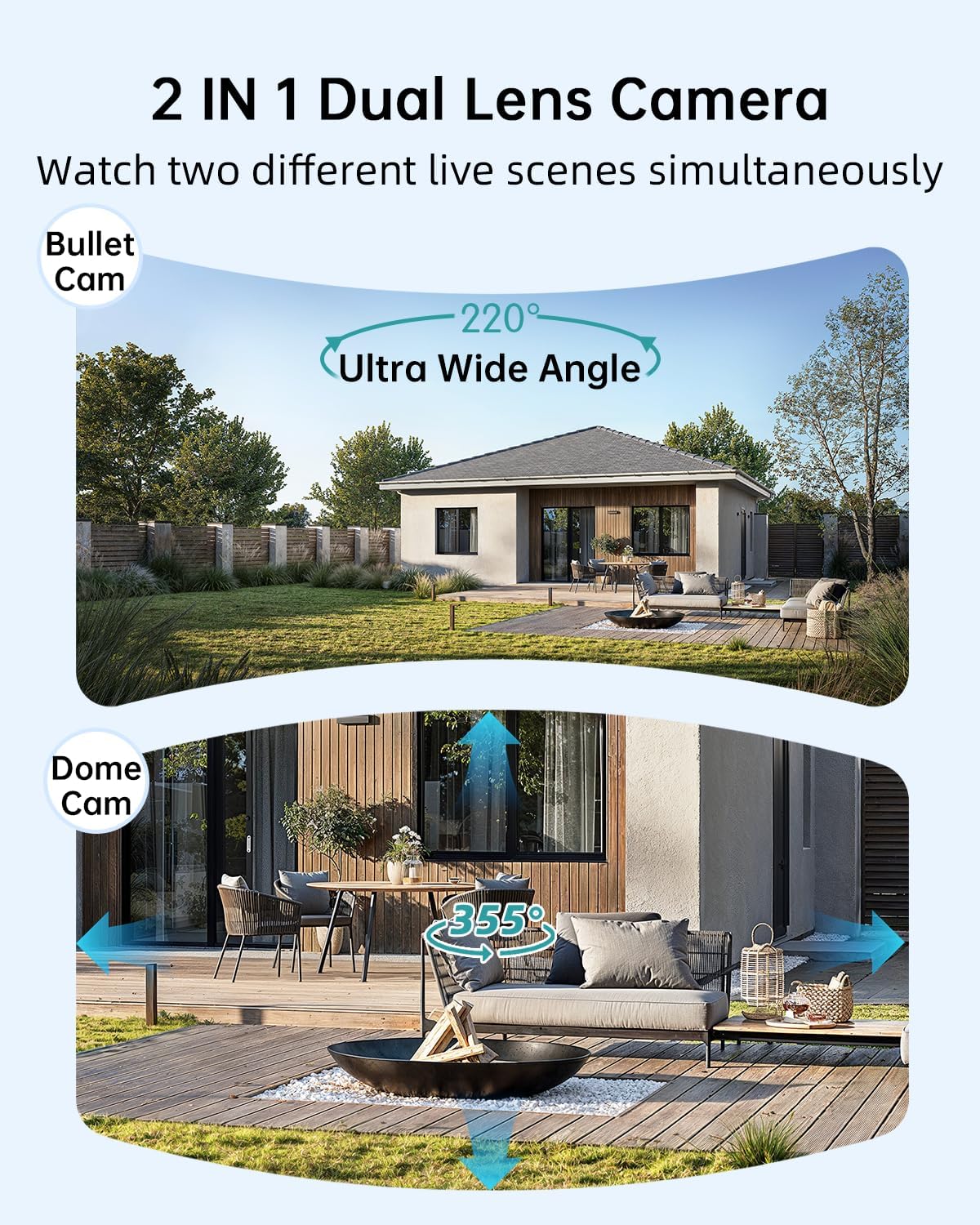
Image: Illustration of the dual-lens functionality, displaying a wide-angle 'Bullet Cam' view and a pan-tilt-zoom 'Dome Cam' view fl-istess ħin.

Image: The ZUMIMALL camera connected to its 5W solar panel, highlighting its non-stop solar power capability and IP66 water resistance (note: product specification is IP65).

Image: A demonstration of the 2K ultra-colorful image quality, showing a clear view of a car's license plate at night, with indicators for 3MP FHD Image, 4X Digital Zoom, and 55FT Night Vision Range.

Image: The ZUMIMALL camera shown enduring heavy rain and snow, illustrating its IP65 waterproof rating and suitability for outdoor use in various weather conditions.
5. Setup
5.1 Iċċarġjar inizjali
Before first use, fully charge the camera's built-in 10000mAh battery using the provided USB cable and a 5V/2A power adapter (not included). A full charge typically takes several hours.
5.2 Tniżżil tal-App u Reġistrazzjoni tal-Kont
- Scan the QR code on the packaging or search for 'ZUMIMALL' in your mobile app store (iOS or Android).
- Download and install the ZUMIMALL app.
- Iftaħ l-app u rreġistra kont ġdid jew idħol jekk diġà għandek wieħed.
5.3 Konnessjoni mal-Wi-Fi
- Kun żgur li l-ismartphone tiegħek huwa konness ma' netwerk Wi-Fi ta' 2.4GHz. Il-kamera ma tappoġġjax Wi-Fi ta' 5GHz.
- In the ZUMIMALL app, tap '+' to add a new device.
- Follow the on-screen instructions to power on the camera and enter Wi-Fi configuration mode.
- Skennja l-kodiċi QR muri fuq l-iskrin tat-telefon tiegħek bil-lenti tal-kamera.
- Wait for the camera to connect to your Wi-Fi network. Once connected, you will hear a confirmation sound.
5.4 Immuntar tal-Kamera u l-Pannell Solari
The camera offers flexible installation options, including magnetic support and bracket support.

Image: Demonstrates two installation methods for the ZUMIMALL camera: a compact magnetic mount for easy placement and a more robust bracket mount for secure, permanent installation.
- Agħżel Post: Agħżel post li jipprovdi l-aspett mixtieq viewing angle, is within Wi-Fi range, and receives ampdawl tax-xemx dirett għall-pannell solari.
- Installa l-Bracket: Use the provided screws to securely attach the mounting bracket to a wall or ceiling.
- Waħħal il-Kamera: Secure the camera to the bracket. For magnetic support, simply attach the camera to the magnetic base.
- Poġġi l-Panew Solari: Mount the 5W solar panel in a location that receives maximum direct sunlight throughout the day. Connect the solar panel cable to the camera's charging port.
- Aġġusta Angolu: Aġġusta l-angolu tal-kamera biex tkopri ż-żona ta' sorveljanza mixtieqa.
6. Istruzzjonijiet Operattivi
6.1 Ħaj View and Dual Lens Control
Open the ZUMIMALL app and select your camera to access the live view. The app will display two video feeds simultaneously from the fixed and PTZ lenses. You can switch between views or control the PTZ lens by swiping on the screen or using the directional controls within the app.
6.2 Modi ta' Viżjoni bil-Lejl
Il-kamera toffri tliet modi ta' viżjoni bil-lejl, li jistgħu jiġu kkonfigurati fis-settings tal-app:
- Viżjoni bil-Lejl b'Kulur Sħiħ: Utilizes the built-in white light to provide color images in low-light conditions.
- Viżjoni bil-lejl infrared: Uses infrared LEDs for black and white images in complete darkness.
- Viżjoni bil-lejl intelliġenti: Jaqleb awtomatikament bejn infra-aħmar u kulur sħiħ ibbażat fuq moviment skopert jew dawl ambjentali.

Image: A comparison of night vision modes, showing a scene with a spotlight on (color night vision) and a spotlight off (infrared night vision), demonstrating the camera's ability to capture clear images in various low-light conditions.
6.3 Smart AI Detection
Configure AI detection settings in the app to receive alerts for specific events.

Image: An illustration of the camera's Intelligent AI Analysis feature, highlighting its capability to detect and differentiate between humans, packages, vehicles, and pets within the surveillance area.
- Tipi ta' sejbien: The camera can identify humans, vehicles, pets, and packages.
- Twissijiet: When motion is detected, an alert notification will be sent to your smartphone.
- Sensittività: Aġġusta s-sensittività tad-detezzjoni tal-moviment biex timminimizza l-allarmi foloz.
6.4 Diskussjoni f'żewġ direzzjonijiet
Use the two-way talk feature to communicate with visitors or deter intruders.

Image: Depicts scenarios where the two-way voice intercom is used, showing a user communicating with a delivery person at the door and a parent speaking to a child playing outside.
- Fil-live view, tektek l-ikona tal-mikrofonu biex titkellem permezz tal-ispiker tal-kamera.
- Release the icon to listen.
6.5 Reġistrazzjoni u Daqq
The camera records events triggered by motion detection. Recordings are stored on a local SD card (not included) or in cloud storage (subscription may be required).
- Daqq: Access recorded videos through the 'Playback' section in the ZUMIMALL app.
- Niżżel: Download important video clips to your phone.
7. Manutenzjoni
- Tindif: Naddaf il-lenti tal-kamera u l-pannell solari perjodikament b'drapp artab u dryer.amp drapp biex tiżgura immaġni ċari u ċċarġjar solari effiċjenti. Tużax kimiċi ħarxa.
- Kura tal-batterija: For optimal battery life, avoid prolonged exposure to extreme temperatures. Ensure the solar panel is free from obstructions to maintain consistent charging.
- Aġġornamenti tal-Firmware: Check the ZUMIMALL app regularly for firmware updates. Keeping your camera's firmware updated ensures the latest features and security enhancements.
8 Issolvi l-problemi
8.1 Il-Kamera Mhux Qed Tikkonnettja mal-Wi-Fi
- Kun żgur li n-netwerk Wi-Fi tiegħek huwa 2.4GHz.
- Iċċekkja s-saħħa tas-sinjal tal-Wi-Fi fil-post fejn tinsab il-kamera.
- Iċċekkja li l-password tal-Wi-Fi li daħħalt hija korretta.
- Erġa' ibda r-router u l-kamera tiegħek.
8.2 Il-Batterija Tiskula Malajr
- Kun żgur li l-pannell solari qed jirċievi dawl tax-xemx dirett għal diversi sigħat kuljum.
- Reduce motion detection sensitivity or frequency of recordings.
- Check for excessive live view streaming, which consumes battery.
8.3 Kwalità Fqira tal-Immaġni
- Naddaf il-lenti tal-kamera.
- Kun żgur li m'hemm l-ebda ostaklu fil-kamp ta' azzjoni tal-kamera. view.
- Iċċekkja l-veloċità tal-konnessjoni Wi-Fi tiegħek.
8.4 Twissijiet Falzi ta' Mozzjoni
- Aġġusta s-sensittività tad-detezzjoni tal-moviment fl-app.
- Utilize AI detection filters (human, vehicle, pet, package) to ignore irrelevant motion.
- Ensure the camera is not pointing at busy public areas or moving foliage.
9. Speċifikazzjonijiet
| Karatteristika | Speċifikazzjoni |
|---|---|
| Mudell | B0F189QLFH |
| Riżoluzzjoni | 2K (3MP + 3MP Dual Lens) |
| Qasam ta View | 220° Ultra Wide Angle (fixed lens), 360° PTZ (rotating lens) |
| Kapaċità tal-batterija | 10000mAh |
| Enerġija tal-Panew Solari | 5W |
| Konnettività Wi-Fi | 2.4GHz (IEEE 802.11b/g/n) |
| Reżistenza għat-temp | IP65 |
| Viżjoni bil-lejl | Full-Color, Infrared, Smart |
| Sejbien | Smart AI (Human, Vehicle, Pet, Package) |
| Awdjo | Taħdita b'żewġ direzzjonijiet |
| Manifattur | ZUMIMALL |
| L-Ewwel Data Disponibbli | 12 ta’ Marzu, 2025 |
10. Informazzjoni dwar Garanzija
ZUMIMALL products are covered by a limited warranty from the date of purchase. Please refer to the warranty card included with your product or visit the official ZUMIMALL websit għal termini u kundizzjonijiet dettaljati tal-garanzija.
11. Appoġġ għall-Klijent
If you encounter any issues or have questions regarding your ZUMIMALL camera, please contact our customer support team:
- Email: support@zumimall.com (Example)
- Websit: ZUMIMALL Official Store
Please have your model number (B0F189QLFH) and purchase information ready when contacting support.