
1. Introduzzjoni
The PGST P92R-3 Smart Infrared Motion Sensor is a passive infrared (PIR) detector designed to enhance the security of your home or office. It detects movement by sensing changes in infrared radiation within its detection area. This sensor is compatible with various PGST home alarm systems, including models A103F, A105F, A107F, A108F, A109F, A01F, A02F, and A519W, providing reliable anti-theft protection.

This image displays three PGST P92R-3 Smart Infrared Motion Sensors, showcasing their compact, white design suitable for discreet placement.
2. Prodott Aktarview
2.1 Karatteristiċi ewlenin
- Firxa Wiesgħa ta' Sejbien: Offers a 110-degree detection angle to cover significant areas.
- Sejbien tal-Moviment: Utilizes PIR technology to accurately detect human movement.
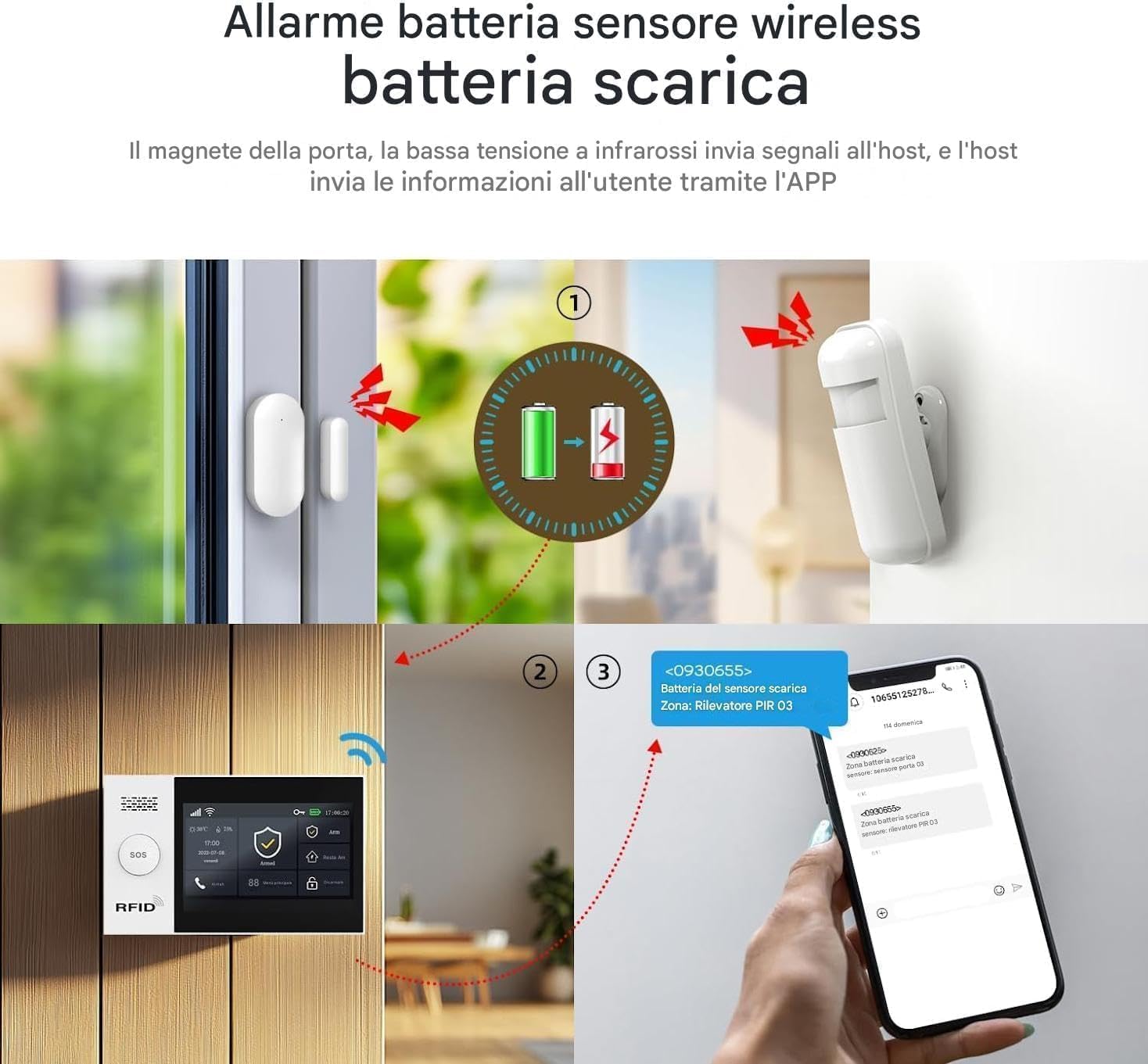
- Low Battery Report: Automatically notifies the alarm host when the battery level is low, ensuring continuous protection.
- Konnettività Wireless: Integrates seamlessly with compatible PGST alarm systems.
- Installazzjoni faċli: Designed for simple wall-mount setup.

A PGST P92R-3 motion sensor is shown mounted on a wall, illustrating its key features: a 110-degree detection range, active motion detection capabilities, and a low battery reporting function for timely alerts.
2.2 Komponenti
Familiarize yourself with the main components of the P92R-3 sensor:
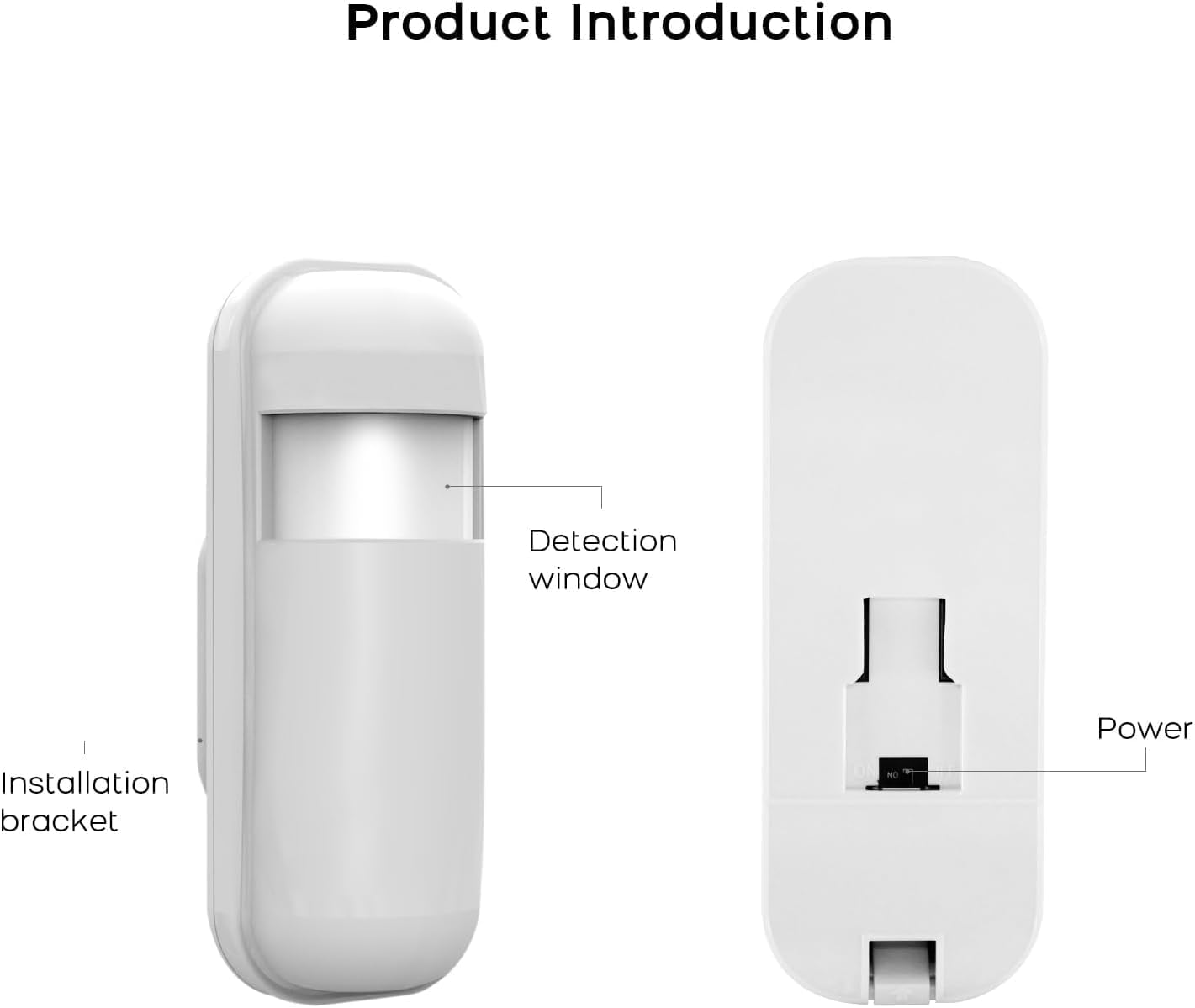
- Tieqa ta' Sejbien: The area through which the sensor detects infrared changes.
- Bracket tal-Installazzjoni: Used for mounting the sensor securely to a wall.
- Swiċċ tal-Enerġija: Located on the back of the device to turn the sensor on or off.
- Kompartiment tal-batterija: Houses the required batteries.

A detailed diagram of the PGST P92R-3 sensor, pointing out its main components: the detection window, the installation bracket for mounting, and the power switch located on the back.
3. Setup
3.1 Installazzjoni tal-batterija
- Iftaħ l-għatu tal-kompartiment tal-batterija fuq wara tas-sensor.
- Insert the included 1 AA battery and 1 Lithium Polymer battery, ensuring correct polarity (+/-).
- Agħlaq l-għatu tal-kompartiment tal-batterija sew.
Din l-immaġni tipprovdi view of the back of the PGST P92R-3 sensor, revealing the battery compartment and the power switch.
3.2 Immuntar tas-Sensor
The P92R-3 sensor is designed for wall mounting to optimize its detection capabilities.
- Choose a suitable location for installation, typically in a corner or on a wall where it can cover the desired area without obstruction. Avoid direct sunlight or heat sources.
- Use the provided screws and wall anchors to securely attach the installation bracket to the wall.
- Slide the sensor onto the mounted bracket until it clicks into place. Ensure it is firmly attached.

The PGST P92R-3 sensor is displayed alongside its mounting accessories, including screws and wall anchors, ready for installation.
3.3 Pairing with PGST Alarm System
Refer to your specific PGST alarm system's manual (e.g., A103F, A105F, A107F, A108F, A109F, A01F, A02F, A519W) for detailed instructions on how to add new wireless sensors. Generally, the process involves:
- Accessing the 'Add Sensor' or 'Zone Settings' menu on your PGST alarm host.
- Activating the sensor (e.g., by triggering it or pressing a pairing button if available) to send a signal to the host.
- Confirming the sensor is successfully added to a zone on the alarm system.
4. Istruzzjonijiet Operattivi
4.1 Activating the Sensor
Once batteries are installed and the sensor is mounted, switch the power button on the back of the sensor to the 'ON' position. The sensor will typically perform a self-test and enter standby mode.
4.2 Sejbien tal-Moviment
When the alarm system is armed, the P92R-3 sensor will monitor its detection area for changes in infrared heat signatures. Upon detecting movement, it will transmit a signal to the connected PGST alarm host, triggering the alarm according to your system's settings.
This image depicts a PGST P92R-3 motion sensor actively detecting movement within a room, indicated by a red infrared beam covering a 120-degree angle and a range of 12 meters.
4.3 Low Battery Notification
The sensor continuously monitors its battery level. When the battery is low, it will send a signal to the alarm host, which will then notify you through the alarm panel or associated mobile application. Replace batteries promptly to ensure uninterrupted security.

A multi-panel diagram showing the sequence of a low battery alert: the sensor detects low power, sends a signal to the host alarm system, which then forwards a notification to the user's mobile application.
5. Manutenzjoni
5.1 Sostituzzjoni tal-batterija
When a low battery alert is received, replace both the AA and Lithium Polymer batteries immediately. Use only recommended battery types. Follow the steps in Section 3.1 for battery installation.
5.2 Tindif
Periodically clean the detection window with a soft, dry cloth to ensure optimal performance. Avoid using abrasive cleaners or solvents, as these can damage the sensor.
6 Issolvi l-problemi
- Is-senser mhux qed jiskopri moviment:
- Iċċekkja jekk is-sensor huwiex mixgħul.
- Kun żgur li l-batteriji huma installati sew u mhux eżawriti.
- Verify the detection window is clean and unobstructed.
- Confirm the sensor is within range of the alarm host.
- Check the alarm system's zone settings to ensure the sensor is active.
- Allarmi foloz:
- Ensure the sensor is not placed near heat sources (e.g., vents, direct sunlight) or moving objects (e.g., curtains near a window).
- Verify the mounting is secure and the sensor is not vibrating.
- Adjust the sensor's position if necessary to avoid pets or drafts.
- Sensor not connecting to alarm host:
- Ensure the sensor is powered on and batteries are good.
- Re-attempt the pairing process as described in your alarm system's manual.
- Check for any interference or distance issues between the sensor and the host.
7. Speċifikazzjonijiet
| Brand | PGST |
| Numru tal-Mudell | P92R-3 |
| Sors tal-Enerġija | Mħaddma bil-batterija |
| Tip ta 'batterija | 1 AA and 1 Lithium Polymer (included) |
| Medda Massimu | 5 Meters (detection) |
| Angolu ta 'skoperta | 110 grad |
| Tip ta 'Immuntar | Mount Wall |
| Apparati Kompatibbli | PGST Home Security System (A103F, A105F, A107F, A108F, A109F, A01F, A02F, A519W) |
| Dimensjonijiet tal-Prodott | 1"D x 1"W x 1"Għ (madwar) |
| Piż tal-oġġett | 7.8 uqija |
| UPC | 704444502471 |
8. Garanzija u Appoġġ
PGST products are manufactured with quality and reliability in mind. For warranty information, technical support, or further assistance, please refer to the documentation provided with your PGST alarm system or visit the official PGST websit. Żomm l-irċevuta tax-xiri tiegħek għal pretensjonijiet ta' garanzija.