
AOSHIDA C200 PRO
SMSL C200PRO Headphone AmpManwal ta 'l-Utent aktar ħaj
Mudell: C200 PRO
1. Introduzzjoni
The SMSL C200PRO is a versatile HiFi MQA DAC and Headphone Amplifier designed to deliver exceptional audio performance. Featuring an ES9039Q2M DAC chip and XMOS XU-316, it supports high-resolution audio up to PCM 32bit/768kHz and DSD512. With multiple input options including USB Type C, Optical, Coaxial, and Bluetooth, and various output choices like 4.4mm/6.35mm headphone jacks and RCA/TRS, the C200PRO is suitable for a wide range of audio setups, from gaming consoles to professional desktop systems. Its low-noise design and comprehensive features ensure a pure and powerful listening experience.
2. X'hemm fil-Kaxxa

Figure 2.1: Contents of the SMSL C200PRO package.
Jekk jogħġbok iċċekkja l-kontenut tal-pakkett meta tiftaħ il-kaxxa:
- 1x SMSL C200PRO Unit
- 1x USB Cable (Type A to C)
- 1x Bluetooth Antenna
- 1x Kontroll mill-bogħod
- 1x AC Power Cable
- 1x Manwal għall-Utent
- 1x SMSL Card
If any items are missing or damaged, please contact AOSHIDA customer support.
Video 2.1: Unboxing the SMSL C200 PRO Headphone Amplifier, showing all included accessories and the main unit.
3. Prodott Aktarview
3.1 Panel ta 'Quddiem

Figure 3.1: Front panel of the SMSL C200PRO.
- Jack tal-headphones ta' 6.35mm: Standard headphone output.
- Jack tal-headphones ta' 4.4mm: Balanced headphone output for enhanced audio quality.
- Pum b'ħafna funzjonijiet: Controls power, volume, input/output modes, and display brightness.
- Skrin tad-displej: Shows current settings, input, and samprata tal-linarda.
3.2 Panel ta 'wara

Figure 3.2: Rear panel of the SMSL C200PRO.
- Input tal-Enerġija AC: Connects to the included AC power cable.
- Port tal-Antenna Bluetooth: Qabbad l-antenna Bluetooth provduta għal konnettività mingħajr fili.
- Input ottiku: Input awdjo diġitali.
- USB Input (Type C): Connects to computers, tablets, or gaming consoles.
- Input koassjali: Input awdjo diġitali.
- Outputs RCA: Analog audio outputs for connecting to amplifiers jew kelliema li jaħdmu bil-mutur.
- TRS Outputs: Ħruġ awdjo analogu bbilanċjat.

Figure 3.3: Detailed input and output connections.
4. Setup
Follow these steps for initial setup of your SMSL C200PRO:
- Konnessjoni tal-Enerġija: Connect the included AC power cable to the AC Power Input on the rear panel and plug it into a wall outlet.
- Antenna Bluetooth: Screw the provided Bluetooth antenna into the Bluetooth Antenna Port on the rear panel.
- Konnessjoni tal-Input:
- USB: Connect your computer, PS5/Switch, or other USB audio source to the USB Type C input using the provided USB cable.
- Ottiċi/koassjali: Connect your CD/DVD player, TV, or other digital audio source to the Optical or Coaxial input.
- Bluetooth: For wireless connection, ensure the Bluetooth antenna is attached.
- Konnessjoni tal-Output:
- Headphones: Plug your headphones into either the 6.35mm or 4.4mm headphone jack on the front panel.
- Kelliema/Ampaktar ħaj: Connect the RCA or TRS outputs on the rear panel to your powered speakers or a separate ampaktar ħaj.
- Qawwa Mixgħul: Long press the multi-function knob on the front panel to power on the device.
Video 4.1: Demonstrating various connections for the SMSL C200PRO, including power, RCA, and USB.

Figure 4.2: Comprehensive connection diagram.
5. Istruzzjonijiet Operattivi
5.1 Multi-function Knob & Remote Control
The C200PRO features a sensitive multi-function knob and comes with a full-function remote control for convenient operation.
- Power On/Off: Long press the knob (or the power button on the remote) to turn the device on or off.
- Aġġustament tal-Volum: Rotate the knob clockwise to increase volume, counter-clockwise to decrease. On the remote, use the volume +/- buttons.
- Navigazzjoni fil-menu: Short press the knob (0.5-1 second) to enter the menu. Short press again to cycle through menu options. Rotate the knob to adjust settings within a menu. Press and hold for 2 seconds to return to the main interface.
- Swiċċjar tad-Dħul/Ħruġ: Use the knob or the remote to switch between different input sources (USB, Optical, Coaxial, Bluetooth) and output modes (Headphone Out, Line Out).
- Il-luminożità tal-wiri: Adjust the display brightness via the menu.
- Siekta: Press the mute button on the remote to mute/unmute audio. The volume display will flash when muted.
- FN Button (Remote): Short press for output switching. Long press to turn off the screen.
Video 5.1: Demonstrating remote control and knob operations for the SMSL C200PRO.
5.2 USB Modes (U1.1 & U2.0)
The C200PRO supports two USB modes:
- U1.1 Mode: Supports all USB devices without requiring a driver. Ideal for gaming consoles like PS4, PS5, and Switch. Supports PCM up to 96kHz.
- U2.0 Mode: Requires driver installation when connecting to a Windows system. Supports high-standard sampling rates (up to PCM 32bit/768kHz, DSD512).
Note: When switching between U2.0 mode and U1.1 mode, please restart the machine for the change to take effect.
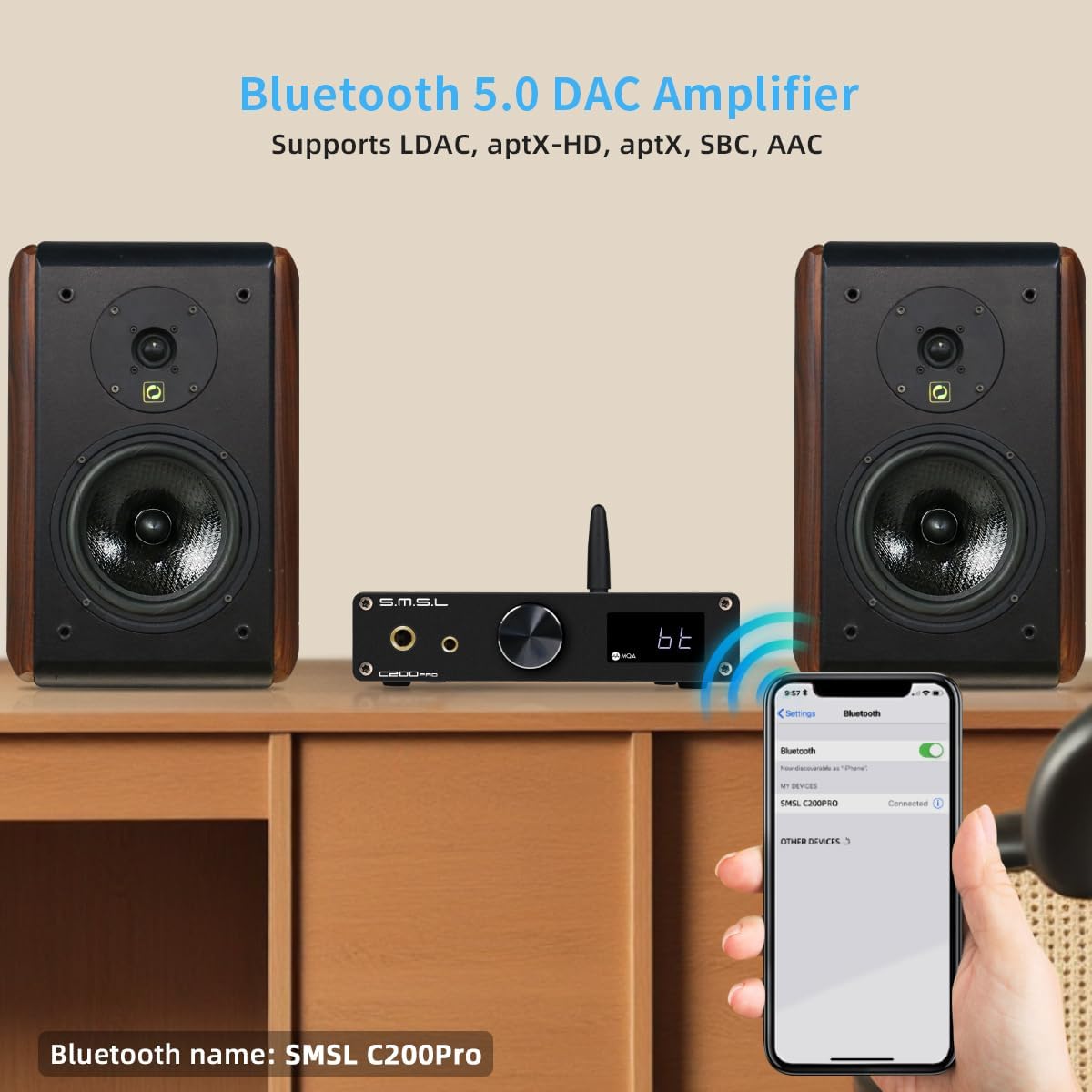
Figure 5.2: USB mode selection for gaming and PC.
5.3 Konnettività Bluetooth
The C200PRO features advanced Bluetooth connectivity with a Qualcomm Bluetooth chip, supporting various high-quality audio codecs:
- LDAC: 24bit/96kHz (990kbps/660kbps/330kbps)
- APTX-HD: 24bit/48kHz (576kbps)
- APTX: 16bit/44.1kHz (352kbps)
- SBCs: 16bit/44.1kHz (328kbps)
- CCA: 16bit/44.1kHz (320kbps)
To connect via Bluetooth, select the Bluetooth input on the device. The Bluetooth name is "SMSL C200Pro".

Figure 5.3: Bluetooth specifications and pairing.
5.4 MQA Decoding
The C200PRO supports full MQA decoding and MQA-CD playback, allowing you to experience Master Quality Authenticated sound as intended by the artist.

Figure 5.4: MQA decoding capabilities.
5.5 DPLL Settings
The DPLL (Digital Phase-Locked Loop) setting helps to reduce clock jitter. DPLL values range from 1 to 9. A lower value indicates less clock jitter, which is generally preferred for optimal sound quality.
If you experience sound interruptions or instability, especially when using a TV as the signal source, you can increase the DPLL value to resolve the issue.
6. Speċifikazzjonijiet

Figure 6.1: Detailed technical parameters.
| Karatteristika | Dettall |
|---|---|
| Dimensjonijiet tal-Prodott | 5.71 x 5.47 x 1.26 pulzieri |
| Piż tal-oġġett | 1.1 liri |
| Numru tal-Mudell tal-Oġġett | C200 PRO |
| Manifattur | SMSL |
| Pajjiż ta' Oriġini | Iċ-Ċina |
| Input | USB (optical fiber/coaxial)/Bluetooth |
| Output | 6.35mm headphone/4.4mm headphone/TRS/RCA |
| Output Ampil-lititudni | TRS: 5Vrms, RCA: 2.5Vrms |
| HPA Output Power | 16Ω: 3W x 2, 32Ω: 1.5W x 2, 150Ω: 350mW x 2, 300Ω: 170mW x 2, 600Ω: 85mW x 2 |
| HPA Gain | +9.5dB |
| THD+N | Line Out: 0.00006% (-123.5dB), Headphone Out: 0.00009% (-120dB) |
| Medda Dinamika | TRS: 129dB, RCA: 126dB, HPA: 125dB |
| SNR | TRS: 129dB, RCA: 126dB, HPA: 125dB |
| Impedenza tal-ħruġ | Line Output: 100Ω, Headphone Output: Near 0Ω |
| Trażmissjoni USB | USB1.1 & USB2.0 (Asynchronization) |
| Kompatibilità USB | Windows 7/8/8.1/10/11 (Need driver), Android, Mac OS, Linux (Driverless) |
| Profond tal-Bit | USB: 1bit, 16-32bit; Optical/Coaxial: 1bit, 16-24bit |
| SampRata tal-linarda | USB: PCM 44.1-768kHz, DSD 2.8224-22.5792MHz; Optical/Coaxial: PCM 44.1-192kHz, DSD DSD64(DoP) |
| Bluetooth Specifications (5.1) | LDAC: 24bit/96kHz (990kbps/660kbps/330kbps); aptX-HD: 24bit/48kHz (576kbps); aptX: 16bit/44.1kHz (352kbps); SBC: 16bit/44.1kHz (328kbps); AAC: 16bit/44.1kHz (320kbps) |
| Konsum tal-Enerġija | <25W |
| Qawwa Standby | <0.5W |
7. Manutenzjoni
To ensure the longevity and optimal performance of your SMSL C200PRO, follow these maintenance guidelines:
- Tindif: Uża drapp artab u niexef biex timsaħ il-barra tal-unità. Evita li tuża prodotti tat-tindif li joborxu, solventi, jew sprejs kimiċi, għax jistgħu jagħmlu ħsara lill-finitura.
- Ventilazzjoni: Ensure the unit has adequate ventilation. Do not block the ventilation holes or place the unit in an enclosed space that could lead to overheating.
- Ħażna: Meta ma tkunx qed tużaha għal perjodi twal, aħżen l-unità f'post frisk u niexef 'il bogħod mix-xemx diretta u minn temperaturi estremi.
- Immaniġġjar: Immaniġġja l-unità b'attenzjoni. Evita li twaqqagħha jew li tissottomettiha għal impatti qawwija.
8 Issolvi l-problemi
If you encounter any issues with your SMSL C200PRO, please refer to the following common problems and solutions:
| Problema | Kawża Possibbli | Soluzzjoni |
|---|---|---|
| Ebda qawwa | Il-kejbil tal-enerġija mhux imqabbad sew; Problema fis-sokit tal-enerġija. | Ensure the AC power cable is securely plugged into the unit and the wall outlet. Try a different outlet. |
| Ebda output tal-ħoss | Incorrect input/output selected; Volume too low; Cables not connected; Muted. | Check if the correct input source is selected. Verify the output mode (headphone/line out). Increase volume. Ensure all audio cables are securely connected. Check if the device is muted. |
| Sound interruptions or instability (especially with TV source) | High clock jitter. | Adjust the DPLL setting in the menu. Increase the DPLL value (1-9) to improve stability. |
| USB connection issues (Windows PC) | Driver not installed for U2.0 mode. | Ensure the correct driver is installed for Windows when using U2.0 mode. Restart the device after switching USB modes. |
| Kwistjonijiet ta 'tqabbil tal-Bluetooth | Device not in pairing mode; Antenna not connected; Out of range. | Ensure the C200PRO is set to Bluetooth input. Check if the Bluetooth antenna is securely attached. Move the device closer to the audio source. |
9. Garanzija u Appoġġ
The SMSL C200PRO is manufactured by SMSL and distributed by AOSHIDA. For warranty information and technical support, please refer to the SMSL Card included in your package or contact AOSHIDA Audio-US directly through their Amazon store page or official websit.
Additional protection plans may be available for purchase through Amazon. Please check the product listing for details.
Manufacturer: SMSL
Brand: AOSHIDA
Ask a question about this manual
Ask about setup, troubleshooting, compatibility, parts, safety, or missing instructions. Manuals+ will review the question and use this page’s manual context to help answer it.