
Introduzzjoni
This manual provides detailed instructions for the operation and maintenance of your Mycket Portable DAB/DAB+ Radio. This device offers high-quality digital radio reception (DAB/DAB+), traditional FM radio, and Bluetooth 5.0 connectivity for audio streaming. Its portable design and rechargeable battery make it suitable for various environments.
Prodott Overview
The Mycket Portable DAB/DAB+ Radio is a compact and versatile audio device. It features a clear color display, intuitive controls, an extendable antenna for optimal reception, and various connectivity options.

Immaġni: Quddiem view of the Mycket Portable DAB/DAB+ Radio, highlighting its compact dimensions (5.5 inches wide, 3.1 inches high, 1.6 inches deep). The radio features a speaker grille on the left, a color display on the right, and control buttons below the display. An extendable antenna is visible on top.

Immaġni: A white digital radio device with a display screen and control buttons. The image shows multiple connectivity icons including Bluetooth, headphone, and speaker options, indicating the radio's versatile audio output capabilities.
Komponenti:
- Wiri LCD bil-kulur: Juri informazzjoni dwar l-istazzjon, il-ħin, u l-għażliet tal-menù.
- Buttuni tal-Kontroll: MODE, OK, M (Menu), FAV (Favorites), and navigation buttons.
- Volume/Selection Knob: Located on top for adjusting volume and navigating menus.
- Antenna li tista' tiġġebbed: For optimal DAB/DAB+ and FM reception.
- Port tal-Iċċarġjar USB-C: Għall-iċċarġjar mill-ġdid tal-batterija interna.
- Jack tal-headphones ta' 3.5mm: Għal smigħ privat.
Setup
1. Iċċarġjar Inizjali
- Before first use, fully charge the radio using the provided USB-C cable. Connect the cable to the radio's USB-C port and a compatible USB power adapter (not included).
- A full charge takes approximately 2.5 hours and provides up to 10-12 hours of playback.

Immaġni: The Mycket Portable DAB/DAB+ Radio displaying a DAB station, with an icon indicating over 12 hours of battery life. This highlights the radio's long-lasting rechargeable battery, ideal for extended use.
2. Tixgħil / Mitfi
- Agħfas u żomm il- MODALITÀ buttuna biex tixgħel jew titfi r-radju.
3. Skennjar Inizjali (DAB/DAB+)
- Upon first power-on, the radio will automatically perform a full scan for available DAB/DAB+ stations. Ensure the antenna is fully extended for best reception.
- The display will show the scanning progress and the number of stations found.

Immaġni: The Mycket Portable DAB/DAB+ Radio displaying a DAB station, with text indicating 'AUTO SCAN & 40 PRESET'. This illustrates the radio's ability to automatically scan for stations and save up to 40 presets (20 DAB and 20 FM).
4. Settings tal-Lingwa
- If prompted, use the navigation buttons and OK button to select your preferred language.
Istruzzjonijiet Operattivi
1. Selecting Modes (DAB/FM/Bluetooth)
- Agħfas il- MODALITÀ Agħfas il-buttuna ripetutament biex tiċċaqlaq bejn il-modi DAB, FM, u Bluetooth.

Immaġni: A digital radio with an LCD screen displaying three distinct connectivity modes: DAB radio, local FM, and Bluetooth 5.0. The image highlights the integrated speaker and antenna, showcasing the radio's multi-functional capabilities.
2. Tħaddim tar-Radju DAB/DAB+
- In DAB mode, use the navigation buttons to browse available stations. Press OK biex tagħżel stazzjon.
- Biex twettaq skennjar sħiħ, agħfas il-buttuna M (Menu) button, navigate to 'Full Scan', and press OK.
- To save a station as a preset, tune to the desired station, then press and hold one of the FAV buttons (1-4) until the display confirms it's saved. You can save up to 20 DAB presets.
- To recall a preset, short press the corresponding FAV buttuna.
3. Operazzjoni tar-Radju FM
- Fil-modalità FM, agħfas il- OK button to auto-scan for the next available station.
- To manually tune, use the navigation buttons.
- To save an FM station as a preset, tune to the desired station, then press and hold one of the FAV buttons (1-4) until the display confirms it's saved. You can save up to 20 FM presets.
- To recall a preset, short press the corresponding FAV buttuna.
4. Bluetooth 5.0 Pairing
- Ibdel ir-radju għall-modalità Bluetooth billi tuża l- MODALITÀ button. The display will show 'Bluetooth Pairing'.
- On your mobile device, enable Bluetooth and search for 'Mycket D009'.
- Select 'Mycket D009' to pair. Once connected, the radio will confirm the connection.
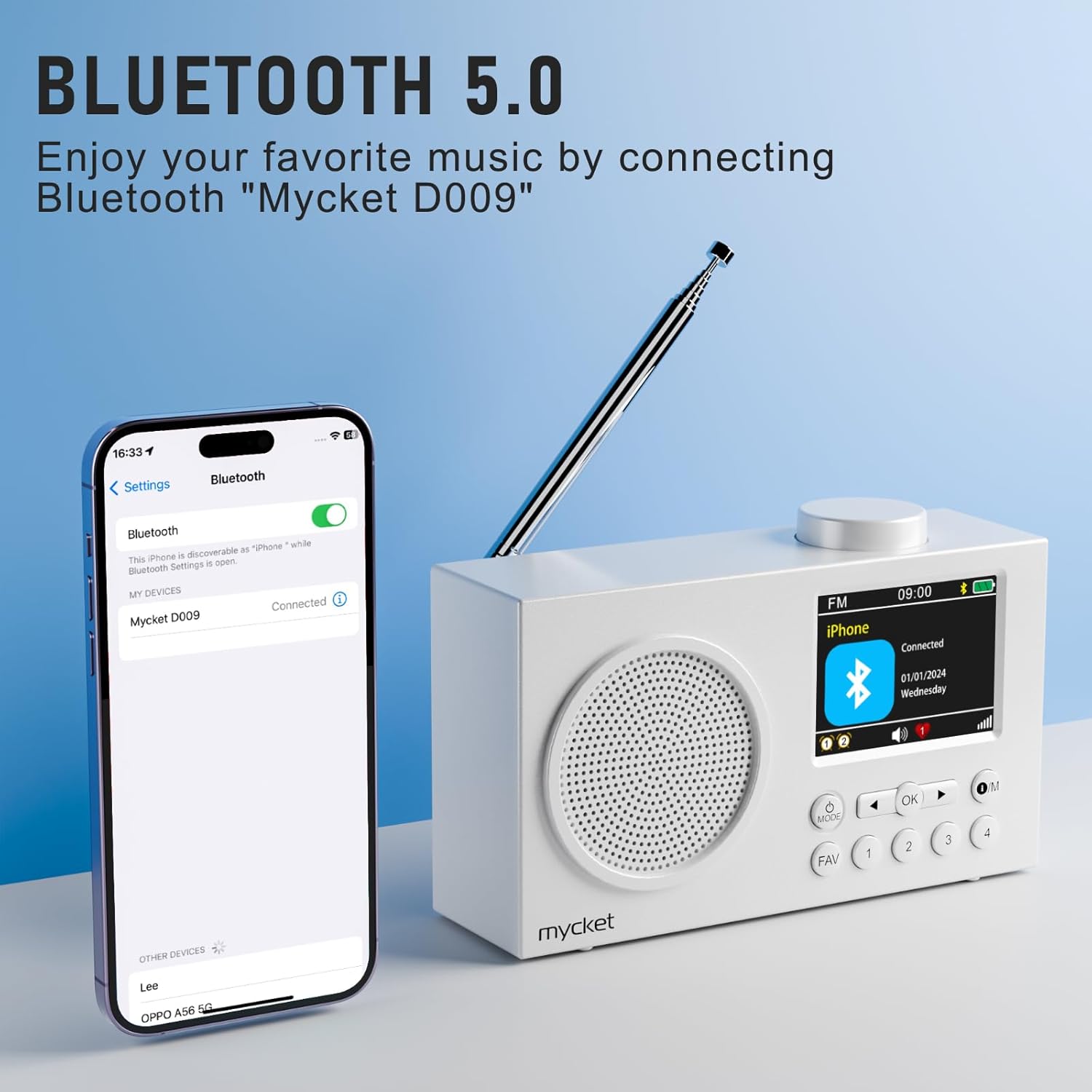
Immaġni: The Mycket Portable DAB/DAB+ Radio displaying a Bluetooth connection, with a smartphone screen showing 'Mycket D009' as a connected device. This illustrates the radio's Bluetooth 5.0 capability for wireless audio streaming.
5. Setting Dual Alarms
- Agħfas il- M (Menu) button, navigate to 'Alarm', and press OK.
- Select 'Alarm 1' or 'Alarm 2' and configure the time, source (DAB/FM/Buzzer), and frequency.

Immaġni: The Mycket Portable DAB/DAB+ Radio displaying its dual alarm function on the LCD screen. The image shows options for setting two separate alarms, along with the speaker grille and antenna.
6. Funzjoni tat-Tajmer tal-Irqad
- Agħfas il- M (Menu) button, navigate to 'Sleep', and press OK.
- Select the desired duration (e.g., 15, 30, 45, 60 minutes, or 1 hour 15 minutes) after which the radio will automatically turn off.

Immaġni: A white digital radio displaying the sleep timer settings on its LCD screen, with options for various durations. The image illustrates the automatic shutdown function, allowing users to fall asleep to their favorite radio program.
7. Kontroll tal-Volum
- Rotate the knob on top of the radio to adjust the volume level.
8. Użu tal-Headphones
- Plug 3.5mm headphones into the headphone jack on the side of the radio for private listening. The internal speaker will automatically mute.

Immaġni: A diagram illustrating a silent listening system, showing a person using headphones connected to a small device, which is linked to a larger audio unit. This demonstrates the option for private audio enjoyment.
Manutenzjoni
1. Tindif
- Imsaħ ir-radju b'ċarruta ratba u niexfa. Tużax prodotti tat-tindif jew solventi li joborxu.
- Avoid exposing the radio to excessive moisture.
2. Kura tal-batterija
- Biex ittawwal il-ħajja tal-batterija, evita li tiċċarġja kompletament il-batterija ta' spiss.
- If storing the radio for an extended period, charge it to approximately 50% every few months.
Issolvi l-problemi
| Problema | Kawża Possibbli | Soluzzjoni |
|---|---|---|
| Ebda qawwa | Il-batterija hija eżawrita. | Charge the radio using the USB-C cable. |
| Riċeviment DAB/FM fqir | Antenna mhux estiża, żona tas-sinjal dgħajjef. | Fully extend the antenna. Try repositioning the radio or moving to an area with better signal. Perform a full scan. |
| Il-Bluetooth mhux qed jgħaqqad | Radio not in pairing mode, device too far, previously paired device connected. | Ensure the radio is in Bluetooth pairing mode. Move your device closer to the radio. Disconnect from other Bluetooth devices. |
| L-ebda ħoss | Volum baxx wisq, headphones imqabbda. | Increase the volume. Disconnect headphones if you want sound from the speaker. |
Speċifikazzjonijiet
- Ditta: Mycket
- Numru tal-Mudell: 6dd4bdb8-92a9-450e-bc79-df90b5ab3ff1
- Kulur: Abjad
- Teknoloġija tal-Konnettività: Bluetooth 5.0, DAB/DAB+ (174.928-239.20 MHz with DLS display), FM (87.5-108 MHz with RDS)
- Dimensjonijiet tal-Prodott: 13.9L x 4W x 8H ċentimetri
- Sors tal-Enerġija: Battery/Wired (2200 mAh integrated lithium battery)
- Karatteristiċi Speċjali: Integrated AM antenna (likely a translation error, should be DAB/FM antenna), Integrated Clock, Lightweight, Portable, Rechargeable
- Modalità tal-Ħruġ tal-Awdjo: Stereo (via headphones)
- Tip ta' wiri: LED (2.4" Color TFT)
- Interface: USB 3.0 Tip Ċ
- Komponenti Inklużi: 1 Portable DAB Radio, 1 USB Charging Cable, User Manual
Garanzija u Appoġġ
Informazzjoni dwar il-garanzija:
This Mycket Portable DAB/DAB+ Radio comes with a 12-month warranty from the date of purchase. Please retain your proof of purchase for warranty claims.
Appoġġ għall-Klijent:
For any questions, technical assistance, or warranty claims, please contact Mycket customer service. Refer to the contact information provided in the packaging or on the official Mycket websit.