1. Introduzzjoni
Thank you for choosing the I3 4K Thumb Action Sports Camera. This compact and versatile camera is designed for capturing high-quality video and photos in various environments, from daily life to adventurous sports. Its lightweight, thumb-sized design and multiple mounting options make it an ideal companion for hands-free recording. Please read this manual carefully before using the camera to ensure proper operation and to maximize its potential.
2. Prodott Aktarview
2.1. Komponenti tal-Kamera
The I3 4K Thumb Action Sports Camera features a minimalist design with essential components for easy operation.

Figura 2.1: Quddiem view of the I3 4K Thumb Action Sports Camera, highlighting its compact size and lens. A skier is visible in the background, demonstrating its use in action sports.
2.2. Karatteristiċi ewlenin
- Thumb-Sized Compact Design: Extremely lightweight at 1.25 ounces (35.7 grams), smaller than a thumb, allowing for hands-free and unobtrusive recording.
- Għażliet multipli ta 'Immuntar: Features a magnetic design for attachment to ferrous surfaces and includes multifunctional accessories like a magnetic lanyard pad and a 360° swivel spring clip for versatile mounting on helmets, bicycles, or clothing.
- Ħajja twila tal-batterija: Equipped with an 800mAh rechargeable lithium-ion battery, providing extended recording time and supporting recording while charging for prolonged use during activities like long rides.
- User-Friendly Hands-Free Operation: Simple one-button operation ensures ease of use for capturing moments without complex controls, suitable for all users.
- 4K High-Resolution Recording: Capable of capturing video in 4K resolution, ensuring clear and detailed footage.
3. Setup
3.1. Iċċarġjar Inizjali
Before first use, fully charge the camera's internal battery. Connect the camera to a USB power source (e.g., computer USB port or wall adapter) using the provided data cable. The charging indicator light will typically show charging status and turn off or change color when fully charged.
3.2. Daħħal Kard tal-Memorja
The camera supports SD flash memory cards. Locate the memory card slot on the camera. Gently insert a compatible SD card into the slot until it clicks into place. Ensure the card is inserted in the correct orientation to avoid damage.
3.3. Immuntar tal-Kamera
The I3 camera offers various mounting solutions:
- Twaħħil manjetiku: The camera has a magnetic base that allows it to adhere directly to suitable metallic surfaces.
- Using the 360° Rotating Back Clip: Attach the camera to the 360° rotating back clip. This clip can then be secured to clothing, backpack straps, or other thin edges for hands-free recording.
- Using the Cycling Back Cover: For bicycle or motorcycle mounting, attach the camera to the cycling back cover, which can then be secured to handlebars or other appropriate parts of the bike.

Figure 3.1: The I3 camera shown with its clip attachment, demonstrating how it can be worn or mounted.
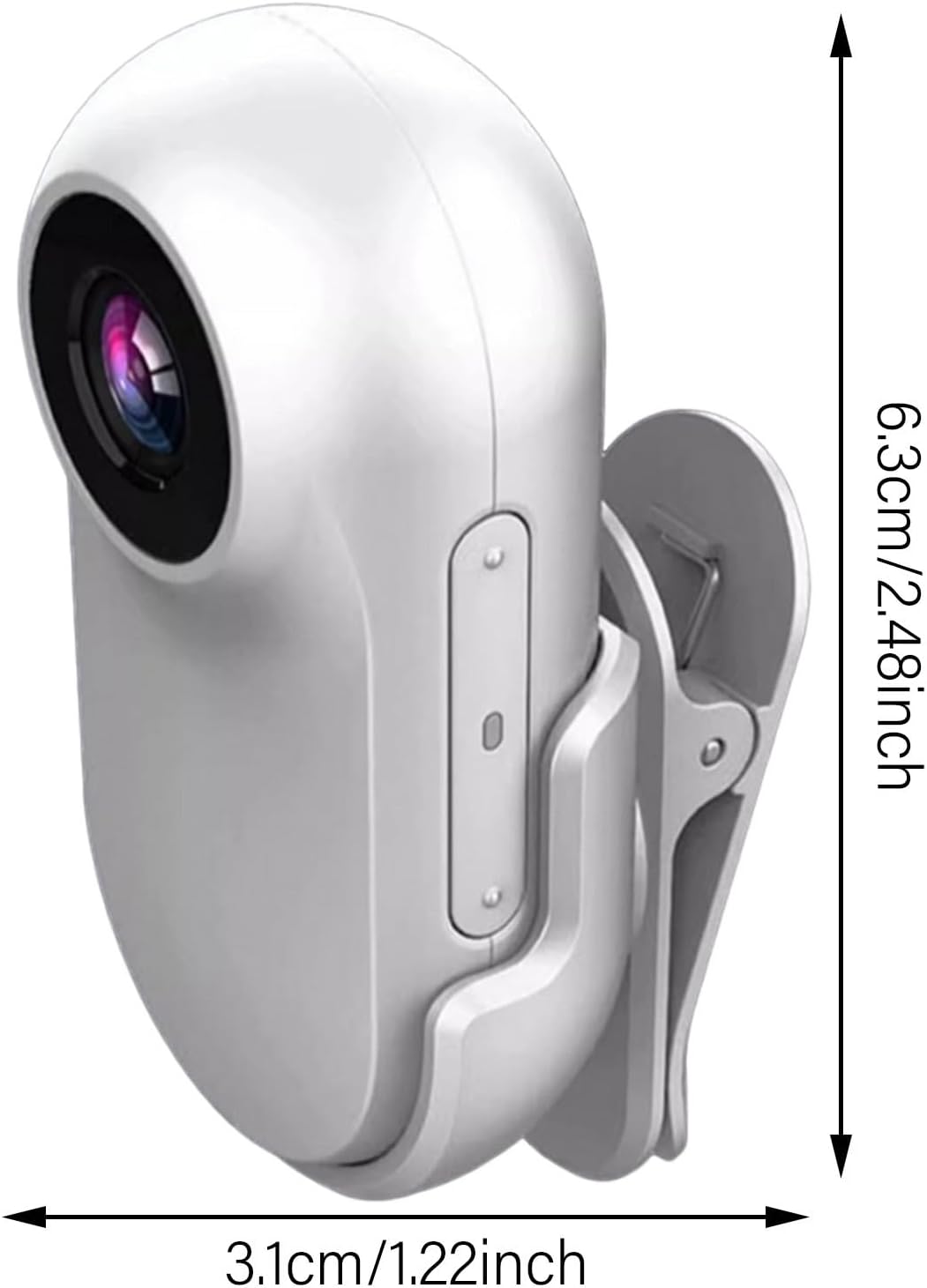
Figure 3.2: Visual representation of the camera's compact dimensions, measuring approximately 6.3cm in height and 3.1cm in width.
4. Istruzzjonijiet Operattivi
4.1. Tixgħil / Mitfi
To power on the camera, press and hold the main button until the indicator light illuminates. To power off, press and hold the same button until the indicator light turns off.
4.2. Reġistrazzjoni tal-Vidjo
Once powered on, the camera typically enters standby mode. Press the main button once to start video recording. The indicator light will change to indicate recording is in progress (e.g., blinking). Press the button again to stop recording and save the file.
4.3. Teħid tar-Ritratti
While in standby mode, a quick double-press of the main button may switch to photo mode (refer to specific indicator light patterns in the included quick start guide). Press the button once to capture a photo.
4.4. It-trasferiment Files
To access recorded videos and photos, connect the camera to a computer using the provided data cable. The camera will appear as a removable storage device. You can then drag and drop files to your computer. Alternatively, remove the SD card and use the provided card reader to transfer files.
5. Manutenzjoni
- Tindif: Uża drapp artab u niexef biex tnaddaf il-korp tal-kamera. Għal-lenti, uża drapp u soluzzjoni speċjalizzati għat-tindif tal-lentijiet. Evita materjali li joborxu jew kimiċi ħarxa.
- Ħażna: Store the camera in a cool, dry place away from direct sunlight and extreme temperatures. If storing for extended periods, ensure the battery is partially charged (around 50%) to prolong its lifespan.
- Kura tal-batterija: Avoid fully discharging the battery frequently. Charge the camera regularly, even if not in use, to maintain battery health.
- Reżistenza għall-Ilma: The camera comes with a silicone rainproof case. Ensure this case is properly installed for protection against moisture. The camera itself is not inherently waterproof without the case.
6 Issolvi l-problemi
- Il-kamera ma tixgħel: Kun żgur li l-batterija hija ċċarġjata. Qabbad ma' sors ta' enerġija u erġa' pprova.
- Ma nistax nirrekordja vidjow/nieħu ritratti: Check if a memory card is inserted correctly and if it has sufficient free space. The card might be full or corrupted.
- Kwalità fqira tal-vidjow/ritratt: Ensure the lens is clean. Check lighting conditions. Verify that the camera settings are appropriate for the environment (if adjustable).
- Camera not recognized by computer: Try a different USB port or cable. Ensure the camera is powered on when connected.
- Ħajja qasira tal-batterija: Ensure the camera is fully charged before use. Battery performance can degrade over time.
7. Speċifikazzjonijiet
| Karatteristika | Dettall |
|---|---|
| Isem tad-Ditta | Ġeneriċi |
| Numru tal-Mudell tal-Oġġett | Thumb Action Sports Camera |
| Kulur | Abjad |
| Karatteristiċi Speċjali | 4K Recording, Long Battery Life, Hands-Free Operation |
| Teknoloġija tas-Sensor tar-Ritratti | CCD |
| Riżoluzzjoni tal-Qbid tal-Vidjo | 1280p (Note: Product description mentions 4K, actual capture resolution may vary or be upscaled) |
| Tul Fokali Massimu | 105 Millimetru |
| Tip ta' Memorja Flash | SD |
| Format tal-Qbid tal-Vidjo | MP4 |
| Daqs tal-Iskrin | 1 Inches (Visible screen diagonal) |
| Teknoloġija tal-Konnettività | USB |
| Pajjiż ta' Oriġini | Iċ-Ċina |
8. X'hemm fil-Kaxxa
The I3 4K Thumb Action Sports Camera package typically includes:
- 1 x 16GB Body Camera
- 1 x Silicone Rainproof Case
- 1 x 360° Rotating Back Clip
- 1 x Cycling Back Cover
- 1 x Qarrej tal-Karta
- 1 x Cable tad-Data
- 1 x Manwal tal-Istruzzjonijiet (dan id-dokument)
9. Garanzija u Appoġġ
Għal informazzjoni dwar il-garanzija u appoġġ għall-klijenti, jekk jogħġbok irreferi għad-dokumentazzjoni pprovduta max-xiri tiegħek jew ikkuntattja lill-bejjiegħ direttament. Żomm il-prova tax-xiri tiegħek għal kwalunkwe talba ta' garanzija.


