
1. Introduzzjoni
This manual provides essential instructions for the safe assembly, operation, and maintenance of your isinwheel M10 Electric Bike. Please read this manual thoroughly before your first ride to ensure proper usage and to maximize the lifespan of your e-bike. Retain this manual for future reference.
Twissija tas-Sigurtà: Always wear a helmet and appropriate safety gear when riding. Familiarize yourself with local traffic laws and regulations. Regular maintenance is crucial for safe operation.
2. Kontenut tal-Pakkett
Upon unpacking, verify that all components listed below are present and undamaged. If any items are missing or damaged, please contact customer support.
- isinwheel M10 Electric Bike Frame (partially assembled)
- Rota ta' Quddiem
- Removable Lithium-Ion Battery (36V 10.4AH)
- 42V 2A Fast Charger
- Pedali (Xellug u Lemin)
- Seat with Seatpost
- Headlight ta 'quddiem
- Riflettur ta 'wara
- Toolkit (including Allen wrenches and spanner)
- Pompa tat-Tajers
- Manwal għall-Utent

Image: All components included in the isinwheel M10 Electric Bike package.
3. Setup u Assemblea
The isinwheel M10 Electric Bike comes 85% pre-assembled. Follow these steps to complete the assembly:
- Unboxing: Carefully remove all components from the packaging. Keep the packaging materials until assembly is complete and you are satisfied with the product.
- Installazzjoni tal-manubriju: Attach the handlebar to the stem using the provided Allen wrenches. Ensure the handlebar is centered and tightened securely.
- Installazzjoni tar-rota ta' quddiem: Secure the front wheel to the front fork. Ensure the brake rotor aligns correctly with the caliper and the quick-release skewer is properly tightened.
- Installazzjoni tad-dawl ta' quddiem: Mount the front headlight onto the designated bracket on the front fork or handlebar, and connect its cable.
- Installazzjoni tal-pedali: Identify the left (L) and right (R) pedals. The left pedal tightens counter-clockwise, and the right pedal tightens clockwise. Use the spanner to secure them firmly.
- Installazzjoni tas-sedil: Insert the seatpost into the frame's seat tube. Adjust the height for comfortable riding and secure it with the quick-release lever.
- Rear Reflector Installation: Attach the rear reflector to the seatpost or rear rack (if applicable) for increased visibility.
- Installazzjoni tal-batterija: Slide the battery into its designated slot on the frame and lock it with the key.
- Ġestjoni tal-Kejbil: Ensure all cables are neatly routed and secured, away from moving parts.

Image: Installing the handlebar.
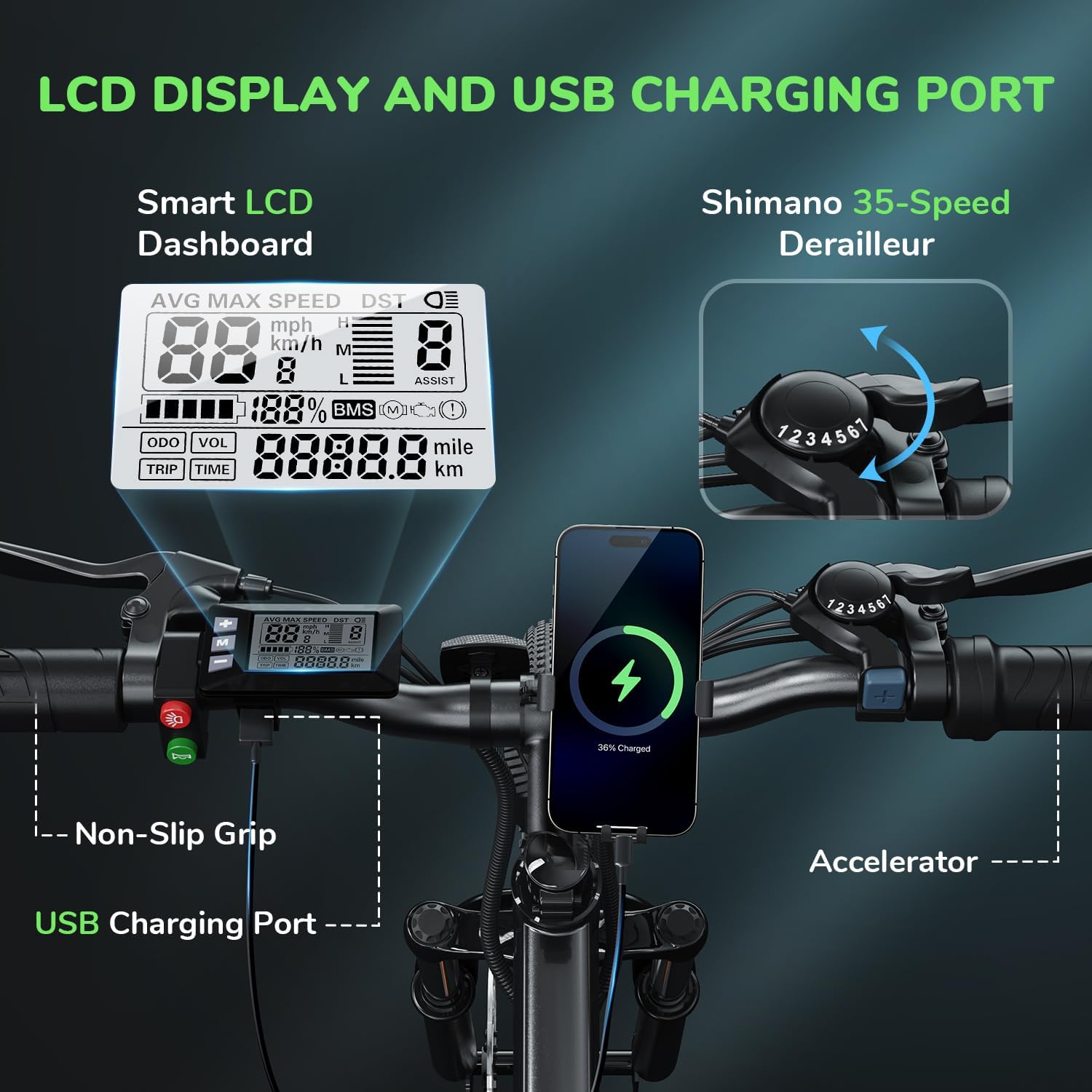
Image: Attaching the front wheel.

Image: Installing the pedals.

Image: Adjusting and securing the seat.

Image: Installing the removable battery.
Gwida tal-Vidjo tal-Assemblea
Video: A comprehensive guide demonstrating the assembly process of the isinwheel M10 Electric Bike, including handlebar, wheel, pedal, and battery installation.
4. Istruzzjonijiet Operattivi
4.1 Power On/Off
- To power on the bike, press and hold the power button on the LCD display for a few seconds until the screen illuminates.
- Biex titfi l-apparat, agħfas u żomm il-buttuna tal-qawwa mill-ġdid sakemm id-displej jintefa.
4.2 Modi tas-Sewqan
The M10 Electric Bike offers multiple riding modes:
- Modalità ta' Assistenza bil-Pedali (PAS): Provides motor assistance as you pedal. Adjust the assist level (1-5) using the '+' and '-' buttons on the control panel. Higher levels provide more assistance.
- Full Electric Mode (Throttle): Engage the throttle for motor power without pedaling. This mode is typically used for quick acceleration or when you need a break from pedaling.
- Modalità Manwali: Irkib ir-rota bħal rota tradizzjonali mingħajr ebda assistenza bil-mutur.
4.3 Shimano 7-Speed Gear System
The bike is equipped with a Shimano 7-speed transmission system. Use the gear shifter on the handlebar to change gears according to terrain and desired speed. Lower gears are for uphill climbing, and higher gears are for flat terrain or downhill riding.
4.4 Funzjonijiet tal-Wiri LCD
The smart LCD display provides real-time riding data:
- Veloċità: Current, average, and maximum speed.
- Ħin tal-irkib: Duration of your ride.
- Mili: Distanza tal-vjaġġ u odometru totali.
- Livell tal-batterija: Il-ċarġ li fadal tal-batterija.
- Livell ta' Assistenza: Current pedal assist level (1-5).
Power On Operation Video
Video: Demonstrates how to power on the isinwheel M10 Electric Bike and navigate the LCD display functions.
5. Ġestjoni tal-batterija
5.1 Tneħħija u Installazzjoni tal-Batterija
The 36V 10.4AH Lithium-Ion battery is removable for convenient charging or storage.
- Tneħħija: Unlock the battery with the provided key, then slide it out from the frame.
- Installazzjoni: Align the battery with the frame slot and slide it in until it clicks into place. Lock it with the key to secure.
5.2 Istruzzjonijiet għall-Iċċarġjar
Use only the provided 42V 2A Fast Charger.
- Kun żgur li r-rota tkun mitfija.
- Locate the charging port on the battery.
- Qabbad il-ċarġer mal-port tal-iċċarġjar.
- Ipplaggja l-ċarġer fi żbokk tal-ħajt standard.
- The charger indicator light will show red during charging and turn green when fully charged.
- L-iċċarġjar tipikament jieħu 3-4 sigħat għal iċċarġjar sħiħ.
- Skonnettja l-ċarġer ladarba l-iċċarġjar ikun lest.
Battery Removal and Charging Video
Video: Instructions for removing and installing the battery, and connecting the charger to the isinwheel M10 Electric Bike.
6. Manutenzjoni
Manutenzjoni regolari tiżgura l-lonġevità u t-tħaddim sikur tal-e-bike tiegħek.
- Tindif: Imsaħ ir-rota b'reklamaramp drapp. Evita ħasil bi pressjoni għolja direttament fuq il-komponenti elettriċi.
- Pressjoni tat-Tajers: Check tire pressure before each ride. Maintain recommended pressure (usually indicated on the tire sidewall) using the included pump.
- Brejkijiet: Regularly inspect brake pads and rotors for wear. Ensure brake levers engage smoothly and provide adequate stopping power. Adjust or replace as needed.
- Katina: Żomm il-katina nadifa u llubrikata biex tevita s-sadid u tiżgura bidliet bla xkiel tal-gerijiet.
- Qafliet: Periodically check all bolts and nuts for tightness, especially on the handlebars, seatpost, and wheels.
- Kura tal-batterija: Aħżen il-batterija f'post frisk u niexef. Jekk se taħżinha għal perjodi twal, iċċarġjaha sa 50-70% kull 2-3 xhur.
Air Inflation Instructions Video
Video: Demonstrates how to properly inflate the tires of the isinwheel M10 Electric Bike using the provided pump.
7 Issolvi l-problemi
If you encounter issues with your isinwheel M10 Electric Bike, refer to the following common problems and solutions:
| Problema | Kawża Possibbli | Soluzzjoni |
|---|---|---|
| Ir-rota ma tixgħelx | Battery not installed correctly or discharged; loose electrical connection. | Ensure battery is fully inserted and locked. Check battery charge level and charge if necessary. Verify all visible electrical connections are secure. |
| Il-mutur mhux qed jgħin | Low battery; assist level set to 0; brake lever engaged; motor cable disconnected. | Charge battery. Increase assist level on the display. Release brake levers. Check motor cable connection. |
| Il-batterija mhix qed tiċċarġja | Charger not connected properly; faulty charger/battery; power outlet issue. | Ensure charger is securely plugged into battery and outlet. Check if the outlet is working. Contact support if issues persist. |
| Il-brejkijiet iħossuhom dgħajfa | Kuxxinetti tal-brejkijiet mikulin; kejbil tal-brejk maħlul; arja fis-sistema idrawlika (jekk applikabbli). | Inspect and replace worn brake pads. Adjust brake cable tension. For hydraulic brakes, professional service may be required. |
If you cannot resolve an issue using the troubleshooting guide, please contact isinwheel customer support for assistance.
8. Speċifikazzjonijiet
Key technical specifications for the isinwheel M10 Electric Bike:
| Karatteristika | Speċifikazzjoni |
|---|---|
| Mudell | M10 |
| Mutur | Mutur bla brushes ta' 500W Peak |
| L-ogħla Veloċità | Up to 32 KM/H (20 MPH) |
| Batterija | 36V 10.4AH (375WH) Removable Li-ion, IPX5 waterproof |
| Ħin tal-Iċċarġjar | 3-4 hours (with 42V 2A Fast Charger) |
| Firxa (Elettrika Sħiħa) | 39-43 miles (63-70 KM) |
| Firxa (Assistenza tal-Pedali) | 50-60 miles (80-96 KM) |
| Trażmissjoni | Shimano 7-Veloċità |
| Materjal tal-qafas | Liga tal-Aluminju |
| Piż tar-Rota | 21.3 KG (47 lbs) |
| Daqs tar-rota | 26 Pulzier |
| Sospensjoni | Sospensjoni tal-furketta ta 'quddiem |
| Brejkijiet | Brejkijiet Mekkaniċi tad-Diska ta' Quddiem u ta' Wara |
| Karatteristiċi Speċjali | Digital LCD Display, Height Adjustable Seat, Lightweight & Portable |
| Ċertifikazzjonijiet | UL 2271 (Li-ion battery), UL 2789 (whole e-bike) |

Image: isinwheel M10 Electric Bike dimensions and rider height guide.
9. Garanzija u Appoġġ
The isinwheel M10 Electric Bike comes with a 12-month warranty from the date of purchase. This warranty covers manufacturing defects in materials and workmanship. It does not cover damage caused by misuse, accidents, unauthorized modifications, or normal wear and tear.
For warranty claims, technical support, or any questions regarding your e-bike, please contact isinwheel customer service. Provide your purchase details and a description of the issue for prompt assistance.
Informazzjoni ta' Kuntatt: Please refer to your purchase documentation or the official isinwheel webis-sit għad-dettalji ta' kuntatt tal-appoġġ għall-klijenti l-aktar aġġornati.