
1. Introduzzjoni
1.1 Prodott Fuqview
The Rraycom 5MP Wireless Security Camera is a battery-powered, outdoor-ready surveillance device designed for home security. It features 5MP ultra-HD video, a 130° wide field of view, and dual light source night vision for both full-color and infrared options. Equipped with AI motion detection, two-way audio, a siren alarm, and spotlight, it provides comprehensive monitoring and deterrence. The camera supports both cloud and local SD card storage and is compatible with Amazon Alexa.
1.2 Karatteristiċi ewlenin
- 2.5K (5MP) Ultra-HD Video: Jipprovdi informazzjoni ta' sorveljanza ċara u dettaljatatage.
- 130° Qasam Wiesgħa ta View: Minimizes blind spots for broader coverage.
- Full-Color & Infrared Night Vision: Offers versatile night monitoring options.
- Batterija rikarikabbli: Ensures wire-free operation and flexible placement.
- IP65 li ma jgħaddix ilma minnha: Designed to withstand various weather conditions for outdoor use.
- Sejbien tal-Mozzjoni PIR bl-Analiżi tal-AI: Accurately detects human movement and sends real-time notifications.
- Awdjo f'żewġ direzzjonijiet: Allows for remote communication with visitors or intruders.
- Siren Alarm & Spotlight: Deters unwanted visitors with audible and visual alerts.
- Cloud/SD Card Storage: Offers flexible options for video recording storage.
- Integrazzjoni Alexa: Enables voice control for live view aċċess.

Immaġni: Fuqview of the Rraycom 5MP Wireless Security Camera and its main features.
1.3 X'hemm fil-Kaxxa?
Jekk jogħġbok iċċekkja l-kontenut tal-pakkett tiegħek. Jekk xi oġġetti huma nieqsa jew bil-ħsara, ikkuntattja l-appoġġ għall-klijenti.
- Rraycom 5MP Wireless Security Camera (x1)
- Bracket tal-Immuntar (x1)
- Mounting Screws and Wall Anchors (x1 set)
- Kejbil tal-Iċċarġjar tal-USB (x1)
- Manwal għall-Utent (x1)
2. Nibdew: Konfigurazzjoni
2.1 Iċċarġjar tal-Kamera
Before initial use, fully charge the camera battery. Connect the provided USB charging cable to the camera's charging port and to a standard 5V USB power adapter (not included). The indicator light will show charging status and turn solid when fully charged.
2.2 Installazzjoni tal-App
Download the companion app, VistaFlow, from your mobile device's app store.
- Għal apparati iOS: Fittex għal "VistaFlow" in the Apple App Store.
- Għal apparati Android: Fittex għal "VistaFlow" in the Google Play Store.
Follow the on-screen instructions to create an account and log in.
2.3 Tqabbil ta' Apparati (Konnessjoni Wi-Fi)
- Kun żgur li l-apparat mobbli tiegħek huwa konness ma' Netwerk Wi-Fi 2.4GHz. The camera does not support 5GHz Wi-Fi.
- Open the VistaFlow app and tap the "Add Device" or "+" icon.
- Agħżel il-mudell tal-kamera tiegħek mil-lista.
- Follow the in-app instructions to power on the camera and put it into pairing mode (usually indicated by a flashing LED).
- Scan the QR code displayed on your phone screen with the camera lens, or follow alternative pairing methods if prompted.
- Ladarba tkun konnessa, agħti isem lill-kamera tiegħek u kompli l-proċess tas-setup.
2.4 Immuntar tal-Kamera
Choose a suitable location for your camera, considering Wi-Fi signal strength, desired viewing angle, and power access for occasional recharging. The camera is IP65 waterproof, making it suitable for outdoor installation.
- Mark the drill holes using the mounting bracket as a template.
- Ħaffer toqob u daħħal ankri tal-ħajt jekk qed twaħħalha fuq ġebel jew drywall.
- Secure the mounting bracket to the wall or ceiling with screws.
- Attach the camera to the mounting bracket and adjust the angle for optimal coverage.
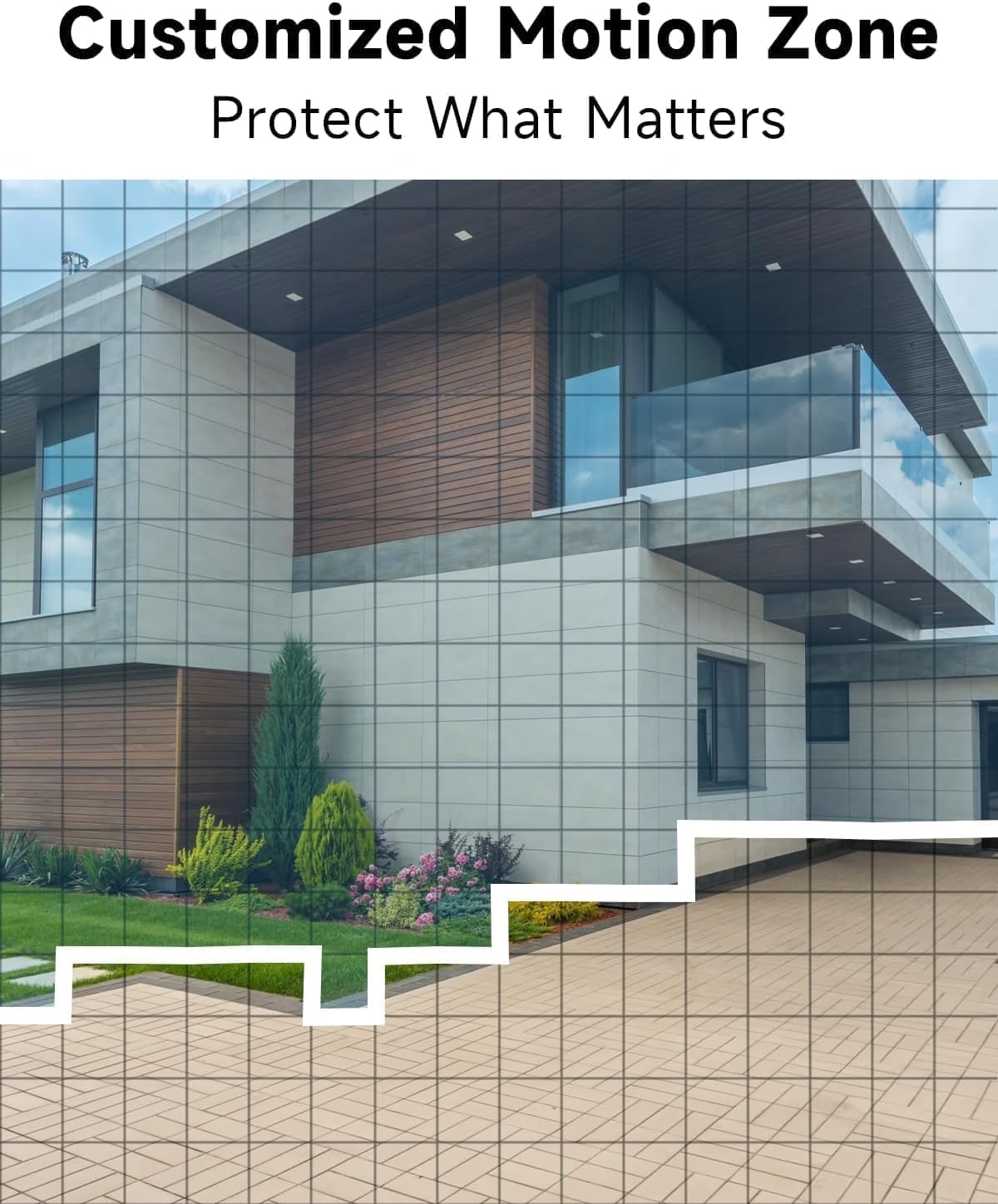
Immaġni: Eżample of camera placement and customized motion zone setup.
3. Istruzzjonijiet Operattivi
3.1 Ħaj View
Access the VistaFlow app and select your camera to view the live feed. You can pinch to zoom and pan across the 130° wide-angle view. The 5MP resolution provides clear details.

Image: Visual comparison of 5MP versus 1080P video resolution.
3.2 Sejbien tal-Mozzjoni u Analiżi tal-AI
The camera uses a PIR sensor and AI analysis to detect motion, specifically identifying persons to reduce false alarms. When motion is detected, you will receive a notification on your phone.
- Customized Activity Zones: In the app settings, you can define specific areas within the camera's view where motion detection should be active, ignoring other areas.
- Aġġustament tas-Sensittività: Adjust the motion detection sensitivity to suit your environment and reduce unwanted alerts.

Image: AI Motion Detection in action, highlighting alert options.
3.3 Awdjo b'żewġ direzzjonijiet
The built-in microphone and speaker allow for real-time two-way communication. Tap the microphone icon in the live view biex titkellem permezz tal-kamera, u tisma' l-awdjo mill-post fejn tinsab il-kamera.

Image: Demonstrating two-way audio communication.
3.4 Viżjoni bil-lejl
Il-kamera toffri żewġ modi ta' viżjoni bil-lejl:
- Viżjoni bil-Lejl b'Kulur Sħiħ: Utilizes the built-in spotlight to provide color images in low-light conditions.
- Viżjoni bil-lejl infrared: Uses infrared LEDs for black and white images in complete darkness.
You can switch between these modes or set them to automatic in the app settings.

Image: Comparison of color and infrared night vision modes.
3.5 Siren Alarm & Spotlight
In response to motion detection, or manually activated via the app, the camera can trigger a siren alarm and turn on its spotlight to deter intruders. You can customize the siren sound with pre-recorded messages.
3.6 Għażliet ta' Ħażna
Il-kamera tappoġġja żewġ metodi ta' ħażna għall-vidjow irreġistrat:
- Ħażna Cloud: A free rolling 3-day cycled cloud storage service is provided. Optional subscription plans may be available for extended cloud storage.
- Karta Micro SD: Insert a micro SD card (up to 256GB, not included) into the camera's SD card slot for local storage.
3.7 Integrazzjoni ta' Alexa
The Rraycom camera is compatible with Amazon Alexa. To enable this feature:
- Open the Alexa app on your mobile device.
- Go to "Skills & Games" and search for "VistaFlow".
- Enable the skill and link your VistaFlow account.
- Skopri apparati.
You can then use voice commands such as: "Alexa, show me the [camera name]" to view il-feed dirett fuq apparati Alexa kompatibbli (eż., Echo Show).
4. Manutenzjoni
4.1 Ġestjoni tal-batterija
The camera is powered by a rechargeable battery. Battery life varies based on usage, motion detection frequency, and environmental factors.
- Iċċarġjar mill-ġdid: When the battery level is low, you will receive a notification via the app. Disconnect the camera from its mount and charge it using the provided USB cable.
- Ottimizzazzjoni tal-Ħajja tal-Batterija: Reduce motion detection sensitivity, shorten recording duration, and minimize live view access to extend battery life.
4.2 Tindif
Periodically clean the camera lens and body to ensure optimal performance.
- Use a soft, dry, lint-free cloth to wipe the lens. For stubborn smudges, a slightly damp Jista' jintuża drapp, segwit minn wieħed niexef.
- Imsaħ il-korp tal-kamera b'reklamaramp drapp. Evita li tuża kimiċi ħarxa jew tindif li joborxu.
5 Issolvi l-problemi
5.1 Kwistjonijiet Komuni u Soluzzjonijiet
| Ħruġ | Soluzzjoni Possibbli |
|---|---|
| Il-kamera ma tikkonnettjax mal-Wi-Fi | Ensure your Wi-Fi is 2.4GHz. Check Wi-Fi signal strength at the camera's location. Restart your router and the camera. Re-attempt pairing in the app. |
| Is-sejbien tal-moviment mhux qed jaħdem jew hemm wisq allarmi foloz | Check motion detection settings in the app. Adjust sensitivity. Define activity zones to exclude irrelevant areas. Ensure camera lens is clean. |
| Kwalità ta 'immaġni fqira | Ensure the camera lens is clean. Check Wi-Fi signal strength. Ensure the camera is set to 5MP resolution in app settings if available. |
| Il-batterija mhix qed tiċċarġja | Ensure the USB cable is securely connected. Try a different USB power adapter. Check if the charging port is clean and free of debris. |
| Cannot hear or speak through two-way audio | Iċċekkja s-settings tal-volum fuq it-telefon tiegħek u fl-app. Kun żgur li l-permessi tal-mikrofonu u tal-ispiker huma mogħtija lill-app. |
6. Speċifikazzjonijiet Tekniċi
| Karatteristika | Speċifikazzjoni |
|---|---|
| Riżoluzzjoni | 5MP (2.5K QHD) |
| Qasam ta View | 130° |
| Konnettività | Wi-Fi (2.4GHz biss) |
| Sors tal-Enerġija | Mħaddma bil-batterija |
| Reżistenza għat-temp | IP65 Waterproof |
| Viżjoni bil-lejl | Full-Color, Infrared |
| Awdjo | Awdjo 2-Way |
| Sejbien tal-Moviment | PIR with AI Analysis (Person Detection) |
| Għażliet ta' Ħażna | Cloud (3-day free rolling), Micro SD Card (up to 256GB) |
| Integrazzjoni tad-Dar Intelliġenti | Amazon Alexa |
| Apparati Kompatibbli | iOS, Android |
| Użu fuq ġewwa/barra | Barra |
7. Garanzija u Appoġġ għall-Klijent
7.1 Informazzjoni dwar Garanzija
Rraycom products come with a limited warranty. Please refer to the warranty card included in your package or visit the official Rraycom websit għal termini u kundizzjonijiet dettaljati tal-garanzija.
7.2 Appoġġ għall-Klijent
If you encounter any issues or have questions regarding your Rraycom 5MP Wireless Security Camera, please contact our customer support team. Contact information can be found on the Rraycom websit jew fl-ippakkjar tal-prodott.