
Introduzzjoni
This manual provides detailed instructions for the installation, operation, and maintenance of the LICAEVEY HW-425 Wireless Audio Module. This module is designed for DIY audio projects, offering 4.2 stereo wireless audio with lossless playback capabilities.
Jekk jogħġbok aqra dan il-manwal bir-reqqa qabel ma tuża l-prodott biex tiżgura l-funzjonalità xierqa u biex tevita l-ħsara.
Karatteristiċi tal-Prodott
- Supports 4.2 wireless connectivity with a connection distance of up to 20 meters in open environments.
- Dual channel stereo lossless playback for high-fidelity audio.
- Designed with precise cuts and interfaces for easy integration into various speaker DIY modifications.
- Constructed from durable materials to resist corrosion and wear.
- Utilizes a professional chipset for stable and superior system performance.
Kontenut tal-Pakkett
Iċċekkja li l-oġġetti kollha elenkati hawn taħt huma preżenti fil-pakkett:
- HW-425 Wireless Audio Module x 1

Image: The HW-425 Wireless Audio Module, showing its compact design and integrated components.
Speċifikazzjonijiet
| Parametru | Valur |
|---|---|
| Tip ta' Oġġett | Modulu |
| Mudell | HW-425 |
| Isem | Wireless Audio Module 4.2 Stereo |
| Provvista tal-Enerġija | Default 5V |
| Distanza ta' Konnessjoni | Approx. 20M / 66ft (open environment) |
| Dimensjonijiet | 2.36 x 2.36 x 0.39 pulzieri (Pakkett) |
| Piż tal-oġġett | 0.071 uqija |
Setup u Installazzjoni
The HW-425 module is designed for integration into existing audio systems or DIY projects. Follow these steps for proper setup:
- Konnessjoni tal-Enerġija: Connect a stable 5V DC power supply to the VCC and GND pins of the module. Ensure correct polarity to prevent damage.
- Output Awdjo: Connect the L (Left) and R (Right) pins to your amplifier or audio input of your speakers. The GND pin should also be connected to the audio ground.
- Control Pins (Optional): The module includes MUTE and KEY pins for advanced control. Refer to your project's specific requirements for their use. The MUTE pin can be used to mute the audio output, and the KEY pin can be used for control inputs (e.g., play/pause, next track).

Immaġni: Fuq u isfel view of the HW-425 module, illustrating the pinout for connections including R, L, GND, VCC, MUTE, and KEY.
Immuntar: The module features precise cuts and interfaces for easy mounting. Secure the module in a suitable position within your enclosure, ensuring it is protected from environmental factors and physical stress.

Image: Close-up of the HW-425 module, highlighting its precise cuts and interfaces for integration.
Istruzzjonijiet Operattivi
- Qawwa Mixgħul: Once the module is correctly wired and powered, it will automatically enter pairing mode.
- Tqabbil: On your device (e.g., smartphone, tablet), search for available wireless devices. The module will typically appear as "HW-425" or a similar identifier. Select it to pair.
- Daqq tal-awdjo: After successful pairing, any audio played on your connected device will be transmitted wirelessly to the HW-425 module and output through its audio pins.
- Medda ta' Konnessjoni: Maintain the connected device within approximately 20 meters (66 feet) of the module for optimal performance, especially in open environments. Obstacles may reduce this range.
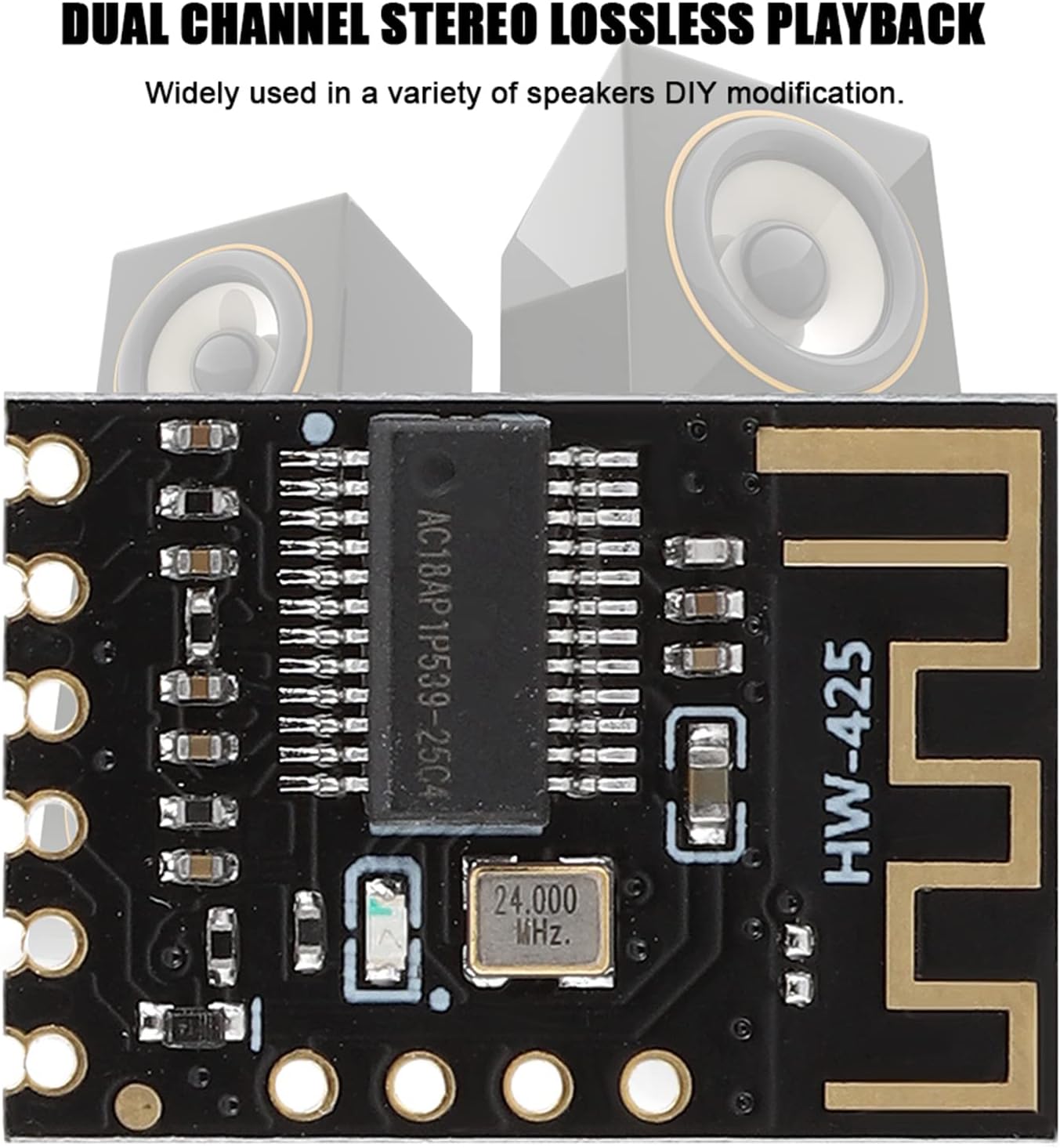
Image: The HW-425 module shown in context with speakers, illustrating its application in dual-channel stereo lossless playback.
Manutenzjoni
The HW-425 Wireless Audio Module requires minimal maintenance. Follow these guidelines to ensure longevity:
- Tindif: Use a dry, soft cloth to gently clean the module if necessary. Avoid using liquids or abrasive cleaners.
- Ambjent: Operate the module in a dry environment, away from extreme temperatures, humidity, and direct sunlight.
- Protezzjoni Fiżika: Ensure the module is securely mounted and protected from physical impact or excessive vibration.

Image: A close-up of the HW-425 module, emphasizing its construction from high-quality materials designed for durability.
Issolvi l-problemi
| Problema | Kawża Possibbli | Soluzzjoni |
|---|---|---|
| Ebda qawwa | Provvista ta' enerġija mhux korretta voltage or polarity; loose connection. | Verify 5V DC power supply. Check VCC and GND connections for correct polarity and secure fit. |
| Ma tistax tqabbad mat-tagħmir | Module not in pairing mode; device too far; interference. | Ensure module is powered on. Bring device closer to the module. Restart both the module and the device. Check for other wireless devices causing interference. |
| Ebda output awdjo | Incorrect audio wiring; amplifier/speaker issue; device volume too low. | Check L, R, and GND audio connections to the amplifier/speakers. Ensure amplifier/speakers are powered on and functioning. Increase volume on the connected device. |
| Poor audio quality or disconnections | Device too far; obstacles between device and module; interference. | Reduce distance between device and module. Remove obstacles. Minimize other wireless activity in the area. |
Garanzija u Appoġġ
For warranty information or technical support, please contact LICAEVEY customer service through the retailer where the product was purchased. Please have your model number (HW-425) and purchase date available when contacting support.
Manifattur: LICAEVEY
Numru tal-Mudell: LICAEVEYvbo76ygsrq (Internal reference)