
Introduzzjoni
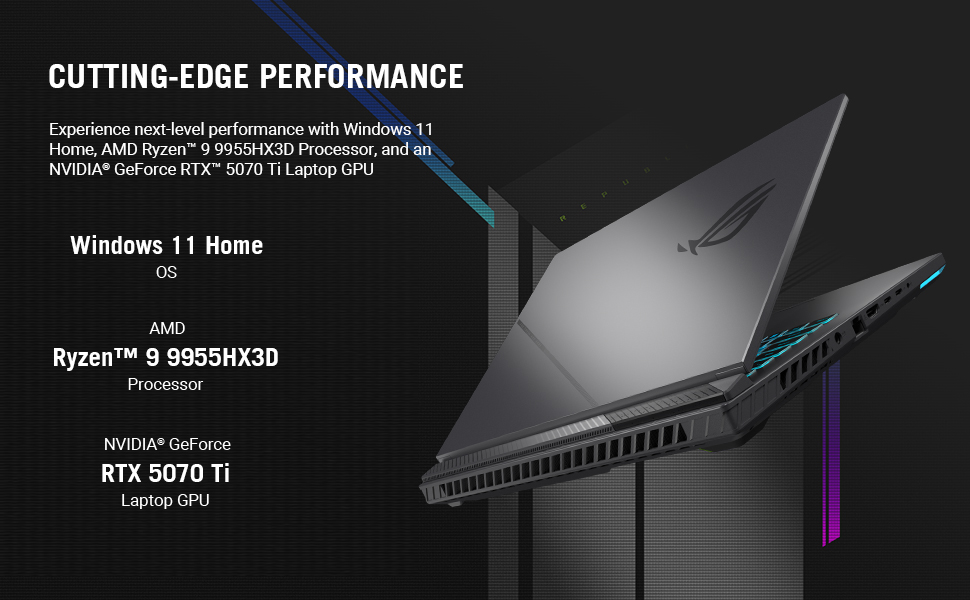
This manual provides essential information for setting up, operating, maintaining, and troubleshooting your ASUS ROG Strix G16 (2025) Gaming Laptop. The ROG Strix G16 is designed for high-performance gaming and creative tasks, featuring an ROG Nebula Display, AMD Ryzen 9 9955HX3D Processor, and NVIDIA GeForce RTX 5070 Ti Laptop GPU. Please read this manual thoroughly to ensure optimal use and longevity of your device.

Setup
1. Unboxing u Spezzjoni Inizjali
Neħħi bir-reqqa l-komponenti kollha mill-imballaġġ. Iċċekkja li l-oġġetti li ġejjin huma inklużi:
- ASUS ROG Strix G16 (Model G614FR-DS96)
- Powercord and Adapter
- Gwida għall-Utent (dan id-dokument)
Inspect the laptop for any physical damage. If any damage is found, contact your retailer immediately.
2. Konnessjoni tal-Adapter tal-Enerġija
Qabbad l-adapter tal-enerġija mal-port tad-dħul tal-enerġija tal-laptop u mbagħad daħħal il-korda tal-enerġija f'sokit tal-ħajt. Huwa rakkomandat li tiċċarġja l-batterija kompletament qabel l-ewwel użu.
3. L-Ewwel Tixgħil
Open the laptop lid and press the power button, typically located on the top-right side of the keyboard deck. The laptop will boot up and guide you through the Windows 11 Home setup process.

4. Konnessjoni Periferali
Connect any external devices such as a mouse, keyboard, or external display to the available USB, HDMI, or Thunderbolt ports. Refer to the specifications section for port details.
It-Tħaddim tal-Laptop Tiegħek
Prestazzjoni u Wiri
The ROG Strix G16 features an AMD Ryzen 9 9955HX3D Processor and an NVIDIA GeForce RTX 5070 Ti Laptop GPU, providing cutting-edge performance for gaming and demanding applications. The 16-inch ROG Nebula Display offers a 2.5K resolution with a 240Hz refresh rate and 3ms response time, ensuring smooth and vibrant visuals. It also includes ACR film technology for enhanced contrast and reduced glare.
Tastiera u Input
The full-size keyboard is designed for gaming with Overstroke technology for faster key actuation. It includes spaced function keys, dedicated hotkeys, and a larger touchpad for precise control. Per-key RGB lighting is customizable through ASUS Aura Sync technology.

Sistema tat-tkessiħ
ROG Intelligent Cooling features tri-fan technology and Conductonaut Extreme liquid metal to maintain optimal temperatures during intense usage, ensuring consistent performance.
MUX Switch with Advanced Optimus
The integrated MUX Switch enhances gaming performance by routing frames directly from the dedicated GPU. Advanced Optimus automatically switches between the integrated and dedicated GPUs to optimize battery life without requiring a system restart.
RGB Lightbar
A customizable RGB lightbar allows you to personalize your laptop's aesthetics. In professional settings, Stealth Mode can be activated to turn off all lighting.
Manutenzjoni
1. Tindif tal-Laptop Tiegħek
- Skrin: Uża ċarruta ratba u mingħajr ħelu dampLaħlaħ bl-ilma jew b'tindif tal-iskrin. Evita kimiċi ħarxa.
- Tastiera u Chassis: Uża drapp artab. Għat-trab fix-xquq, uża arja kkompressata.
- Ventijiet: Neħħi t-trab mill-ventijiet tat-tkessiħ regolarment billi tuża arja kkompressata biex tiżgura fluss tal-arja xieraq u tevita li jisħon iżżejjed.
2. Aġġornamenti tas-Software
Keep your operating system (Windows 11 Home) and drivers updated. ASUS provides utility software to manage driver updates and system settings. Regular updates ensure optimal performance, security, and compatibility.
3. Kura tal-batterija
To prolong battery life, avoid consistently discharging the battery completely or keeping it at 100% charge for extended periods. ASUS battery health management tools can help optimize charging cycles.
4. Ġestjoni tal-Ħażna
Regularly manage your 1TB PCIe Gen 4 SSD by deleting unnecessary files and uninstalling unused applications to maintain optimal system speed and free up storage space.
Issolvi l-problemi
Kwistjonijiet Komuni u Soluzzjonijiet
| Ħruġ | Soluzzjoni Possibbli |
|---|---|
| Il-laptop ma jixgħelx | Kun żgur li l-adapter tal-enerġija huwa konness sew kemm mal-laptop kif ukoll ma' sokit tal-enerġija li jaħdem. Iċċekkja jekk is-sokit tal-enerġija hux qed jaħdem. Ipprova sokit ieħor. |
| L-iskrin huwa vojt jew iswed | Press the power button to ensure the laptop is on. Connect an external monitor to check if the display output is working. Adjust screen brightness. |
| Is-sħana żejda waqt l-użu | Ensure cooling vents are clear and unobstructed. Use the laptop on a hard, flat surface. Consider using a laptop cooling pad. Update drivers. |
| Prestazzjoni bil-mod | Close unnecessary applications. Check for background processes consuming high resources (Task Manager). Ensure sufficient free storage space. Update drivers and Windows. |
| Kwistjonijiet ta' konnettività Wi-Fi | Restart your router and modem. Ensure Wi-Fi is enabled on the laptop. Update Wi-Fi drivers. Check network settings in Windows. |
If you encounter persistent issues not covered here, please refer to the ASUS support websit jew ikkuntattja lis-servizz tal-konsumatur.
Speċifikazzjonijiet
| Karatteristika | Dettall |
|---|---|
| Brand | ASUS |
| Isem tal-Mudell | G614FR-DS96 |
| Daqs tal-Iskrin | 16 Pulzier |
| Riżoluzzjoni tal-Wiri | 2560 x 1600 Pixel (2.5K) |
| Riffriskar Rata | 240Hz |
| Ħin ta' Rispons | 3ms |
| Teknoloġija tal-Wiri | ROG Nebula, In-plane Switching (IPS) Technology |
| Proċessur | AMD Ryzen 9 9955HX3D (16 Cores, up to 5.4 GHz) |
| Koproċessur tal-Grafika | NVIDIA GeForce RTX 5070 Ti (12 GB GDDR5) |
| Memorja RAM | 32 GB DDR5-5600MHz |
| Ħażna | SSD PCIe Ġen 4 ta' 1 TB |
| Sistema Operattiva | Windows 11 Home |
| Konnettività | Wi-Fi 6E, Bluetooth, HDMI, USB, Thunderbolt, Ethernet |
| Portijiet | 3x USB, 1x Thunderbolt, 1x HDMI |
| Tastiera | Gaming, Backlit (Per-key RGB), QWERTY Layout |
| Piż tal-oġġett | 5.51 Liri |
| Batterija | 90 Watt Hours Lithium Ion |
| Sena Mudell | 2025 |
Garanzija u Appoġġ
Garanzija Standard
Your ASUS ROG Strix G16 laptop comes with a Garanzija Limitata ta' 1 Snin. This warranty covers manufacturing defects and hardware malfunctions under normal use conditions. Please retain your proof of purchase for warranty claims.
Protezzjoni minn Ħsara Aċċidentali (ADP)
ASUS provides one year of free Accidental Damage Protection (ADP) against liquid spills, drops, and electrical surges on new laptops registered within 60 days of purchase. This protection covers incidents that might occur during everyday use.

Appoġġ għall-Klijent
For technical assistance, driver downloads, or warranty service, please visit the official ASUS support website. You can find detailed FAQs, troubleshooting guides, and contact information for customer service representatives.
Appoġġ ASUS Websit: www.asus.com/support/


