
1. Prodott Aktarview
The QRD Junior E5 Wireless Controller is a compact and versatile gaming controller designed for a wide range of platforms, including Nintendo Switch, Switch Lite, Switch OLED, PC (Windows), Mac, iOS, and Android devices. Its ergonomic design and advanced features provide an enhanced gaming experience.

Stampa 1.1: Quddiem view of two QRD Junior E5 Wireless Controllers.

Image 1.2: Back and front views of the QRD Junior E5 Wireless Controller, highlighting its design.
2. Kontenut tal-Pakkett
- QRD Junior E5 Wireless Controller (2 units for this package)
- Cable tal-Iċċarġjar tal-USB-C
- Manwal għall-Utent (dan id-dokument)
3. Setup u Konnessjoni
3.1 Iċċarġjar tal-Kontrollur
Before first use, fully charge the controller. Connect the provided USB-C cable to the controller's charging port and the other end to a USB power source (e.g., console, PC, or USB wall adapter). The indicator lights will show charging status and turn off when fully charged.
3.2 Konnessjoni man-Nintendo Switch
- On the Nintendo Switch HOME Menu, select Kontrolluri > Ibdel il-Maqbad/Ordni.
- Agħfas u żomm il- Buttuna tad-dar on the QRD Junior E5 controller for 3-5 seconds until the indicator lights start flashing rapidly.
- Ladarba jkun imqabbad, id-dawl(i) indikatur(i) tal-plejer korrispondenti fuq il-kontrollur jibqa'(jibqgħu) mixgħul(a).
3.3 Connecting to PC (Windows/Mac)
The controller supports both wireless Bluetooth and wired USB-C connections for PC and Mac.
3.3.1 Konnessjoni Bluetooth mingħajr fili
- Ensure your PC/Mac has Bluetooth enabled.
- On your PC/Mac, go to Bluetooth settings and search for new devices.
- Agħfas u żomm il- Buttuna tad-dar on the QRD Junior E5 controller for 3-5 seconds until the indicator lights start flashing rapidly.
- Select "QRD Controller" or similar from the list of available devices to pair.
- The controller supports X-input for PC games.
3.3.2 Konnessjoni USB-C bil-fili
Connect the controller to your PC/Mac using the provided USB-C cable. The controller will be automatically recognized, and no driver installation is required.
3.4 Connecting to iOS/Android Devices
- Enable Bluetooth on your iOS/Android device.
- Agħfas u żomm il- Buttuna tad-dar on the QRD Junior E5 controller for 3-5 seconds until the indicator lights start flashing rapidly.
- Fittex għal "QRD Controller" or similar in your device's Bluetooth settings and pair.
4. Istruzzjonijiet u Karatteristiċi tat-Tħaddim
4.1 Kontrolli Bażiċi
The QRD Junior E5 controller features standard button layouts including A/B/X/Y buttons, D-pad, Left/Right joysticks, L/R/ZL/ZR triggers, Home button, and +/- buttons.
4.2 Funzjoni TURBO
The TURBO function allows for continuous or automatic rapid firing of buttons. This feature can be customized for different games and play styles.
- To set TURBO: Press and hold the desired action button (e.g., A) and then press the Buttuna TURBO once. The button will now continuously fire when held.
- To set Auto-TURBO: Press and hold the desired action button and then press the Buttuna TURBO a second time. The button will automatically fire without being held.
- To clear TURBO: Press and hold the desired action button and then press the Buttuna TURBO it-tielet darba.
- Aġġustament tal-Veloċità TURBO: Agħfas il- Buttuna TURBO u l- Up/Down D-pad simultaneously to cycle through speeds: 8 times/sec, 15 times/sec, 25 times/sec.

Image 4.1: Illustration of the Turbo function for rapid actions in games.
4.3 6-Axis Gyro Motion Sensor
The controller is equipped with an advanced 6-axis gyro motion sensor, allowing for precise viewpoint and tilt operations in compatible games. Tilt, turn, and twist the controller to interact with game environments dynamically.

Image 4.2: Demonstrating the 6-Axis Gyro motion sensor capability.
4.4 Feedback tal-Vibrazzjoni Aġġustabbli
Dual vibration motors provide immersive haptic feedback. The vibration intensity can be adjusted to suit personal preference and game requirements.
- Vibration modes: 0% (no vibration), 30% (weak), 70% (medium), and 100% (strong).
- To adjust vibration: Press the Buttuna tal-vibrazzjoni (if present, or a combination like TURBO + Left/Right joystick click) to cycle through intensity levels. Refer to the quick start guide for specific button combinations.

Image 4.3: Visual representation of the adjustable vibration feature.
5. Manutenzjoni u Kura
- Żomm il-kontrollur niexef u 'l bogħod minn temperaturi estremi.
- Naddaf il-kontrollur b'ċarruta ratba u niexfa. Tużax kimiċi ħarxa jew materjali li joborxu.
- Evita li twaqqa' jew li tissottometti l-kontrollur għal impatti qawwija.
- Aħżen il-kontrollur f'post sigur meta ma jkunx qed jintuża biex tevita l-ħsara.
6 Issolvi l-problemi
6.1 Il-Kontrollur Mhux Qed Jikkonnettja
- Kun żgur li l-kontrollur huwa ċċarġjat kompletament.
- Verify Bluetooth is enabled on your device (Switch, PC, Mac, iOS, Android).
- Make sure the controller is in pairing mode (indicator lights flashing rapidly).
- Try restarting both the controller and the device you are trying to connect to.
- If connecting to Switch, ensure you are on the "Change Grip/Order" screen.
- For PC/Mac, try a wired USB-C connection to rule out Bluetooth issues.
6.2 Input Lag or Unresponsive Buttons
- Ensure the controller is within range of the connected device.
- Iċċekkja għal interferenza minn apparat ieħor mingħajr fili.
- Confirm the controller is fully charged. Low battery can affect performance.
- Restart the controller and the game/device.
6.3 Vibration Not Working or Incorrect
- Check the vibration settings on the controller (refer to section 4.4) to ensure it's not set to 0%.
- Ivverifika li l-logħba li qed tilgħab tappoġġja feedback bil-vibrazzjoni.
- Ensure the controller's firmware is up to date (if applicable, check the manufacturer's websit).
7. Speċifikazzjonijiet
| Mudell | Junior E5 |
| Brand | QRD |
| Konnettività | Wireless Bluetooth, Wired USB-C |
| Kompatibilità | Nintendo Switch, Switch Lite, Switch OLED, PC (Windows), Mac, iOS, Android |
| Modi ta' Input | X-input (PC), Switch-input (Nintendo Switch) |
| Karatteristiċi Speċjali | 6-Axis Gyro Motion Sensor, Adjustable Vibration, TURBO Function |
| Dimensjonijiet (madwar) | 5 x 3.31 x 2.13 pulzieri (12.7 x 8.4 x 5.4 ċm) |
| Piż (madwar) | 1.06 liri (0.48 kg) |
| Batterija | 2 Nonstandard Battery batteries required (internal, rechargeable) |

Image 7.1: Physical dimensions of the QRD Junior E5 Wireless Controller.
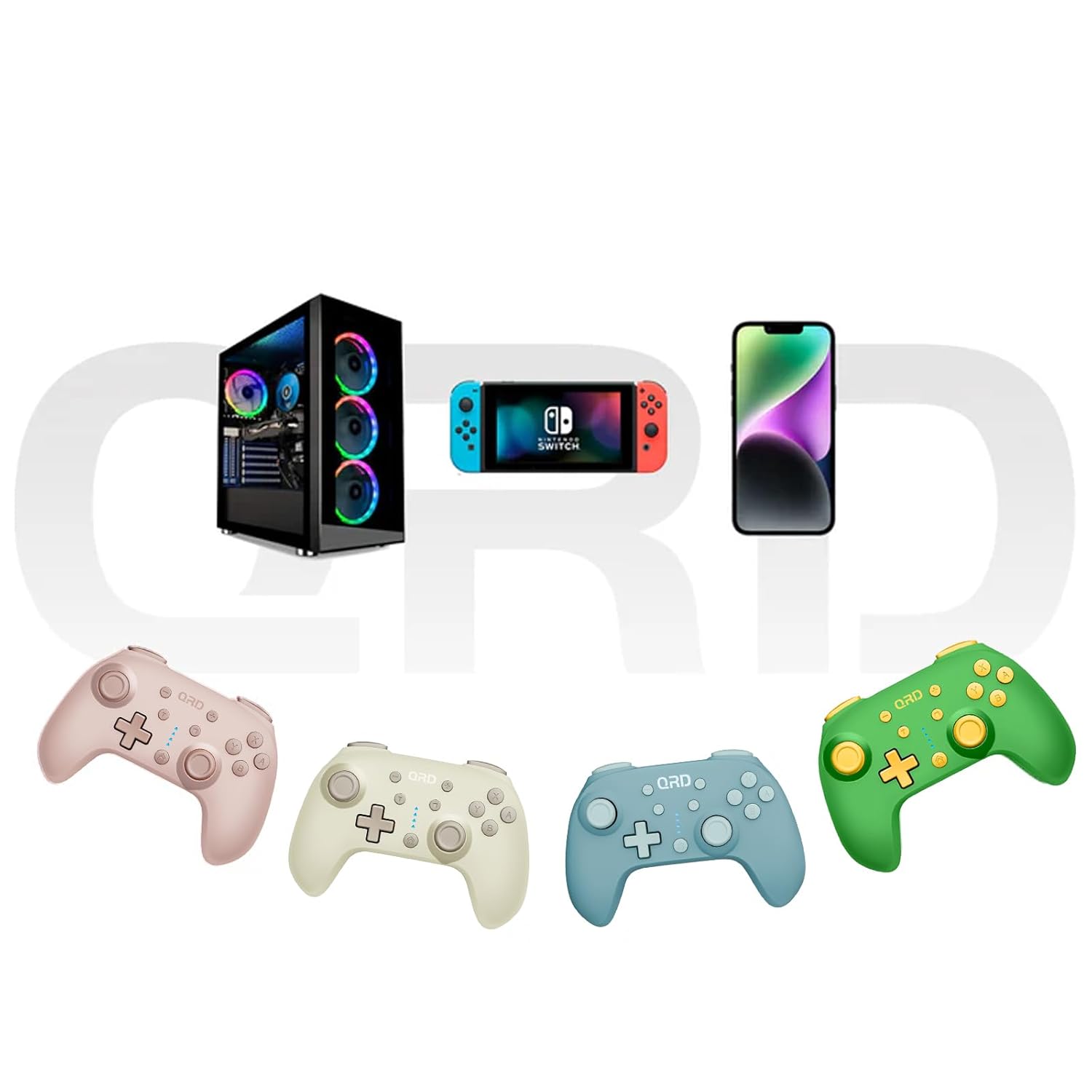
Image 7.2: Multi-platform compatibility of the QRD Junior E5 Wireless Controller.
8. Garanzija u Appoġġ
QRD products are designed for reliability and performance. For warranty information, technical support, or service inquiries, please refer to the contact information provided with your purchase or visit the official QRD websit. Jekk jogħġbok żomm il-prova tax-xiri tiegħek għal talbiet ta' garanzija.
Għal aktar appoġġ, tista' żżur il- QRD Store on Amazon.