
Introduzzjoni
The ALOGIC Illuminate USB-C Light Bar with 4K Autofocus Webcam is designed to enhance your workspace by providing adjustable lighting and a high-quality webcam. This device offers warm or neutral lighting without screen glare, intuitive touch controls, and a magnetic remote dial for precise adjustments. The integrated 12MP (4K) autofocusing webcam is compatible with Mac and Windows, suitable for video calls, streaming, and recording. A magnetic privacy cover is included for the webcam, and a bright status LED indicates when the camera is active. The light bar is compatible with monitors 8-30mm thick and connects via a single USB-C cable.

Image: The ALOGIC Illuminate USB-C Light Bar with 4K Autofocus Webkamera, wirjaasing its sleek design and integrated webcam.
Kontenut tal-Pakkett
Jekk jogħġbok iċċekkja l-pakkett għall-oġġetti li ġejjin:
- ALOGIC Illuminate USB-C Light Bar with 4K Autofocus Webcam
- USB-C Cable
- Magnetic Remote Control Dial
- Qoxra tal-Privatezza Manjetika
Setup
- Waħħal il-Bar tad-Dawl: Gently place the Illuminate light bar on top of your monitor. The adjustable clamp mechanism is designed to securely fit monitors between 8-30mm thick. Ensure the light bar is centered for optimal lighting and webcam positioning.
- Qabbad il-Qawwa u d-Data: Connect the provided USB-C cable to the USB-C port on the light bar and then to an available USB-C port on your computer or monitor. This single cable provides both power and data for the light and webcam.
- Position the Remote Dial: Place the magnetic remote control dial on your desk within easy reach. It will automatically connect to the light bar.
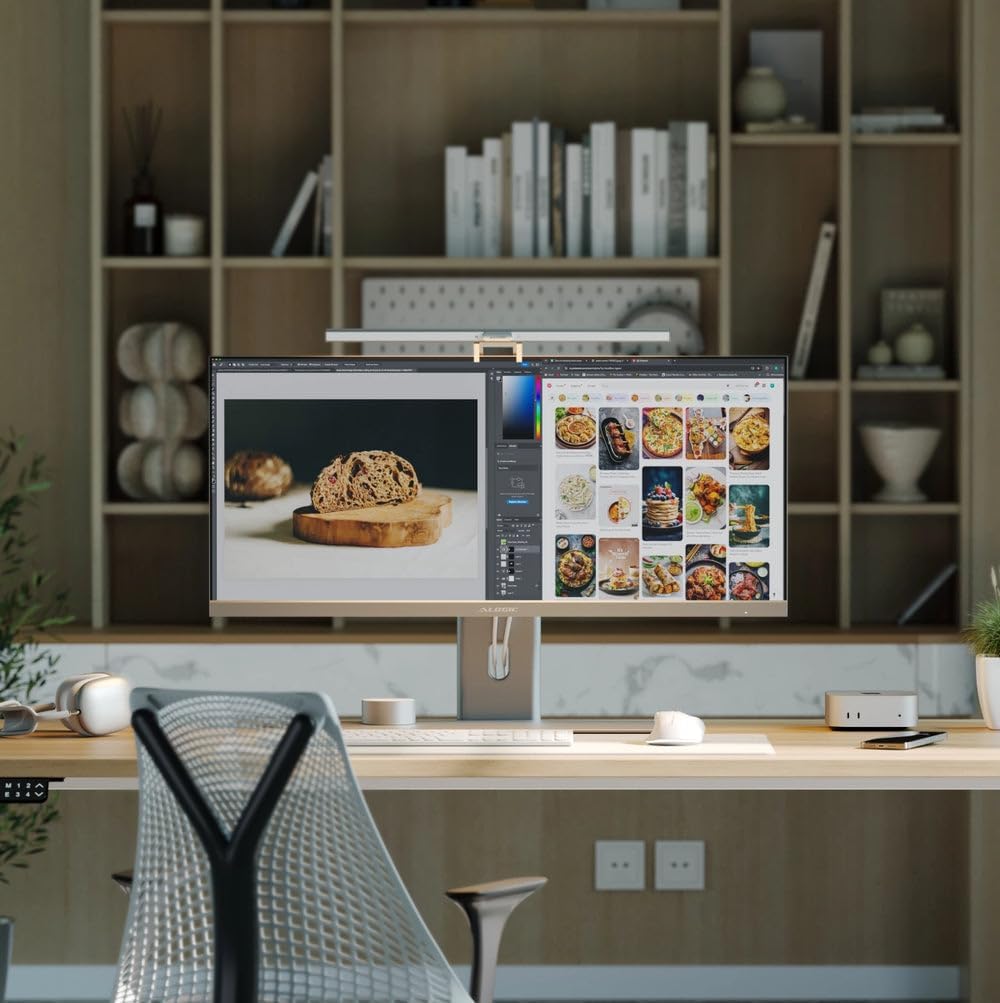
Image: The Illuminate light bar securely mounted on top of a monitor, integrated into a modern workspace.

Image: Diagram illustrating the USB-C connection for power and data, simplifying setup.
Istruzzjonijiet Operattivi
Kontroll tad-Dawl
The Illuminate light bar offers flexible lighting options to suit your environment.
- Kontrolli touch: The light bar features intuitive touch controls located on its surface. Use these to quickly adjust brightness and color temperature.
- Remote Dial: For fine-tuned adjustments, use the magnetic remote control dial. Swipe your finger along the adjustment bar on the dial to change brightness or color temperature. Press the power button to turn the light on/off, and the mode switch button to cycle through color temperature presets.
- Temperatura tal-Kulur: Adjust the light from warm to neutral tones to match your preference or environment.

Image: A diagram highlighting the touch-sensitive buttons on the light bar for adjusting power, brightness, and color temperature.

Image: The magnetic remote control dial, detailing its power button, mode switch button, and adjustment bar for light settings.

Image: Visual representation of the light bar providing various color temperatures, from warm to cool, on a monitor.
Webcam Użu
The integrated 4K autofocus webcam is ready for use once connected to your computer.
- Kompatibilità: Il- webcam is fully compatible with Mac and Windows operating systems. It functions as a standard USB webcam.
- LED tal-Istatus: A bright status LED on the light bar indicates when the webcam is active and sharing video.
- Qoxra tal-Privatezza: For privacy, attach the magnetic privacy cover over the weblenti tal-kam meta ma tkunx qed tintuża.

Immaġni: Close-up view demonstrating the magnetic privacy cover snapping onto the webcam for enhanced privacy.
Vidjo Uffiċjali tal-Prodott
Video: An official product video from ALOGIC USA demonstrating the features and functionality of the Illuminate USB-C Light Bar with 4K Autofocus Webcam.
Manutenzjoni
To ensure the longevity and optimal performance of your ALOGIC Illuminate device, follow these simple maintenance guidelines:
- Tindif: Use a soft, dry, lint-free cloth to clean the surface of the light bar and webcam lens. Avoid using abrasive cleaners, solvents, or aerosol sprays, as these can damage the finish or optical components.
- Ħażna: Meta ma tkunx qed tużah għal perjodi twal, aħżen l-apparat f'post frisk u niexef 'il bogħod mix-xemx diretta u minn temperaturi estremi.
- Kura tal-Cable: Avoid bending or crimping the USB-C cable excessively to prevent internal damage.
Issolvi l-problemi
If you encounter issues with your ALOGIC Illuminate, refer to the following common solutions:
- Light or Webcam Not Functioning:
- Ensure the USB-C cable is securely connected to both the light bar and your computer/monitor.
- Try connecting to a different USB-C port on your computer or monitor.
- Verify that your computer's operating system recognizes the webcam (check Device Manager on Windows or System Information on Mac).
- Ibda mill-ġdid il-kompjuter tiegħek.
- Webcam Image Quality Issues:
- Tiżgura l- webcam lens is clean and free from dust or smudges.
- Check your video conferencing software settings to ensure the ALOGIC webcam is selected and configured for 4K resolution if supported.
- Żgura li jkun hemm dawl adegwat fl-ambjent tiegħek.
- Remote Dial Not Responding:
- Ensure the remote dial is within close proximity to the light bar.
- Check if the light bar itself is powered on.
Speċifikazzjonijiet
Detailed specifications for the ALOGIC Illuminate USB-C Light Bar with 4K Autofocus Webcam:
| Karatteristika | Speċifikazzjoni |
|---|---|
| Brand | ALOGIKA |
| Piż tal-oġġett | 2.2 Liri |
| Numru ta' Batteriji | 1 Batterija Mhux Standard (inkluża) |
| Stil | Moderna |
| Numru ta' Sorsi tad-Dawl | 1 |
| Angolu tar-raġġ | 120 Grad |
| Konnettività | USB-C |
| Sistemi Operattivi | Windows®, macOS®, Android, Linux |
| Materjal | ABS / Aluminju |
| Dimensjonijiet tal-Pakkett | 21.81 x 6.34 x 2.28 pulzieri |
| ASIN | B0DT9PS68Y |
| Data L-Ewwel Disponibbli | 17 ta’ Jannar, 2025 |
Garanzija u Appoġġ
For warranty information and technical support, please refer to the ALOGIC official webis-sit jew ikkuntattja lis-servizz tal-konsumatur tagħhom direttament. Żomm l-irċevuta tax-xiri tiegħek għal talbiet ta' garanzija.