
1. Introduzzjoni
The ESSAGER Bluetooth 5.3 Audio Receiver Transmitter is a versatile 2-in-1 device designed to enhance your audio experience. It functions as both a Bluetooth transmitter (TX mode) and a Bluetooth receiver (RX mode), allowing you to wirelessly connect various audio devices.
In Modalità TX, you can transmit audio from non-Bluetooth sources like TVs, computers, or in-flight entertainment systems to Bluetooth headphones, earbuds, or speakers via a 3.5mm AUX connection.
In Modalità RX, it enables your smartphone or other Bluetooth-enabled devices to stream audio to wired speakers or headphones, transforming them into wireless audio systems.
This device features CVC8.0 noise reduction and Digital Signal Processor (DSP) technology for clear call quality, a built-in microphone for hands-free communication, and supports navigation app voice notifications. Its flexible 3.5mm AUX plug is designed for convenience in tight spaces.

Image 1.1: The ESSAGER Bluetooth Receiver Transmitter, highlighting its dual functionality and compact design.
2. Informazzjoni dwar is-Sigurtà
Please read and adhere to the following safety guidelines to ensure proper use and prevent damage to the device or injury.
- Immaniġġjar tal-batterija: Keep the device away from extreme temperatures and humidity. Do not expose the device to liquids.
- Interferenza potenzjali: This device may interfere with other wireless devices. Avoid using it near pacemakers or other medical devices.
- Żarmar: Tippruvax tiżżarma, issewwi, jew timmodifika l-apparat. Dan jista' jannulla l-garanzija u joħloq riskji għas-sigurtà.
- Rimi: Armi l-apparat u l-batterija tiegħu skont ir-regolamenti lokali. Tarmix fl-iskart domestiku.
3. Kontenut tal-Pakkett
Ivverifika li l-oġġetti kollha huma preżenti fil-pakkett tiegħek:
- ESSAGER Bluetooth 5.3 Audio Receiver Transmitter
- Integrated Flexible 3.5mm AUX Plug
- Kejbil tal-Iċċarġjar tat-Tip C
- Airplane Audio Adapter
- Manwal għall-Utent
4. Prodott Aktarview
Iffamiljarizza ruħek mal-komponenti tal-apparat:

Stampa 4.1: Quddiem view of the ESSAGER Bluetooth Receiver Transmitter and the included airplane adapter.
- Flexible 3.5mm AUX Plug: Connects to audio input/output ports. Crafted from high-rebound TPU material for durability and flexibility in tight spaces.
- Buttuna MFB (Buttuna b'Funzjoni Multipla): Power On/Off, Play/Pause, Answer/End/Reject/Redial Calls.
- RX/TX Switch: Toggles between Receiver (RX) and Transmitter (TX) modes.
- Indikatur LED: Juri l-istatus tal-apparat (tqabbil, konness, qed jiċċarġja).
- Mikrofonu inkorporat: Għal sejħiet mingħajr idejn.
- Port tal-Iċċarġjar tat-Tip C: Għall-iċċarġjar tal-apparat.

Image 4.2: The flexible 3.5mm AUX plug, designed for easy connection in various orientations.
5. Twaqqif u Tqabbil
5.1 Iċċarġjar tal-Apparat
Before first use, fully charge the device. Connect the included Type-C charging cable to the device's charging port and a USB power source (e.g., wall adapter, computer USB port). The LED indicator will show charging status and turn off when fully charged. A full charge takes approximately 1.5 hours.
5.2 Power On/Off
- Qawwa Mixgħul: Press and hold the MFB button for approximately 3 seconds until the LED indicator lights up.
- Itfi: Press and hold the MFB button for approximately 3 seconds until the LED indicator turns off.
5.3 Mode Selection (RX/TX)
Use the RX/TX switch on the side of the device to select the desired mode:
- Modalità RX (Riċevitur): For receiving audio from a Bluetooth source (e.g., smartphone) and outputting to a wired audio device (e.g., car stereo, wired headphones).
- Modalità TX (Trasmettitur): For transmitting audio from a non-Bluetooth source (e.g., TV, computer, airplane entertainment) to a Bluetooth audio device (e.g., Bluetooth headphones, speaker).

Image 5.1: Visual representation of TX and RX modes and their respective applications.
5.4 Pairing in RX (Receiver) Mode
- Ibdel l-apparat għal Modalità RX.
- Plug the flexible 3.5mm AUX plug into the audio input port of your wired speaker, car stereo, or wired headphones.
- Power on the ESSAGER device. It will automatically enter pairing mode, indicated by the LED flashing blue and red.
- On your smartphone or other Bluetooth-enabled device, go to Bluetooth settings and search for "ESSAGER" (or similar device name).
- Select "ESSAGER" to connect. Once paired, the LED indicator will turn solid blue.
5.5 Pairing in TX (Transmitter) Mode
- Ibdel l-apparat għal Modalità TX.
- Plug the flexible 3.5mm AUX plug into the audio output port of your non-Bluetooth source (e.g., TV, computer, MP3 player, airplane entertainment system). If using for airplane entertainment, use the included airplane audio adapter.
- Power on the ESSAGER device. It will automatically enter pairing mode, indicated by the LED flashing blue and red.
- Put your Bluetooth headphones or speaker into pairing mode (refer to their respective user manuals).
- The ESSAGER device will automatically search for and connect to nearby Bluetooth audio devices in pairing mode. Once paired, the LED indicator will turn solid blue.
6. Istruzzjonijiet Operattivi
6.1 Daqq tal-Mużika
- Play/Pawsa: Agħfas qasir il-buttuna MFB.
6.2 Hands-Free Calling (RX Mode Only)
When in RX mode and connected to a smartphone, the built-in microphone allows for hands-free calls.
- Irrispondi Sejħa: Short press the MFB button when an incoming call rings.
- Tmiem Sejħa: Short press the MFB button during a call.
- Irrifjuta Sejħa: Press and hold the MFB button for approximately 2 seconds when an incoming call rings.
- Isemmi mill-ġdid l-Aħħar Numru: Double-press the MFB button when not on a call.

Image 6.1: The device used for hands-free calling in a car, emphasizing safety.
6.3 Voice Notifications
In RX mode, the device supports broadcasting voice notifications from navigation applications on your connected smartphone, allowing you to hear directions clearly while driving.
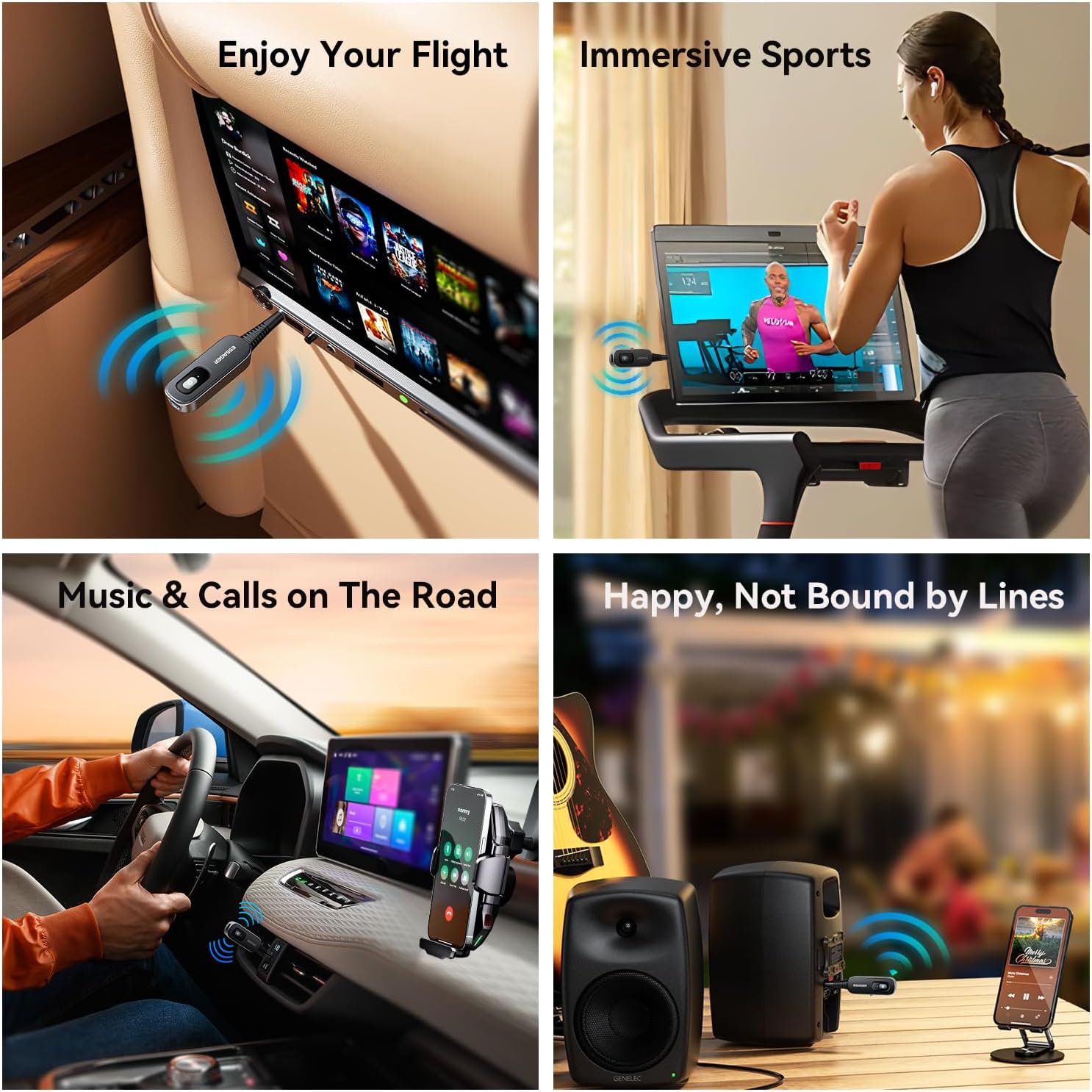
Image 6.2: Various applications of the ESSAGER Bluetooth device, including airplane use, exercise, car audio, and home stereo.
7. Manutenzjoni
- Tindif: Uża drapp artab u niexef biex tnaddaf l-apparat. Tużax prodotti tat-tindif likwidi jew aerosols.
- Ħażna: Aħżen l-apparat f'post frisk u niexef 'il bogħod mix-xemx diretta u minn temperaturi estremi.
- Evita l-Impatt: Twaqqax jew tissuġġetta l-apparat għal impatti qawwija.
8 Issolvi l-problemi
| Problema | Kawża Possibbli | Soluzzjoni |
|---|---|---|
| L-apparat ma jixgħelx. | Batterija baxxa. | Iċċarġja l-apparat kompletament billi tuża l-kejbil tat-Tip Ċ provdut. |
| Ma tistax tqabbad ma' apparat ieħor. | Incorrect mode selected (RX/TX). Apparat mhux fil-modalità ta' pairing. Wisq 'il bogħod mill-apparat l-ieħor. Previous pairing interference. | Ensure the correct RX or TX mode is selected. Power cycle the device to re-enter pairing mode (LED flashing blue/red). Bring devices closer (within 10 meters/33 feet). Clear Bluetooth history on the source/receiving device and try again. |
| Poor audio quality or intermittent connection. | Barra mill-firxa. Interferenza minn apparati oħra mingħajr fili. Batterija baxxa. | Ensure devices are within 10 meters (33 feet) and without major obstructions. Move away from other Wi-Fi routers, microwaves, or strong electromagnetic fields. Iċċarġja l-apparat. |
| Hands-free calling not working. | Not in RX mode. Microphone blocked. Not connected to a phone. | Ensure the device is in RX mode. Check that the microphone is not covered. Verify successful Bluetooth connection to your smartphone. |
9. Speċifikazzjonijiet
| Brand | ESSAGER |
| Mudell | B0DT6F83Z |
| Verżjoni Bluetooth | 5.3 |
| Modi Operattivi | Receiver (RX), Transmitter (TX) |
| Port tal-awdjo | 3.5mm AUX |
| Port tal-Iċċarġjar | Tip-Ċ |
| Ħajja tal-batterija | 6-7 hours (music/calls) |
| Ħin tal-Iċċarġjar | Madwar sagħtejn |
| Distanza tat-Trażmissjoni | Sa 10 metri (33 pied) |
| Tnaqqis tal-Ħoss | CVC8.0, DSP |
| Dimensjonijiet | 96.69mm x 19.95mm (madwar 3.81 x 0.79 pulzieri) |
| Piż tal-oġġett | 1.76-il uqija (madwar 0.05 kg) |
| Sors tal-Enerġija | Mħaddma bil-batterija |
| Karatteristiċi Speċjali | Low Latency, Noise Cancellation, Flexible 3.5mm AUX |

Image 9.1: Dimensions of the ESSAGER Bluetooth Receiver Transmitter.
10. Garanzija u Appoġġ
ESSAGER products are designed for reliability and performance. For warranty information, technical support, or customer service inquiries, please refer to the contact information provided on the product packaging or the official ESSAGER websit. Jekk jogħġbok żomm il-prova tax-xiri tiegħek għal talbiet ta' garanzija.